

























Key takeaways
 At $4 per user per month, Zoho Projects is one of the lower-cost PM platforms, especially for projects that depend on sequencing and standardized processes.
- Zoho Projects works best for companies already using Zoho apps. Integrations with Books, CRM, and Analytics connect project work with billing and reporting.
- The interface can feel crowded as projects become more complex. Advanced features add more menus and settings, making initial setup more complex than simpler project management tools.
| Zoho Projects review at a glance | |
|---|---|
| My rating | 4.49 out of 5 |
| Free plan | Up to five users and three projects |
| Starting price | $4 per user/month, billed annually |
| Best for | Companies already using Zoho products and small and midsize teams that want affordable project management software |
| Key features | Task management, Gantt charts, dependencies, time tracking, budgeting, workload management, automation, reporting, and integrations |
| AI | Content generation, project summaries, translation, action item extraction, task creation |
Why you should trust Project-management.com
As a tech analyst for project management software, I have tested nearly 20 platforms over the past five years, and several have become part of my workflow. I have written dozens of buyer’s guides covering a wide range of use cases and company sizes, which gave me a broader understanding of what project teams need from these tools.

Senior Staff Writer for Project Management
Marianne Sison
How I evaluated Zoho Projects
For this Zoho Projects review, I signed up for an account and tested the platform across core project management workflows, including task planning, time tracking, reporting, and automation. I also compared my findings with recent user reviews before scoring Zoho Projects against a weighted rubric.
Pricing (20%): I compared plan costs, free-plan limits, and what each paid tier includes. I also checked the cost of upgrading as teams add more projects, users, or automation credits.
General features (25%): I reviewed the standard tools used across project work, including task management, scheduling, time tracking, collaboration, and integrations. I also checked which features are available on the entry-level paid plan.
Advanced features (20%): I reviewed tools for more complex project work, such as dependency scheduling, resource planning, workflow automation, portfolio reporting, and project cost tracking. I also checked which of these features require higher-tier plans.
Ease of use (10%): I assessed project setup, navigation, and standard task workflows. Recent user feedback also helped me compare my experience with how other users describe the learning curve.
Support (10%): I reviewed the available support channels, service hours, onboarding resources, and help documentation. I also checked whether support access changes depending on the plan.
Expert score (15%): My final assessment draws from product testing, pricing, feature coverage, and recent user feedback. I used these findings to judge how effectively Zoho Projects supports common project management needs for its cost.
What is Zoho Projects?
Zoho Projects is a cloud-based project management platform for planning work, assigning tasks, tracking progress, and managing deadlines from one workspace. It includes tools for task management, Gantt charts, time tracking, automation, reporting, and integrations.
With its free plan and low-cost monthly plans, Zoho Projects suits the budget needs of small teams and startups. As part of the larger Zoho suite, Zoho Projects works best for organizations that want project data to connect with existing Zoho applications.
Zoho Projects is a good choice for
- Time tracking and managing client work: Built-in timesheets and timers track work hours, while integrations with Zoho Books and Zoho Invoice support expenses, budgets, and client invoicing.
- Project managers who rely on schedule planning: Gantt charts support dependencies and critical path planning, while workload reports help managers review resource allocation.
- Organizations already using the Zoho ecosystem: Integrations with Zoho apps connect project work with billing, reporting, agile workflows, and other business processes.
- Teams that manage software issues alongside project work: Zoho Projects includes built-in issue tracking for managing bugs, from initial reporting through assignment and resolution.
Zoho Projects is less suitable for
- Teams that need a generous free plan: The free version is limited to three projects, so teams managing several initiatives will need a paid plan. If you’re looking for a feature-rich alternative, ClickUp tops our list of free project management tools.
- Project management outside the Zoho ecosystem: Several of Zoho Projects’ financial and business workflow advantages depend on Zoho applications, which may provide less value to companies with a different software ecosystem.
- Extensive portfolio management in the same workspace: Zoho Projects focuses on project planning and execution, so organizations with program or portfolio requirements may need additional features.
Zoho Projects pros & cons
Pros
 Affordable per-user plans
- Native time tracking includes timers and timesheets
- Integrates with Zoho applications
- Includes issue tracking alongside project features
- Supports workflow automation through rules, Blueprint, and custom functions
Cons
 Lacks real-time communication features
- Charges extra for client access
- Portfolio capabilities are less extensive
- Interface can feel dense when configuring projects
Zoho Projects pricing
Zoho Projects is one of the more affordable project management platforms, with paid plans starting at $4 per user per month. Its highest standard plan costs $14 per user per month, which is close to the starting price of many competing platforms. Teams can move into higher tiers for features such as budgeting, workload management, and more advanced automation while keeping per-user costs relatively low.
The pricing offers the most value for companies that want to link project work with their existing Zoho applications. AI capabilities are included at no extra cost, while automation usage varies by plan and comes with generous limits.
| Plan | Monthly pricing | Best for | Key features |
|---|---|---|---|
| Free | $0 | Individuals and very small teams | Up to 5 users and 3 projects, basic task management, subtasks, whiteboards, and limited automation |
| Premium | $4/user | Small and midsize teams | Unlimited projects, time tracking, budgeting, recurring tasks, Zia AI features, and higher automation limits |
| Enterprise | $9/user | Teams managing multiple projects | Portfolio dashboard, cross-project dependencies, critical path, baselines, custom roles |
| Ultimate | $14/user | Organizations that need higher usage limits | Everything in Enterprise, plus more read-only users and resources, expanded dashboards |
| Projects Plus | Custom pricing | Organizations managing traditional and agile projects across several teams | Everything in Ultimate, Zoho Sprints Premium, Zoho Analytics Premium, and Zoho WorkDrive Starter |
*Prices shown are based on annual billing
Extra costs apply when teams add different user types or resources. Client users cost $4 per user with annual billing, while read-only users cost $7 per five users annually. Additional resources use the same annual pricing, and Lite Users cost $4 per user on the highest plan. While these options add to the total subscription fees, they can reduce seat costs for users who only need basic access.
Task management
Zoho Projects offers several ways to break down tasks and manage dependencies. Tasks can include up to six levels of subtasks, and each subtask can have its own assignee, priority, duration, progress percentage, and dates.
For scheduling, Zoho supports all four dependency types, along with lead and lag time. Teams can also choose between hard and soft dependencies, so successor tasks can either move automatically when dates change or stay fixed.
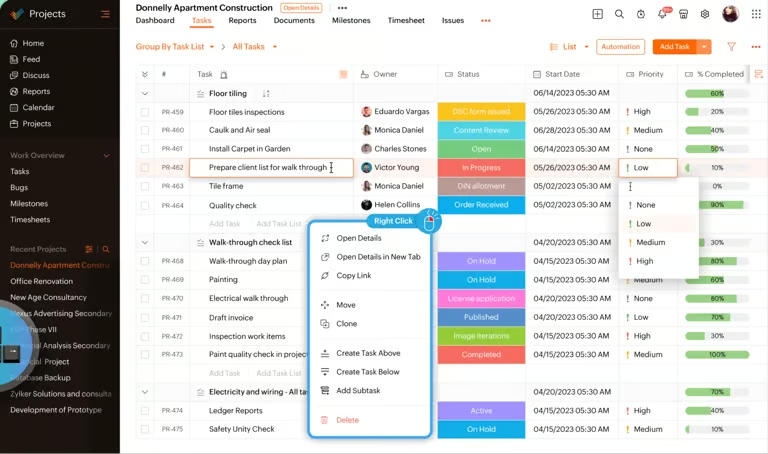
Users can create recurring tasks on a set schedule, after the previous task is completed, or based on whichever happens first. Blueprint controls how tasks move through statuses and which actions are required at each stage.
AI & automation
AI Hub in Zoho Projects includes Zia-powered features and connects with external AI models such as ChatGPT, Gemini, Anthropic, and Cohere. Teams can use AI to draft project descriptions, summarize updates, translate text, extract action items, and turn written requirements into tasks or subtasks. It can generate up to 50 tasks and subtasks at once, saving significant time during project setup.
Automation lets users create workflow rules that respond to events such as task creation, field changes, comments, deletions, or file attachments. These rules can update fields or trigger webhooks, while macro rules apply changes across multiple tasks at once.
Time management
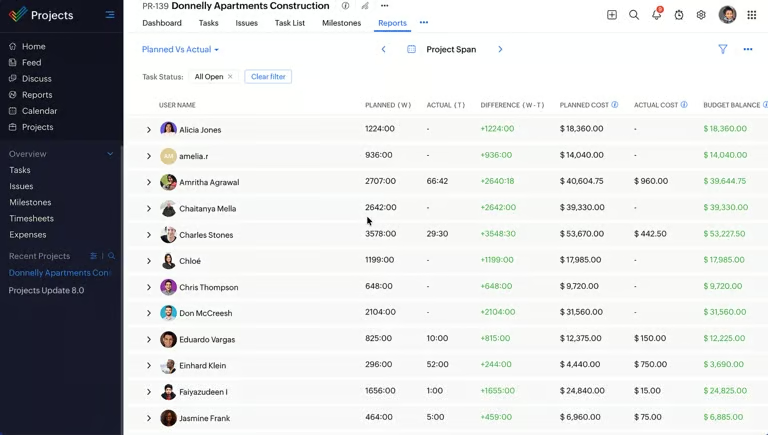
Zoho Projects offers two ways to track time spent on tasks: users can run a timer while they work or enter hours manually through timesheets. Each entry can be marked as billable or non-billable, and managers can review submitted timesheets before approval. When tracking workload allocations, reporting also helps in comparing planned hours with actual time spent.
Integrations with Zoho Books and Zoho Invoice let teams use logged hours for billing and invoicing. This helps service-based teams connect logged project work with client billing while keeping time records in Zoho Projects.
Charts & reports
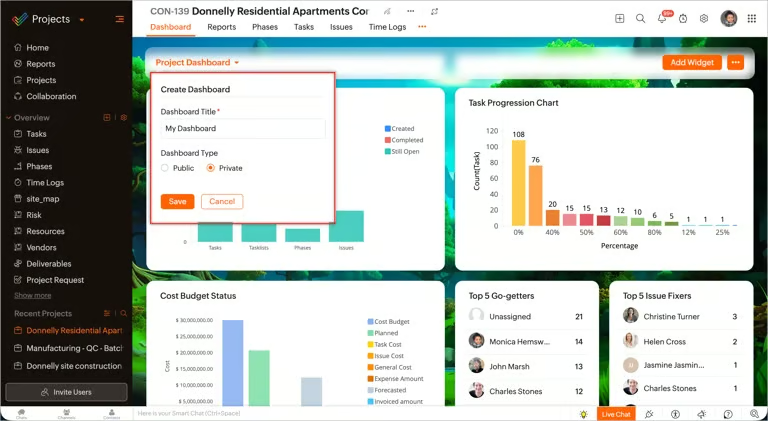
Zoho Projects lets you build reports across projects, work items, and timesheets, then customize the chart type, criteria, and calculation method. Custom dashboards display selected widgets and KPIs at the personal, project, or team level. For advanced analytics, users can connect Zoho Analytics and use over 50 charts and reports, with sharing, export, and embedding options.
Zoho integrations
As part of the Zoho ecosystem, Zoho Projects connects project data and workflows with other Zoho apps. Here are some of the main integrations available across the Zoho ecosystem.
- Zoho Sprints: Supports agile and hybrid project workflows.
- Zoho Analytics: Adds custom reporting and more advanced analysis.
- Zoho CRM: Connects project tasks with customer records.
- Zoho Books and Zoho Invoice: Link budgets, time logs, expenses, and invoicing.
- Zoho Desk: Turns support tickets into project issues.
- Zoho Cliq: Connects team chats with task and issue updates.
- Zoho Mail: Lets users manage project work from their inbox.
- Zoho Meeting: Supports online meetings connected to project work.
- Zoho People: Shares employee availability and approved leave information with Projects.
Ease of Use
Zoho Projects is easy to learn for basic project management tasks such as creating assignments, updating statuses, and tracking progress. It becomes less intuitive when configuring advanced settings, since some menus and project views can feel crowded and take longer to learn. Setup may also require extra time when teams configure custom workflows or permissions, so new users may need some guidance before they can fully use the platform.
Zoho Projects alternatives
If Zoho Projects does not match your team’s needs, monday.com, Wrike, and ClickUp are three alternatives worth comparing. Each offers a different approach to work management, customization, and collaboration.
| Zoho Projects alternative | Best for | Starting price | How it compares to Zoho Projects |
|---|---|---|---|
| monday.com | Visual work management and customizable workflows | $9/seat/month | monday.com offers more visual customization and a broader work management approach, with configurable boards, workflows, automations, and multiple views. |
| Wrike | Managing complex workflows | $10/user/mo | Wrike stands out for its customizable workflows, dashboards, Gantt charts, and enterprise work management. |
| ClickUp | Extensive customization in one workspace | $7/user/month | ClickUp offers more workspace customization and combines project management with Docs, dashboards, time tracking, and extensive automation options. |
Final verdict: Is Zoho Projects worth it?
Zoho Projects is worth considering for teams that want project management features at a relatively low price. However, it may be less appealing for teams that want a visual interface or broader work management capabilities outside traditional project workflows. Even so, Zoho Projects covers a wide range of project management needs for a lower monthly cost than many competitors, making it a credible option for small businesses and growing project teams.
FAQs
Is Zoho Projects worth it?
For teams that want project management features at a lower price, Zoho Projects offers good value. It mainly caters to existing Zoho customers because Projects connects with apps such as Zoho CRM, Zoho Books, Zoho Analytics, and Zoho Sprints.
Is Zoho Projects good for small businesses?
Yes. Zoho Projects offers low-cost paid plans, task management, Gantt charts, time tracking, budgeting, automation, and AI features. It is designed for small businesses that already use Zoho apps and want project data connected with finance or CRM workflows.
How much does Zoho Projects cost?
Zoho Projects starts at $4 per user per month with annual billing. Higher tiers cost more but remain relatively affordable, with the standard plans topping out at $14 per user per month before optional add-ons or bundle pricing.