

























Open source project management software appeals to project teams that want more control over data and deployment. OpenProject is a familiar option for those overseeing multiple projects, while Plane focuses on product development workflows. For agile teams, Taiga is designed for sprint planning and continuous delivery. If you’re deciding which open-source platform fits your project workflow, I compare six providers based on their standout features, usability, and cost.
| Best for | Free & open source? | Monthly starting fee | |
|---|---|---|---|
| OpenProject | Best for managing project portfolios | ✅ | $7.25/user |
| Plane | Best for product development | ✅ | $6/user |
| Taiga | Best for Scrum and Kanban | ✅ | $57.97/year |
| Leantime | Best for connecting goals to tasks | ✅ | $8/user |
| Redmine | Best for configurable issue tracking | ✅ | Free |
| ProjectLibre | Best for critical path scheduling | ✅ | Custom pricing |
Why you should trust Project-management.com
As a tech analyst for project management software, I have tested nearly 20 platforms over the past five years, and several of them have become part of my workflow. I have written dozens of buyer’s guides covering a wide range of use cases and company sizes, which gave me a broader understanding of what project professionals need from these tools.
Marianne Sison
Senior Staff Writer for Project Management

How I evaluated the best open source project management software
Open-source project management tools require an evaluation approach compared to cloud-based platforms. I considered how much functionality remains free and the setup required to run the software. Each provider received a score from zero to five across six weighted categories, which produced the final rating.
- Pricing (20%): I compared free access, paid options, and hosting costs. I also considered the availability of project management features in the open-source edition.
- General features (25%): This category covered the standard project features, including task tracking, scheduling, and dependencies. I gave higher scores to platforms that provide these capabilities natively.
- Advanced and niche features (20%): I reviewed capabilities designed for complex project environments, such as resource tracking, portfolio management, and critical-path planning. I also assessed tools tailored for agile workflows and product development.
- Ease of use (10%): I assessed how a new user could navigate the software and configure a new project. I also considered the effort required to manage self-hosted installations.
- Support (10%): I reviewed official documentation, community forums, and support channels. I gave a higher score to platforms that offer up-to-date resources for setup and admin control.
- Expert score (15%): I based this score on usability, product capabilities, and the quality of the vendor’s documentation. I also considered how effectively each platform addresses the needs of its target users and project environments.
- Open source project management software compared
- 1. OpenProject– Best for managing project portfolios
- 2. Plane – Best for product development
- 3. Taiga – Best for Scrum & Kanban
- 4. Leantime– Best for connecting goals to tasks
- 5. Redmine– Best for configurable issue tracking
- 6. ProjectLibre– Best for critical-path scheduling
- How to choose the best open source project management software
- FAQs
Open source project management software compared
| Key features | Deployment options | My rating | |
|---|---|---|---|
| OpenProject | • Milestones • Agile boards • Time and cost tracking | • Self-hosted • Linux packages or Docker • Kubernetes & Helm support • Vendor-hosted | 4.87 out of 5 |
| Plane | • Intake and triage • Cycles and modules • Project pages | • Self-hosted • Docker-based • Vendor-hosted | 4.36 out of 5 |
| Taiga | • Scrum planning • Kanban WIP limits • Issue tracking | • Self-hosted via Docker or source code • Taiga-hosted | 3.98 out of 5 |
| Leantime | • Multiple task views • Gantt charts • Time tracking | • Self-hosted • Docker & package installation • Vendor-hosted | 3.63 out of 5 |
| Redmine | • Custom issue workflows • Gantt chart • Time tracking | • Self-hosted web app | 3.47 out of 5 |
| ProjectLibre | • Critical-path scheduling • Resource management • Microsoft Project compatibility | • Free desktop app • Paid cloud | 3.04 out of 5 |
1. OpenProject– Best for managing project portfolios

- My rating: 4.87 out of 5
- Free and open-source
- Starts at $7.25/user/month
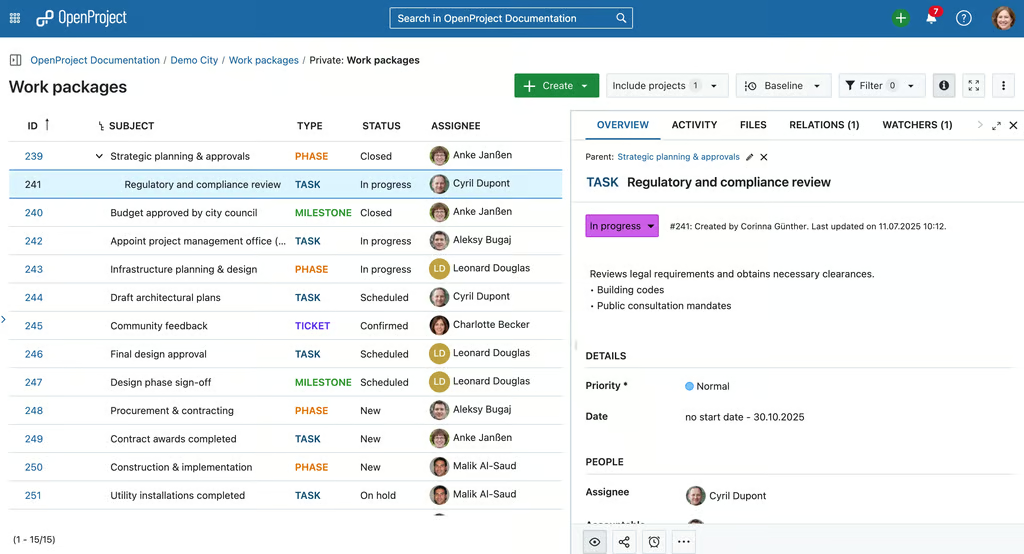
Work package details help teams review status and ownership from one project view. (Source: OpenProject)

Why I chose OpenProject
OpenProject features a portfolio workspace for grouping programs and projects under one executive view. I would use it when I need to review status, budget, or risk across several initiatives before deciding which projects need strict monitoring. Saved filters also help streamline recurring portfolio reviews by letting me return to the same view instead of rebuilding it each time.
Cross-project Gantt views place multiple initiatives on the same timeline, allowing me to identify overlapping milestones and schedule conflicts. I can also use the wiki module for portfolio reporting by embedding work-package tables and live calculations, while phase gates let me confirm that required criteria are met before a project moves forward.
Portfolio access, however, is locked behind the Premium plan. Community users can use project lists and global work-package views as alternative options, but the portfolio workspace requires a paid upgrade. If the main requirement is no-cost multi-project tracking and release planning, Redmine may be the more suitable option.
Pros and cons
| Pros | Cons |
|---|---|
| Resource planning uses individual work schedules | Self-hosting requires technical experience |
| Multiple active sprints stay within one project | Project Overview layout cannot be customized |
| Programs group related projects together | Mobile app remains in beta |
Key features
- Work packages: Track tasks, risks, bugs, and milestones as configurable work items with owners and project attributes.
- Gantt charts: Schedule tasks and milestones on a shared timeline, then review dependencies and project delays.
- Baseline comparison: Compare work package changes over time to identify schedule or scope movement.
- Time and costs: Track logged effort and labor costs against project work for budget monitoring.
Pricing
- Free plan: Community is free with project planning, Gantt scheduling, agile boards, time tracking, and cost management.
- Free trial for paid plans: 14 days for Enterprise Cloud or an Enterprise on-premises trial license.
- Basic: $7.25/user/mo at 25-user minimum, adding Basic Enterprise add-ons and email support to Community features.
- Professional: $13.50/user/mo at 25-user minimum, adding Professional Enterprise capabilities and phone support.
- Premium: $19.50/user/mo at 100-user minimum, adding Premium Enterprise capabilities plus installation and upgrade assistance.
Corporate: Custom pricing with a 250-user minimum, adding custom plugin support, dedicated support, and enterprise onboarding.
2. Plane – Best for product development

- My rating: 4.36 out of 5
- Free and open-source
- Starts at $6/user/month
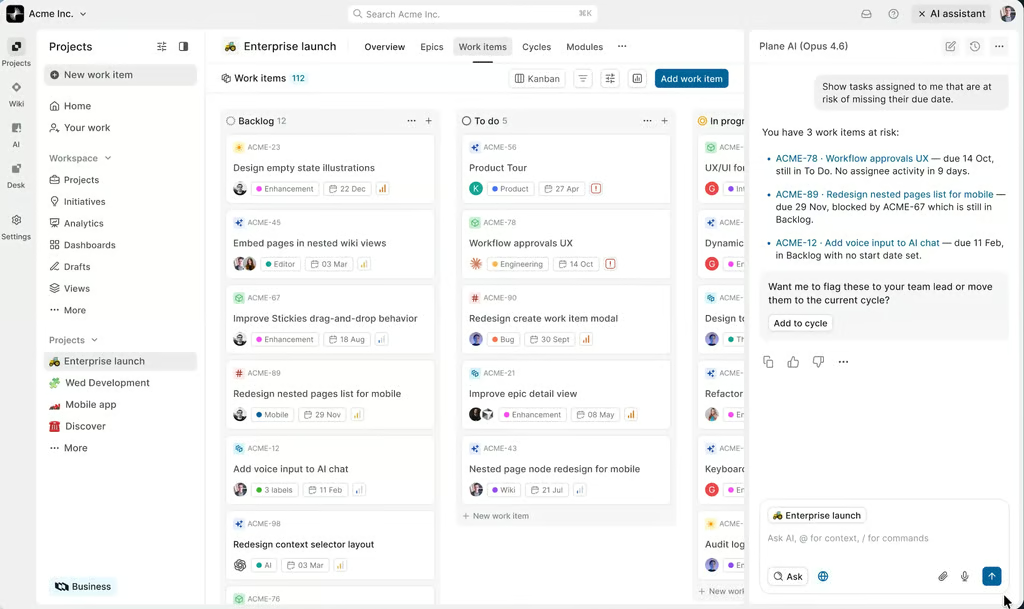
AI flags work items at risk from missed dates and blockers. (Source: Plane)

Why I chose Plane
Plane organizes product delivery through Cycles and Modules, allowing teams to plan work by time period and product initiative. Cycles cover work scheduled within a specific sprint or release window, while Modules collect tasks related to a particular feature or product area.
After a Cycle ends, Plane preserves its scope and delivery history for reviewing past performance. Teams can also view project data via Kanban boards, tables, or calendars, so product managers and engineers can review open and completed work from the same workspace.
Accessing the Community edition requires technical skill because teams must deploy and maintain Plane through Docker or Kubernetes. I would recommend Taiga for IT teams that prefer a hosted agile platform and lack internal DevOps support.
Pros and cons
| Pros | Cons |
|---|---|
| Subtasks connect across separate projects | 10-seat minimum for paid self-hosting |
| Create dashboard reports with PQL filters | Self-hosting requires regular server admin |
| Reusable work item types across projects | Some integrations are incomplete or developing |
Key features
- Cycles: Plan sprint or release work across projects and monitor progress from workspace-level views.
- Modules: Group related work items by feature, product area, or initiative and track progress for each group.
- Intake: Route incoming requests into project work through custom intake channels
- Dependencies in Timeline: Link related work items on the timeline to identify scheduling conflicts
Pricing
- Free plan: Includes core project tracking with five work views and project pages for up to 12 users.
- Free trial for paid plans: 14 days
- Pro: $6/user/mo. Adds configurable work management time reporting and workspace knowledge tools.
- Business: $13/user/mo. Adds reusable project workflows and recurring work automation, advanced intake, dashboards.
- Enterprise Grid: Custom pricing. Includes managed deployments and granular governance with enterprise authentication.
AI pricing note: Free includes 500 credits per seat monthly; Pro includes 1,000, Business includes 2,000, and Enterprise provides flexible allocations.
3. Taiga – Best for Scrum & Kanban

- My rating: 3.98 out of 5
- Free and open-source
- Starts at ~$57.97/year
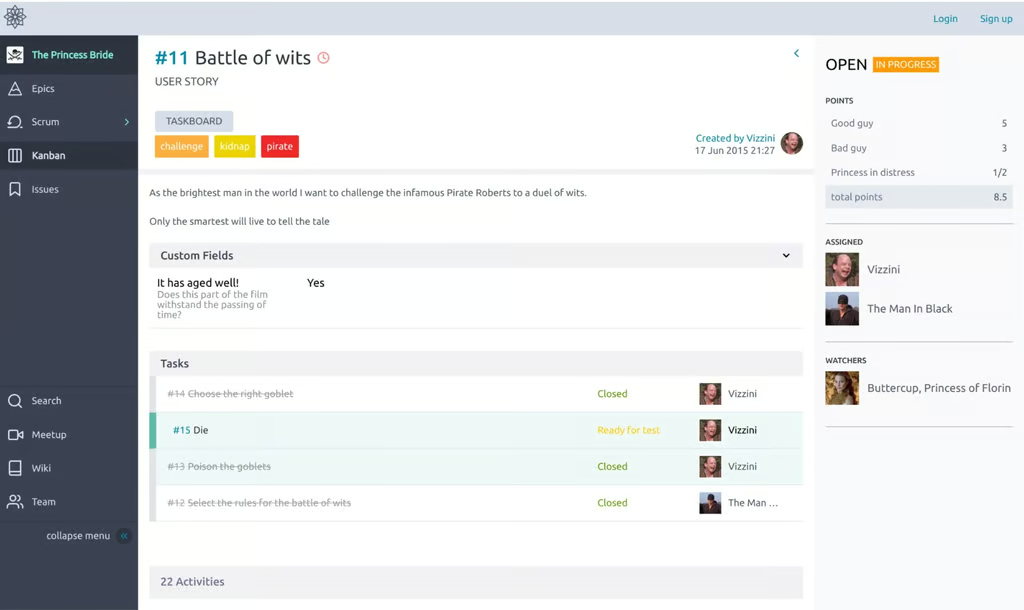
User story displays task progress and ownership during sprint work. (Source: Taiga)

Why I chose Taiga
For agile teams that use both Scrum and Kanban within the same project, Taiga supports sprint-based planning alongside continuous-flow work. The same user stories remain available in both frameworks, so teams can change their delivery method without recreating product work.
For Scrum, I can prioritize backlog items, estimate work, and track sprint progress through burndown charts. Kanban adds WIP limits and swimlanes, while the issue tracker can turn a defect into a user story once it becomes planned product work.
Taiga provides fewer configurations for projects where task sequencing determines the final delivery date. For schedules that rely heavily on dependencies and critical-path analysis, ProjectLibre is known for its Gantt chart and network scheduling capabilities.
Pros and cons
| Pros | Cons |
|---|---|
| Archived projects preserve read-only delivery history | Native time tracking is unavailable |
| Issue voting ranks backlog demand | No Gantt chart |
| Scrum and Kanban support agile planning | Bulk edits cannot reassign users or epics |
Key features
- Kanban: Control work-in-progress with WIP limits and track stories as they progress through custom workflow stages.
- Scrum: Plan sprints from the backlog and monitor completion through sprint burndown charts
- Issues: Track bugs by type and priority, then promote qualifying issues into user stories
- Dashboards and reporting: Review sprint performance and project activity through dashboards plus custom reports
Pricing
- Free plan: Includes one public project and one private project for unlimited users, plus 10MB storage.
- Enthusiast: Approximately $57.97/year. Includes five public projects, five private projects for unlimited users, and 100MB storage.
- Basic: Approximately $231.86/year. Supports unlimited projects for unlimited users and includes 500MB storage with basic support.
- Premium: Approximately $695.58/year. Supports unlimited projects for unlimited users and includes 3GB storage with premium support.
- Private Cloud: Custom pricing. Provides a dedicated managed instance with flexible computing resources.
4. Leantime– Best for connecting goals to tasks

- My rating: 3.63 out of 5
- Free and open-source
- Starts at $8/user/month
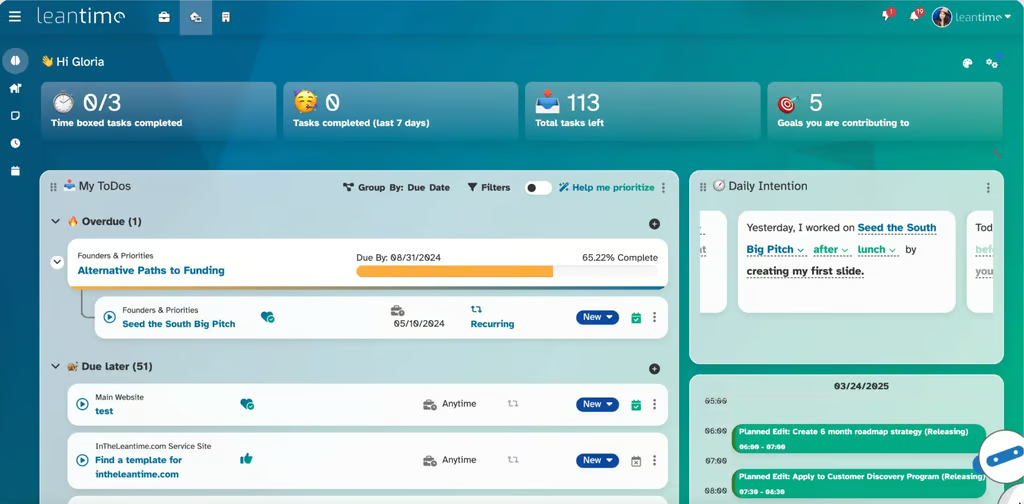
Task priority view helps users decide what to work on next. (Source: Leantime)

Why I chose Leantime
Leantime caters to business teams that want project work connected to specific company goals rather than tracked only through completed tasks. Managers can compare project progress with metrics such as revenue, customer growth, or another goal the company has set.
By connecting company objectives with project goals, I can see why certain milestones or tasks deserve higher priority. This helps when stakeholders need to understand how a specific task supports a broader business objective.
The timeline includes only tasks linked to milestones, so tasks must be assigned to a milestone before they appear there. If you need more detailed schedule control, ProjectLibre is a better choice because it supports task dependencies and critical-path analysis.
Pros and cons
| Pros | Cons |
|---|---|
| Program views combine tasks from multiple projects in one view | Limited integrations with business tools |
| MCP accepts API keys for agent workflows | Self-hosted add-ons draw recurring cost complaints |
| Permission controls have centralized management updates | MCP task updates can report false success |
Key features
- Milestones: Group dated tasks into milestones and review project timing on the Gantt chart
- Blueprints: Use a guided canvas to draft the project purposes and assumptions before converting ideas into goals and tasks.
- Retrospectives: Document project successes and issues, then assign follow-up actions for the next work cycle.
- Timesheets: Track billable time across projects and consolidate entries for reporting
Pricing
- Free plan: Includes the self-hosted edition with basic project management features and community support.
- Free trial for paid plans: 14 days
- Pro: $8/user/mo. Includes unlimited projects and full access to cloud features
- Enterprise: Custom pricing. Includes on-premises deployment with enterprise security and governance controls.
AI pricing note: Pro includes 500 monthly AI credits; AI capabilities are excluded from the open-source edition.
5. Redmine– Best for configurable issue tracking
- My rating: 3.47 out of 5
- Free and open-source
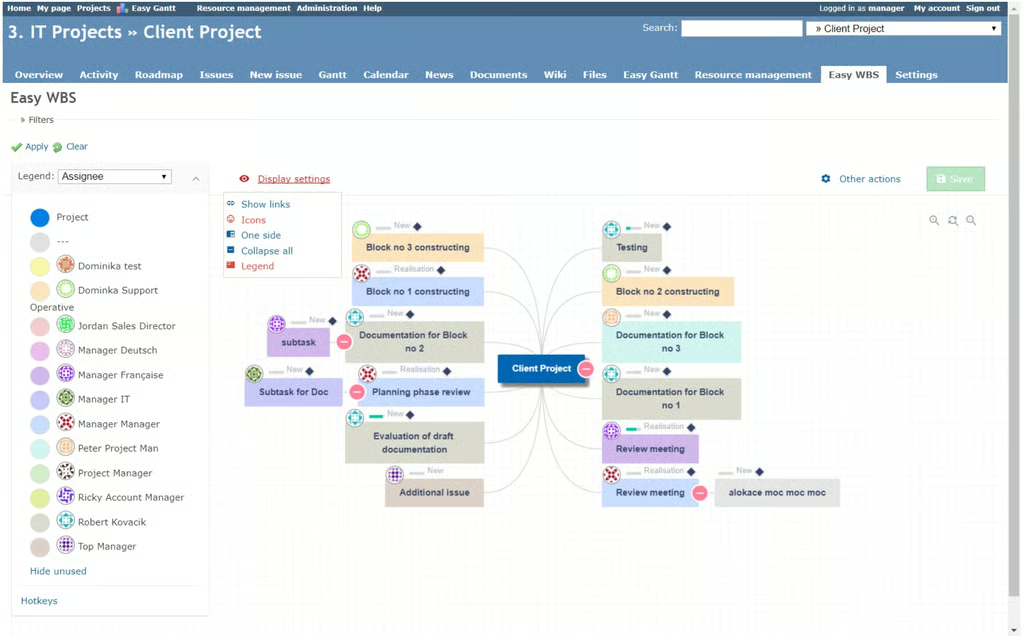
Work breakdown views help teams trace project tasks and their relationships. (Source: Redmine)

Why I chose Redmine
Redmine lets administrators create separate trackers for defects, requests, and other issue types, each with its own workflow and fields. Instead of sharing a generic process, I can easily assign unique status sequences for different work types.
Field behavior can change by role and workflow state. For example, an admin can set a required field at one stage and read-only at another, while custom fields capture information specific to internal procedures or audit requirements.
Redmine’s flexibility comes with a higher administrative burden as trackers, roles, and status rules multiply. Taiga has less upfront process configuration if the team already follows Scrum or Kanban and wants those workflows ready to use.
Pros and cons
| Pros | Cons |
|---|---|
| Webhooks trigger systems from project events | Reporting capabilities cannot keep up with large projects |
| Default due dates support configurable offsets | Plugin compatibility can fall behind version updates |
| Plugins add features for specific project processes | Initial setup requires technical skill |
Key features
- Issue tracking system: Configure issue types and role-specific status transitions for different project workflows
- Multiple subproject support: Group related subprojects under a main project for easier tracking.
- Project views: Review issues by start and due dates across Gantt chart and calendar views
- Time tracking functionality: Track hours by project or issue and report time by user or activity
Pricing
Free plan: Includes the complete self-hosted, open-source application under the GPLv2 license.
6. ProjectLibre– Best for critical-path scheduling
- My rating: 3.04 out of 5
- Free and open source
- Pricing available on request
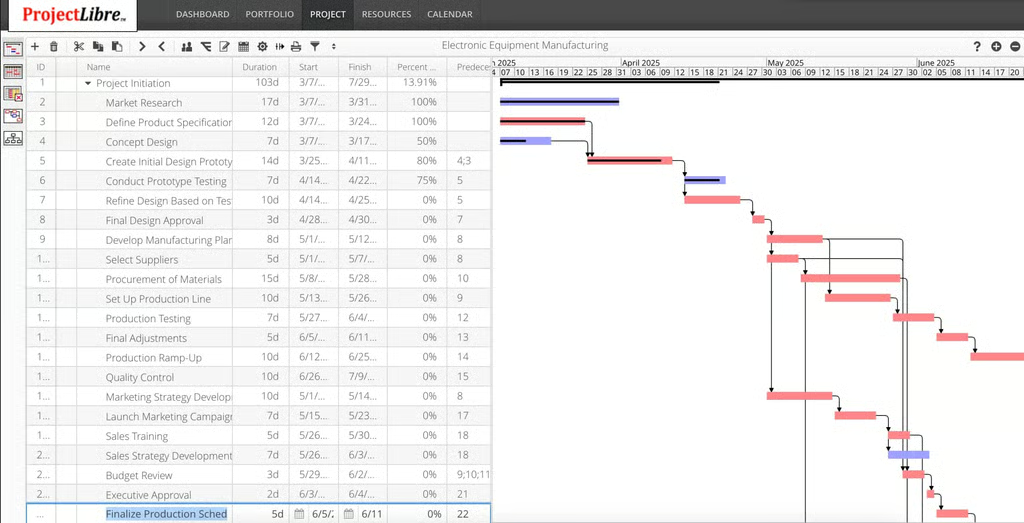
Gantt scheduling helps teams trace task dependencies across a detailed project timeline. (Source: ProjectLibre)

Why I chose ProjectLibre
ProjectLibre is best for project managers who need to closely track how task order affects the final delivery date. Its Gantt and network views support projects with multiple dependencies by calculating the critical path and identifying which tasks can delay completion.
Baselines let users compare the current schedule against the project plan, while resource leveling helps correct assignments that exceed available capacity. Microsoft Project file support is also useful for opening existing MPP schedules and continuing work in an open-source desktop app.
ProjectLibre Desktop is designed mainly for individual use, while team collaboration is handled through ProjectLibre Cloud. OpenProject is a better option when teams need shared project access, user permissions, and portfolio reporting in one workspace.
Pros and cons
| Pros | Cons |
|---|---|
| Cloud supports simultaneous schedule editing | Desktop version lacks real-time team collaboration |
| AI generates schedules from prompts | Some macOS installations fail to launch |
| Cloud version can access Microsoft Project files | Desktop version has not been updated since April 2025 |
Key features
- Gantt chart: Schedule tasks with dependencies and milestones across an interactive project timeline
- Work Breakdown Structure (WBS): Break projects into hierarchical work packages for planning and progress tracking
- Network diagram & critical path analysis: Trace task dependencies and identify activities that determine the project completion date
- Resource management: Assign resources to tasks, monitor workload, and adjust assignments when someone is over capacity.
Pricing
- Free plan: Includes the open-source desktop app for individual project scheduling and resource management.
- Free trial for paid plans: Available by request
- Cloud AI: Pricing provided upon request. Includes collaborative browser-based project management with AI-assisted scheduling.
How to choose the best open source project management software
Along with deployment requirements and supported project types, several other factors can help you compare open-source project management software:
- Match the software to your planning method: Check how the platform supports your project workflow. Agile teams may need sprint planning and WIP limits, while waterfall projects often depend on task dependencies and critical-path analysis.
- Review the open source edition: Confirm which features are included before comparing paid tiers. Some vendors reserve portfolio management or role-based permissions for premium plans.
- Check admin requirements: Review installation, upgrades, backups, and database requirements before deployment. Command-line maintenance or database management may require dedicated IT support.
- Assess customization options: Determine what you can change through settings and plugins before considering code changes. Custom development should be reserved for requirements the software cannot support through configuration.
- Review integrations and APIs: List the systems that need to exchange data with the platform, such as source control or accounting software. Then confirm whether the product supports those connections through native integrations or APIs.
- Review maintenance activity and documentation: Check the date of recent releases and review the official installation or admin guides. Regular releases show whether bugs, security updates, and compatibility changes are still being addressed.
- Calculate the total operating cost: Include hosting and paid extensions, then estimate the staff hours required for administration. A free license can still incur ongoing infrastructure and labor costs.
FAQs
What is open source project management software?
Open source project management software gives users access to the source code, allowing organizations to host and modify the platform based on their technical requirements and licensing terms.
Is open source project management software free?
Many open-source project management tools offer free community editions, but hosting and maintenance incur additional costs. Some vendors also charge for enterprise features, managed cloud hosting, or commercial support.
Is open source project management software secure?
Security depends on the software and how it is deployed. Self-hosted platforms provide admin control over updates, access policies, and infrastructure, but organizations are also responsible for maintaining the environment and applying security patches.