

























Orangescrum offers project management software for agencies or IT service teams tracking delivery across a large group of contributors. Monthly plans use flat-rate pricing for unlimited users, while a self-hosted option is available for those who wish to manage their own infrastructure. In this Orangescrum review, I examine its strengths and trade-offs alongside current user feedback.
Orangescrum overview
| Category | Details |
|---|---|
| Best for | Service teams with multiple project contributors |
| Free plan | 1 user and 1 project; includes Kanban plus 500 MB storage |
| Free trial | 14 days for paid cloud plans |
| Starting price | $26 per month, billed annually |
| Deployment options | Vendor-hosted cloud or self-hosted |
| Key features | Kanban and Gantt views, Agile sprints, time and workload tracking, project budgets, AI project planning |
Who should use Orangescrum
Orangescrum is best suited for project teams that want to manage multiple users under a single account fee. This pricing model works well for client projects where the number of contributors changes frequently.
If you’re considering Orangescrum, here’s the type of team it suits best and who may need another option.
Orangescrum works best for:
- Agencies working with freelancers or client reviewers.
- IT service teams tracking billable hours against project budgets.
- Scrum teams that need backlog planning, sprint reporting, and time tracking in one platform.
- Businesses that prefer project management software on their own servers.
- Growing teams that want to avoid per-user subscription increases.
Orangescrum is less suitable for:
- Solo users who need to manage multiple projects, since the free plan is limited to a single project.
- Small teams that will not benefit from unlimited users and could pay less elsewhere.
- Organizations that need resource forecasting without the cost of its Premium plan.
- Businesses looking for an AI project assistant to handle a range of tasks.
Orangescrum pros & cons
| Pros | Cons |
|---|---|
| Monthly plans support unlimited users | Slightly outdated interface compared to modern platforms |
| Cloud and self-hosted plans | Small teams may pay more to access higher-tier features |
| Cloud-based features are not gated behind add-ons | Steep price jump on higher-tier plans |
Orangescrum pricing
Orangescrum offers two pricing options: flat-rate cloud subscriptions and annual self-hosted licenses. For monthly plans, it uses a fixed subscription fee rather than per-user pricing common among project tools.
Each plan supports unlimited users, so adding team members does not increase the costs. Still, make sure to compare feature access before choosing a plan because the cost of moving to a higher tier may outweigh those savings.
| Cloud plan | Price | Best for | Key features |
|---|---|---|---|
| Free | $0 | Individual users testing basic task tools | 1 user and 1 project; Kanban board; 500 MB storage |
| Basic Unlimited | $26/month, billed annually | Teams managing up to 10 projects | Unlimited users, Kanban and Gantt views, project templates, 50 GB storage |
| Pro Unlimited | $62/month, billed annually | Service teams tracking project hours and budgets | Unlimited projects, Agile boards and reports, custom workflows, time and workload tracking |
| Premium Unlimited | $297/month, billed annually | Organizations managing resources across programs | Resource allocation and utilization, critical path, cost reports and invoicing, advanced dashboards |
| Enterprise | Custom pricing | Organizations requiring robust access controls | SSO and 2FA, custom reports, resource forecasting, dedicated support |
Orangescrum’s self-hosted plans are annual licenses installed on a company’s infrastructure. Core and Business have user caps, while Enterprise supports unlimited users. Apart from the annual fee, note that running Orangescrum on your own servers may add maintenance costs.
| Self-hosted plan | Price | Best for | Key features |
|---|---|---|---|
| Core | $1,500/year for up to 25 users | Small orgs with internal hosting resources | Unlimited projects and tasks, Kanban board, audit trail, resource availability and allocation |
| Business | $2,250/year for up to 50 users | Growing teams managing Agile delivery and billable work | Sprint planning and Agile reports, Gantt dependencies, timesheet approvals, project budgets, and invoices |
| Enterprise | Custom pricing for unlimited users | Large organizations with stricter security requirements | Custom reports and resource cost reporting, automation and REST APIs, SSO and 2FA, priority support |
Optional add-ons cost $499 each per year. These include advanced reporting and document management. API access, risk management, and program management use the same annual rate.
Orangescrum key features
Orangescrum covers the standard tools for project planning, resource management, and agile workflows. Teams can create tasks with assigned owners, set priorities, and track progress in different project views. Project calendars help everyone follow deadlines, while custom task statuses support different workflows.
Here are other standard features included in Orangescrum cloud packages.
- Critical path and conflict resolution
- Scrum backlogs and sprint reports
- Docs and version history
- Time records and project budgets
- Workload and resource reports
- Workflow automation
- AI project planning
Task views and dependencies
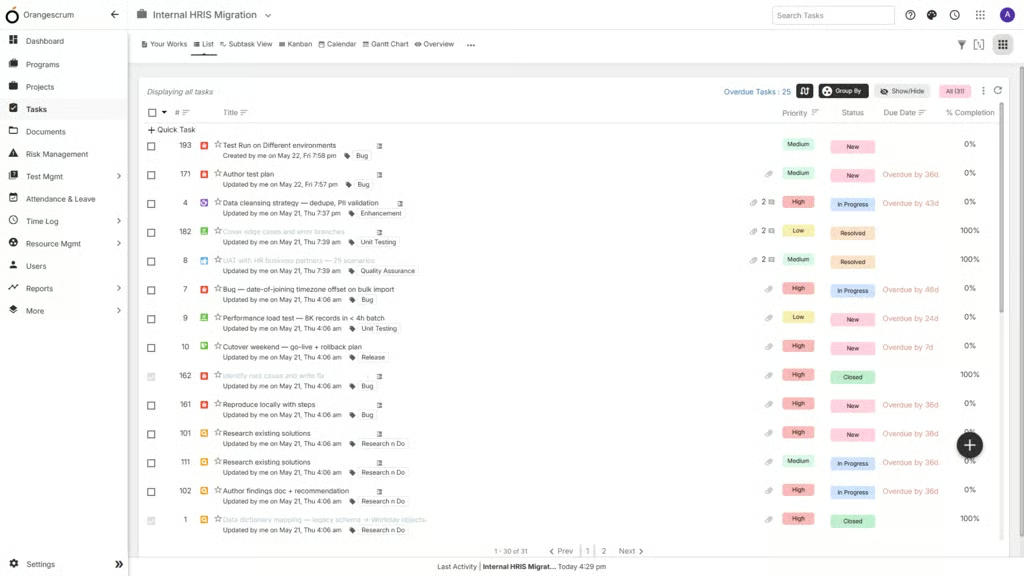
Each task can have an owner with start or due dates. When one task relies on another, teams can add a dependency or set its priority. Users can switch between list and Kanban views, or they can plan the schedule on a calendar or Gantt chart. Comments and files stay with the task, so team members can review feedback and requested changes without having to search elsewhere.
Agile sprint planning
Orangescrum’s Agile project features support the entire Scrum workflow instead of limiting teams to a basic task board. Product managers can organize work into epics and user stories, prioritize the backlog, and move selected items into sprint planning. Each sprint includes dedicated spaces for documenting daily standups, collecting stakeholder feedback, and recording retrospective discussions.
The platform also includes Agile reports that help teams evaluate delivery performance. Velocity charts compare completed work across multiple sprints to show whether output is increasing or slowing over time, while burndown charts track the remaining work against the sprint timeline. These reports provide more context than a Kanban board alone, helping teams identify whether a sprint is likely to finish on schedule.
Feature availability depends heavily on the subscription tier. The Basic plan includes Kanban boards but excludes Scrum planning tools. Pro introduces sprint boards, backlog management, velocity charts, and burndown reports, making it the ideal starting point for Scrum teams. Premium adds approval workflows for epics and features, along with Scrumban support.
Resource management & time tracking
Orangescrum’s time-tracking tools suit agencies and service teams that bill by the hour. Employees can record time against individual tasks, which helps managers identify where a project exceeded its estimate. Comparing planned and actual hours also gives teams a basis for pricing similar work.
Basic excludes timers and weekly timesheets, making Pro the minimum plan for time tracking. Upgrading to Premium is required to convert approved hours into invoices and review labor through project cost reports.
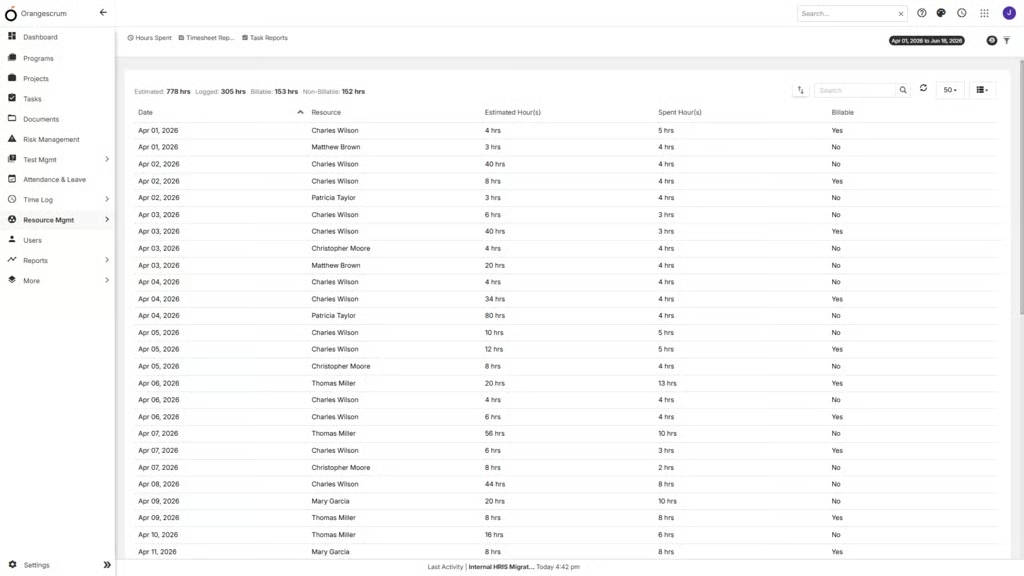
For resource management, Pro covers basic workload planning, while Premium adds availability, utilization, allocation, and cost data. Forecasting is reserved for Enterprise, so teams that need to plan future staffing or long-term capacity must move to a custom-priced plan.
Overall, Orangescrum’s time tracking and resource tools are most valuable on the higher cloud tiers, where managers can connect staffing hours and project costs.
AI & automation
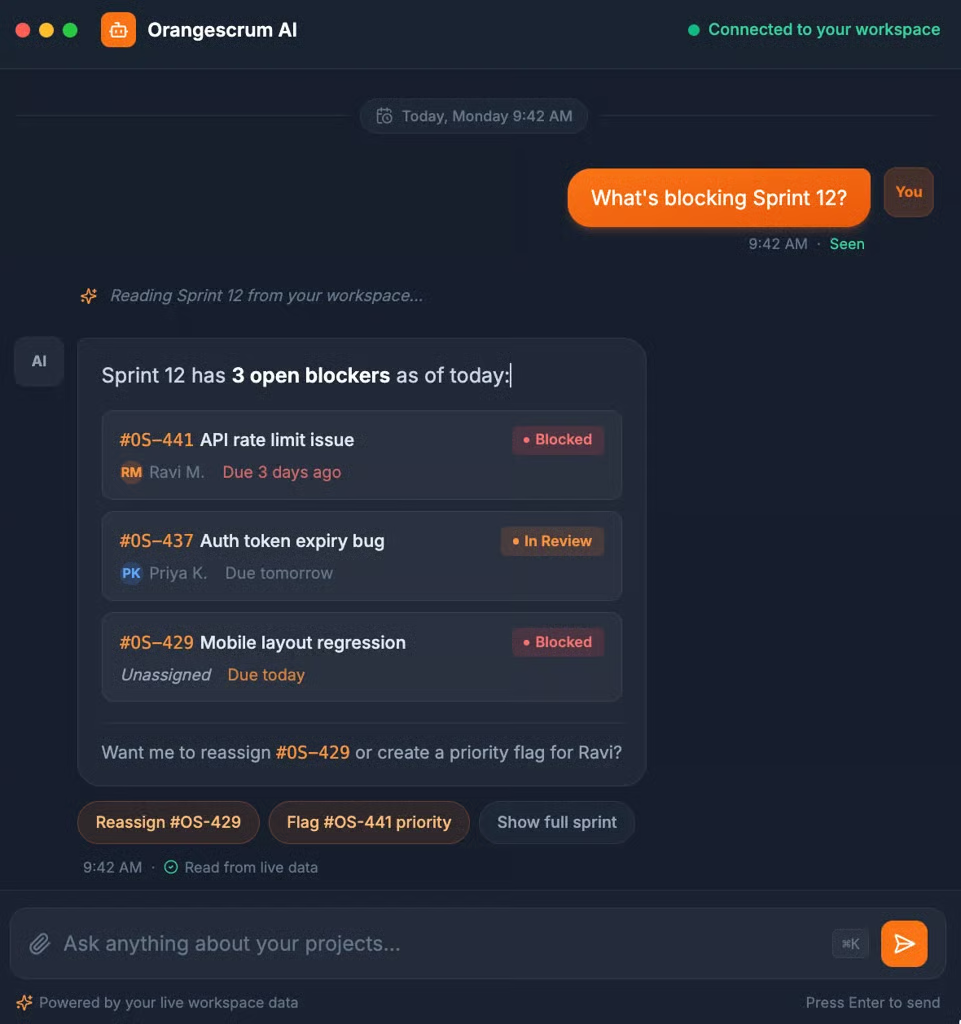
Orangescrum’s AI focuses on project data rather than general writing assistance. AI Chat can answer questions about overdue tasks and sprint blockers by reading the current workspace. It can also log time or update tasks from a prompt.
Each write action requires user confirmation, while separate read and write permissions control what each role can do. Admins can set message and token limits, which helps companies control AI usage across the account. The MCP server also lets external AI assistants access Orangescrum data through the same permission controls.
Orangescrum’s AI toolset can generate a project plan from a short brief and suggest task durations or assignees. It also produces project summaries and flags possible delays. However, Orangescrum does not clearly map these capabilities to its cloud plans. Buyers should use the trial to confirm which AI actions are available on their preferred plan and what usage limits apply.
Ease of use
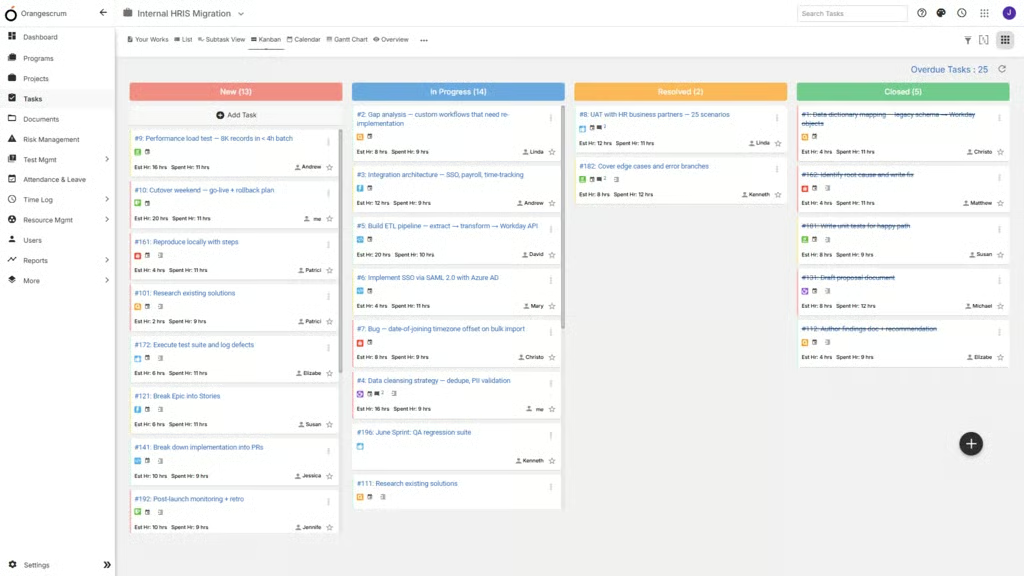
Orangescrum is straightforward to learn for everyday task management. Users can switch between List and Kanban views without changing how work is organized, and task cards display key details such as assignees, status, and tracked time.
As projects grow, however, boards become busier because each card displays several icons and labels. The navigation menu is also easy to follow at first, but it becomes more crowded as teams enable additional modules such as resource management or governance tools.
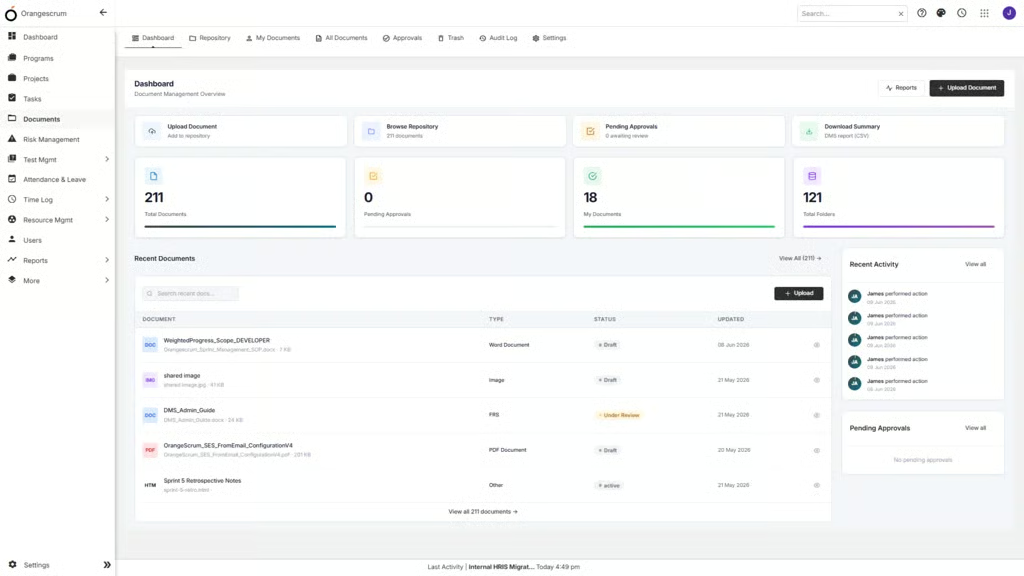
The interface is less consistent once you move beyond task management. Features like document management and project templates use spacious layouts with clearly labeled controls, while the Gantt chart relies more heavily on icons and a different navigation pattern. As a result, contributors can quickly pick up daily task updates, but project managers may need additional time to become comfortable with scheduling and reporting.
My personal experience aligns with recent customer feedback from G2, which described the core workspace as easy for new users while noting that advanced reports and workflow features required a longer learning period.
Customer support
Orangescrum gives all users access to its help center and email support. Its cloud support guide says email replies arrive within 24 business hours, with faster response times for Enterprise customers. Enterprise and self-hosted subscriptions add a dedicated account manager plus priority ticket handling.
All paid cloud plans include training and real-time support through video calls, phone, and live chat. The pricing page does not publish support hours for those channels, so teams with coverage requirements should confirm the schedule before purchase.
Orangescrum alternatives
Orangescrum’s flat pricing works well for teams that need unlimited user allocation, but smaller teams may spend less with a per-user plan. If you need a lower starting price or a different feature set, here are three alternatives to consider.
 |  |  | |
|---|---|---|---|
| Best for | Extensive customization | Visual workflows | Request and approval workflows |
Annual-billing starting price | $7 per user/month | $9 per user/month | $10 per user/month |
Why choose it over Orangescrum | Lower entry cost for a small team, plus published AI add-on pricing | Over 200 project templates and intuitive interface | Conditional request forms and file approval workflows |
| Learn more |
Final verdict: Is Orangescrum worth it?
I would shortlist Orangescrum for agencies and IT service companies that need to add many contributors without paying per user. The Pro plan offers the strongest balance for this type of buyer because it removes project limits and adds sprint planning, timesheets, and project budgets. Teams can manage delivery, track hours, and monitor spending within one subscription.
The choice is less straightforward when advanced resource planning is a priority. Premium costs $297 per month with annual billing, while AI availability by plan is not clearly defined. Smaller teams may spend less with ClickUp and get more transparent AI pricing. Orangescrum’s self-hosted edition may also appeal to organizations that want control over their data, though the IT team must handle maintenance and upgrades.
Orangescrum makes the most sense when unlimited user access offsets its higher monthly price. Smaller teams should compare the full annual cost against per-user alternatives before choosing it for the larger feature set.
FAQs
Is Orangescrum free?
Yes. The free cloud plan supports one user and one project with a Kanban board. It includes 500 MB of storage. Paid plans are needed for more projects or Agile planning, and the free plan does not represent a workable team deployment.
Can Orangescrum be self-hosted?
Yes. Orangescrum sells annual self-hosted licenses. Core supports up to 25 users, while Business supports up to 50. Enterprise has custom pricing for unlimited users. Your organization is responsible for the infrastructure and maintenance.
Does Orangescrum charge per user?
Paid cloud plans do not use per-user pricing. Every paid cloud plan allows unlimited users for one account fee. Self-hosted Core and Business licenses do have user caps, so do not apply the cloud pricing model to those editions.