

























Key takeaways
 Kanban uses a continuous workflow and visual boards to help teams manage incoming work, limit bottlenecks, and improve efficiency.
- Scrum organizes work into short sprints, giving teams a predictable delivery cycle with regular planning, reviews, and feedback.
- Scrumban combines Scrum’s planning structure with Kanban’s flexibility, making it useful for teams balancing project work and ongoing requests.
I’ve worked with teams using Scrum sprints and Kanban boards long enough to know the framework is not the hard part. The real challenge is choosing the one that fits how your team works. Both get recommended as default starting points for Agile work, which means plenty of teams end up using a methodology that doesn’t fit the way they work. In this guide, I’ll break down the key differences between Kanban vs Scrum, explain when each approach works best, and help you determine which one fits your team.
Kanban vs Scrum at a glance
| Kanban | Scrum | |
|---|---|---|
| Best for | Continuous workflows | Project-based work |
| Planning approach | On demand | Sprint planning |
| Scope changes | Allowed anytime | Limited during a sprint |
| Works best when | Work arrives unpredictably | Work can be planned ahead |
| Main advantage | Flexibility | Predictability |
| Main limitation | Less forecasting control | Less flexible during sprints |
| Typical teams | Support, operations, maintenance | Product, software development |
| Learning curve | Lower | Higher |
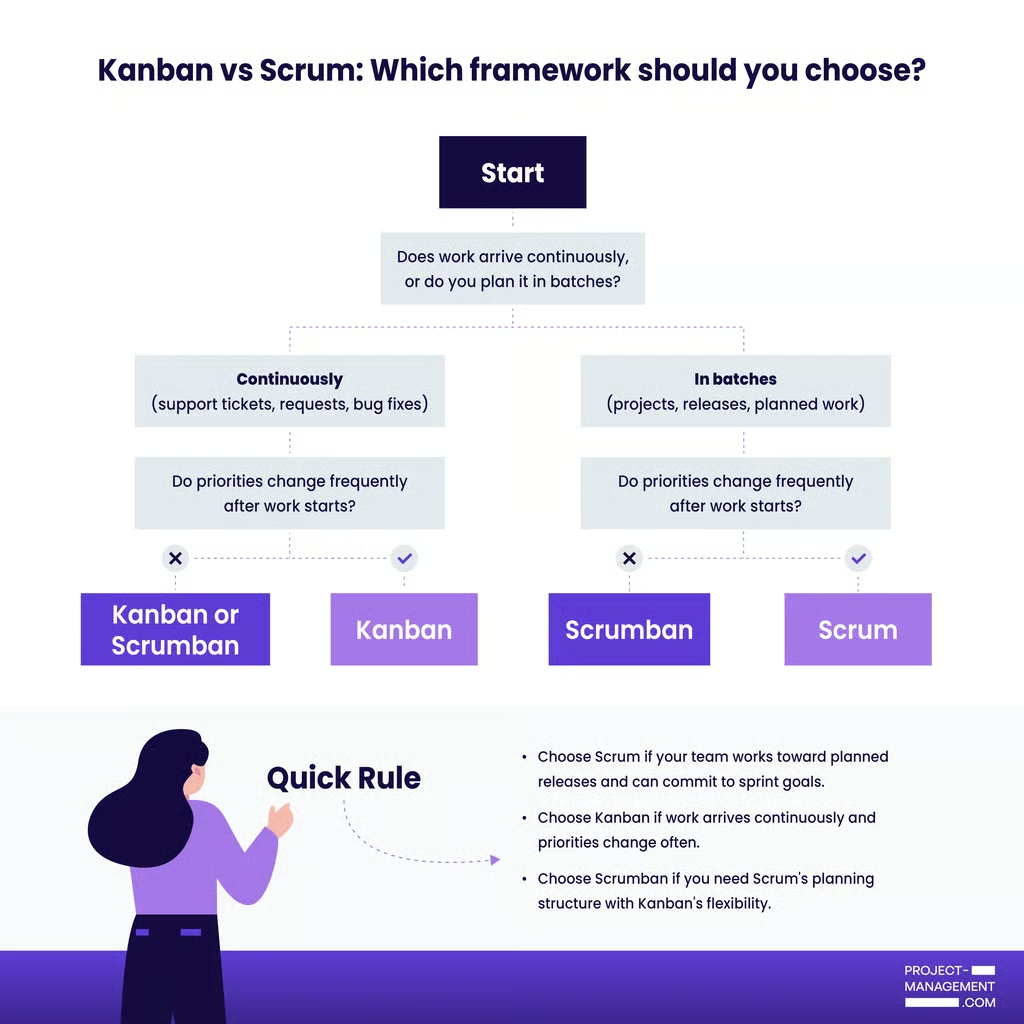
Need a quick answer? Use the decision tree below.
What is Scrum?
Scrum is an Agile framework for managing and delivering work in short, repeatable cycles called sprints. Originally built for software development teams, Scrum has since been adopted across product design, marketing, and operations — anywhere a team needs to deliver work incrementally and improve based on feedback.
Core principles: Scrum is built on three pillars: transparency, inspection, and adaptation. Teams maintain transparency through shared goals and priorities, inspect progress through Scrum events, and adapt based on feedback and lessons learned. This cycle helps teams improve both the product and the way they work.
The framework is deliberately lightweight. Scrum doesn’t tell you how to build a product or run a company. It gives you a structure: defined roles, a set of events, and a few artifacts like product backlog, sprint backlog, and increments.
How Scrum works
Scrum divides work into sprints that typically last one to four weeks. Before each sprint, the product owner prioritizes the backlog, then the team selects work they can complete during the sprint.
Daily standups of 15-minute timeboxed meetings help the team coordinate work and address blockers. In these meetings, the entire team literally stands up in a circle to have each person answer three questions:
- What did you do yesterday
- What are you planning to do today
- Are there any blockers?
The Scrum Master supports and reinforces the proper use of Scrum, helping the team apply the framework consistently while educating the broader organization on how the process should work. Each sprint ends with a review of completed work and a sprint retrospective focused on improving future performance.
When should you use Scrum?
Scrum works best for teams that deliver work in planned increments and need regular feedback. It is particularly useful when requirements may change over time, but the team still needs a predictable delivery cycle.
Consider Scrum if your team:
- Builds products or features that evolve based on user feedback.
- Needs regular stakeholder reviews and checkpoints.
- Works toward goals that can be completed in short sprints.
- Values continuous improvement through reviews and retrospectives.
Scrum is less effective for teams that handle a constant stream of incoming requests, change priorities daily, or lack the capacity to support Scrum roles and events.
What is Kanban?
Kanban, derived from the Japanese word for signboard or visual card, is a workflow management method that originated in Toyota’s manufacturing system and was later adapted for knowledge work. Unlike Scrum, it does not prescribe roles, ceremonies, or sprint schedules. Instead, Kanban uses a visual board with moving cards to track tasks, along with work-in-progress (WIP) limits to help teams manage work and improve efficiency.
Core principles: Kanban is built on four core principles: start with your current process, improve through incremental change, respect existing roles, and encourage continuous improvement. Rather than introducing new roles or ceremonies, Kanban helps teams identify bottlenecks and improve workflows over time.
How Kanban works
A Kanban board shows each stage of your workflow, such as To Do, In Progress, In Review, and Done. Each task appears as a card and moves across the board as work progresses.
The key rule is the work-in-progress (WIP) limit, which caps the number of tasks allowed in a column at one time. If the In Progress column has a WIP limit of three, no new task can enter that stage until one moves forward. This helps teams finish work before starting more and makes bottlenecks easier to spot.
Kanban does not use fixed sprints. New work can be added to a backlog on the Kanban board, then pulled into the active workflow as team capacity allows. This gives teams flexibility to reprioritize work without waiting for the next formal planning cycle, making Kanban especially useful for teams that handle unpredictable or incoming requests.
Kanban teams usually track cycle time, lead time, and throughput. These metrics show how long work takes, how quickly requests are delivered, and how much the team completes over time.
Meetings are optional. Teams can use standups, reviews, or backlog replenishment meetings if they help, but Kanban does not require them.
When should you use Kanban?
Kanban works best for teams that manage a continuous flow of work and need the flexibility to adjust priorities as new requests arrive. It is also easier to adopt than Scrum because it does not require new roles, sprint schedules, or prescribed ceremonies.
Consider Kanban if your team:
- Handles a steady stream of incoming requests, such as support tickets, content requests, or bug reports.
- Needs to reprioritize work frequently.
- Delivers work continuously rather than on a fixed schedule.
- Needs better visibility into bottlenecks and workflow delays.
Kanban is less effective when projects require fixed delivery commitments, review cycles, or sprint planning. It also depends on teams respecting WIP limits. Without those constraints, a Kanban board becomes little more than a task list.
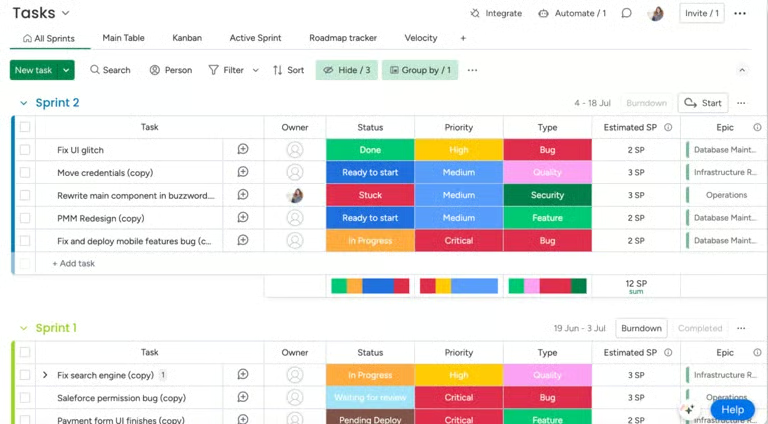
monday work management supports both Scrum and Kanban, making it a good option for teams evaluating or transitioning between frameworks. Scrum teams can use sprint boards, backlog management, burndown charts, and sprint planning tools to manage Agile delivery cycles. Kanban teams can use custom boards, workflow automations, and work-in-progress tracking to visualize work and manage continuous flow.
Scrum vs Kanban: Key differences
Understanding what separates these two frameworks goes deeper than “one has sprints and one doesn’t.” They affect planning, team roles, change management, and the way teams measure progress.
| Kanban | Scrum | |
|---|---|---|
| Continuous flow vs sprint cycles | Work enters the workflow on the board when capacity opens and moves forward until it is complete. | The team plans the work at the start of the sprint, delivers it by the end, then reviews the outcome before the next cycle begins. |
| Roles | Teams can keep their current responsibilities and use the board to manage work. | Product Owner, Scrum Master, and Development Team. |
| Lifecycle | Always active. Cards move across the board until they are done, which gives teams a real-time view of the current workload. | Resets at the start of each sprint. Incomplete work either moves into the next sprint or returns to the backlog. |
| Change management | Kanban accepts change more easily. A new urgent task can move into the queue as long as WIP limits are respected. | Scrum minimizes mid-sprint changes to help teams stay focused. |
| Key metrics | Uses cycle time, lead time, and throughput to measure delivery speed, bottlenecks, and output. | Uses velocity to estimate sprint capacity and forecast delivery timelines. |
| Meetings/ceremonies | No required meetings. Teams use standups or reviews only if they add value. | Includes sprint planning, daily standups, reviews, and retrospectives |
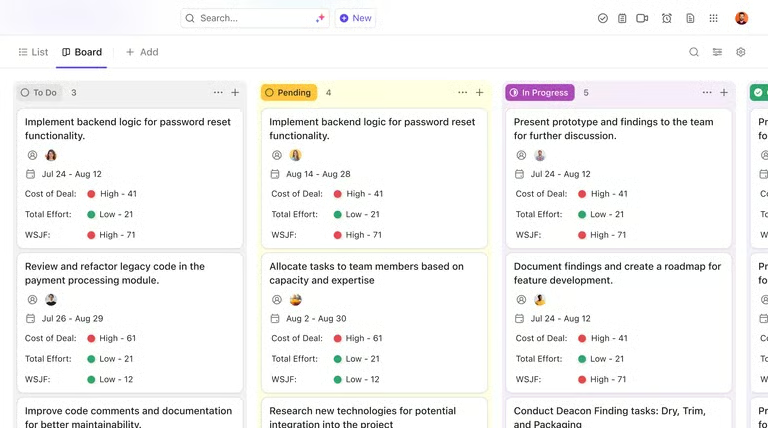
ClickUp supports both Scrum and Kanban workflows through custom views and Agile-focused features. Scrum teams can manage backlogs, plan sprints, track velocity, and monitor burndown charts, while Kanban teams can use drag-and-drop boards, workflow automations, and work-in-progress limits to manage continuous flow.
How to choose between Kanban & Scrum
Both Kanban and Scrum are effective frameworks, but they are designed for different workflows. To identify the better fit, evaluate how work enters your system, how often priorities change, and how much process structure your team needs.
- What does your incoming work look like?
If work can be planned in advance and grouped into deliverables, such as product features, releases, or campaigns, Scrum is often a better fit. If work arrives continuously through support tickets, requests, bug reports, or operational tasks, Kanban is usually more effective.
- How often do priorities change?
Scrum works best when priorities remain relatively stable during a sprint. While teams can adjust future plans, constant mid-sprint changes reduce the value of sprint commitments. Kanban is designed for environments where priorities shift frequently. Teams can reprioritize work as new requests arrive without disrupting the overall process.
- Can your team support Scrum roles?
Scrum relies on the Product Owner and Scrum Master responsibilities. These roles are specific, often require additional training, and can be difficult for smaller teams to separate effectively. Kanban does not require dedicated roles, making it easier to adopt for operations teams, support groups, and smaller departments.
- Do stakeholders need regular checkpoints?
Scrum provides a review cycle through sprint reviews and planning sessions. This works well when stakeholders expect scheduled updates and opportunities to provide feedback. Kanban offers more flexibility. Teams can review work whenever necessary without following a fixed meeting schedule.
- How much process structure do you need?
Scrum provides a defined framework with roles, events, and planning cycles. Teams that benefit from clear routines and regular reflection often find this structure valuable. Kanban is lighter by design. It focuses on visualizing work and managing flow, allowing teams to decide how much process they want to add.
Scrumban: Combining Scrum & Kanban
Not every team fits cleanly into one framework. If you’ve read through this guide and found yourself nodding at the Scrum sections but wincing at the ceremony overhead, or agreeing with the Kanban logic but needing more structure than a board and WIP limits provide, Scrumban is worth considering.
Scrumban combines Scrum’s planning and review cycles with Kanban’s continuous workflow and WIP limits. Teams still meet regularly to review priorities and improve processes, but work flows continuously rather than being locked into sprint commitments. This approach works well for teams that manage both project-based work and operational requests.
Scrumban is most effective when the work requires elements of both frameworks. A product team, for example, may use sprint reviews to keep stakeholders aligned while managing support tickets and maintenance work through a Kanban-style workflow.
The framework you choose matters less than whether your team understands why you chose it and has the discipline to run it properly. Scrum, Kanban, or Scrumban — the board only works if the team does.
FAQs
Is Kanban better than Scrum?
Neither framework is inherently better. Kanban works best for continuous work streams, while Scrum is often better for teams delivering work in planned increments.
Which is easier to implement, Kanban or Scrum?
Kanban is generally easier to adopt because it requires fewer role changes, meetings, and process rules.
Does Kanban work for non-software teams?
Yes, and it often works better than Scrum for teams outside software development. Marketing teams managing content pipelines, customer support teams handling ticket queues, and operations teams coordinating recurring workflows all benefit from Kanban’s continuous flow model.