

























Planning a podcast can be overwhelming, especially when you’re managing everything from episode concepts and guest outreach to recording schedules and publishing timelines. Rather than building a system from scratch, many project management tools offer ready-made podcast planning templates that cover the full production cycle. To save you the time of hunting them down, I’ve compiled the best podcast planning templates worth using today.
- 1. monday work management— For multi-stage production workflows
- 2. ClickUp – For coordinating production teams
- 3. Miro – For guest coordination
- 4. Smartsheet – For podcast promotion
- 5. Google Sheets – For tracking production status
- 6. Notion – For all-in-one podcast management
- 7. Trello – For podcast workflow management
- 9. Airtable – For managing podcast seasons & guest databases
- 10. Coda – For creating episode briefs
- What to look for in a podcast planning template
- FAQs
1. monday work management— For multi-stage production workflows
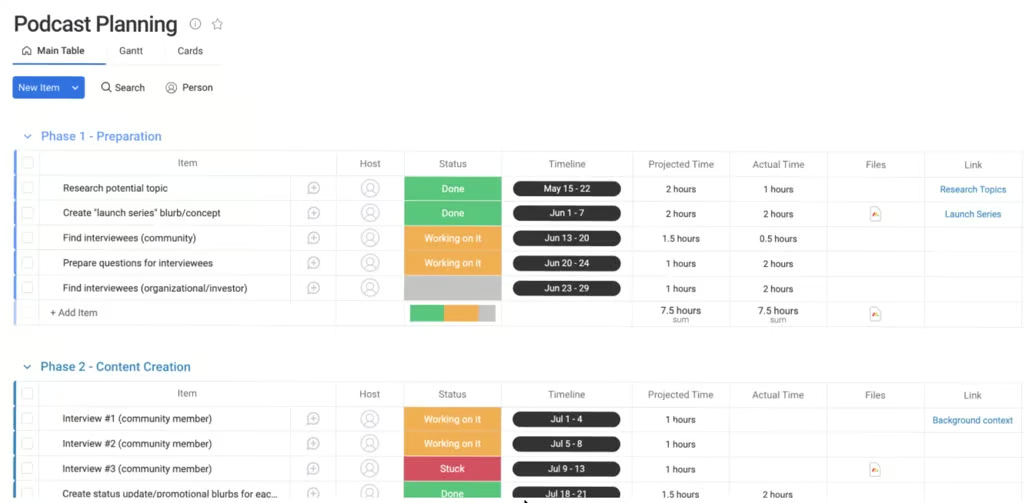
This podcast planning template from monday.com lets you move podcast episodes through each stage of production, from research to publishing. Status updates show which tasks are complete and which ones need to be prioritized before the next production milestone. If an interview is delayed or research is incomplete, you can quickly identify what needs to be resolved before recording.
Why I like monday.com’s template
When planning an episode, you can assign deadlines to research, guest outreach, and content creation tasks to track recording schedules. The projected and actual time fields helps in comparing estimates against the time spent on each task.
The linked files and reference materials keep research documents, interview notes, and background information connected to the relevant task. This reduces the time spent searching across different folders when preparing for interviews or editing sessions.
After producing several episodes, you can use that data to build more realistic production schedules for future releases.
2. ClickUp – For coordinating production teams
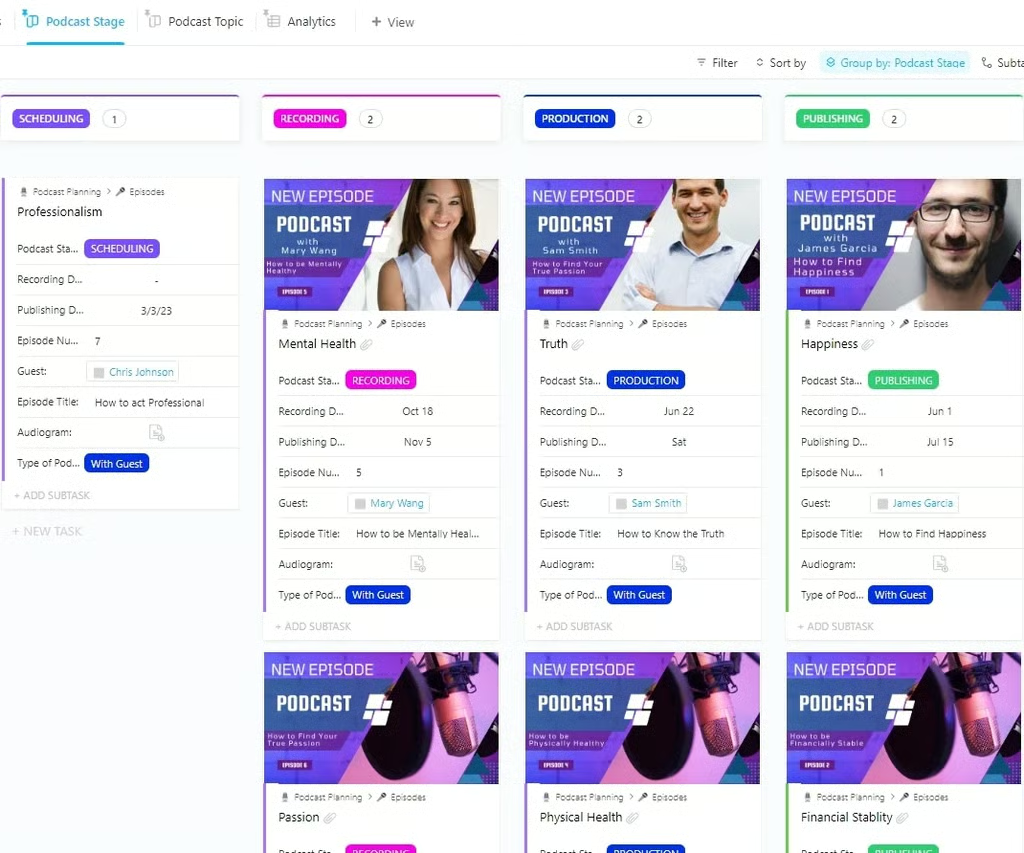
ClickUp supports podcast production teams by showing each episode’s progress in a Kanban board. When a topic is approved, the episode can move into the next stage, signaling that recording preparation should begin. Guest information is included within each episode card, making it easier to coordinate interviews and confirm participants before recording day.
Why I like ClickUp’s template
ClickUp is a project management software that offers a wide range of podcast planning templates. Among the options, this podcast planner is best for production teams that rely on multiple handoffs between planning, recording, editing, and release. As episodes enter production, the workflow highlights which recordings are moving forward to the next stage. If multiple episodes remain in the same stage, delays become easier to identify before they affect the production schedule.
Episode cards contain production notes, assets, and episode details, giving contributors the context needed to complete their tasks. Once an episode reaches publishing, the team can shift attention to upcoming recordings and the next set of deliverables.
3. Miro – For guest coordination
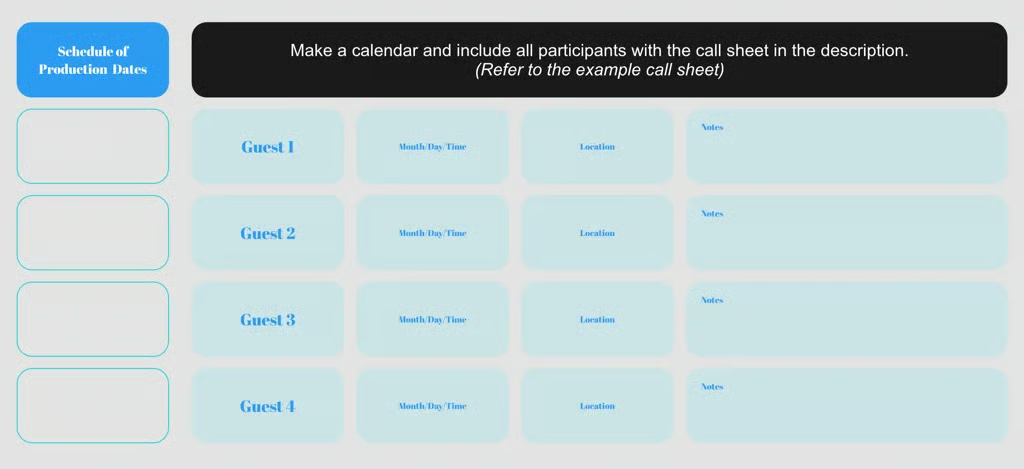
Miro helps coordinate podcast guests by storing recording schedules, participant details, and production notes in the same workspace. It uses a whiteboard-style approach that works well when presenting podcast plans to collaborators, sponsors, or stakeholders who need a visual overview of the production timeline.
Why I like Miro’s template
Guest scheduling often becomes difficult when multiple guests have different availability, locations, and recording requirements. What I like about this template is it includes those details within the production schedule so recording plans can be finalized in one place.
If an episode includes multiple guests, each participant can be tracked separately to confirm availability and recording requirements. Production notes can capture special requests, technical needs, or discussion topics that need attention before recording day. When schedules change, recording details can be updated for the guest appearance.
4. Smartsheet – For podcast promotion
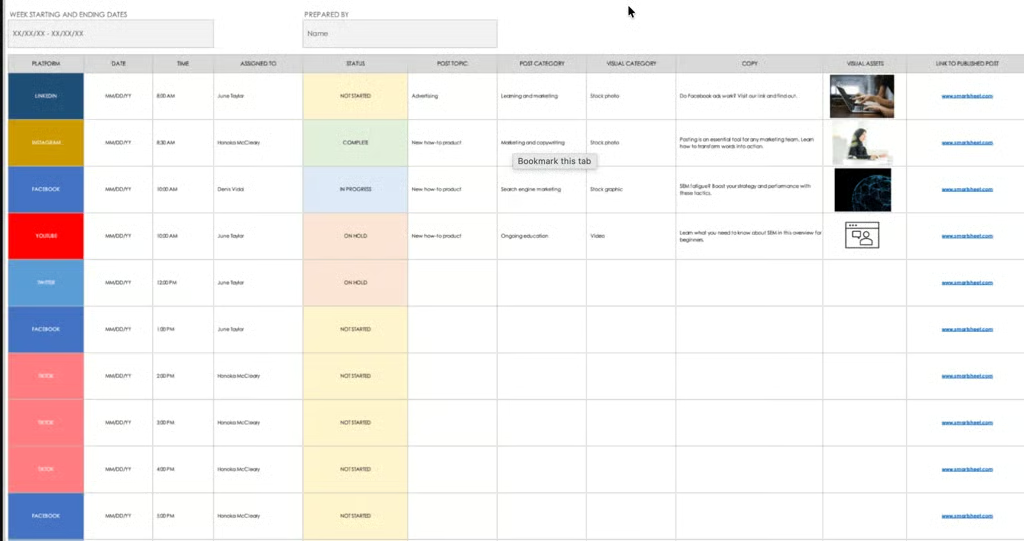
Smartsheet helps podcast teams plan promotional campaigns by connecting marketing activities to specific publishing dates. When an episode is released, promotional posts can be scheduled across different channels so content is distributed according to plan.
Why I like Smartsheet’s template
Smartsheet’s template stood out for me, particularly in how it links podcast production work between content creators and marketing contributors. Assigned owners make it clear who is responsible for creating, reviewing, or publishing each post. This reduces confusion when multiple contributors are involved in each episode promotion.
Post copy and visual assets are attached to promotional items to easily confirm if content is ready before publication. If revisions are needed, status updates show which posts are still pending.
5. Google Sheets – For tracking production status
Google Sheets is one of the best collaboration software solutions that offers a simple, no-frills way to plan and track podcast episodes. It’s easy to customize, share, and update in real time, making it a practical option for teams that prefer straightforward spreadsheets.
Why I like Google Sheet’s template
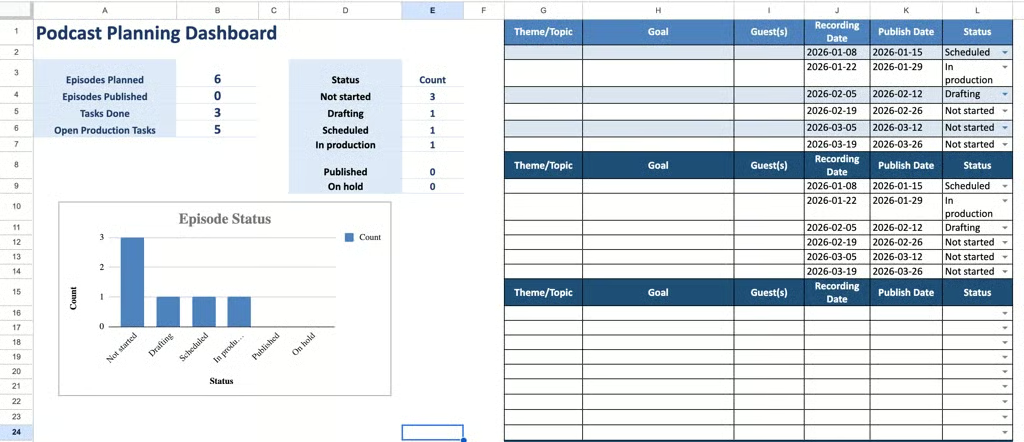
I chose Google Sheets’ podcast template because it focuses on one of the most important parts of podcast production: tracking episode progress against upcoming deadlines. The template combines production statuses, recording schedules, publishing dates, and episode details in a format that is easy to update as work progresses.
Another reason I selected this template is its dashboard summary. Instead of reviewing individual episodes one by one, producers can quickly assess how many episodes are planned, how much work has been completed, and where open production tasks exist.
6. Notion – For all-in-one podcast management
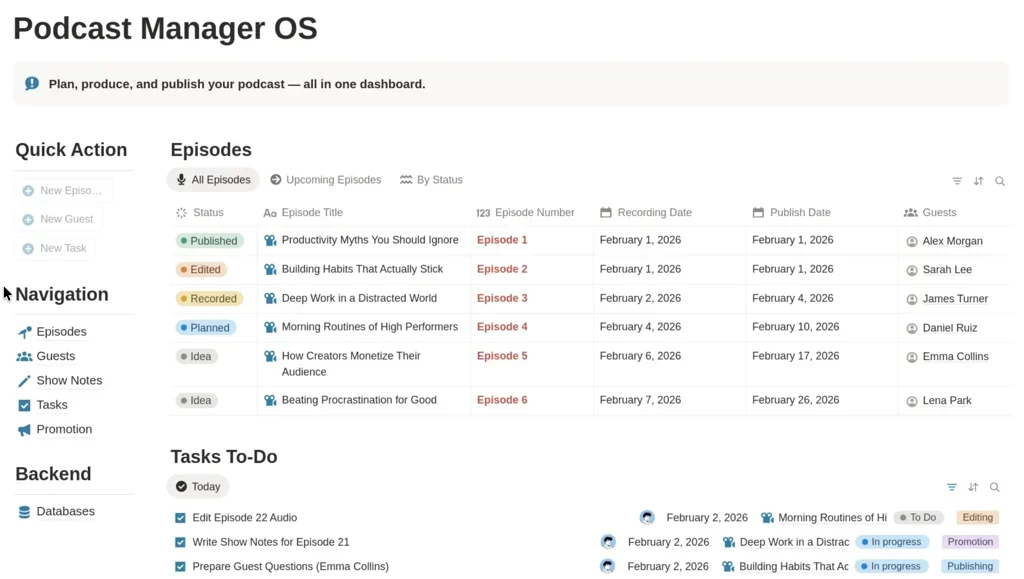
For teams managing multiple episodes at different stages, Notion’s podcast management template supports the entire podcast lifecycle from initial idea through publication and promotion. Episode details, guest information, production tasks, and publishing schedules are displayed in the same workspace, making it easier to manage the entire podcast workflow from one location.
Why I like Notion’s template
When a new episode is approved, the recording date and guest details are added to the episode record. Production tasks such as editing, show notes, and publishing are tracked alongside the episode, making it easier to monitor progress. Guest profiles also provide quick access to interview information during preparation and recording.
Publishing dates help teams prioritize upcoming releases and balance work across multiple episodes. Promotional activities can be tracked alongside each episode, allowing producers to manage production and marketing efforts from the same record.
7. Trello – For podcast workflow management
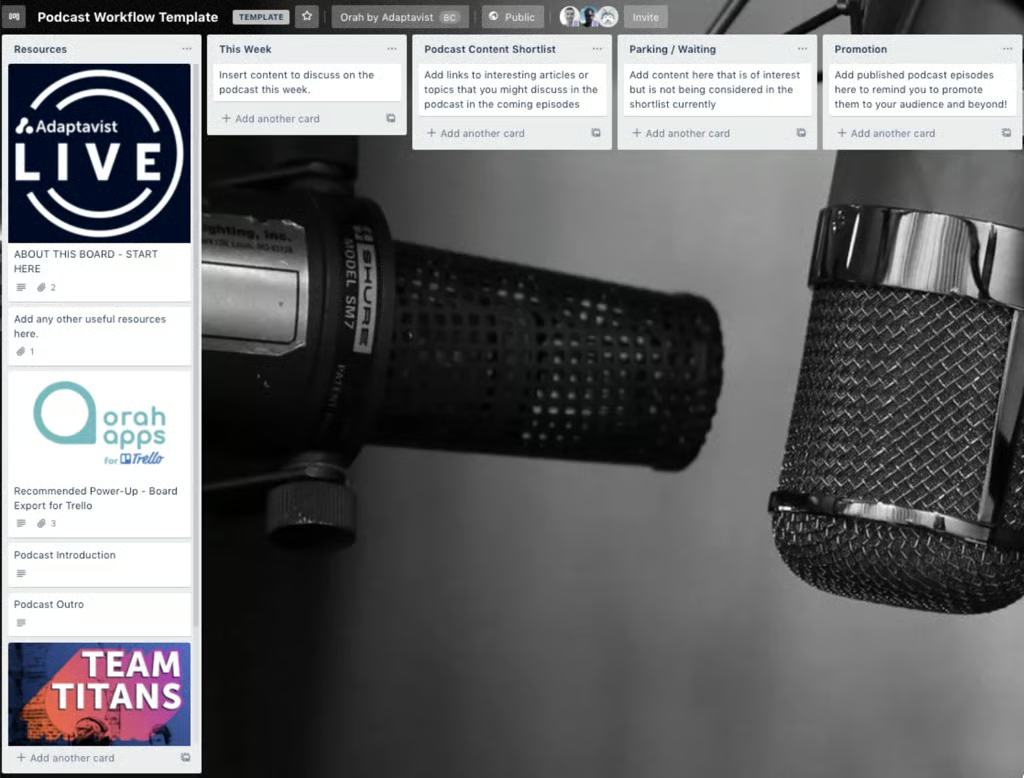
Trello works well for podcast workflow management because content can move through a production pipeline as episodes progress from idea to publication. When evaluating potential topics, episode concepts can be collected in a backlog until they are ready for discussion.
Why I like Trello’s template
I chose Trello’s podcast workflow template because it mirrors how podcast production naturally progresses. Similar to ClickUp, it uses a visual Kanban workflow that makes it easy to determine which episodes are being researched, recorded, or promoted.
The template is also useful for managing editorial decisions, where producers can separate episode ideas from lower-priority topics. This reduces the time spent reviewing content that is not ready for production.
9. Airtable – For managing podcast seasons & guest databases
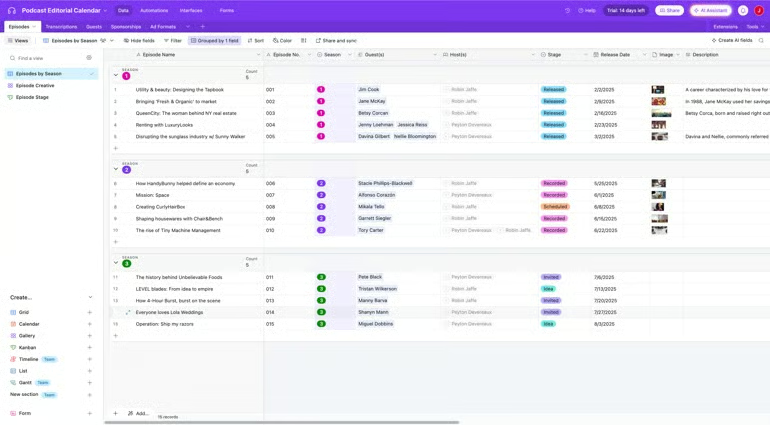
Airtable uses a database structure that connects episodes, guests, hosts, and sponsorships in one project board. For podcast planning, this makes it easier to track guest appearances, manage season schedules, and search past episodes as the podcast library grows.
Why I like Airtable’s template
I chose Airtable’s podcast template because it connects episode planning and guest management in a single database. Producers can assign guests to specific episodes, which makes interview scheduling easier to manage as a season progresses.
The template also groups episodes by season for content planning and release sequencing. Guest records provide a history of past appearances and upcoming bookings, supporting better outreach decisions over time.
10. Coda – For creating episode briefs
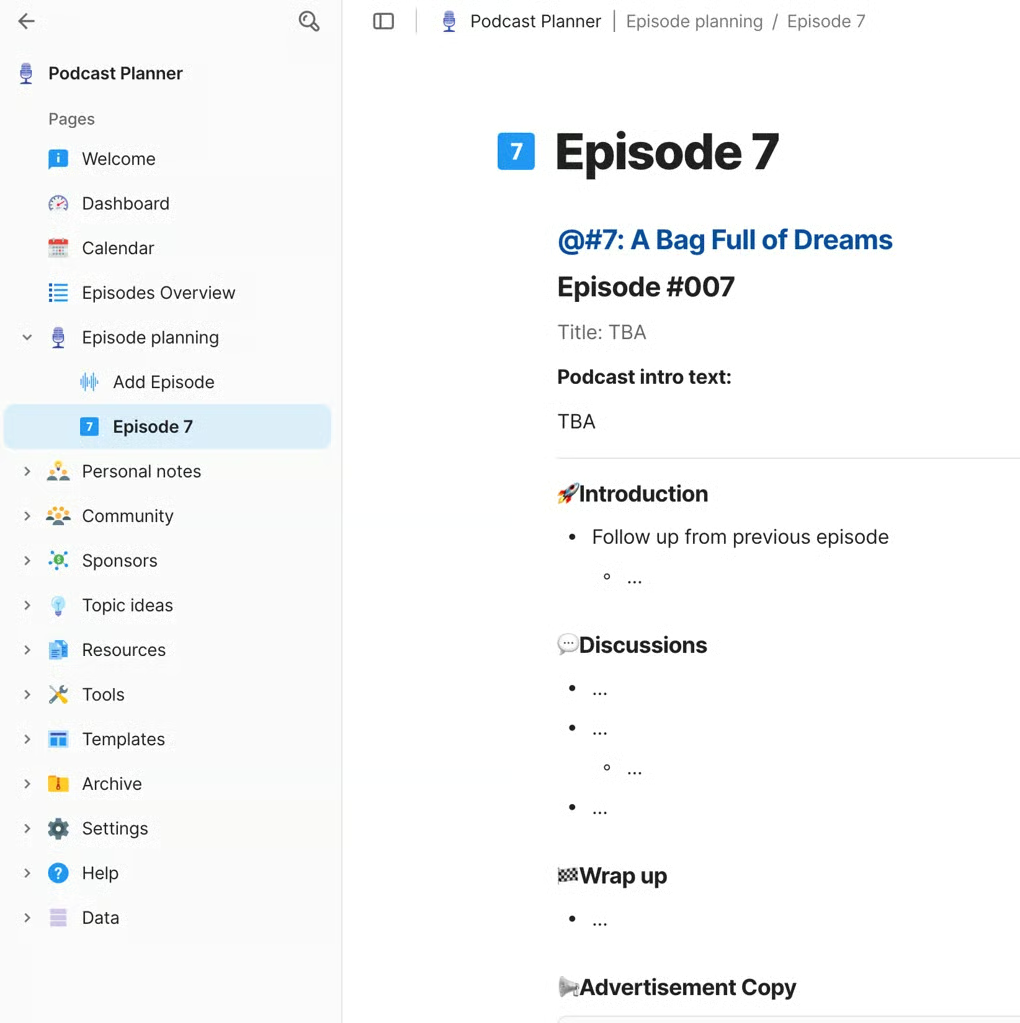
Coda’s podcast production template combines tasks, timelines, guest info, and show notes in a modular document. It’s fully interactive, allowing you to check off completed stages, update deadlines, and capture feedback in one single workspace.
Why I like Coda’s template
Coda’s flexible structure allows you to organize your podcast however you like, using features like tables, toggles, and interactive checklists to keep things tidy. I particularly like that it encourages centralization: production steps, notes, and guest details are all housed in a single, editable document. This template is ideal for podcasters seeking a streamlined, collaborative workspace that also serves as their episode archive.
What to look for in a podcast planning template
Like most use cases, not all podcast planning templates are created to meet your needs. Here are the things that you need to look out for when choosing the best template, based on your requirements and preferences:
- Clear production workflow: The template should guide you through each stage — from brainstorming to publication.
- Flexible task management: Look for templates that support subtasks, dependencies, and deadlines.
- Team collaboration features: If you’re working with co-hosts, editors, or marketers, your template should support file sharing, commenting, and assignment tracking.
- Promotion planning: A strong template includes marketing or promotion checklists to boost reach.
- Customization: Your needs will evolve. Templates should be adaptable for growth.
- Episode metadata tracking: Include fields for titles, show notes, links, and guests to keep things organized.
Read next: Content Operations Project Management Templates to Keep Teams Aligned and Output Flowing
FAQs
What should a podcast planning template include?
A podcast planning template should include episode titles, content goals, recording dates, guest details, production status, publishing schedules, and promotional tasks. Some templates also include show notes, sponsor information, and content calendars.
Which tool is best for podcast planning templates?
The best tool depends on your workflow. Google Sheets works well for simple tracking, Airtable is useful for managing guest databases, ClickUp supports production coordination, and Notion is a good option for combining episode planning with documentation.
Can you use free tools for podcast planning?
Yes, you can use free tools for podcast planning, especially if you’re just starting out. Platforms like Trello, Notion, and Google Sheets offer free templates that cover basic workflows, task tracking, and scheduling.
While they may lack advanced automation or integrations, they’re often enough for solo podcasters or small teams. As your production becomes more complex, you can upgrade to paid tools for additional features like automation, reporting, and collaboration controls.