

























Key takeaways
 Jira outperformed Rally in pricing, features, support, and buyer accessibility, making it the stronger choice for most software development and cross-functional teams.
- Rally excels in enterprise agile management. Organizations using SAFe benefit from Rally’s portfolio planning, capacity management, and program-level visibility.
- Neither platform prioritizes simplicity. Both tools have steep learning curves, but Jira balances complexity with extensive customization, integrations, and documentation.
I’ve worked in Agile environments long enough to have a few strong opinions about the tools that run them, and Rally and Jira are two I know well. Both support Agile delivery from backlog to release, but Rally is purpose-built for large enterprises running Agile at scale, while Jira gives smaller and mid-sized IT teams the flexibility to customize workflows. If you’re deciding which tool is better, this Rally vs Jira comparison breaks down pricing, key features, ease of use, and overall value.
Why you can trust Project-management.com
Over the past four years as a project management writer, I have personally tested nearly 20 PM platforms, and several of them have become part of my own workflow. I have written dozens of buyer’s guides covering a wide range of use cases and company sizes, which gave me a broader understanding of what project professionals need from these tools.
Beyond hands-on testing, I design custom scoring rubrics for each evaluation to make sure every platform is assessed accurately and on equal footing, not ranked on gut feel or vendor claims.

Senior Staff Writer for Project Management
Marianne Sison
My methodology
My evaluation focused on five criteria: Agile workflow support, customization, reporting, integrations, and ease of use. I sourced pricing and feature data from Atlassian and Broadcom, cross-referenced user reviews on G2 and Gartner Peer Insights, and applied my personal experience using both tools in Agile environments.
General features (25%): I evaluated the core project capabilities, including task management, workflow customization, reporting, dashboards, automation, and integrations. I also assessed how each platform supports collaboration and Agile frameworks.
Pricing (20%): I compared free plans, entry-level pricing, AI availability, and total cost of ownership. My evaluation considered feature availability at lower tiers, pricing transparency, and the likelihood of needing additional licenses or add-ons.
Advanced and niche features (20%): I examined capabilities designed for enterprise environments, such as SAFe support, portfolio management, capacity planning, governance controls, and dependency tracking. I focused on features that help organizations coordinate work across multiple teams and programs.
Expert score (15%): I applied my experience reviewing project management software to assess overall product quality and buyer value. This score reflects feature depth, market positioning, independent user sentiment, and how effectively each platform supports task management workflows.
Ease of use (10%): I analyzed user feedback to understand onboarding difficulty, interface design, navigation, and the level of technical knowledge required to operate the platform. My scoring favored providers that balance flexibility with a manageable learning curve.
Customer support (10%)I reviewed official vendor resources to verify support channels, educational materials, community engagement, and security capabilities. I gave additional weight to evidence that was clearly documented on vendor-owned websites and help centers.
Rally vs Jira overview
| Rally | Jira | |
|---|---|---|
| My overall score | 3.63/5 | 4.46/5 |
| Best for | Enterprise agile management | Agile software teams of all sizes |
| Pricing | Custom enterprise pricing | Free plan available; paid plans start at $9.05/user/month |
| Agile methodologies | Scrum, Kanban, and SAFe | Scrum and Kanban, with SAFe through add-ons |
| Customization | Moderate customization options | Highly customizable workflows and issue types |
| Reporting & analytics | AI-driven forecasting and reporting | Robust reporting with extensive dashboard customization |
| Integrations | Major development tools and enterprise systems | Large marketplace with thousands of integrations |
| Visit Rally | Visit Jira |
What is Rally?
Rally, formerly known as CA Agile Central, is an enterprise Agile management platform owned by Broadcom. It supports Scrum, Kanban, and hybrid methodologies, and is available on-premises or in the cloud.
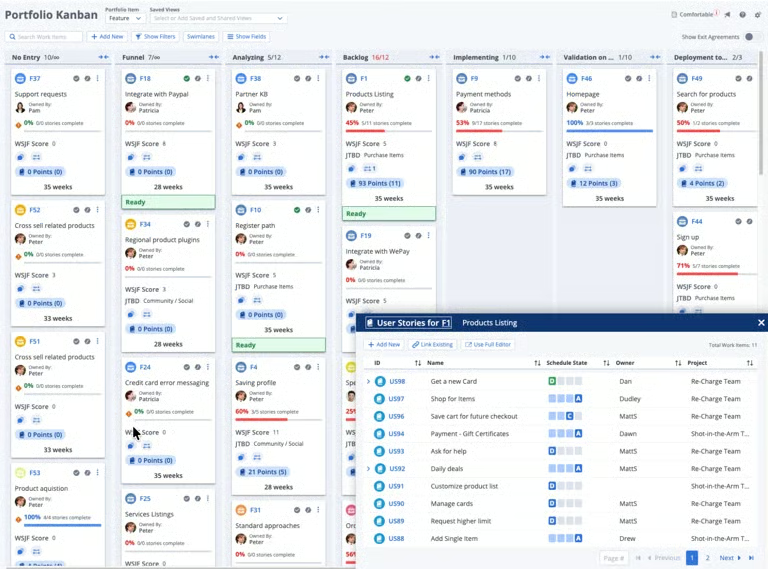
Where most Agile tools stop at sprint management, Rally connects that work to business strategy through OKRs, capacity planning, release tracking, and real-time rollup reporting across programs. Rally is part of Broadcom’s ValueOps platform, which also includes Clarity for project portfolio management and ConnectALL for enterprise integrations.
Rally pros & cons
Pros
 Supports for SAFe and enterprise Agile frameworks
- Advanced portfolio management and reporting capabilities
- Surface risks with AI-powered predictions
Cons
 Steeper learning curve for new users
- User interface feels less modern than competitors
- Limited third-party integrations compared to Jira
What is Jira?
Jira is an Agile project management and issue-tracking platform developed by Atlassian. It helps teams plan sprints, manage backlogs, track work progress, and automate workflows through custom boards and project configurations.
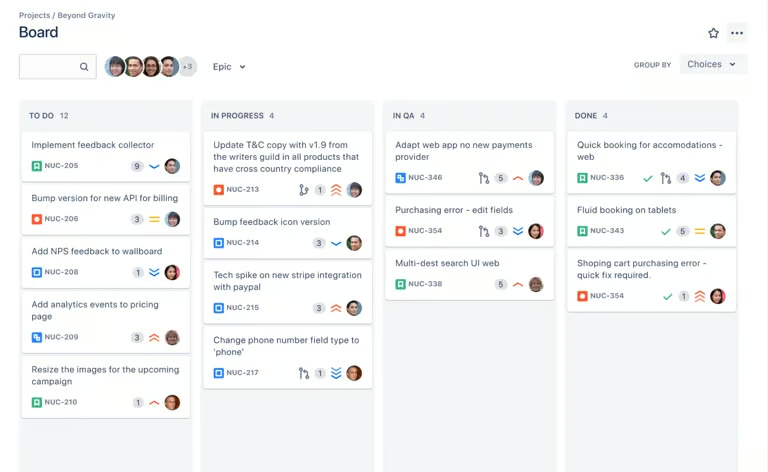
Jira is widely adopted by software development teams because of its flexibility, extensive integration marketplace, and ability to scale from small teams to large enterprises.
Jira pros & cons
Pros
- Highly customizable workflows, issue types, and dashboard
- Extensive integration marketplace with thousands of apps
- User-friendly interface for Scrum and Kanban boards
Cons
- Can become complex to administer as configurations grow
- Advanced features often require additional paid add-ons
- Reporting may require premium plans or add-ons
Pricing
Winner: Jira
Jira is the better choice for organizations seeking transparent pricing and a lower initial investment. Atlassian offers a free plan for small teams, along with tiered subscription plans that scale based on user count and feature requirements.
Beyond subscription fees, it’s important to consider the total cost of ownership. Jira may require paid marketplace apps to unlock advanced reporting or SAFe capabilities, which can increase overall costs as your needs grow. Rally includes many enterprise-focused Agile features out of the box, which may reduce the need for additional tools but often come with a higher upfront investment.
| Rally | Jira | |
|---|---|---|
| Free plan | Not publicly available | Free for up to 10 users |
| Entry-level plan | Custom quote | Standard: $9.05 per user/month |
| Mid-tier plan | Custom quote | Premium: $18.30 per user/month |
| Enterprise plan | Custom pricing | Custom pricing |
| Deployment options | Cloud and on-premises | Cloud plans and enterprise deployment |
| Best for | Large enterprises requiring custom licensing | Teams seeking predictable pricing and scalable plans |
Rally vs Jira: Key features
Winner: Tie (Rally for enterprise Agile at scale; Jira for single-team or small multi-team setups)
Both Rally and Jira support Scrum and Kanban methodologies, backlog management, sprint planning, reporting, and team collaboration. The biggest difference is their focus: Rally prioritizes enterprise visibility, while Jira emphasizes flexibility, customization, and integration with the broader Atlassian ecosystem.
Agile workflows
Winner: Rally
Rally and Jira both support Agile frameworks, but they cater to different organizational needs. Rally is designed for enterprise Agile adoption and supports SAFe, program increments, iteration tracking, and portfolio roadmaps. The epic-feature-story hierarchy is also built into the platform.
Jira provides Scrum and Kanban boards that are easy to configure, making it a popular choice for software development teams of all sizes. However, cross-program coordination and governance reporting typically require additional apps or a separate Jira Align subscription.
| Rally | Jira | |
|---|---|---|
| Scrum boards | ✓ | ✓ |
| Kanban boards | ✓ | ✓ |
| SAFe support | Native support | Available through Jira Align and apps |
| Backlog management | ✓ | ✓ |
| Sprint planning | ✓ | ✓ |
| Enterprise portfolio planning | Comprehensive | Moderate |
Workflow customization
Winner: Jira
Customization is one of Jira’s biggest strengths. Teams can create custom workflows, issue types, fields, screens, and automation rules to support nearly any process.
Rally offers workflow configuration as well, but it works within a fixed Agile structure rather than letting you build from scratch. You can customize fields, iteration lengths, and release cadences, but the underlying hierarchy of portfolio, program, and team layers stays in place. This ensures consistency across teams, but it limits how far you can deviate from standard Agile practice.
| Rally | Jira | |
|---|---|---|
| Custom workflows | Limited | Extensive |
| Custom fields & issue types | Yes | Yes, more granular |
| No-code automation | Yes | Yes |
| Workflow templates | Agile-specific | Agile, IT, and business |
| Marketplace extensions | Limited | Extensive |
Reporting & analytics
Winner: Rally
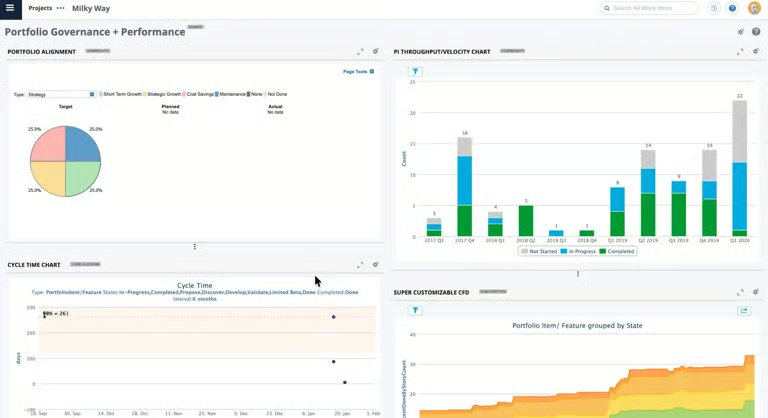
Both platforms offer reporting tools, but Rally focuses mainly on program-level visibility. Its dashboards help organizations monitor strategic initiatives, release progress, and team performance across large Agile environments.
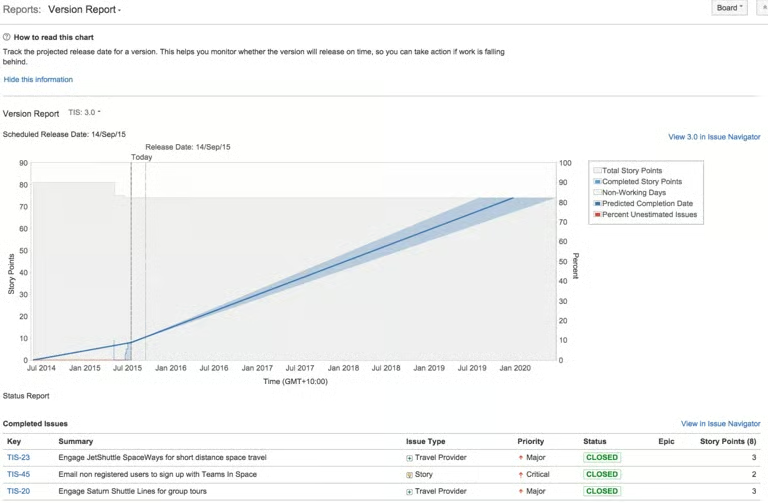
Jira delivers Agile reporting capabilities as well, although some advanced analytics may require Premium plans or marketplace apps. It covers agile metrics well, such as sprint velocity, burndown, and cycle time, but portfolio analytics require Jira Align or third-party tools like EazyBI.
If you need real-time delivery data without building custom dashboards, Rally handles that out of the box.
| Rally | Jira | |
|---|---|---|
| Sprint reports | ✓ | ✓ |
| Velocity & burndown charts | ✓ | ✓ |
| Capacity forecasting | Built-in | Limited |
| Portfolio analytics | Native | Requires Jira Align |
| Executive dashboards | Advanced | Moderate |
| Custom dashboards | Moderate | Advanced |
AI & automation features
Winner: Tie (Jira for AI usability; Rally for AI-driven forecasting)
Jira has invested heavily in AI through Rovo, which helps users generate summaries, create content, answer questions, and task suggestions within existing tickets.
Rally launched an AI Coding Assistance Integration via the MCP server in early 2026, adding a conversational mode for creating child artifacts and AI-driven analytics for predicting bottlenecks and modeling capacity.
While Rally supports workflow automation and analytics capabilities, its AI functionality is currently less mature than Jira’s. Teams looking to leverage AI for productivity gains will find more options within the Atlassian ecosystem.
| Rally | Jira | |
|---|---|---|
| Task suggestions | Yes, conversational mode | Yes, Rovo |
| Predictive analytics | Yes | Limited |
| Automation rules | Yes | Yes, extensive |
| Issue summarization | No | Yes |
Integrations
Winner: Tie (Jira for out-of-the-box integration; Rally for enterprise-grade data sync across large tool ecosystems)
When it comes to integrations, Jira has a clear advantage. It connects to over 3,000 apps through the Atlassian Marketplace, with native integrations for GitHub, Bitbucket, Confluence, Slack, and Salesforce.
Rally takes a different approach because it uses ValueOps ConnectALL to sync data across enterprise platforms like Azure DevOps, ServiceNow, Microsoft Project, and Jira. This works for organizations managing data across multiple systems, but it requires more configuration than plugging in a Marketplace app.
| Rally | Jira | |
|---|---|---|
| Integration method | ValueOps ConnectALL | Atlassian Marketplace |
| Number of integrations | Selective, enterprise-focused | 3,000+ apps |
| GitHub / Bitbucket | Yes | Yes, native |
| Azure DevOps | Yes | Yes |
| ServiceNow | Yes | Via third-party apps |
| TSM & service management | Moderate | Extensive |
Ease of use
Winner: Jira
Between Rally vs Jira, Jira has a reputation for being complex to set up, and that’s fair. Configuring permissions, building workflows, and managing automation rules at scale does require a dedicated admin. But for individual contributors, the user experience is straightforward once the system is configured.
Rally’s learning curve runs in the opposite direction. The platform’s pre-built Agile structure reduces setup time, but the interface itself draws consistent criticism for feeling dated and cluttered, particularly for new users. Users on G2 and Gartner Peer Insights frequently flag the dashboard as unintuitive on first login.
| Rally | Jira | |
|---|---|---|
| Initial setup complexity | Moderate | High |
| Admin overhead | Moderate | High |
| UI design | Dated, cluttered | More modern |
| Learning curve for new users | Steep | Moderate |
| Mobile experience | Limited | Better supported |
| Free onboarding resources | Broadcom Software Academy | Atlassian University |
Rally & Jira alternatives
While Jira and Rally are strong choices for agile project management, they are not the best fit for every team. If you need a simpler interface, more flexible work management, or a better balance between functionality and cost, several alternatives are worth considering.
| monday | ClickUp | Wrike | |
|---|---|---|---|
| Best for | Ease of use | Value for money | Resource management |
| Monthly starting fee | $9/user/month | $7/user/month | $10/user/month |
| Key features | Offers a more intuitive experience. Most teams can start building workflows without admin support. | Includes documents, whiteboards, dashboards, goals, workload management, and AI capabilities. | Combines advanced workflow automation, resource planning, and with a more approachable user experience than Rally. |
| Learn more | Visit monday.com | Visit ClickUp | Visit Wrike |
Rally vs Jira: Which one should you choose?
Choosing between Rally vs Jira largely depends on how mature your Agile practices are and how you manage work at scale.
Jira makes sense if you’re running a single team or a small group of teams that need flexibility over structure. It’s cost-effective, widely adopted, and supported by a broad integration ecosystem. The tradeoff is admin overhead and the eventual need for add-ons as your programs grow.
Rally is the better fit if you’re coordinating Agile delivery across multiple programs, need SAFe support out of the box, or have executives requiring portfolio-level reporting. The price is significantly higher, and the UI takes time to learn, but for large enterprises with complex delivery needs, Rally is built for that environment.
FAQs
What is the difference between Rally vs Jira?
The biggest difference in Rally vs Jira is their target audience. Jira supports software development, while Rally focuses on enterprise agile planning.
Which platform is easier to use, Jira or Rally?
Jira and Rally both have learning curves, but Jira is generally easier to adopt due to its larger knowledge base, extensive documentation, and more modern interface. Rally often requires extensive training for new users.
Can Rally and Jira be used together?
Yes. Rally integrates with Jira through ValueOps ConnectALL, syncing data bidirectionally between the two platforms. Some enterprises run both, using Jira for team-level work and Rally for portfolio management.