

























Key features
 Productive is an agency management software that enables service-based firms to manage projects, financials, and resources in one platform.
- Its integrated financial features include expense management, invoicing, scenario builder, and revenue forecasting.
- Productive is best for professional services agencies with around 10 to 100 employees, though it may not be the best fit for smaller teams or general project management.
Productive is a professional services automation (PSA) platform for service-based businesses such as agencies and consultancies that need a single solution to manage projects, finances, and resources. While it is often compared to standard project management tools, it is built specifically for companies that sell time, expertise, or client deliverables.
If you’re considering it as a fresh adoption or an alternative to what you’re currently paying for, this Productive review breaks down the pricing, standout features, and my personal experience from using it.
Productive overview
| Free trial | 14 days |
| Monthly starting fee | $12 per user (minimum of 3 users) |
| Annual starting fee | $10 per user (17% for yearly billing) |
| Key features | Project managementTime trackingResource planningBudgeting & profitability |
| Best for | Service-based agencies in marketing, IT, and creative industries |
Who should use Productive
If you’re new to professional services management (PSA) tools, it helps to think of Productive less like a generic project management tool and more like a business operating system for service-based companies. Its target users typically include:
- Creative and marketing agencies forecasting profit for individual clients or projects
- Consulting firms managing client projects on billable hours
- IT services and software agencies with retainer-heavy revenue models
- Small-to-mid-size businesses that want to avoid the enterprise overhead of Kantata or full Salesforce implementations
These businesses share the same workflows: they manage client projects, bill hours, and track profitability per project. So if you’ve worked with tools like monday or ClickUp, Productive offers a similar experience but comes integrated with advanced financial tools and resource planning.
Productive pros & cons
Pros
 Extensive financial tracking features
- Entry-level plan includes advanced capabilities such as budgeting and resource planning.
- Average response time of four minutes
Cons
 No free plan, unlike many comparable tools
- Not ideal for solo users due to seat block pricing
- Rich feature set can be overwhelming for beginners
Productive pricing & plans
Productive offers a 14-day free trial with no payment details required at signup. While it doesn’t have a freemium plan, the trial is long enough to access the platform’s full feature set. Paid plans are divided into three pricing tiers with a minimum seat requirement of three users, which makes the entry point $30 to $36 per month.
At a glance, Productive offers competitive pricing for teams that are large enough to absorb seat block costs and take advantage of its robust financial tools. For creative and professional services agencies between 10 and 100 people, I would say it offers the best value for an all-in-one platform.
| Essential | Professional | Ultimate | |
|---|---|---|---|
| Best for | Small service teams | Growing agencies | Advanced financial management |
| Monthly starting fee | $12 per user | $29 per user | Custom quote |
| Annual starting fee | $10 per user | $25 per user | Custom quote |
| Project management features | ✓ | ✓ | ✓ |
| Task workflows | 2 | 5 | 10 |
| Time tracking | ✓ | ✓ | ✓ |
| Time approvals | ✗ | ✓ | ✓ |
| Public forms | ✗ | ✗ | ✓ |
| Expenses, invoices, budgets | ✓ | ✓ | ✓ |
| Retainer management | ✓ | ✓ | ✓ |
| Booking | ✓ | ✓ | ✓ |
Productive key features
As a PSA platform, Productive offers a suite of tools for managing end-to-end client work. To make this easier to navigate, I’ve broken this section down by its four core feature areas: project management, resource planning, financial tracking, and time tracking.
Project management
Productive’s project management features cater to service-based teams that need more than simple task tracking. You can organize work into projects, break them down into tasks, and assign them to team members. In my experience, what stands out is how closely tasks connect to budgets, time tracking, and billable work, so you are not managing projects in isolation from financial outcomes.
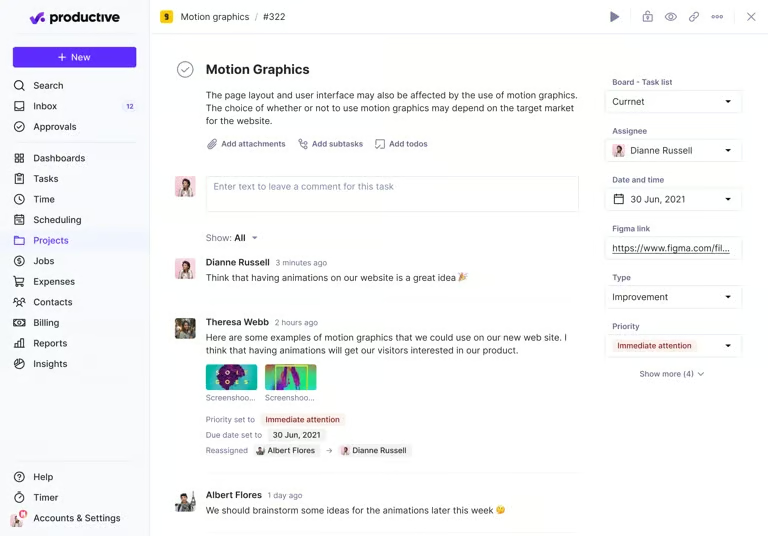
Collaboration is built into each project through comments, file sharing, and activity tracking, which ensures transparency in client work across teams. However, it may feel less flexible than traditional tools like ClickUp or Asana when it comes to custom workflows or highly visual task views.
Productive focuses more on operational processes and profitability, so while it handles core project management well, it is not always the best choice if your priority is advanced workflow customization or sprint-based planning.
Time tracking
Productive gives teams several ways to log work hours: daily entry, weekly timesheets, a desktop timer, calendar tracking via Google or Outlook, automatic tracking via bookings, and time logging within tasks. The range of time tracking options is an advantage for service teams, where different roles track time differently.
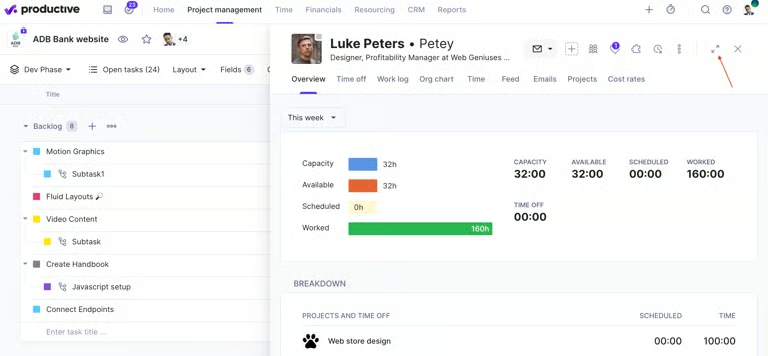
A key strength is how work time links to financial insights. Tracked hours feed contribute to project performance and profitability, so you can understand how time impacts revenue.
On the management side, time approvals allow managers to decide whether logged hours are billable and request more detail from team members when entries are submitted. Approved time off updates team availability, so managers can see who is free or overloaded.
Resource planning
Productive’s resource planning provides a detailed overview of how work is distributed across the team. You can review each person’s assigned hours, availability, and approved time off to identify who has capacity and who is already at risk of overload. This makes it easier to assign the right people to specific projects, especially when you are managing several client engagements.
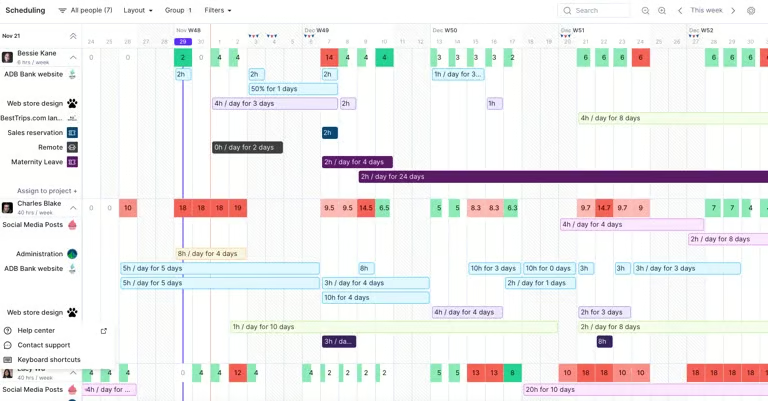
The platform shows booked versus available time across the entire team, including who is on vacation or out sick, so staffing decisions are based on capacity. For projects that are not yet confirmed, teams can create placeholder entries and tentative bookings to reserve capacity in advance, and when a role needs to be filled. Project managers can also submit resource requests and rank the best-matched team members based on the requirements set for that role.
Approved time off automatically appears in the resource planner, so there is no risk of scheduling someone against an approved leave. Scheduled work is also reflected in the budget and profit forecasts, so a manager can see how assigning a specific person to a project affects cost and margin.
The main limitation is that scenario modeling, which lets teams plan and compare future staffing needs, is reserved for higher pricing tiers, so teams on lower plans may not access the full financial forecasting features.
Budgeting
Productive’s budgeting features reflect how agencies assign rates on service-based work. You can use different pricing models, including fixed price or time and materials, and use rate cards to define service-level pricing. This allows you to standardize how work is billed while still adjusting rates for specific clients.
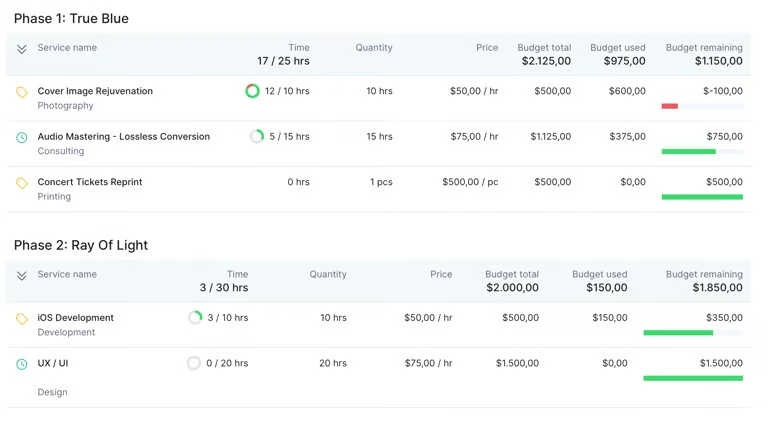
The platform also supports breaking budgets into phases, which is useful for long-term or complex projects. Each phase can have its own services, time estimates, and costs, so you can track progress and spending in detail.
A key strength is real-time budget tracking tied to logged time and expenses. As your team records work, the system updates remaining budget, invoiced amounts, and profitability metrics. You can also forecast when a project is likely to exceed its budget and review projected profit margins.
Ease of use
Productive’s interface uses a clean layout with a left-hand navigation panel and a main workspace that changes based on the selected module. The navigation divides features into areas like resourcing, projects, and financials, allowing you to move between different parts of the platform. This reflects how service businesses operate, where project work and financial data are closely connected.
The main workspace focuses heavily on data visualization. Dashboards show charts, tables, and summary metrics such as budget usage or resource availability, which give you quick insight into performance. These elements are customizable, so you can adjust what data appears based on your role or priorities.
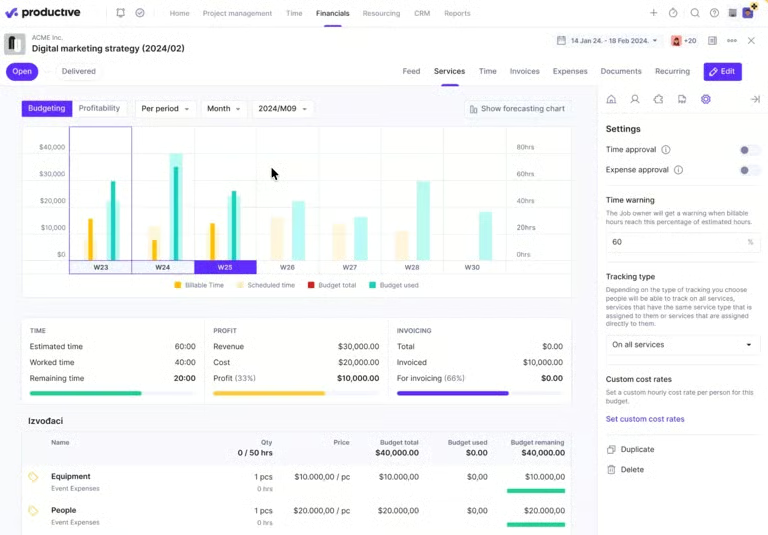
In project views, you can switch between layouts such as list, board, calendar, and table. This makes it easier to view the same data in different formats depending on your task. For example, a board view helps with task tracking, while a calendar view supports scheduling.
One limitation is that the interface can feel dense due to the amount of information displayed on each screen. With multiple modules and data layers available, new users may need time to understand where to find specific features.
Customer support
Productive’s customer support combines fast response channels with a strong focus on documentation and system reliability. The platform offers chat and email support, with an average chat response time of around four minutes, which is relatively quick compared to typical support expectations
From a reliability and trust standpoint, Productive reports 100% global uptime, which suggests a stable platform for day-to-day operations. It also meets SOC 2 Type II standards, which indicate that its security controls are audited over time, and it complies with GDPR requirements for data protection.
What users say about Productive
Users often describe Productive as essential for managing client pipelines, workloads, billing, and reporting in one system, which improves coordination across teams.
Ease of use receives generally positive but mixed feedback. Many users find the interface intuitive once they are familiar with it, but some mention that the platform can feel complex during setup or require time to learn.
In terms of performance and functionality, reviewers frequently highlight the breadth of features, particularly the combination of project management, time tracking, and financial tools. At the same time, some users recognized a few friction points, such as limited customization or missing features that affect daily workflows.
Productive alternatives
If Productive doesn’t fully match your needs, you can consider alternatives like monday, Wrike, and Smartsheet, which offer different approaches to work management.
| monday | Wrike | Smartsheet | |
|---|---|---|---|
| Best for | Visual task tracking | Resource capacity planning | Portfolio management |
| Monthly starting fee | $9 per user | $10 per user | $9 per user |
| Key features | • Grid-style boards • No-code automation • Form builder | • Cross tagging • Dynamic Gantt chart • File proofing | • AI formulas • Spreadsheet-like layout • Custom workflows |
| Learn more | Visit monday | Visit Wrike | Visit Smartsheet |
My methodology
I evaluated Productive based on how well it supports professional services workflows, including project management, time tracking, budgeting, and resource planning. I reviewed its product pages, documentation, and interface previews to understand how each feature works. I also considered ease of use, integration between modules, and how effectively the platform connects operational work with financial data. Finally, I considered customer feedback and support resources to understand the overall user experience.
Final verdict: Is Productive worth it?
Productive is a strong choice for service-based businesses that need to manage projects and track financial performance in one platform. It works well for agencies and consultancies that handle multiple client projects, and helps you connect client work with budgets and profitability. However, it may not be the best fit for small teams or for simple project management needs.
FAQs
Is Productive good for small agencies?
Productive works well for small agencies, but the per-seat cost can be hard to justify for under 10 users. The Essential plan covers the basics, but most of the financial features are locked behind the Professional tier.
How does Productive compare to other PSA tools?
Productive is one of the few PSA tools that publishes actual pricing and offers a free trial, making it easier to evaluate than competitors like Accelo or Kantata. It is generally more affordable than Scoro and better suited to agency workflows than general project management tools like ClickUp or monday.
What do users say in Productive reviews?
Most reviewers praise Productive for replacing multiple tools with one platform and highlight its real-time profitability tracking and responsive customer support as strengths. The most common complaint across reviews is that building custom reports can be difficult, particularly for users new to the platform.