

























| Key takeaway: Jira is the best workflow management software for managing complex agile workflows from issue tracking and sprint planning. Wrike follows for teams managing processes across multiple departments, while Asana comes in third for teams that want a visual way to manage tasks without a steep learning curve. |
Working in a fast-paced environment with multiple layers of handoffs is what pushed my team to look for a better way to map our processes and cut down on unnecessary back and forth. That search meant testing a range of workflow management software, from simple task trackers to tools built for more complex processes. Below are the platforms that stood out to me and the specific situations where each one works best.
| Best for | Monthly starting fee* | |
| Jira | Best for Agile software workflows | $9.05 per user |
| Wrike | Best for complex approval workflows | $10 per user |
| Asana | Best for team coordination | $13.49 per user |
| ClickUp | Best for customizable task workflows | $10 per user |
| Smartsheet | Best for spreadsheet-based workflows | $12 per user |
| monday work management | Best for visual workflow tracking | $12 per user |
| Notion | Best for knowledge-based workflows | $12 per user |
| Trello | Best for simple Kanban workflows | $6 per user |
*The pricing above is for monthly payments; annual plans may lower these prices.
Why you should trust Project-management.com
My workflow software reviews are shaped by years of testing how teams move work through intake, assignment, review, and completion. I have evaluated dozens of tools for different team sizes and needs, from simple task boards to approval-heavy systems. For each buyer’s guide, I design a scoring rubric so every platform is measured against the same workflow criteria, including automation, reporting, governance, ease of use, and overall value.

Marianne Sison
Senior Staff Writer for Project Management
- 1. Jira – Best for Agile software workflows
- 2. Wrike – Best for complex approval workflows
- 3. Asana – Best for team project coordination
- 4. ClickUp – Best for customizable task workflows
- 5. Smartsheet – Best for spreadsheet-based workflows
- 6. monday work management – Best for visual workflow tracking
- 7. Notion – Best for knowledge-based workflows
- 8. Trello – Best for simple Kanban workflows
- How to choose the best workflow management software
- FAQs
1. Jira – Best for Agile software workflows
- Free plan available
- Starts at $9.05/user/month
Why I chose Jira
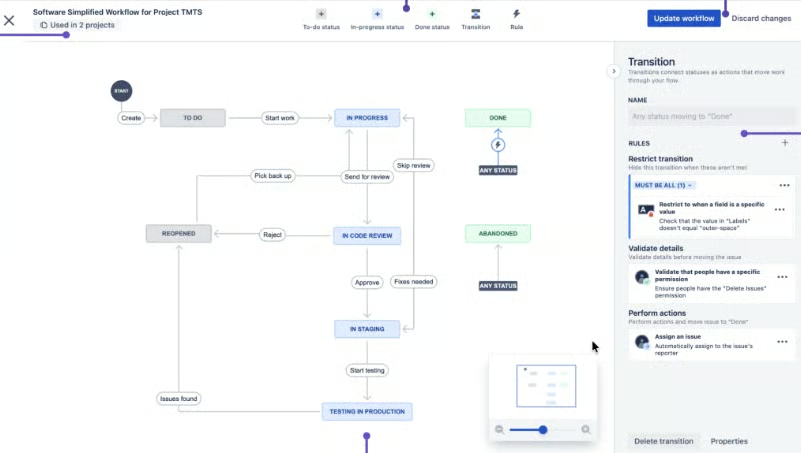
Jira helps Agile teams manage backlog refinement, sprint execution, and blockers in one place, which is why it works well for software delivery. Instead of simply adding tasks in lists, Jira lets teams separate bugs, features, tasks, and incidents into different issue types, each with its own workflow. Those issues can then move through Scrum or Kanban boards or connect to larger goals or releases.
Jira also supports more than 3,000 app integrations, so dev teams can connect it with the tools they use for testing and support. Admins can customize issue types and workflows to match how different types of work should move from intake to completion, while dependency tracking helps teams see which items are blocking a sprint or release.
Given its Agile approach, Jira is less ideal in general business workflows. For nontechnical teams that want more customization, monday work management is a better choice.
| Pros | Cons |
|---|---|
| ✅Agile backlogs support sprint planning ✅Custom workflows enforce issue handoffs ✅Dashboards track blockers and delivery status | ❌ Setup requires Jira admin knowledge ❌Nontechnical teams face navigation issues ❌Issue types require planning upfront |
Key features
- Forms: Collect partner requests and turn them into trackable work items.
- Dependency mapping: Connect related initiatives so launch teams can see blocked work.
- Custom workflows: Standardize how issues move through review, approval, and completion stages.
- Rovo automations: Create custom automation rules from natural-language instructions.
Pricing
- Free plan: Includes goals, projects, tasks, forms, multiple views, dashboards, and 100 automation runs per month.
- Standard: $9.05/user/mo. – Includes Rovo AI, user permissions, external collaboration, data residency, and higher automation limits.
- Premium: $18.30/user/mo. – Includes cross-team planning, dependency management, approvals, onboarding customization, unlimited storage, and SLA-backed support.
- Enterprise: Custom pricing – Includes Atlassian Analytics, Data Lake, advanced admin controls, enterprise identity, unlimited automation, and multiple sites.
Read our full Jira review.
2. Wrike – Best for complex approval workflows
- Free plan available
- Starts at $10/user/month
Why I chose Wrike
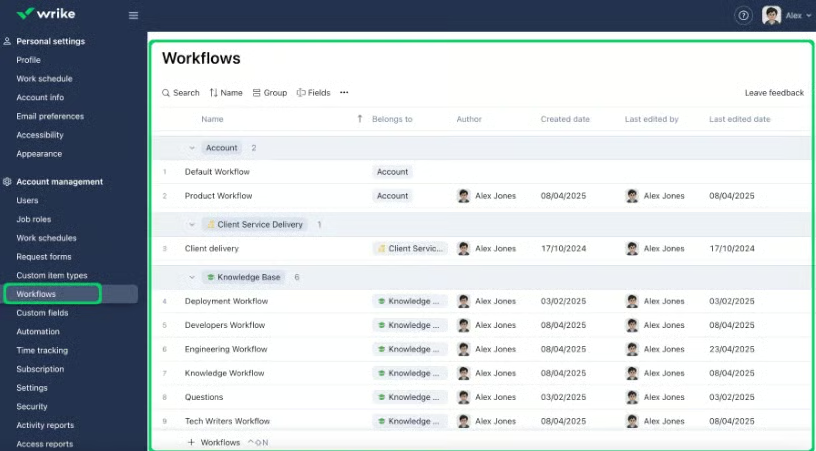
Wrike is designed for projects that move through several approval stages before delivery, which makes it useful for creative teams, client services teams, and PMOs. When work starts with a request and needs stakeholder sign-off, Wrike gives teams a way to manage those steps in one workflow instead of tracking approvals separately.
For intake, Wrike’s dynamic request forms help teams collect the required details before work enters the queue. Forms support conditional logic, so each request type can capture the right information for that workflow, such as design specs, client notes, deadlines, or approvers.
Wrike also supports approval management through proofing, automation, and resource management. As teams route work to reviewers and track approval status, managers can also monitor timeline changes and workload issues that could delay completion.
The trade-off is that Wrike often requires time to configure forms, folders, and approval workflows before teams can use it effectively. If a team wants flexible workflows with less process structure, ClickUp is a better alternative.
| Pros | Cons |
|---|---|
| ✅Workload charts show team capacity ✅Proofing tools support creative approvals ✅Custom request forms standardize intake | ❌Proofing workflows can feel process-heavy ❌New users may need in-depth training ❌Admin setup takes dedicated ownership |
Key features
- Dynamic request forms: Use conditional logic to route requests with the right project details.
- Resource management: Balance team workloads and capacity before assigning work.
- Gantt charts: Plan project timelines with interactive schedules and task relationships.
- AI agents: Monitor risks, assign resources, and summarize status updates.
Pricing
- Free plan: Includes web, desktop, and mobile apps, project and task management, board view, and table view.
- Team: $10/user/mo. – Includes AI Essentials, dashboards, Gantt charts, and project tracking for small teams.
- Business: $25/user/mo. – Includes AI Elite starter actions, workflow templates, standard integrations, and workflow customization.
- Pinnacle: Custom pricing – Includes AI Elite actions, resource planning, budgeting, and advanced reporting.
- Apex: Custom pricing – Includes Apex features, AI-led workflows, Wrike Integrate, Wrike Sync, and enterprise workflow automation.
Read our full Wrike review.
3. Asana – Best for team project coordination
- Free plan available
- Starts at $13.49/user/month
Why I chose Asana
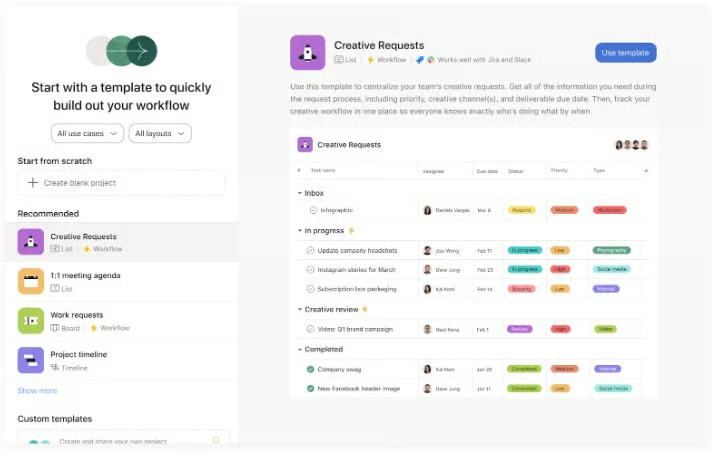
Asana keeps project coordination organized across teams without making every workflow feel technical. Its core workflow comes from forms for standardized requests, portfolios for project monitoring, goals for business alignment, and dashboards for work reporting.
As a project management tool, Asana works well when stakeholders need to understand who owns the work, what stage it is in, and how it connects to larger goals. Capacity planning and workload features also help managers compare staffing plans against project priorities, which is useful when delivery depends on several teams.
Asana is less ideal when a team needs highly detailed custom items, granular workflow structures, or workspace-level configuration across many departments. For teams that need more customization inside task workflows, ClickUp is the better pick.
| Pros | Cons |
|---|---|
| ✅Portfolios track project health by team ✅Goals connect tasks to business priorities ✅Rules automate assignments and status changes | ❌ AI features require paid add-ons ❌ Portfolio reporting depends on a consistent setup ❌Permissions are limited on lower plans |
Key features
- Bundles: Apply the same process updates across multiple projects from one place.
- Forms: Standardize work requests before tasks reach the delivery team.
- Portfolios: Monitor connected projects in one command center.
- Capacity planning: Balance team capacity with project priorities to avoid scheduling conflicts.
Pricing
- Free plan: Includes unlimited tasks, projects, list view, board view, calendar view, status updates, and 100+ integrations for up to two users.
- Starter: $13.49/user/mo. – Includes AI Studio Basic, timeline view, Gantt view, reporting dashboards, automations, forms, and custom fields.
- Advanced: $30.49/user/mo. – Includes portfolios, goals, workload, approvals, proofing, BI integrations, form branching, and time tracking.
- Enterprise: Custom pricing – Includes SAML, SCIM, universal workload, capacity planning, service accounts, admin controls, and workflow bundles.
Read our full Asana review.
4. ClickUp – Best for customizable task workflows
- Free plan available
- Starts at $10/user/month
Why I chose ClickUp
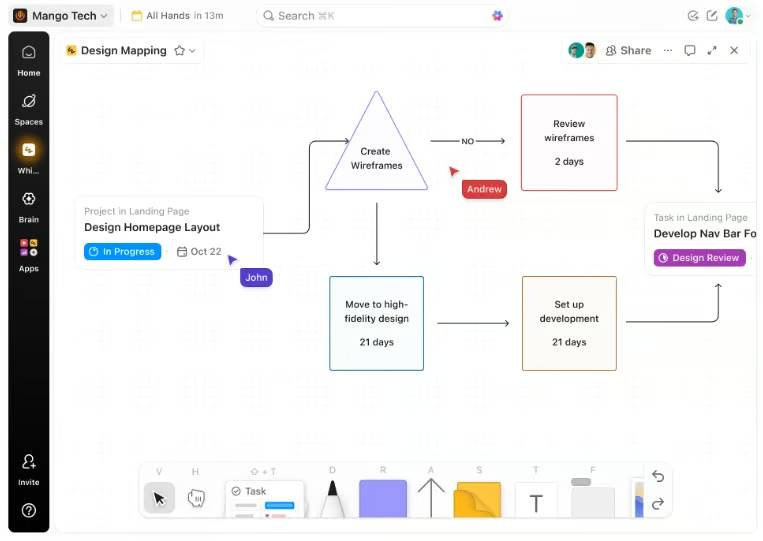
ClickUp’s AI project management platform supports a wide range of task workflows, allowing teams to organize work around their existing processes. It handles end-to-end workflow management with automations, multiple project views, Docs, real-time chat, time tracking, and connected search.
The platform is especially useful when teams want a single workspace for project planning, messaging, and documentation. Custom fields can add workflow-specific data to tasks, dashboards can track project health and key metrics, and automations can update task states through rules rather than repeated status changes.
On the downside, ClickUp can become difficult to manage if teams create too many fields, views, and automations without shared setup rules. For teams that prefer simpler board-based workflows, Trello is a better alternative.
| Pros | Cons |
|---|---|
| ✅Multiple views support different workflows ✅Docs connect tasks with project context ✅Custom fields support detailed work tracking | ❌ New users face too many configuration options ❌Dashboards require setup time ❌ Performance issues appear in user reviews |
Key features
- AI automation builder: Build workflow automations from plain-English instructions.
- Dynamic assignees: Update owners automatically when teams or responsibilities change.
- Automation audit logs: Review automation activity and verify actions across work locations.
- AI custom fields: Generate task summaries, updates, and analysis through automation triggers.
Pricing
- Free plan: Includes unlimited tasks, collaborative docs, Kanban boards, sprint management, calendar view, basic custom fields, and one form.
- Unlimited: $10/user/mo. – Includes unlimited spaces, folders, forms, Gantt charts, integrations, storage, custom fields, goals, portfolios, and resource management.
- Business: $12/user/mo. – Includes dashboards, timeline views, automation integrations, 5,000 automations per month, sprint reporting, proofing, and workload management.
- Enterprise: Custom pricing – Includes enterprise permissions, custom roles, SAML SSO, SCIM, audit logs, data residency, and 250,000 automations per month.
Read our full ClickUp review.
5. Smartsheet – Best for spreadsheet-based workflows
- Free trial only
- Starts at $12/user/month
Why I chose Smartsheet
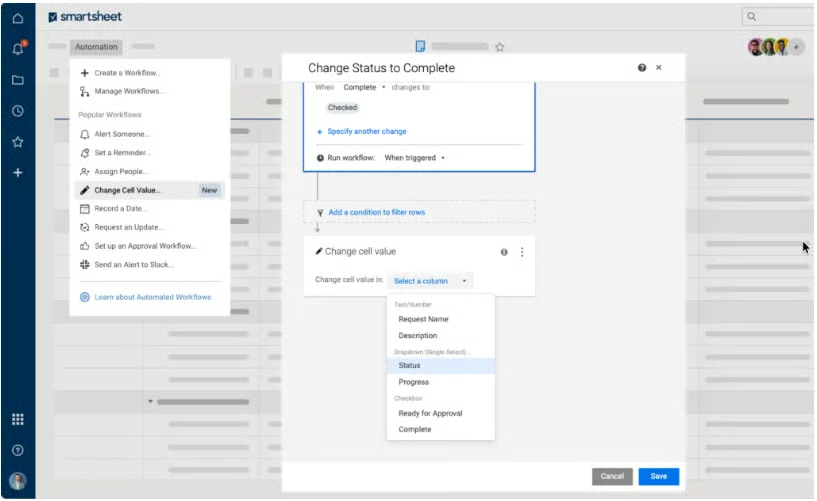
Smartsheet gives spreadsheet-oriented teams a familiar way to manage work while adding project controls that standard spreadsheets do not provide. Its workflow logic builds on rows, fields, formulas, and reports, which makes it approachable for operations teams that are used to a grid-based layout.
Teams can stick to spreadsheet-style tracking while adding forms, approval requests, reports, and portfolio features as work becomes more complex. Smartsheet also supports AI tools such as Smart Assist, Smart Columns, AI dashboard builder, and intelligent form fill, while higher plans add portfolio management and admin controls.
As an enterprise project management platfom, Smartsheet is not the easiest choice for teams that dislike rows, formulas, and sheet-based setup. For teams that want a more interactive experience, monday work management is the stronger alternative.
| Pros | Cons |
|---|---|
| ✅Grid view suits spreadsheet-based teams ✅Forms route requests into sheets ✅Reports summarize projects across workspaces | ❌ Interface feels less modern ❌ Advanced automation needs formula knowledge ❌Resource management tools cost extra |
Key features
- Conditional forms: Collect requests and adjust questions by response.
- Approval requests: Route work for review without separate approval tracking.
- Portfolio management: Manage large-scale work portfolios through the Control Center.
- Workload tracking: Review team capacity before assigning new project work.
Pricing
- Pro: $12/member/mo. – Includes project tracking, multiple views, formulas, AI features, unlimited sheets, forms, reports, and 250 automations per month.
- Business: $24/member/mo. – Includes timeline view, workload tracking, admin controls, unlimited automations, 1 TB attachment storage, and external AI integrations.
- Enterprise: Custom pricing – Includes scenario planning, portfolios, SAML SSO, Enterprise Plan Manager, directory integrations, and unlimited attachment storage.
- Advanced Work Management: Custom pricing – Includes Control Center, Dynamic View, Data Shuttle, connectors, DataMesh, Calendar App, Pivot App, and premium support.
Learn more in our Smartsheet review.
6. monday work management – Best for visual workflow tracking
- Free plan available
- Starts at $12/user/month
Why I chose monday
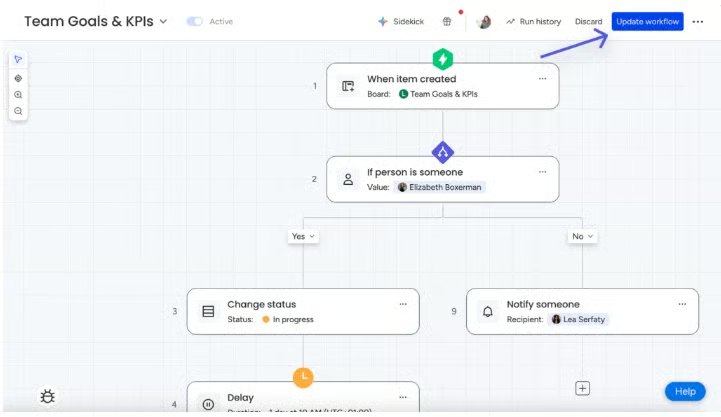
monday work management presents workflows in a visual, status-driven way that business teams can understand quickly. Its interactive boards caters to visual thinkers managing work through owners, statuses, stages, and handoffs rather than formal project methods.
The color-coded columns help teams quickly review project status, assign owners, and automate routine updates. monday also offers AI agents for recurring work, including project monitoring, risk analysis, and status reporting.
As part of its AI platform, monday goes beyond basic automation rules. It can analyze existing work patterns and suggest repetitive steps that could be automated. Drift Detector flags broken workflows, helping teams spot process issues before missed handoffs or delayed tasks become harder to trace.
The limitation is that visual boards can be difficult to manage if teams keep adding columns, automations, and connected workflows without admin rules. For Agile teams that need tighter control over software delivery, Jira is the better option.
| Pros | Cons |
|---|---|
| ✅Boards make workflow status easy to scan ✅Automations assign owners and update statuses ✅Templates cover common department workflows | ❌Automation limits vary by plan ❌Large boards can become cluttered ❌AI usefulness depends on workflow setup |
Key features
- Custom automations: Build code-free rules for ownership, reminders, and status changes.
- Task handovers: Move ownership between teams as workflow stages change.
- Auto-assign tasks: Send new work to owners based on predefined rules.
- Ready-made automations: Apply common workflow rules without building each step manually.
Pricing
- Free plan: Includes up to two seats, three boards, three docs, 200+ templates, eight column types, and mobile apps.
- Basic: $12/seat/mo. – Includes unlimited items, unlimited free viewers, Basic AI, and 1,000 AI credits per month.
- Standard: $14/seat/mo. – Includes automations, integrations, timeline view, Gantt view, calendar view, guest access, and 2,000 AI credits per month.
- Pro: $24/seat/mo. – Includes private boards, advanced board views, time tracking, advanced columns, higher automation limits, and 3,000 AI credits per month.
- Enterprise: Custom pricing – Includes enterprise security, governance, portfolio management, resource management, multi-level permissions, 250,000 automation and integration actions, and custom AI credits.
Learn more in our full monday.com review
7. Notion – Best for knowledge-based workflows
- Free plan available
- Starts at $12/user/mo.
Why I chose Notion
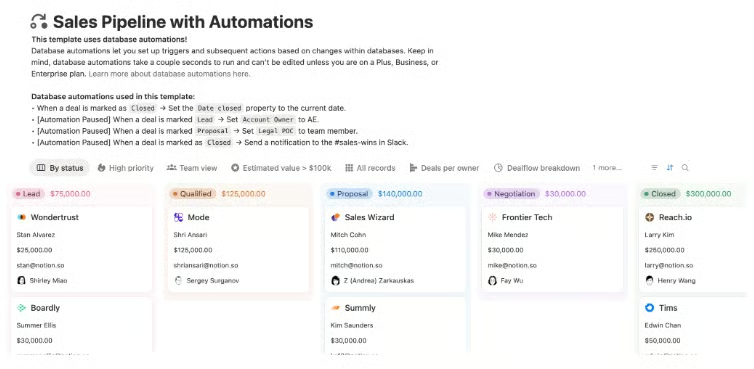
Notion combines project work with the documents, wikis, and knowledge pages teams use to store project context. I can keep plans, decisions, documentation, and task tracking close together, which is useful when work depends on more than status updates.
As a note-taking tool, Notion works best when project execution depends on context, research, specs, and meeting notes. Databases can capture project details in one place, while dependencies help teams see which tasks are blocking others. For project needs, a single page can turn into a roadmap, project brief, or task database.
The downside is that teams need time to configure layouts, databases, and views before the workspace feels ready for project tracking. If the priority is reporting and portfolio monitoring, Smartsheet is a better choice.
| Pros | Cons |
|---|---|
| ✅Databases organize tasks and project docs ✅Wiki pages centralize project information ✅AI helps summarize project updates | ❌ Native reporting is limited ❌Workspace requires layout customization ❌ Enterprise governance needs admin planning |
Key features
- Database properties: Track priority, status, and ownership through custom project fields.
- Timeline dependencies: See blocked tasks and deadline risks in project timelines.
- Database automations: Trigger task flows, bug reports, and project entries automatically.
- Granular database permissions: Restrict project access by assignee, owner, or page rules.
Pricing
- Free plan: Includes databases, basic forms, basic sites, Notion Calendar, Notion Mail, and a limited Notion AI trial.
- Plus: $12/member/mo. – Includes unlimited blocks, unlimited file uploads, custom forms, unlimited charts, and basic connections.
- Business: $24/member/mo. – Includes Notion Agent, AI Meeting Notes, Enterprise Search beta, SAML SSO, granular database permissions, private teamspaces, and premium connections.
- Enterprise: Custom pricing – Includes SCIM, audit log, advanced security controls, customer success support, and zero data retention with LLM providers.
Read our full Notion review.
8. Trello – Best for simple Kanban workflows
- Free plan available
- Starts at $6/user/month
Why I chose Trello
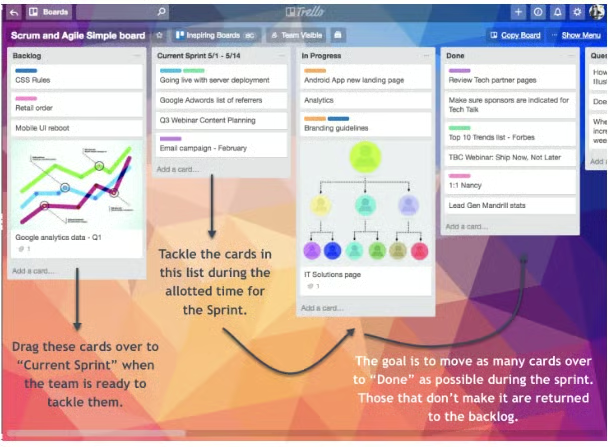
Trello focuses on Kanban views to keep workflow management simple enough for Agile teams. Its board layout is well suited for lightweight processes where the main concern is whether work is waiting, active, blocked, or done.
Teams can capture work, move cards through stages, automate board actions, and add structure only when needed. Premium views help teams move beyond a single Kanban board by adding dashboard, timeline, table, calendar, and workspace-level views. Built-in automation reduce repetitive board actions, while card mirroring keeps related work connected across boards.
Trello becomes less practical when projects require advanced dependencies, resource planning, or portfolio reporting. For teams that need more workflow configuration without leaving a task-first environment, ClickUp is the better alternative.
| Pros | Cons |
|---|---|
| ✅Kanban boards simplify task tracking ✅Power-Ups add calendars and integrations ✅Card checklists support simple workflows | ❌ Dashboards require paid plans ❌ Complex dependencies need workarounds ❌Limited controls for large teams |
Key features
- Butler rules: Trigger board actions when cards move, update, or reach deadlines.
- Card buttons: Run multi-step workflow actions from a single card click.
- Inbox capture: Turn emails, Slack messages, and notes into board items.
- Power-Ups: Connect Trello boards to team tools through plugins.
Pricing
- Standard: $6/user/mo. – Includes unlimited boards, AI-powered task capture, Planner, advanced checklists, card mirroring, custom fields, and 1,000 command runs.
- Premium: $12.50/user/mo. – Includes calendar view, timeline view, table view, dashboard view, map view, workspace views, unlimited command runs, and admin controls.
- Enterprise: $210/user/year or $17.50/user/mo. – Includes unlimited workspaces, organization permissions, public board management, multi-board guests, attachment permissions, Power-Up administration, SSO, and user provisioning with Atlassian Guard.
Read our full Trello review.
How to choose the best workflow management software
Before choosing from our top picks, here the factors you want to weigh most when comparing workflow management software:
- Workflow structure and process complexity: Some tools can handle simple, linear task lists, while others are built for processes with multiple stages and dependencies. Choose software based on how your workflows run, not how complex they might become later.
- Automation and approval needs: If your work involves recurring approvals or status changes, look for software that lets you set rules without custom scripting. Tools that require a developer to build automations rarely get used consistently by non-technical teams.
- Reporting and project visibility: Check whether the software shows real-time status or requires manual updates and exports to build a report. This is particularly useful when leadership asks for an update, and you don’t want to build a report from scratch every time.
- Ease of setup and team adoption: A platform can have every feature on your list, but slow setup or a confusing interface will delay adoption. Pay attention to how quickly a new user can create and manage a task on day one.
- Scalability, permissions, and governance: Consider whether the software can support more users, departments, or workflows as your needs grow. Permission settings also matter once multiple teams or clients share the same system, since not everyone should access everything.
FAQs
What is workflow management software?
A workflow management software helps teams plan, route, and track recurring work from intake to completion. Unlike a simple to-do list, it maps how tasks move between people, sets rules for approvals, and shows where each task stands at any point.
How is workflow management software different from project management software?
Workflow management software focuses on repeatable processes, like approvals or onboarding, that follow the same steps every time. Project management software is built around projects with start and end dates. Many platforms today blend both, but the core distinction still matters when comparing tools.
Can workflow management software integrate with other business tools?
Most platforms connect with common tools like Slack, Google Workspace, and Microsoft Teams. Many also offer native integrations with CRMs or file storage systems. Some support API access or third-party automation platforms for teams that need to connect several systems together.
Are there free workflow management software solutions?
A number of free workflow management solutions exist, including ClickUp and Jira. While other project management tools may offer workflow capabilities and free versions, it’s important to look closely at the feature offerings in their free plans; many vendors do not include any workflow automation or management capabilities outside of paid plans.