

























Key takeaways
I’ve used Jira to manage Agile sprints and content calendars, including teams with no prior project management experience. The gap between these experiences taught me more about the platform than any documentation did. Here are the pros and cons of using Jira for project management, so you can decide if it’s the right fit for your team.
Jira pros & cons at a glance
Pros
Cons
Want a closer look at Jira? If you want a deeper analysis of Jira’s features, pricing, usability, and integrations, check out our full Jira review.
Pros of Jira
1. Highly customizable workflows
One of the biggest reasons I recommend Jira for project managers is its workflow flexibility. The Workflow Designer lets me control which transitions are available at each stage and require certain conditions before an issue can move forward. For example, I’ve configured workflows that require a linked pull request before a ticket can move to “Ready for QA.”
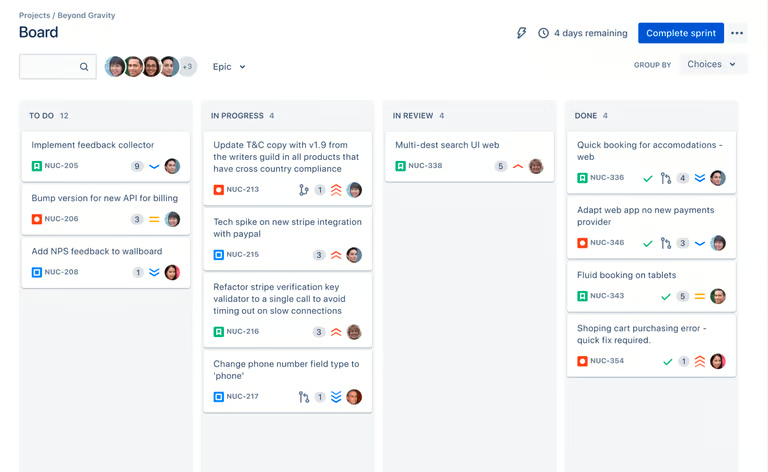
I’ve customized issue types, fields, and statuses to separate workflows for software development, product requests, and internal operations. I can also configure automation rules to assign tickets, update statuses, or notify stakeholders automatically. Screen schemes allow me to show different fields to developers and QA reviewers, while permission schemes determine which users can perform specific actions within a workflow.
2. Robust issue & bug tracking
Each issue in Jira carries a configurable set of fields: priority, severity, environment, affected version, linked issues, and custom fields. I can attach files, break work into subtasks, link related tickets, and pull commit and pull request data into the issue view through GitHub or Bitbucket.
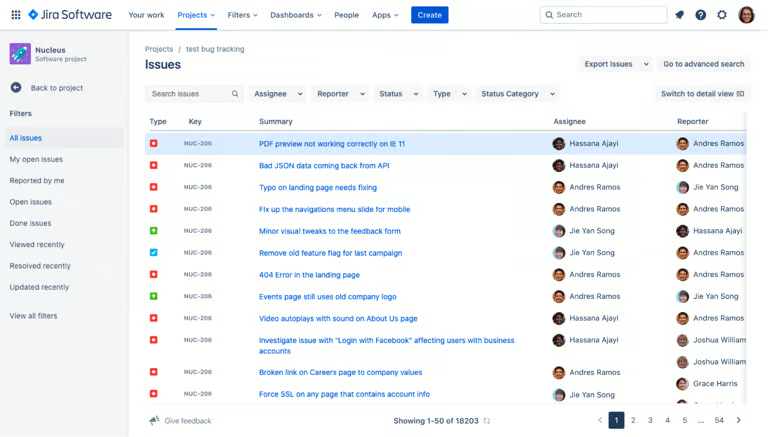
Jira Query Language (JQL) is useful for quickly surfacing high-priority bugs, overdue tasks, or unresolved blockers. For instance, instead of clicking through preset filters, you write queries like project = DEV AND issuetype = Bug AND priority = High AND status != Done to pull exactly what you need across any combination of projects.
3. Powerful Agile reporting and analytics
Jira’s reporting suite is built around Scrum and Kanban workflows. Built-in reports such as burndown charts, velocity charts, sprint reports, and cumulative flow diagrams help you track delivery trends over time.
Teams can also create custom dashboards with metrics, filters, and issue data. For example, I use velocity reports to improve sprint planning and control charts to identify delays in workflow stages.
4. Extensive integration ecosystem
Jira works well as the central hub of a project management ecosystem because it connects with hundreds of business and development tools. Within the Atlassian ecosystem, Confluence handles documentation and links directly to Jira issues, while Bitbucket surfaces commit and pull request status inside the development panel.
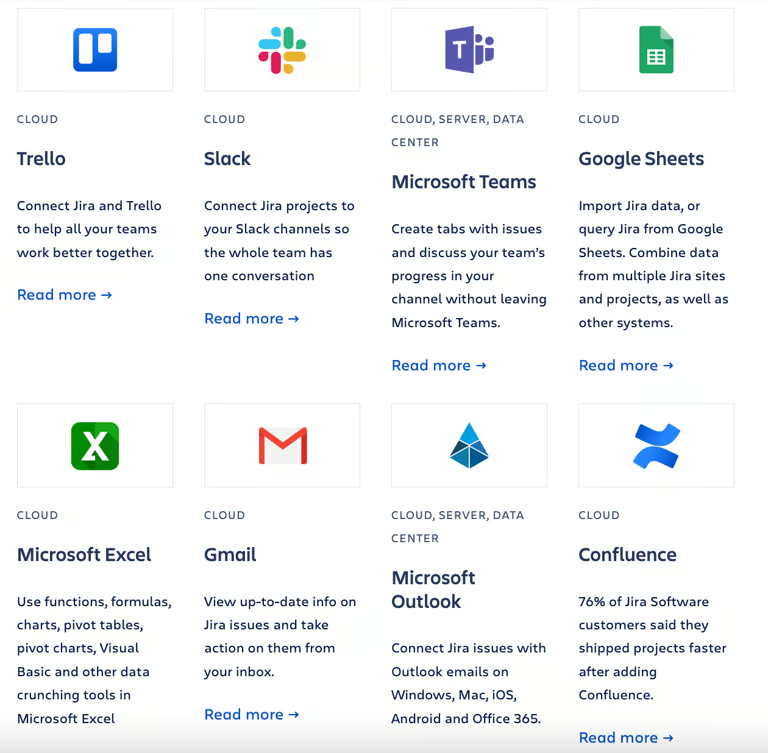
Outside of Atlassian, GitHub, Slack, and Microsoft Teams all have official integrations that sync code activity and project updates. For broader business workflows, the Atlassian Marketplace has over 10,000 apps covering CRM connections, time tracking, test management, DevOps pipelines, and more.
5. Scales from small teams to enterprise
I’ve used Jira in both small project teams and larger organizations, and its scalability is one of its strongest advantages. Jira’s free plan supports up to 10 users with access to Scrum and Kanban boards, backlog management, and basic reporting.
As teams grow, Premium and Enterprise tiers include Advanced Roadmaps for visualizing work across multiple teams on a single timeline. Enterprise admins can also manage permissions, governance policies, and configurations across multiple business units.
Cons of Jira
1. Steep learning curve
Getting productive in Jira takes longer than I expected. The interface has plenty of settings, and core features like issue hierarchies, workflow transitions, permission schemes, and JQL are not intuitive for beginners. New users can create and update tickets quickly, but advanced configuration takes more time.
For instance, customizing a workflow, writing a JQL filter, or building an automation rule usually requires training or help from a Jira admin. Proper onboarding and internal documentation can minimize confusion, but that investment is worth factoring into the adoption timeline.
2. Limited support for waterfall planning and resource allocation
Jira works best for Agile teams that plan work in sprints and manage projects through epics, user stories, and backlogs. From my perspective, teams using a traditional waterfall approach may find it less practical. Jira does not include a native Gantt chart in its standard plans, and it lacks built-in tools for resource allocation and budget tracking.
While Advanced Roadmaps supports timeline view and dependencies, it still centers on Agile concepts rather than project phases and milestones. That said, organizations needing resource planning or cost management often rely on Marketplace apps or separate project management tools. If your projects depend heavily on timelines, budgets, and resource planning, Jira may require additional software to meet those needs.
3. Charges extra for premium features and apps
Jira’s pricing can increase quickly as your team grows. In my experience, the Standard plan covers the basics, but many organizations eventually need features that sit behind higher-priced tiers. For example, Advanced Roadmaps, which supports cross-team planning and dependency tracking, is only available on Premium plans and higher. Security features such as Atlassian Guard that come with the Enterprise tier require a separate subscription for Standard and Premium plans.
Marketplace apps are priced based on the maximum number of users in your Atlassian app. Apps are priced for the maximum tier of Jira products on your site. So if you have 25 users, you pay the 25-user price, even if fewer people use the app itself.
The free plan is a good option for small teams, but larger organizations should look beyond the advertised per-user price. I recommend calculating the cost of required apps, security add-ons, and plan upgrades before making a long-term commitment.
4. Not built for non-technical teams
Jira’s terminology, issue hierarchies, and default configurations reflect a software development context. Epics, stories, sprints, and JQL are intuitive to developers and Scrum practitioners, but they require explanation for marketing, HR, or operations teams being onboarded onto the platform.
Jira addresses some of this with simpler views like calendars and lists, but the underlying system remains the same. Without a technical context, teams rarely get full value from the platform without significant admin support.
5. Risk of over-customization
Jira’s flexibility is one of its strengths and one of its most common failure points. Since almost everything can be configured, projects become complex over time.
I’ve seen teams create separate workflows for similar work, making reporting and administration more difficult. New team members inherit a setup they can’t easily interpret, and making changes becomes riskier as dependencies between configurations grow.
Jira alternatives to consider
Jira is a powerful platform, but it’s not the right fit for every team. If the learning curve, pricing model, or agile-centric design works against your workflow, here are alternatives worth considering:
| monday | ClickUp | Wrike | |
|---|---|---|---|
| Best for | Non-technical or mixed teams | All-in-one workspace tool | Marketing and creative teams |
| Monthly starting fee | $9/user/mo | $7/user/mo | $10/user/mo |
| Key feature | Grid-style boards | AI-powered project management | Resource planning and approval workflows |
| Learn more | Visit monday | Visit ClickUp | Visit Wrike |
monday.com is built around visual boards and is significantly easier to get running for teams without a dedicated admin. It lacks Jira’s robust agile reporting capabilities but handles general project tracking well.
ClickUp covers the widest feature range of any alternative, including docs, goals, time tracking, and resource management, all in one plan. The tradeoff is a similarly steep learning curve.
Wrike is a strong option for marketing teams that need flexible project views. It includes time tracking and resource management tools that require Jira add-ons for access. Marketing teams managing review cycles benefit from its approval workflows and proofing tools.
Bottom line: Is Jira worth it?
The honest answer is that Jira rewards teams that match its design assumptions. If your team runs sprints, tracks coding activities, and has someone who can own the Jira configuration long-term, it earns its place. If those conditions aren’t in place, a simpler tool will likely serve you better at a lower cost and with less friction.
Choose Jira if…
For software development and DevOps teams running Scrum or Kanban, Jira is hard to argue against. The issue tracking, native agile reporting, and extensive integrations cover most of what an engineering team needs. At that level of fit, the learning curve and configuration overhead are worth the investment.
Consider another tool if…
Non-technical teams, small businesses without a dedicated admin, or organizations running waterfall projects will spend more time working around Jira’s limitations than benefiting from its strengths.
FAQs
Does Jira work for non-developers?
Yes, but it works best for technical teams. Non-developers can use Jira for project management, though some Agile terms and features may require training or customization.
Is Jira hard to learn?
Yes, initially. Basic ticket creation is straightforward, but workflows, JQL, and permission schemes take time to learn. Teams without a dedicated admin typically experience the steepest adjustment period during the first few sprints.
What are the biggest complaints about Jira?
The most common complaints are its complexity, learning curve, and rising costs. Some users also find the interface overwhelming, while others dislike needing additional apps for unsupported features.