

























Key takeaways
 A user story template helps agile teams describe user needs in a standard format, allowing stakeholders to view all critical information at a glance.
- Well-defined acceptance criteria within each story allow developers to verify when work meets its intended purpose and matches the project’s goals.
- User stories create a shared framework for discussion, helping teams decide what to build next and how it supports user priorities.
Agile teams often face challenges when product launches fail to address a specific user goal. A user story bridges that gap by describing the user’s intent and expected result, giving developers context for every feature they build.
In this article, I’ll walk through how to create effective user stories and share a free user story template to guide your team.
What is a user story?
A user story refers to a short, simple description of what a user needs and why it matters. It is often mistaken for a software feature, but its purpose is to capture the user’s intent or desired outcome. In agile frameworks, user stories help developers interpret functionality from the user’s perspective rather than focusing solely on technical specifications.
Here’s an example:
As a registered user, I want to reset my password so I can regain access to my account without contacting support.
Writing an effective user story begins with identifying who the user is, what action they need, and the outcome they expect. Each story needs to represent a single, measurable goal. Once defined, teams can add acceptance criteria to clarify what “done” means for developers and testers.
Why create user stories?
User stories offer a range of benefits in agile development:
- Encourages user-centered thinking: Every story starts from the user’s perspective, which help product teams design solutions that address real needs rather than assumptions.
- Improves communication between teams: User stories create a shared understanding of goals, reducing misinterpretation between developers and stakeholders.
- Supports flexible planning: Breaking work into small, goal-based stories allows teams to adapt priorities and deliver incremental value throughout the project.
Who writes user stories?
User stories are usually written by the product owner, but agile teams often collaborate to refine them. Developers, testers, and stakeholders contribute to ensuring each story reflects real user needs and remains technically achievable. This shared process enables the entire team to understand the purpose behind every feature, strengthening alignment between business goals and product outcomes.
What are the components of a user story?
There’s no required structure for a user story, but what matters is that it captures the key elements that define purpose, action, and value.
- User role: Identifies who the story is for and helps the team to understand whose needs the feature addresses.
- Goal or action: Describes what the user wants to accomplish and defines the core functionality being requested.
- Reason or benefit: Explains why the user needs the feature and clarifies how it adds value or resolves an issue.
- Story points: Estimates the effort required to complete the story, helping the team plan workloads and balance sprint capacity.
Agile user story template & examples
Project management platforms offer sample agile user story templates that help teams capture and organize user stories in a unified format. Each template comes in different layouts suitable for team discussions and stakeholder presentations.
1. monday work management – Best for Kanban-style workflow
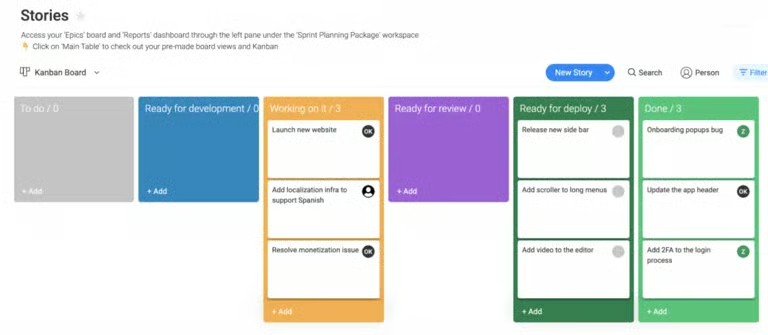
monday’s user story template uses a Kanban-style workflow divided into stages such as To Do, Ready for Development, Working on It, Ready for Review, Ready for Deploy, and Done. Each column separates progress levels, which enables teams to track story movement and workload distribution. Color-coded sections and story cards make it easier to see product development priorities and coordinate responsibilities between developers and reviewers.
2. ClickUp – Best for managing user stories linked to tasks & sprint goals
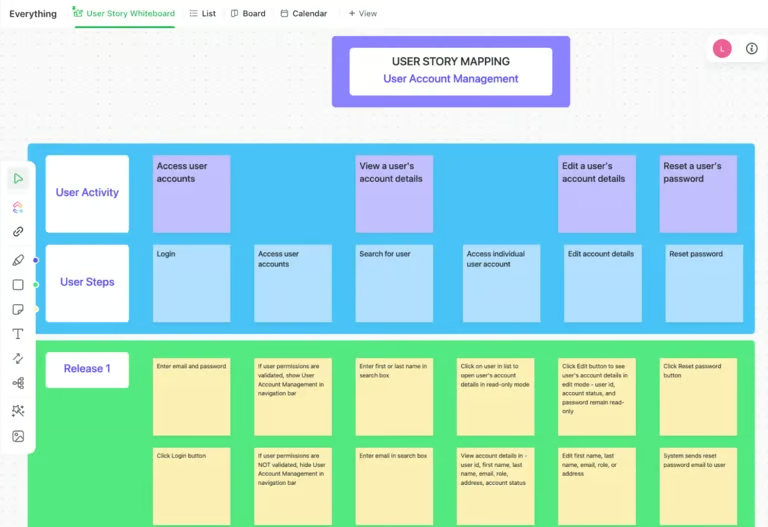
ClickUp uses a horizontal mapping layout, where user activities, steps, and releases are arranged in separate rows to show the progression from conception to delivery. Each card corresponds to a user story that can be converted into a ClickUp task, which connects story mapping to sprint goals and execution boards. The layered color coding between user activity and release segments gives a clear distinction between what users do and how those actions translate into planned deliverables.
3. Miro – Best for collaborative story mapping
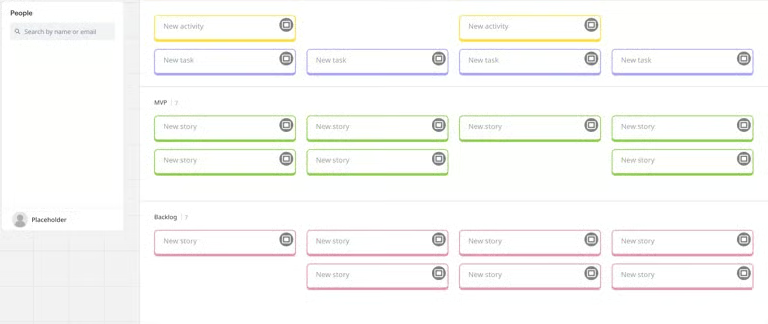
Miro’s agile user story template organizes activities, tasks, and stories into color-coded sections that distinguish Minimum Viable Product (MVP) work from backlog items. Each lane shows how individual stories contribute to broader user activities, allowing users to trace workflow dependencies during planning. The whiteboard format makes it easy for distributed teams to collaborate on user stories in real time.
4. Jira – Best for agile-focused workflows
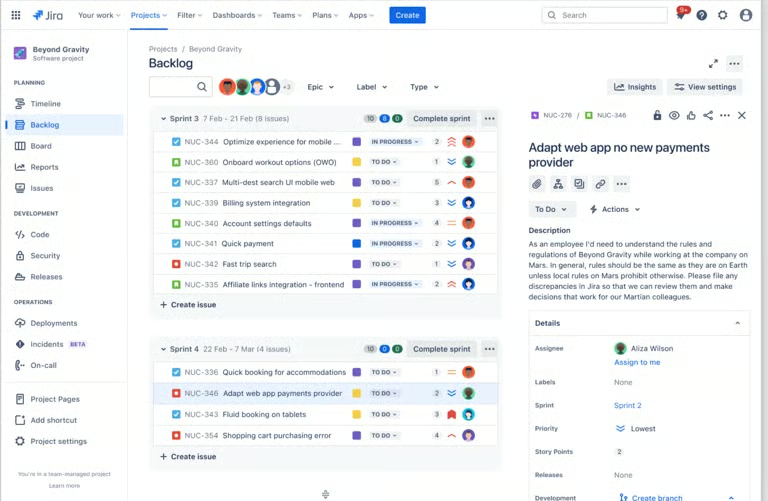
Jira’s user stories template displays work items in a sprint-based backlog, so teams can track progress by status and priority while linking each story to its assignee and estimate. The side panel shows story descriptions and task details, so users can review context within the sprint flow. With its agile-focused platform, teams can estimate effort, plan iterations, and align product goals with sprint execution in one space.
5. Smartsheet – Best for documenting stories with acceptance criteria & estimates
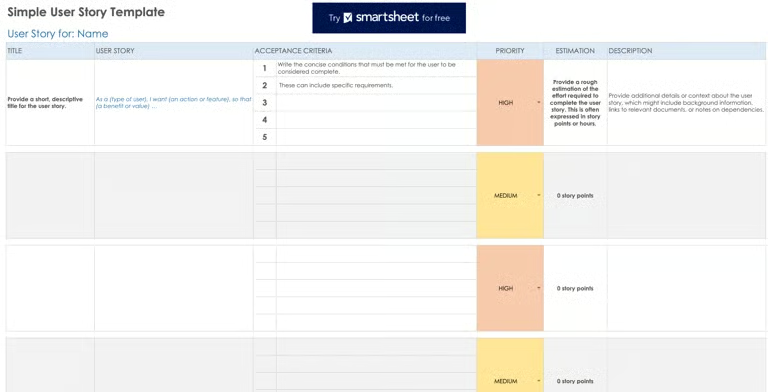
Smartsheet uses a spreadsheet-based layout with predefined columns for acceptance criteria, priority level, and estimation. It works best for documenting stories with completion standards and quantifiable estimates that guide sprint forecasting. The numbered criteria and estimation fields makes it easy to measure scope and ensure each story meets defined requirements.
6. Wrike – Best tracking user stories in project plans
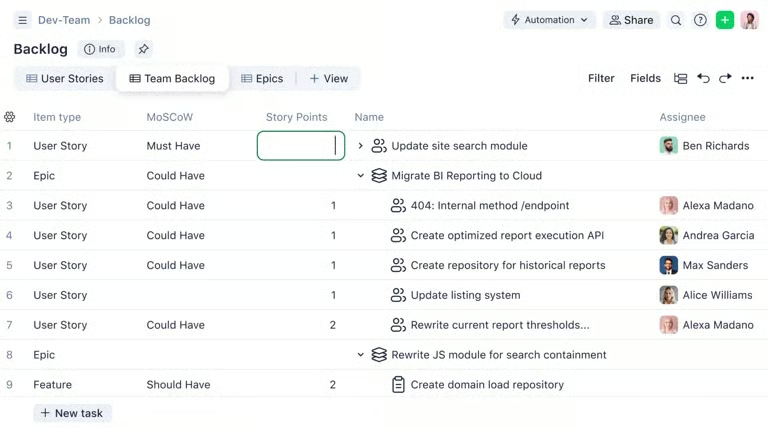
Wrike uses a backlog format that connects MoSCoW (Must have, Should have, Could have, and Won’t have) prioritization with story points and ownership, making it effective for tracking deliverables against overall project plans. Automation and configurable workflows keep statuses current across project plans, while reporting tools display assignees and important dates for all bugs and user stories.
How to write a good user story
Writing a user story turns user needs into actionable goals that guide product development. Here’s a step-by-step process to help you create one that aligns with agile principles and delivers real user value.
- Identify the user persona – Start by defining the target user who will benefit from the feature. A clear persona helps your team understand the user’s goals and challenges.
- Define the user’s needs – Determine what the user is trying to accomplish or the problem they want to solve. Keep it focused on their goals rather than system features.
- Determine the value and purpose – Explain why this feature matters to the user and how it supports their goals. This ensures the story communicates real business or user value.
- Specify acceptance criteria – Set measurable conditions that must be met for the story to be considered complete. These criteria guide testing and help verify that the outcome meets user expectations.
- Write the user story format – Combine the persona, need, and value into a simple structure such as: As a [user], I want to [goal] so that [value]. This statement keeps the story concise and outcome-driven.
- Refine and prioritize the story – Review the story with your team to confirm clarity and alignment with sprint goals. Prioritize it based on impact and feasibility before moving it to the backlog.
Tips for writing a user story
Using an agile user story template enables teams to keep their stories consistent and easy to refine throughout product development. It also ensures that every story communicates user intent, business value, and completion standards.
Two established frameworks are used to maintain well-structured and actionable user stories: the 3 Cs and the INVEST criteria.
The 3 Cs of User Stories
This framework defines how a user story should be created, discussed, and confirmed before implementation.
- Card: Capture the story in a short, structured format that summarizes what the user needs.
- Conversation: Encourage dialogue among team members to clarify details and refine understanding.
- Confirmation: Define measurable acceptance criteria to verify that the story meets expectations.
The INVEST Criteria
This framework helps evaluate if a user story is ready for inclusion in a sprint or backlog.
- Independent: Each story should stand alone without relying on another to deliver value.
- Negotiable: Keep stories flexible enough to allow adjustments during team discussions.
- Valuable: Ensure each story delivers a clear benefit to the user or business.
- Estimable: Provide enough detail for the team to estimate effort or complexity accurately.
- Small: Keep the story manageable enough to complete within a single sprint.
- Testable: Define clear conditions to verify when the story is successfully done.
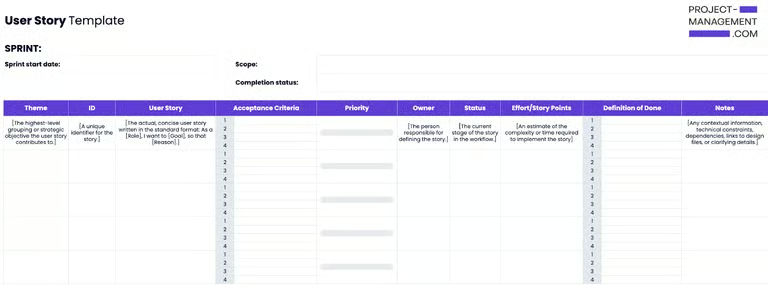
Free user story template
Start your project planning with our free sample user story template, available in spreadsheet and document versions.
FAQs
What is the format for a user story?+
A user story follows a simple format: As a [type of user], I want [a goal or feature] so that [a reason or benefit]. This structure keeps the story user-focused and outcome-driven. Using a user story template provides a unified format across multiple stories.
What are the 5 components of a user story?+
The five main components are the user role, goal, benefit, acceptance criteria, and story points. Together, they define what users need, why it matters, and how completion is measured. This format helps development teams plan effectively and deliver value-driven outcomes in agile projects.
What are the 3 Cs of a good user story?+
The 3 Cs are Card, Conversation, and Confirmation. Each represents how a story is captured, discussed, and validated within the team. An agile user story template often incorporates these elements to ensure every story supports collaboration and aligns with sprint objectives.