Planning and tracking your projects has never been easier. Check out our list of the top 5 project scheduling software and find the perfect option for your team.
Learn the basics of project management with this comprehensive guide. We'll cover everything from the planning process to daily project management tasks.
Start your project management career journey by knowing what the CAPM certification is and how it can help you in your career. Read our guide for details.
How to Create a Project Management Plan in 5 Steps
We've made an easy-to-follow guide to help you create a project management plan in X steps. Gain key insights & practical tips to ensure project success.
How AI Is Changing Project Management: Uses, Impacts, & Trends
learn how AI is transforming project management with planning, risk management, decision-making, & team collaboration tools Explore trends & case studies.
Planning and tracking your projects has never been easier. Check out our list of the top 5 project scheduling software and find the perfect option for your team.
Learn the basics of project management with this comprehensive guide. We'll cover everything from the planning process to daily project management tasks.
Start your project management career journey by knowing what the CAPM certification is and how it can help you in your career. Read our guide for details.
How to Create a Project Management Plan in 5 Steps
We've made an easy-to-follow guide to help you create a project management plan in X steps. Gain key insights & practical tips to ensure project success.
How AI Is Changing Project Management: Uses, Impacts, & Trends
learn how AI is transforming project management with planning, risk management, decision-making, & team collaboration tools Explore trends & case studies.
project-management.com content and product recommendations are
editorially independent. We may make money when you click on links
to our partners.
Learn More
Key takeaways
The best AI project management software autonomously optimizes schedules, predicts risks using historical data, and instantly retrieves context across your entire workspace.
The core benefit of AI in project management is reduced admin overhead, as features like automated scheduling, AI summaries, and workflow automation replace repetitive planning and documentation tasks that traditionally consume project manager time.
ClickUp, Wrike, and Taskade lead AI project management by turning AI into an active workflow engine that converts workspace knowledge into execution, predicts risk early, and automates multi-step workflows.
If you feel like you spend more time updating status documents than actually managing your team, your current tool stack is failing you.
AI’s real value in project management isn’t content generation, but predictive intelligence. Apart from auto-generating tasks, AI predicts delays, auto-shuffles your calendar when priorities change, and summarizes messy Slack threads into actionable items.
However, it’s not easy to choose a platform when every software claims to be “AI-powered.” To help you cut through the marketing noise, I tested the top 8 AI project management tools on the market.
ClickUp: Best unified platform for AI-driven productivity
Wrike: Best for AI-powered task writing and summaries
Taskade: Best for building customizable project apps
We are able to offer our services for free because some vendors may pay us for web traffic or other sales opportunities. Our mission is to help technology buyers make better purchasing decisions, so we provide you with information for all vendors — even those that don't pay us.
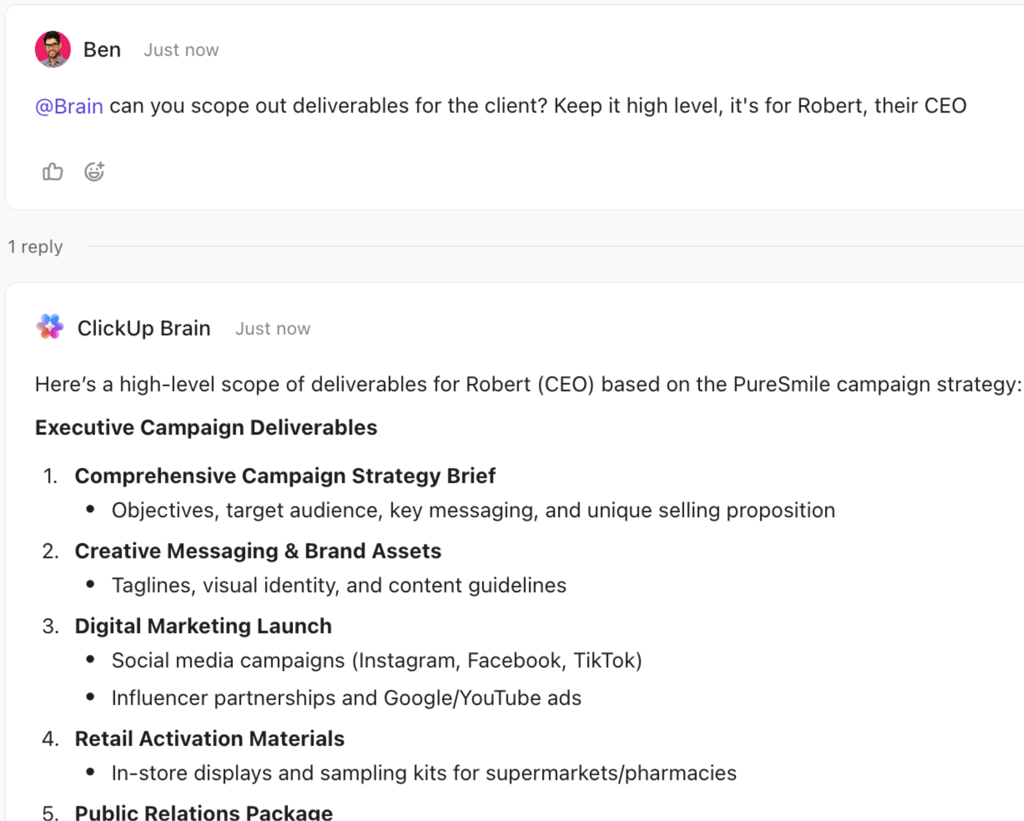
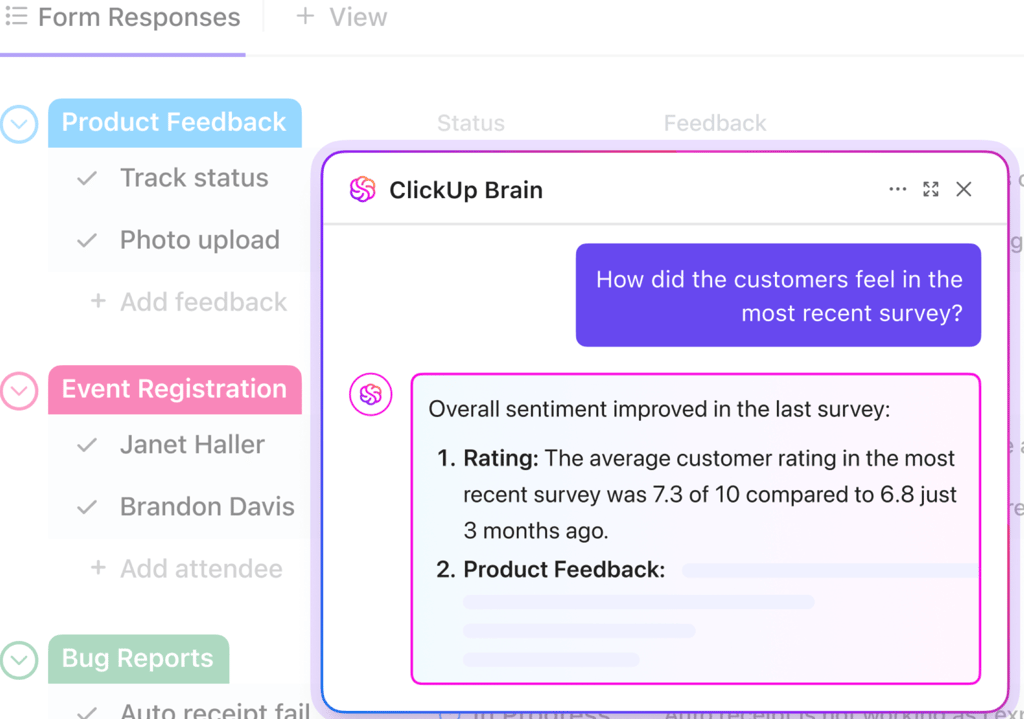
ClickUp Brain generating executive-ready deliverables and summarizing customer feedback directly within tasks and forms to support faster decision-making. (Source: ClickUp)
ClickUp Brain generating executive-ready deliverables and summarizing customer feedback directly within tasks and forms to support faster decision-making. (Source: ClickUp)
When I use ClickUp Brain in project management, it becomes my central AI assistant for both task planning and execution. I can start by creating ideas or meeting notes with its AI Notetaker, which automatically turns conversations into tasks, summaries, and action steps. The platform also features auto-tracking progress and self-prioritizing tasks for updating timelines and adjusting task priorities.
ClickUp Intelligent Task Assigning ensures that each deliverable is assigned to the right person by analyzing expertise and workload. I use AI Standups to compile updates and blockers into a single summary, which helps me oversee sprint health without scheduling extra check-ins.
What makes ClickUp stand out as an all-in-one AI productivity tool is how it combines automation and contextual awareness. Its AI Agents execute actions directly from within the workspace, while Enterprise AI Search retrieves answers across tasks, documents, and discussions. During reviews, the AI Creator assists me in building visuals or written reports without requiring separate tools. This approach allows me to spend more time analyzing project outcomes instead of stitching together information from multiple systems.
Pros
Supports OpenAI and Gemini as foundational AI models
Set up a native AI voice capture within the platform.
Host AI-powered meetings within the app
Cons
Requires a monthly add-on plan for AI access
Admins cannot define limits for AI usage
AI features are only available at the Workspace level, not individual users
Standout features
AI Notetaker: Automatically records, transcribes, and summarizes meetings, then links the captured notes to relevant docs and tasks within your workspace.
Enterprise search: Provides a unified, AI-powered search across all company tools and data, providing contextual answers from tasks, docs, messages, and connected apps.
Talk to text: Converts spoken audio into written text so users can dictate tasks and have them automatically stored within ClickUp.
ClickUp Agents: Act as AI teammates who act like real coworkers by performing tasks and automating workflows across your workspace.
ClickUp pricing
Free Forever: Includes unlimited users, Kanban view, and sprint management
Unlimited: $7/user/month — Adds integrations, forms, Gantt charts, time tracking, portfolios, and resource management
Business: $12/user/month — Adds timeline view, workload management, and reporting
Enterprise: Custom — Adds SSO, advanced permission, and custom roles
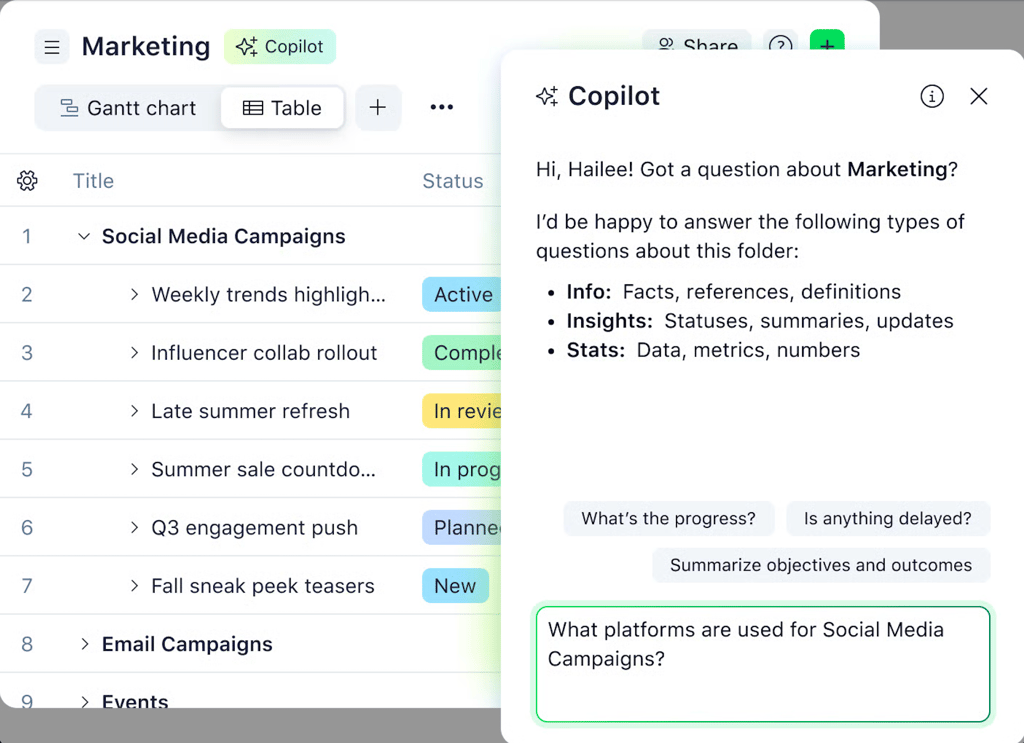
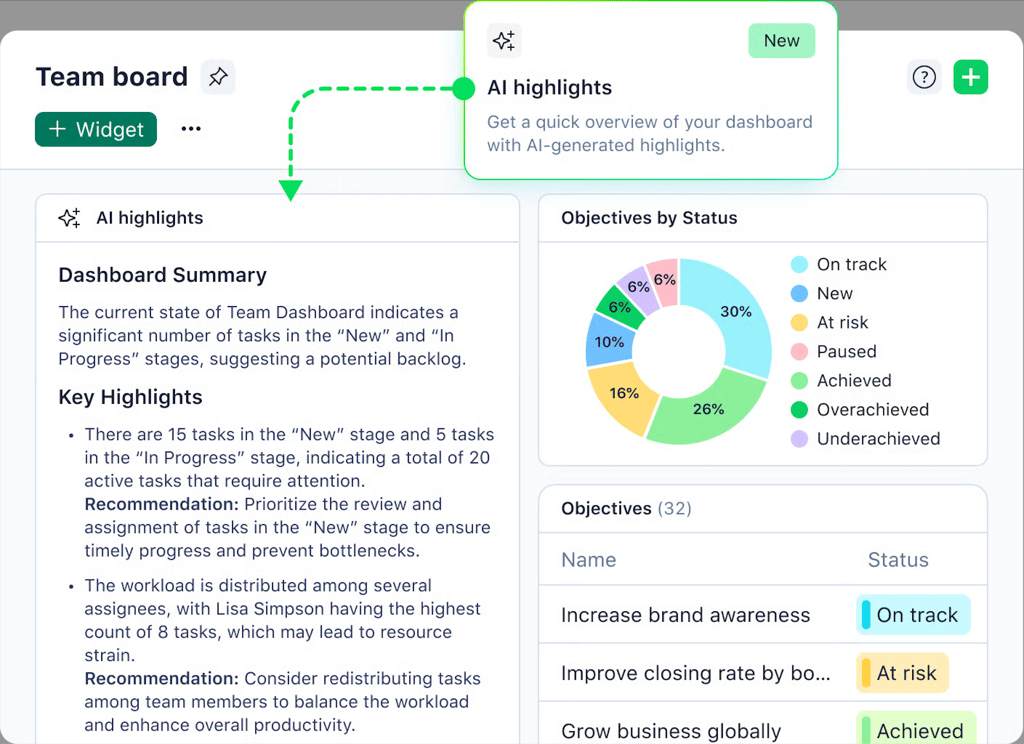
Wrike Copilot and AI highlights provide real-time insights into campaign progress, task distribution, and goal performance directly within marketing dashboards. (Source: Wrike)
Wrike Copilot and AI highlights provide real-time insights into campaign progress, task distribution, and goal performance directly within marketing dashboards. (Source: Wrike)
Working with Wrike’s generative AI features makes it easier to draft task descriptions and project communications. I can select a task or comment, and then generate rewritten text that clarifies intent or fills in missing details based on the existing project context.
I also rely on Wrike’s ability to generate summaries from comments or task details to avoid spending hours reviewing each thread. It can compress multiple messages into a concise overview that captures decisions and key action points, which I can then share with others or include in status updates. This capability speeds up our review cycles because the summaries reflect the actual content of the discussion rather than my interpretation of it.
Overall, Wrike’s gen AI capabilities help project managers preserve the integrity of their original inputs while producing ready-to-use deliverables that fit into their workflow.
Pros
Uses AI to surface project risks
Trial available for experimental AI features
Sorts mobile inbox through AI
Cons
AI features rely exclusively on Microsoft Azure OpenAI.
Generative AI is only accessible in the Item view
Monthly “AI action” quotas limit AI usage
Standout features
AI highlights: A dashboard widget that surfaces key insights and trends based on your dashboard data.
AI Priority Inbox: Automatically sorts and prioritizes emails or messages by urgency and relevance so you can focus on important updates
Wrike Copilot: Serves as an AI assistant that answers questions, prioritizes work, and detects project risks while delivering insights and recommendations to improve productivity.
Subitem creation: Uses natural language processing to identify actionable phrases within task descriptions or comments, then automatically generates subitems from those detected sections.
Wrike pricing
Free: Unlimited users and basic task management
Team: $10/user/month — Adds cross-tagging, Gantt charts, and portfolio management
Business: $25/user/month — Adds request forms, approvals, and resource planning
Enterprise: Custom pricing — Adds admin permissions and custom roles
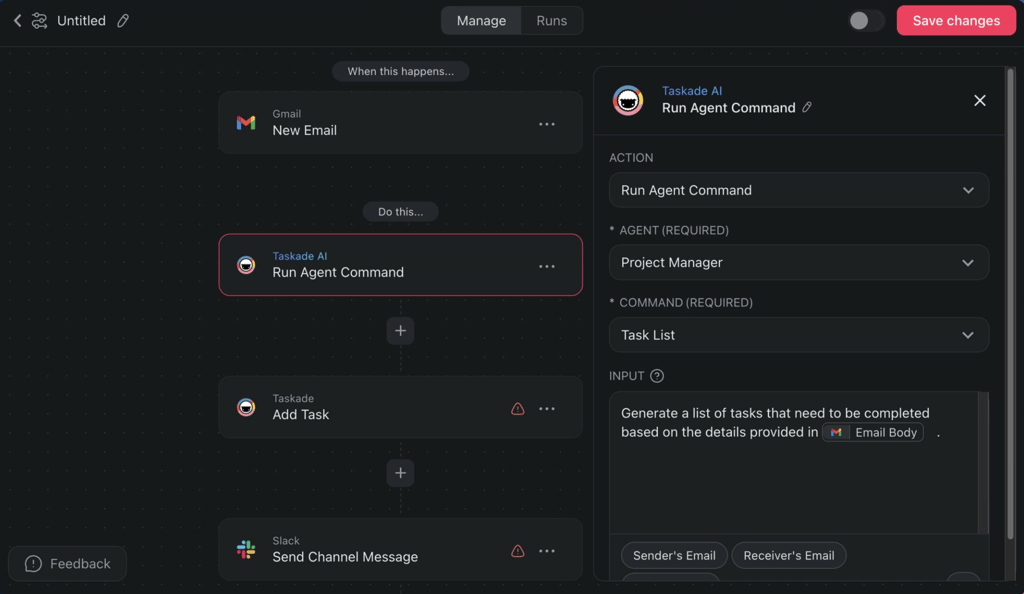
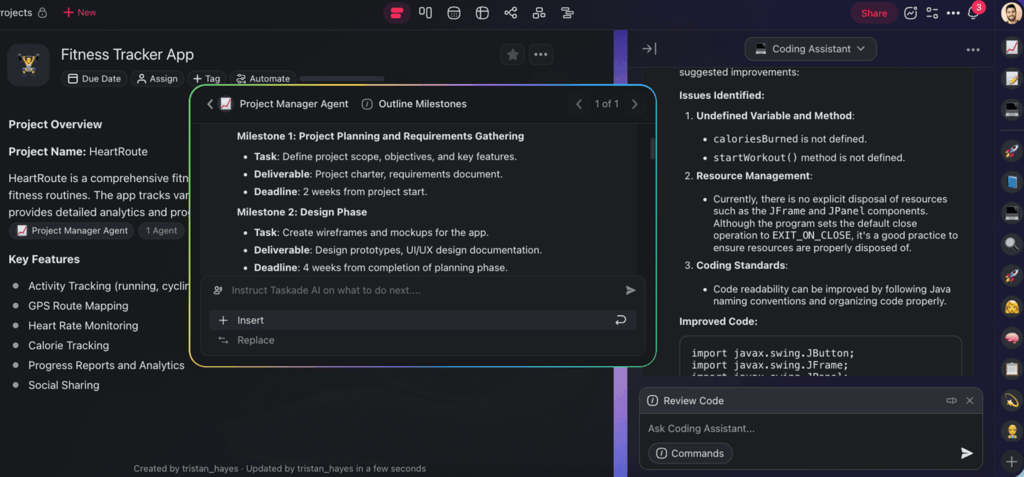
Taskade combines AI agents, automation workflows, and in-context assistants to manage projects, generate tasks, and support planning and development from a single workspace. (Source: Taskade)
Taskade combines AI agents, automation workflows, and in-context assistants to manage projects, generate tasks, and support planning and development from a single workspace. (Source: Taskade)
Taskade Genesis has completely changed how I design internal project tools and workflow systems. Instead of relying on prebuilt templates, I describe what I want in plain language, whether it’s a client portal, a booking tool, or an approval process, and then Genesis instantly builds it into a working application.
The system uses what Taskade calls Workspace DNA, which pulls information from my automations and projects to build an app based on how my team already works. For instance, when I create a project tracker, the generated app automatically connects to my existing automations and AI agents so that updates, notifications, and task logic function the moment it is built.
Genesis also gives me the flexibility to refine and expand each app as my needs evolve. Features like Hot Reload show every change, while Version History ensures I can compare and restore previous builds instantly. I can even assign a custom domain and track engagement metrics using the Analytics Dashboard.
From a project management standpoint, it saves weeks of development time and lets my team move from idea to functioning software in minutes, all powered by Taskade’s integrated AI engine.
Pros
Deploy AI agents to help with your workflow
Integrates AI with multiple project views
Create apps from a single prompt
Cons
AI agents have context limits
Limited app integrations
AI features may feel excessive for lightweight use cases
Standout features
Genesis: Acts as an app builder that instantly creates knowledge databases and automation workflows from a single written prompt.
Workflow automation: Let users define triggers and actions so AI can automatically run tasks and processes across the workspace based on predefined conditions and logic.
AI Knowledge Upload: Provide documents, files, or texts as memory so AI agents can reference that content to give accurate answers and generate work based on your knowledge base.
AI Project Studio: Create project plans or outlines based on your prompts so you can jumpstart work.
Taskade pricing
Free: Includes one user, basic AI models, and one workspace
Starter: $6/user/month — Adds three users and unlimited workspaces
Pro: $16/user/month — Adds AI agents and integrations
Ultra: $40/user/month — Adds advanced analytics and custom domains
4. monday work management: Best AI workflow templates
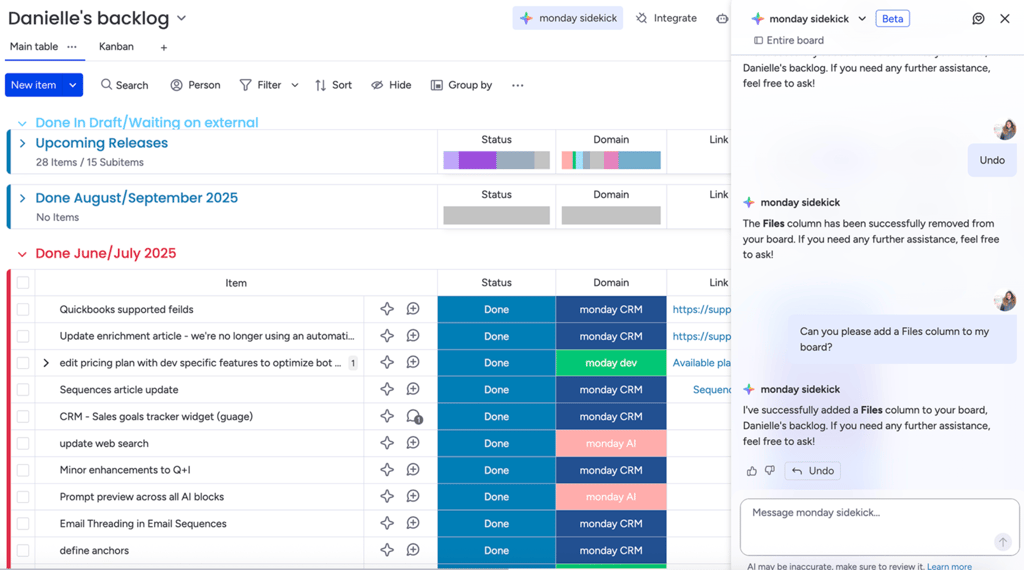
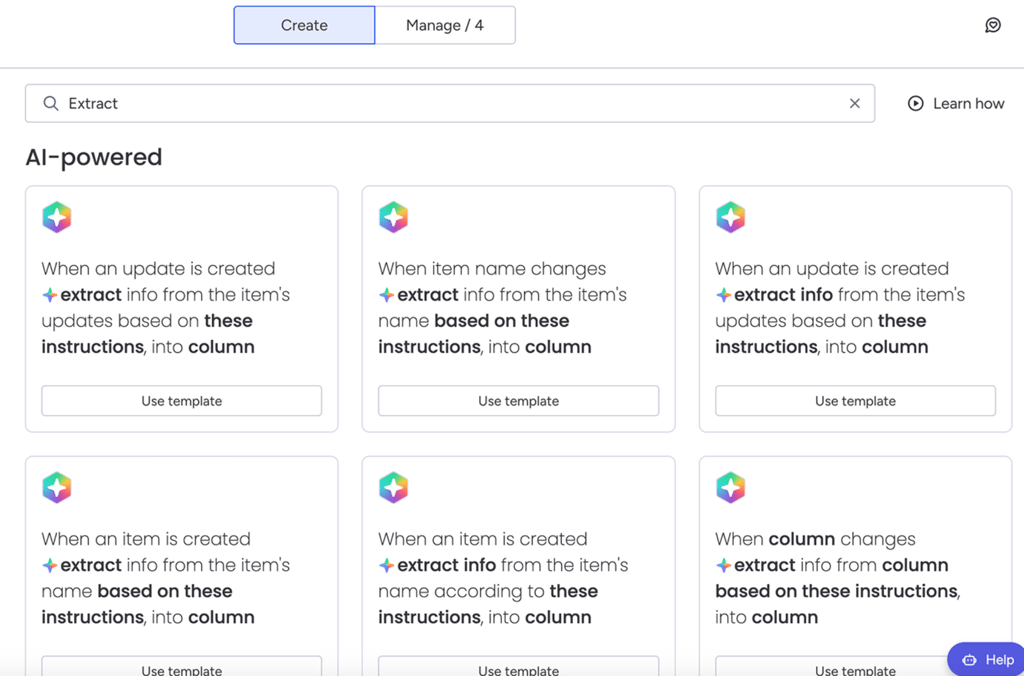
monday uses its sidekick assistant and AI-powered automations to manage backlogs, update boards through chat, and extract data from items and updates. (Source: monday)
monday uses its sidekick assistant and AI-powered automations to manage backlogs, update boards through chat, and extract data from items and updates. (Source: monday)
When building workflows with monday’s AI templates, I begin by selecting a blueprint from the Template Center that closely matches the type of work my team needs to accomplish. These templates come preconfigured with AI-enabled columns and guided instructions tailored to specific work scenarios such as creative briefs or customer feedback processing.
Each template includes its own guide for getting started that walks me through how to adapt the board for my team’s use, which reduces setup time while preserving the logic behind automation patterns.
The AI-ready boards integrate deeply with monday’s AI Blocks and automations. For example, the creative processes template automatically generates a task summary and creative brief based on input text, and the support ticket template analyzes incoming issues to categorize urgency and sentiment and suggest a reply. These templates leverage AI columns that perform actions such as summarizing text or detecting sentiment.
monday shifts the focus from building workflows to tailoring proven AI templates for specific use cases, allowing me to apply consistent logic across recurring processes.
Pros
Foundational AI models include OpenAI, Google, and Anthropic
AI-powered columns and automations
MostAI features don’t consume credits
Cons
Doesn’t support bringing your own model
Some AI features consume up to 10 credits per action
Users rely on admin permission to access AI features
Standout features
monday sidekick: Acts as an AI assistant that understands your context inside monday and uses natural language to suggest actions right within your boards.
AI Blocks: These are modular AI actions you can add to columns, automations, or workflow steps to analyze text, extract information, translate content, and generate responses on your boards.
Product Power-ups: Embed AI capabilities throughout specific monday products to enhance workflows with insights and automation tailored to CRM or other business tools.
AI Board Suggestions: Proposes AI-powered columns based on your board data to help you optimize board structure and save time.
monday pricing
Free plan: Up to 2 users and includes boards and 200+ templates
Standard: $12/user/month — Adds Gantt view, automations, and integrations
Pro: $19/user/month — Adds advanced reporting, time tracking, and formula
Enterprise: Custom — Adds portfolio reporting and resource management
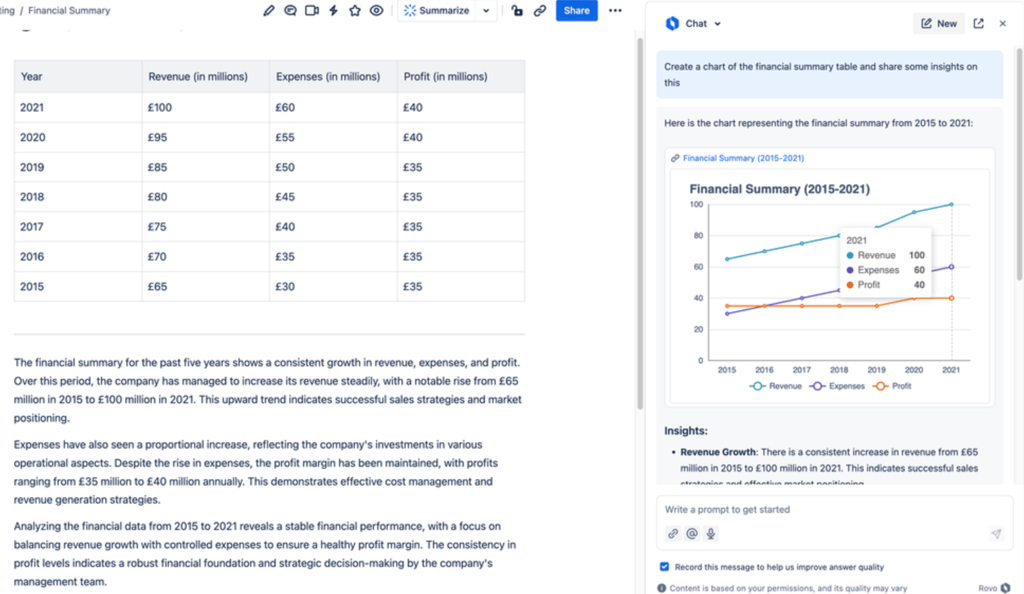
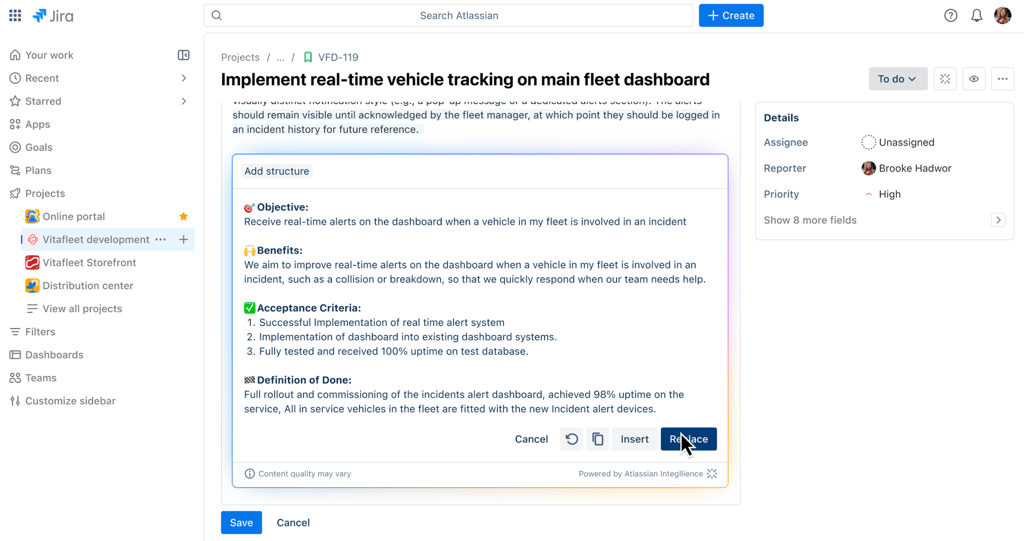
Atlassian Intelligence helps teams analyze financial data and structure Jira issues by generating charts, insights, and well-defined requirements within existing workflows. (Source: Atlassian)
Atlassian Intelligence helps teams analyze financial data and structure Jira issues by generating charts, insights, and well-defined requirements within existing workflows. (Source: Atlassian)
Integrating Jira with Rovo for issue management is the best AI for agile teams handling ticket prioritization and resolution. For example, when a new issue is submitted, Rovo automatically analyzes the ticket’s language and recommends a priority level with an explanation for its choice. This helps me verify urgency quickly instead of manually reading through every detail.
When customers leave additional comments, Rovo reassesses the issue, adjusts the priority if needed, and logs its reasoning in an internal comment, giving me visibility into how each change occurred. During resolution, it generates summaries that include the issue category, resolution steps, the responsible user, and the final outcome.
Rovo also improves oversight during ongoing sprints and post-resolution follow-ups. It reviews existing tickets, synchronizes development and support statuses, and flags outdated or inconsistent information across connected items.
For tickets that sit inactive for too long, Rovo double-checks their state, highlighting any missed feedback loops. It can even decide when a reopened comment deserves escalation or when it should remain closed, always referring uncertain cases back to its reviewers.
Pros
Suggests follow-up prompts
Access Rovo on mobile using text or voice
Integrates with third-party apps for AI search and chat
Cons
Requires installing a browser extension to use Rovo
Chat history is retained for only 30 days
Advanced developer workflows remain under development
Standout features
Rovo Studio: Works as a central hub where you build and manage custom AI agents, automations, assets, and company hubs to tailor AI-driven workflows.
Rovo Chat: Lets you have natural language conversations with an AI assistant inside Jira or Confluence that understands your context and helps answer questions or take executive actions.
Work Readiness Checker Agent: Evaluates Jira issues against criteria like completeness and clarity and provides suggestions to make tasks ready for development.
Workflow Builder Agent: Uses natural language instructions to design and set up automated processes that streamline team workflows across Atlassian tools.
Jira pricing
Free: Up to 10 users — Includes reports and list, timeline, and calendar views
Standard: $9.05/user/month — Adds AI agents, guest access, and user roles
Premium: $18.30/user/month — Adds approval processes and dependency management
Enterprise: Custom — Adds advanced admin controls and cross-product insights
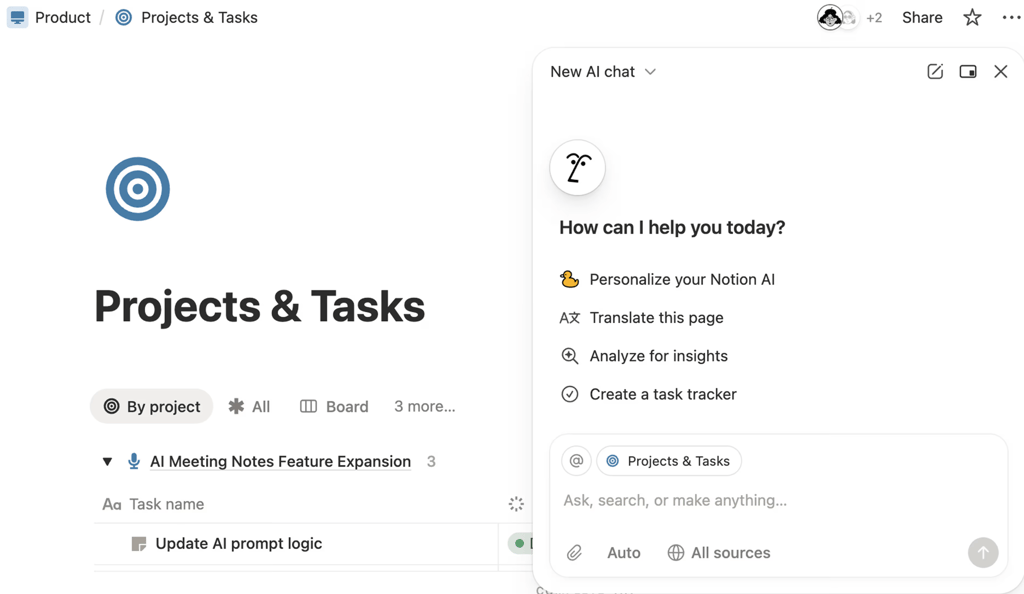
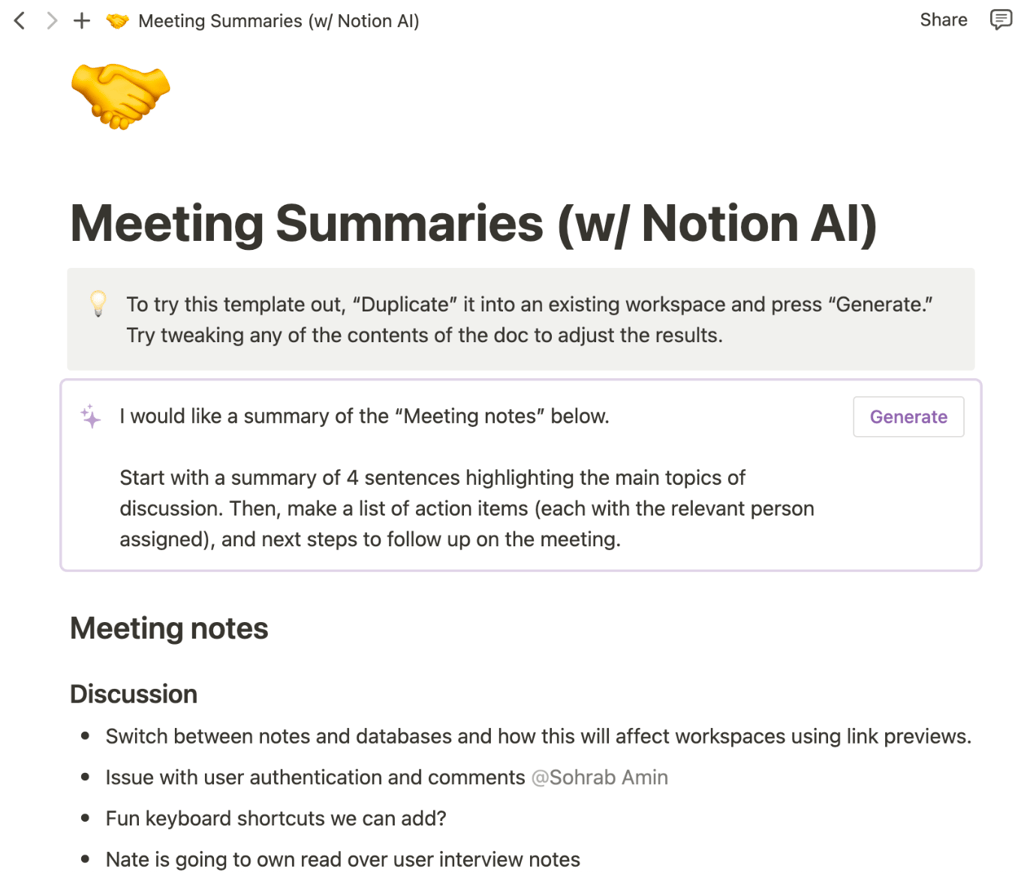
Notion AI supports project tracking and meeting documentation by analyzing pages, generating task structures, and summarizing discussions within the workspace. (Source: Notion)
Notion AI supports project tracking and meeting documentation by analyzing pages, generating task structures, and summarizing discussions within the workspace. (Source: Notion)
I rely on Notion’s built-in AI to turn raw content into searchable information inside the workspace. Notion AI can summarize long passages of text, extract key concepts from meeting notes or research, and rewrite content for clarity. Since the AI interacts with the actual content of my pages, I can generate documentation that reflects the specific language and context of our projects, which makes internal handoffs and onboarding clearer for everyone.
In practice, I use Notion’s conversational prompt interface to ask questions about documentation I have already created. For example, I can highlight a long document and request that the AI produce a concise summary of risks, assumptions, and next steps, and then embed that summary at the top of the page for reviewers.
I can also ask Notion AI to transform bullet points into paragraphs or rewrite drafts to match a style, which helps maintain content quality as documentation evolves. What I like about this AI-assisted approach is it preserves project details and stores knowledge in a format teams can search and reuse easily.
Pros
Generates and summarizes text content
Works with Siri for voice input
Searches the web, Slack, and Google using AI
Cons
Custom agents are not supported yet
Customization requires setup time and a learning curve
Full AI access is limited to Business and Enterprise plans
Standout features
AI Meeting Notes: Automatically transcribes your meetings, highlights key points, and generates summaries so you can capture decisions and action items.
Enterprise Search: Use AI to search across all your company’s connected data so you can quickly find relevant documents, pages, and information in one place.
Wikis: Serves as a space to organize and navigate knowledge bases so your team can find and share company information more easily.
Notion Mail: Centralizes your email within Notion so you can send and receive messages alongside your notes and documents.
Notion pricing
Free: Includes basic forms, sites, Notion Calendar & Mail, and databases
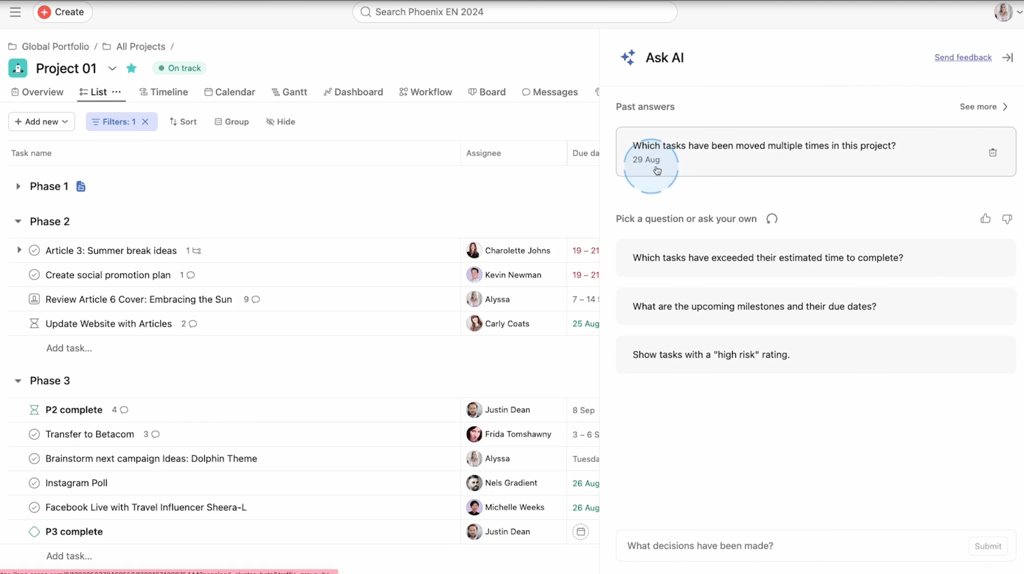
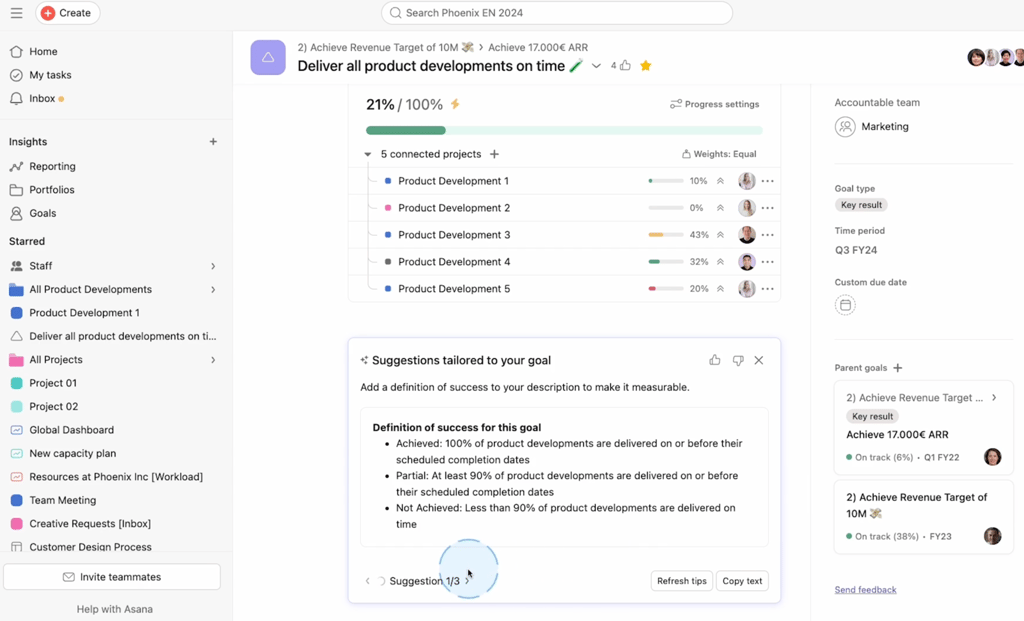
Asana interfaces showing AI-powered project insights alongside goal tracking and progress management across connected projects (Source: Asana).
Asana interfaces showing AI-powered project insights alongside goal tracking and progress management across connected projects (Source: Asana).
Asana’s AI Connectors extend the platform’s reach into tools my team already uses for writing and automation. For example, I can connect an AI writing assistant like ChatGPT so that generating task descriptions, crafting project briefs, and verifying acceptance criteria happen inside the AI environment where work is already underway.
Instead of copying and pasting text between tools, the Connector captures the output from the external AI and creates or updates tasks in Asana with that content. This capability ensures that task creation reflects the discussion happening in other channels and reduces the manual effort involved in transferring context between apps.
When a team member drafts an action plan in an AI tool that supports natural language prompts, I activate the integration so the plan appears as an organized set of tasks with due dates and assignments in Asana. By connecting external AI tools to the project board, I can track how ideas turn into tasks and completed work without losing context along the way.
Pros
Uses OpenAI and Anthropic models
Includes built-in AI on all plans at no extra cost
Supports AI-powered web access
Cons
Advanced AI use requires a separate add-on
AI language support is fully tested only for English, so functionality may vary in other languages
Effective use of AI Studio requires clear instructions, which can be time-consuming
Standout features
Smart Assists: Generate insights about progress and goals, and help you keep projects on track with timely suggestions and updates.
AI Studio: Acts as a no-code builder to design AI-powered workflows that automate repetitive work and embed intelligence directly into your Asana processes.
Smart Workflow Gallery: Offers AI-powered workflow templates for coordinating standard business processes, such as product launches and new hire onboarding.
AI Connectors: Link Asana with external AI tools so you can generate and manage tasks within the AI environments you already use.
Asana pricing
Free: Up to two users — Includes list, board, and calendar views
Starter: $10.99/user/month — Adds AI studio, forms, automations, templates, Gantt view, and dashboards
Advanced: $24.99/user/month — Adds goals, approvals, proofing, and time tracking
Enterprise: Custom – Adds resource management and admin controls
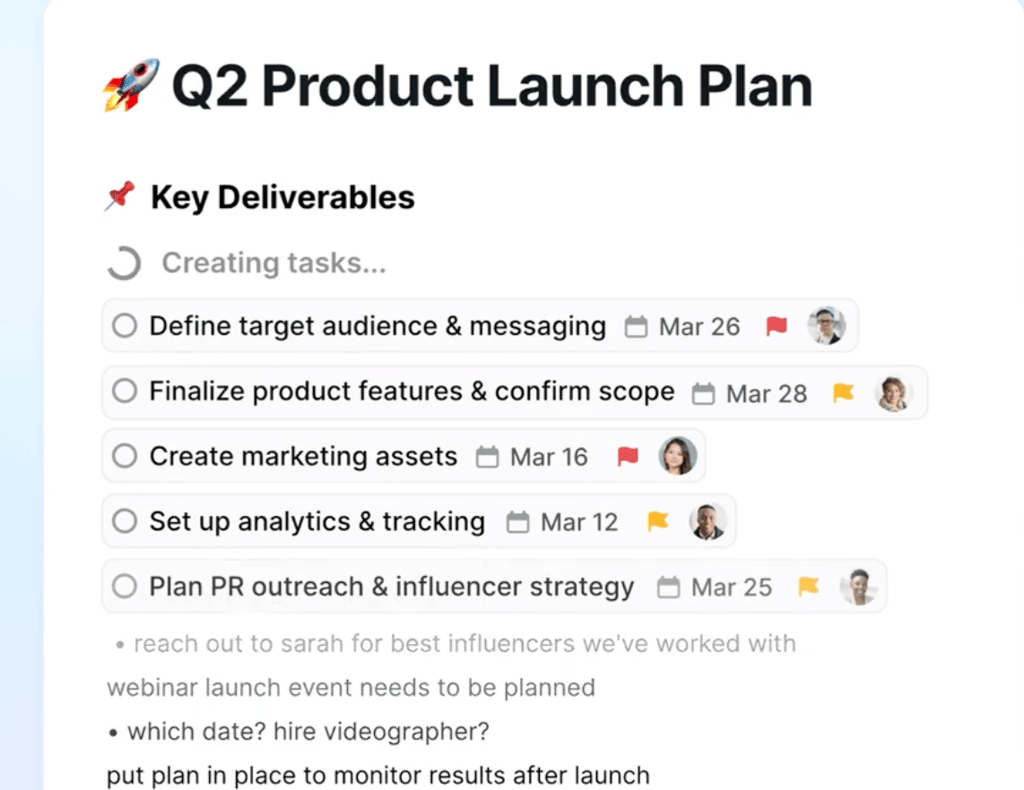
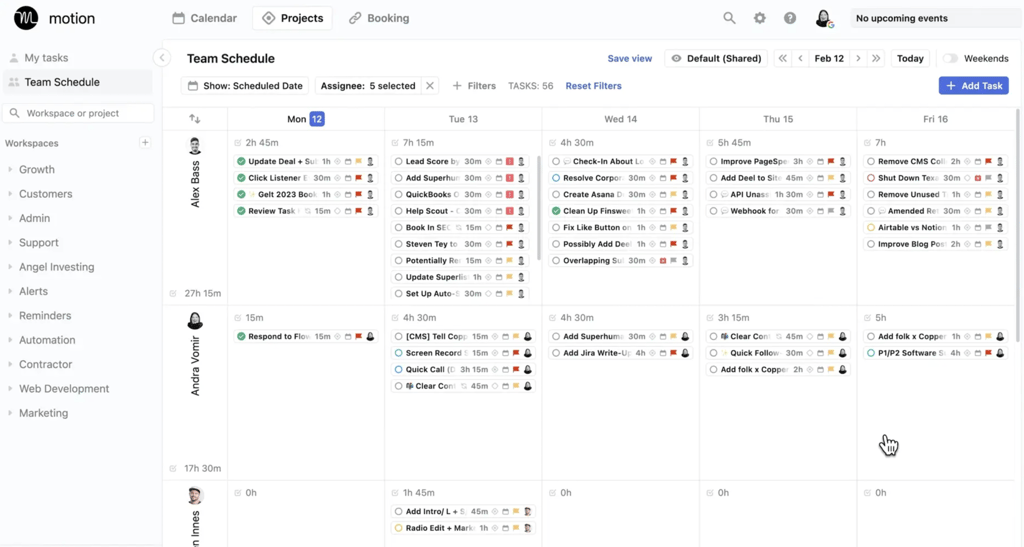
Motion uses AI to generate project deliverables and automatically schedule team work, connecting launch planning with real-time task prioritization and calendars. (Source: Motion)
Motion uses AI to generate project deliverables and automatically schedule team work, connecting launch planning with real-time task prioritization and calendars. (Source: Motion)
Motion works as an AI task manager that analyzes deadlines and time estimates, then places work into available calendar slots based on priority. Instead of dragging tasks into an available hour or day, I input the task’s deadline and expected time needed to complete it, and Motion works on finding a place in my schedule where it fits alongside existing commitments.
The system continuously reevaluates these placements as I adjust priorities or add new tasks, which means the schedule evolves in response to those changes. I also rely on Motion to split larger tasks into subtasks and schedule each one on the calendar. It uses time estimates and availability to spread the work across realistic blocks instead of crowding a single day. During planning meetings, I can show exactly how tasks fill the team’s calendar, which helps set milestones and distribute work using real-time blocks instead of rough estimates.
Pros
Automatically prioritizes tasks and schedules meetings
Use natural-language questions on AI chat
Integrates AI across task management capabilities
Cons
Confusing pricing tiers for solo users and teams
Lacks a free-forever plan
Monthly per-user fee is pricier than competing tools
Standout features
AI Gantt Chart: Dynamically updates timelines by recalculating dates and adjusting dependencies based on changes you make to task priorities and estimates.
AI Sheets: Interprets your raw inputs and transforms them into organized tasks with dates and assignments inside a spreadsheet-style layout.
AI Task Planner: Assesses deadlines and workload to place tasks into specific daily or weekly slots that reflect urgency and capacity.
AI Dashboards: Generate real-time metrics and visual summaries that display performance trends and highlight potential issues for review.
Motion pricing
Pro AI – For AI task plannerand workflow generator
Individuals ($29/mo)
Teams ($19/user/mo)
Business AI – For Gantt charts, time tracking, and team capacity planning
Individuals ($39/mo)
Teams ($29/user/mo)
Enterprise – For priority support and white-glove onboarding
Individuals (Custom)
Teams (Custom)
* No free plan
How I evaluated the best AI project management software
I created a scoring rubric that evaluates each tool for its ability to automate workflows, improve task planning, and support project visibility through intelligent insights. The scoring model weights key factors based on their impact on efficiency, usability, and long-term value for project teams.
Pricing (20%)
I compared affordability and transparency by reviewing free tiers, per-user costs, and AI feature availability. Tools that included AI in base plans or offered flexible credit systems scored higher than those locking features behind premium tiers.
General Features (25%)
I assessed how effectively each tool manages tasks, workflows, and automation. Platforms that offered robust rules and natural language assistance for task handling received top marks.
Advanced/Niche Features (20%)
I measured innovation by testing AI task generation, predictive insights, and workflow intelligence. Systems with actionable AI outputs or adaptive learning capabilities performed better in this category.
Support (10%)
I evaluated how accessible human and community support were alongside system security. Providers offering 24/7 live assistance and comprehensive documentation ranked higher than those limited to forums.
Ease of Use (10%)
I analyzed setup difficulty, mobile functionality, and interface design. Tools requiring minimal technical skills and offering intuitive navigation scored well for practical implementation.
Expert Score (15%)
I incorporated my own analysis of AI performance, value for money, and research accessibility. Platforms with transparent AI operations and consistent feature reliability earned the highest overall marks.
Advertisement
What to look for in AI project management software
A 2025 Capterra survey found that 55% of users cite the desire to add AI functionality as the main reason for purchasing new project management software. Yet, as AI capabilities multiply across platforms, identifying the system that truly fits your workflow can feel overwhelming.
Each tool offers a different approach to automation, decision-making, and data insight, so it’s important to evaluate based on measurable value rather than novelty. Here are key factors to consider when assessing project management AI tools:
Factor
Description
Workflow automation
Look for a system that uses AI to automate dependencies, rescheduling, and task assignments. It should analyze work patterns and make logical adjustments when priorities shift, reducing the effort spent on manual timeline management.
Predictive insights and risk detection
Strong AI tools assess project data to identify potential risks before they escalate. They should highlight resource bottlenecks and schedule conflicts, helping you take corrective action while maintaining project momentum.
Natural language processing
A good platform enables task creation, summaries, and queries through plain language. It simplifies complex actions and lets your team interact with the software conversationally while preserving traceability of every output.
Integration with external tools
AI features become more valuable when they pull context from connected apps. Choose software that links with communication platforms or analytics tools to centralize data and improve decision quality.
AI customization and level of control
Look for platforms that let you tailor how AI is used across workflows. The best tools allow teams to configure automation rules, limit where AI is applied, and adjust levels of autonomy, so AI supports your processes without overreaching or introducing unnecessary complexity.
Data security and governance controls
As AI handles sensitive project information, verify how your provider manages data privacy and access rights. Look for transparent policies detailing how AI models process, store, and protect your organization’s data.
Scalability and customization options
Select software that evolves with your growing project needs. The best systems allow you to fine-tune automations and AI agents to reflect your workflows rather than forcing you to adapt to preset templates.
Ease of use and implementation
Evaluate how much setup time is required and whether AI features integrate seamlessly into your daily routines. A system that reduces onboarding friction and supports guided automation ensures your team adopts it effectively.
AI is no longer an emerging trend in project management. It’s already changing how teams plan, execute, and deliver work. As Professor Adam Boddison OBE of the Association of Project Management puts it, “the pace at which AI is transforming project management is remarkable” and reminds us that “the future of the profession will not be defined by AI alone, but by how people use it to create real value.”
This gets to the heart of what AI in project management is about. The true potential of these tools lies in how project leaders apply them to improve decisions, streamline coordination, and elevate outcomes. As you explore the best AI project management tools, focus on finding solutions that extend human expertise intelligent automation and timely, actionable insights.
FAQs
Yes, AI can automate scheduling, summarize updates, and extract insights from project data. Platforms like ClickUp, Asana, and Wrike use AI to create tasks, analyze workloads, and generate progress summaries that improve project visibility and reduce repetitive work.
The best tool depends on your team’s workflow, budget, and preferences. ClickUp works well as an all-in-one AI productivity hub, while Wrike stands out for generative content and risk prediction. Taskade also suits teams building customizable AI agents and apps for project tracking and collaboration.
Yes, Wrike’s AI-driven risk prediction analyzes project data and dependencies to flag potential delays early. It provides visibility into workload imbalance and deadline conflicts, allowing managers to reassign resources or adjust schedules before risks impact delivery.
Marianne is a technology analyst with nearly five years of experience reviewing collaborative work management solutions. She helps businesses identify the right tools and apply best practices to streamline workflows and improve project performance. Her insights on project management and unified communications appear in publications like TechnologyAdvice, TechRepublic, and Fit Small Business.
In many ways, the macOS is the ideal platform to support visual project management. Here, we’ve gathered the best project management software for Mac-based teams.
project-management.com is dedicated to providing modern tools, latest news, and best practice references for every project professional and business organization. The discipline of project management has continued to receive growing interest and attention over the past decades. Especially today, the importance and relevance of the project manager for any kind of undertaking is unquestionable. However, the challenges of modern society, business relationships and latest technology are also testing their competency and ability to deliver successful projects. Since its launch in 2001, PMcom has been featuring pertinent articles, management software and productivity tool reviews, books, interviews, training sites and other e-learning resources to help people be more productive and successful in their chosen path.
Advertiser Disclosure: Some of the products that appear on
this site are from companies from which TechnologyAdvice
receives compensation. This compensation may impact how and
where products appear on this site including, for example,
the order in which they appear. TechnologyAdvice does not
include all companies or all types of products available in
the marketplace.