

























Digital asset management often breaks down not because teams lack tools, but because they lack structure. Files get duplicated, approvals stall, and no one is quite sure which version is final. The right template can fix that.
Below, I’ve curated 10 digital asset management templates from top project management platforms that help teams organize assets, streamline workflows, and stay aligned. Whether you’re handling creative requests, tracking approvals, or managing versions, there’s a setup here that can simplify your process.
- 1. Smartsheet — Form-driven asset intake and check-in/out tracker
- 2. monday.com — Collaborative asset request and approval board
- 3. Airtable — Digital asset request workflow with approval and assignment
- 4. Notion — Inventory-focused asset database
- 5. ClickUp — Centralized asset knowledge hub with docs and bookmark integration
- 6. Wrike — Creative production asset request and budget tracking
- 7. Autodesk — Engineering-focused asset library with advanced file-type filtering
- 8. Accelo — Campaign-linked asset management
- 9. Knack — Asset repository with tagging and access controls
- 10. Softr — Public-facing asset portal with searchable visual gallery
- What to look for in a digital asset management template
1. Smartsheet — Form-driven asset intake and check-in/out tracker
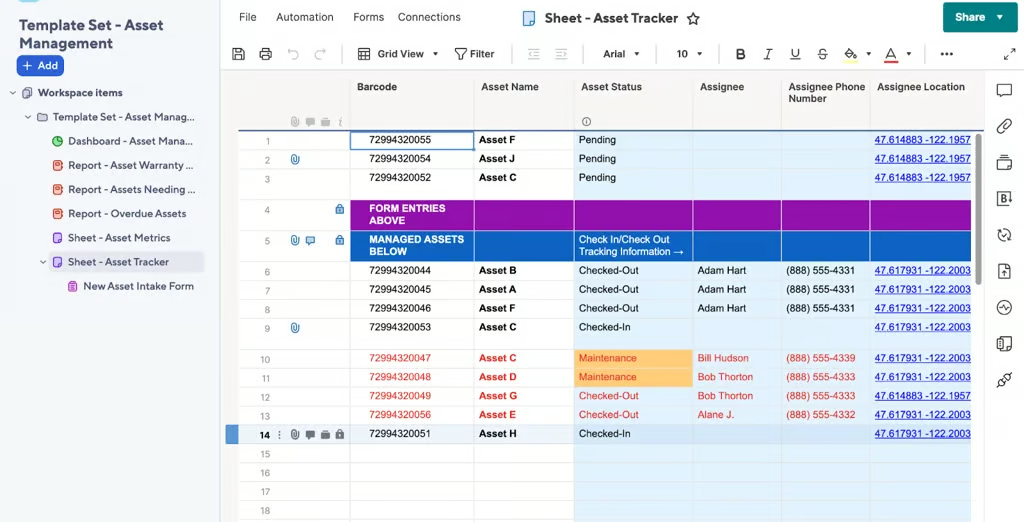
Smartsheet’s digital asset template is built for teams that need structure from the moment an asset enters the system. Its digital asset template streamlines intake and management through a spreadsheet-style interface. The form-driven workflow clearly marks asset statuses like “Checked-Out” or “Maintenance,” facilitating smooth tracking and reducing asset downtime.
Why I like Smartsheet‘s template
I’ve found that Smartsheet works best for teams that struggle with inconsistent asset intake or lack a clear tracking system. The pre-built forms ensure every new asset is logged in a standardized way, while the mobile barcode scanner makes it easy to update statuses in real time. This is especially useful for teams managing physical or shared resources.
Where this template really stands out is its emphasis on process discipline. By enforcing structured inputs and clear status tracking, it reduces guesswork around asset availability and improves accountability across teams.
- Best for: Teams that need a structured, process-driven approach to asset intake and tracking
- Trade-off: Less flexible than database-style tools like Airtable, especially for teams that want highly customized views or relationships between assets
2. monday.com — Collaborative asset request and approval board
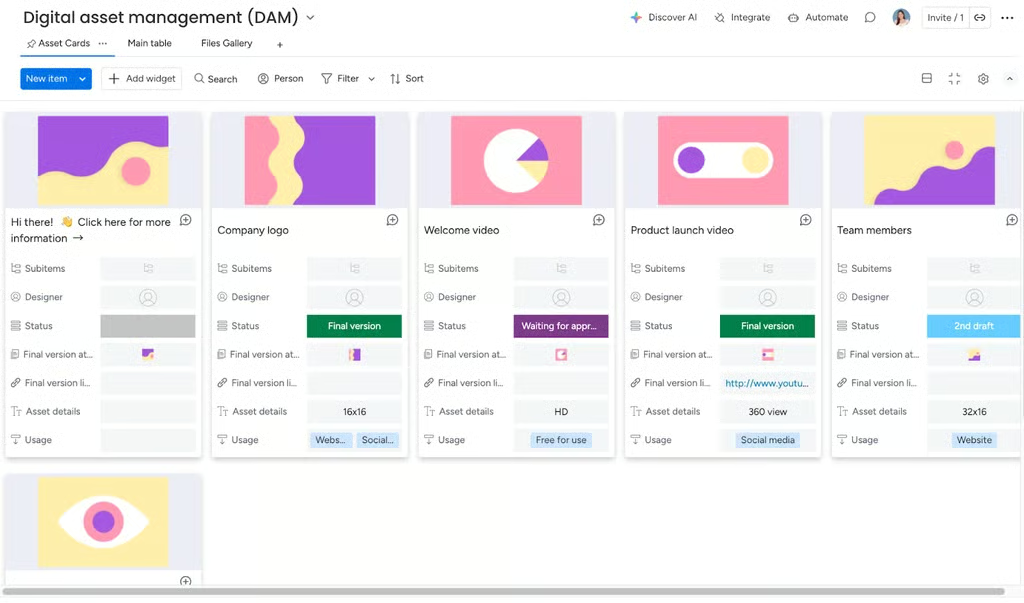
monday.com’s digital asset template is designed for teams that prioritize visibility and speed in their workflows. monday.com’s collaborative board facilitates seamless asset request and approval. Its collaborative board uses cards, symbols, and color-coded statuses to make asset requests and approvals easy to track at a glance. It’s tailored for teams needing real-time updates and transparent approval processes to avoid bottlenecks.
Why I like monday.com‘s template
I’ve observed monday.com works best for teams that need fast-moving, highly collaborative approval workflows. The visual status indicators reduce the need for constant check-ins, making it easier for stakeholders to stay aligned without slowing down production.
Where this template stands out is its clarity. Teams can immediately see asset status and ownership and this helps prevent miscommunication, which is one of the most common causes of delays in creative and marketing workflows.
- Best for: Teams managing high volumes of asset requests and approvals, especially in marketing or creative environments
- Trade-off: Less structured than tools like Smartsheet, which may lead to inconsistency if workflows aren’t clearly defined upfront
3. Airtable — Digital asset request workflow with approval and assignment
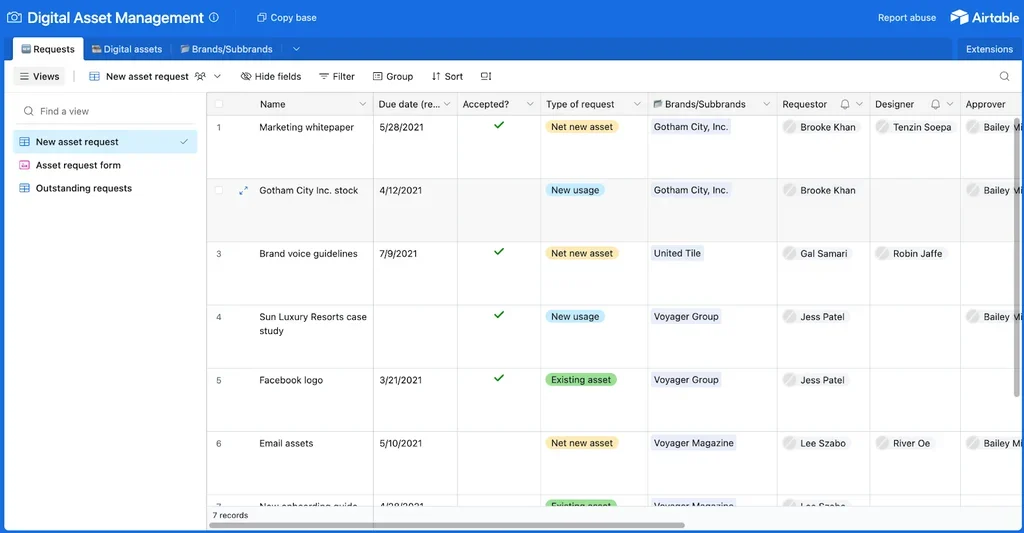
Airtable’s digital asset management template combines spreadsheet flexibility with database capabilities, perfect for teams that require advanced asset organization. There’s a dedicated tab for requests, digital assets, and brand associations, giving you full visibility over every step of the asset life cycle.
Why I like Airtable‘s template
I’ve found that Airtable works best for teams that have outgrown simple tracking tools and need more control over how assets are structured and connected. The ability to link records (e.g., tying assets to campaigns, clients, or requests) makes it especially useful for managing complex workflows with multiple stakeholders.
This template stands out for its flexibility. Unlike more rigid tools, Airtable allows teams to customize views, group data dynamically, and build workflows that match how they actually operate rather than forcing a predefined structure.
- Best for: Teams managing complex asset ecosystems with multiple relationships (e.g., campaigns, clients, or content pipelines)
- Trade-off: Requires more setup and ongoing maintenance than simpler tools, which can slow adoption for less technical teams
4. Notion — Inventory-focused asset database
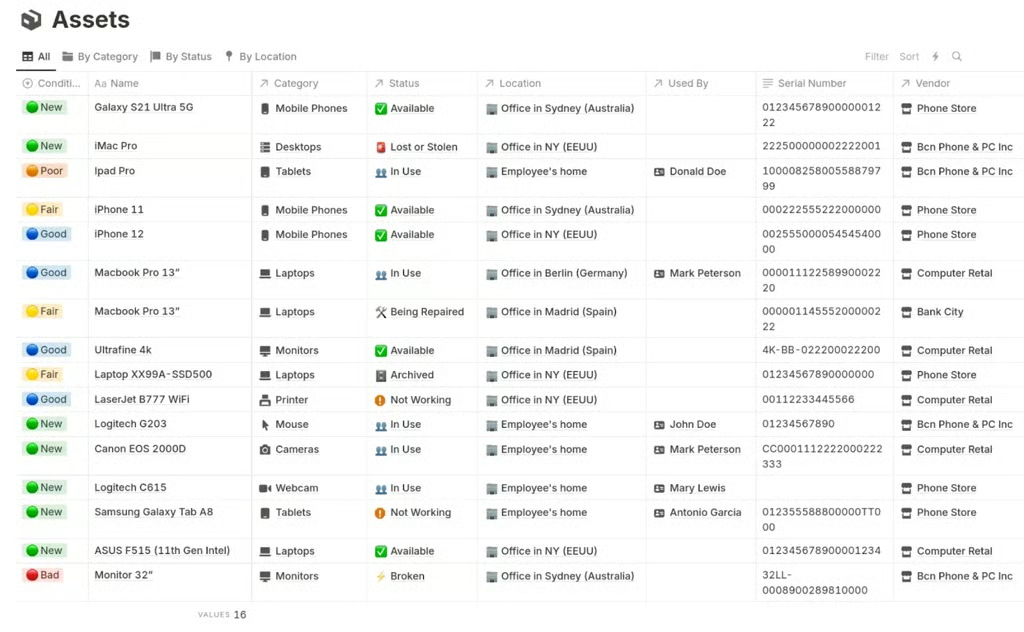
Notion’s asset management template supports comprehensive asset tracking, covering key details like condition, usage status, and location insights. It offers intuitive categorization and clear insights into asset quality and usage, helping teams with resource allocation and making informed decisions.
Why I like Notion‘s template
In my experience, Notion’s in-depth inventory insights make it much easier to monitor asset health and location. It allows you to quickly spot which asset needs maintenance or should be moved. With advanced filters, teams can minimize downtime and stay ahead of issues. Notion stands out for its detailed asset tracking and customizable database structure.
With this template, teams can build a highly customized asset database without needing a fully technical setup, allowing them to adapt the system as their inventory grows or changes.
- Best for: Teams managing physical assets or equipment that require ongoing monitoring (e.g., IT, operations, or facilities)
- Trade-off: Lacks the built-in workflow automation and approval features found in tools like monday.com or Smartsheet
5. ClickUp — Centralized asset knowledge hub with docs and bookmark integration
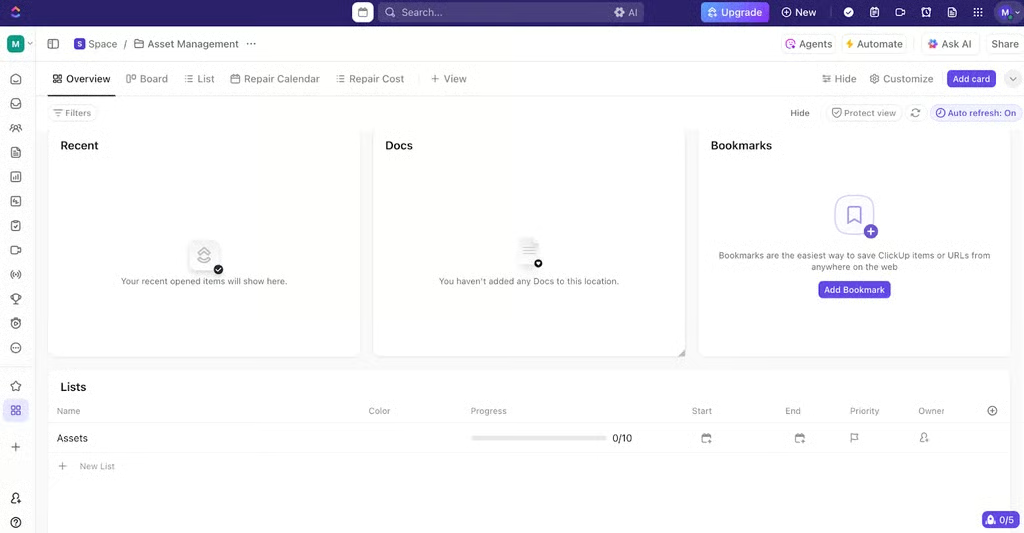
ClickUp’s template centralizes asset information, combining project details, documents, and bookmarks in one accessible hub. This supports knowledge sharing and decision-making among teams needing robust project documentation.
Why I like ClickUp‘s template
What stands out to me about ClickUp is its strong emphasis on centralized knowledge management. It works best for teams that need to connect asset management with broader project knowledge. Its built-in docs and bookmark features allow teams to centralize not just assets, but also the context around them, including briefs, references, and related resources, which reduces time spent searching across multiple tools.
Instead of treating assets as separate from tasks and documentation, ClickUp brings everything into a single workspace, which is especially valuable for teams managing complex, cross-functional projects.
- Best for: Teams that want to combine asset management with project documentation and task tracking in one system
- Trade-off: Can become overwhelming without clear structure, especially for teams that only need lightweight asset tracking
6. Wrike — Creative production asset request and budget tracking
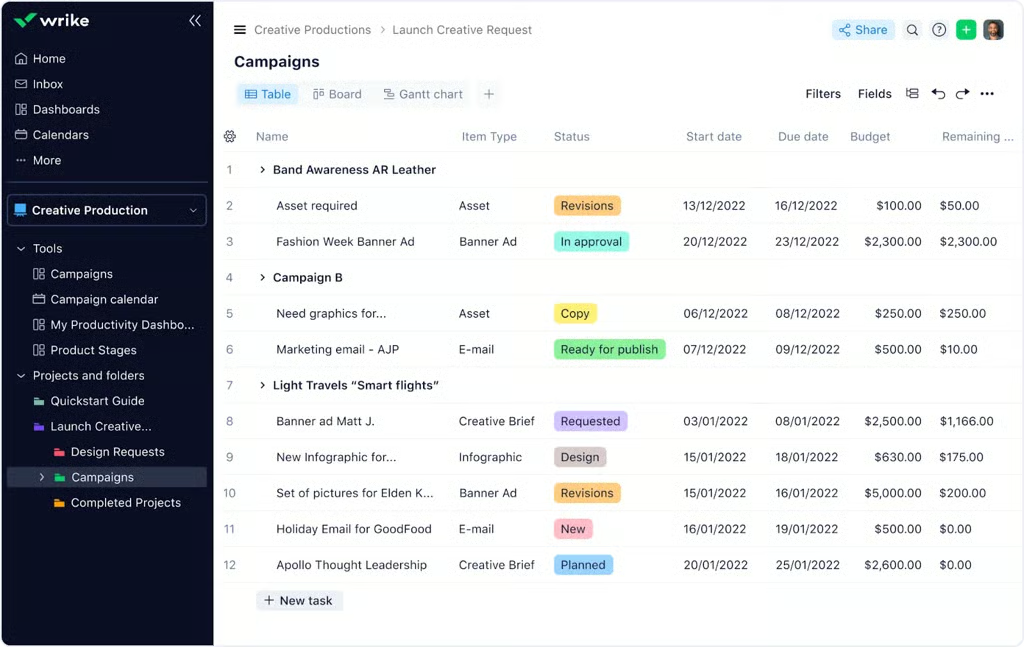
Wrike’s dashboard simplifies creative asset management by combining request forms with built-in budgeting features. It provides a comprehensive view of production statuses, timelines, and budget allocations, enabling teams to manage complex workflows with ease and avoid common problems like cost overruns.
Why I like Wrike‘s template
What I find especially valuable about Wrike is how effortlessly it blends budget tracking into asset management. You can easily monitor project spend while keeping an eye on asset progress, allowing efficient cost control. In my opinion, this is the best option for teams managing asset production alongside tight budgets and timelines.
Color-coded status tracking eliminates confusion and enhances visibility across projects. The added layer of AI-driven insights further supports teams in identifying risks and optimizing workflows over time.
- Best for: Teams managing complex creative or production workflows where budget control is just as important as asset delivery
- Trade-off: More robust (and potentially heavier) than simpler tools, which may be unnecessary for teams with straightforward asset tracking needs
7. Autodesk — Engineering-focused asset library with advanced file-type filtering
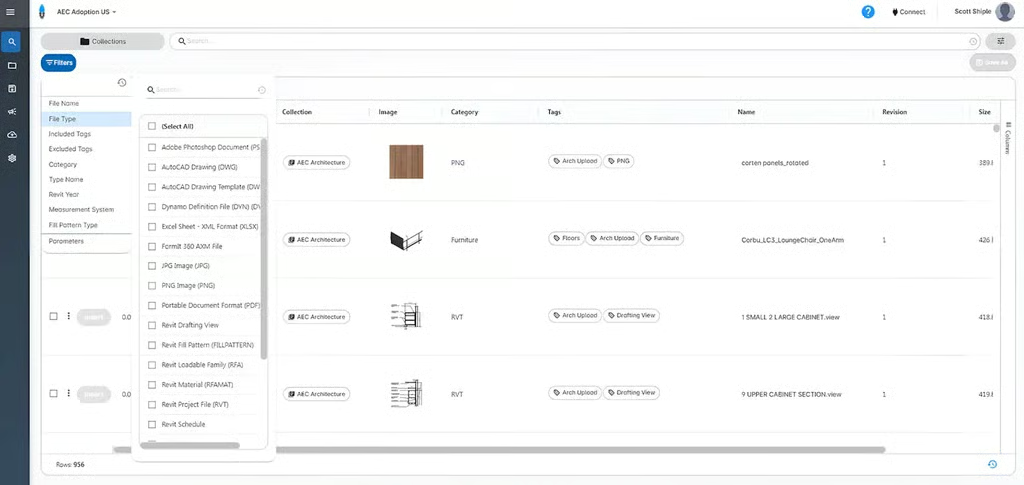
Autodesk’s asset library template is designed for engineering-heavy projects, with its robust categorization and advanced file-type filters. You can also sort by material type, file format, number of revisions, or project stage. It’s suitable for construction teams managing complex data across building information modeling (BIM) workflows or computer-aided design (CAD) assets.
Why I like Autodesk‘s template
Autodesk’s strength lies in its engineering-centric asset management, which lets you easily manage, distribute, and identify the most recent versions of your BIM content. Its advanced filtering and categorization make it significantly easier to locate the correct file version, which is essential in projects where even small discrepancies can lead to costly errors.
Unlike more general-purpose tools, Autodesk is built to handle complex engineering data, allowing teams to manage revisions, formats, and project stages within a single, reliable system. This reduces search time and ensures teams are consistently working from the most up-to-date assets.
- Best for: Engineering, construction, or architecture teams managing complex BIM or CAD asset libraries
- Trade-off: Highly specialized, making it less suitable for general marketing or creative asset management needs
8. Accelo — Campaign-linked asset management
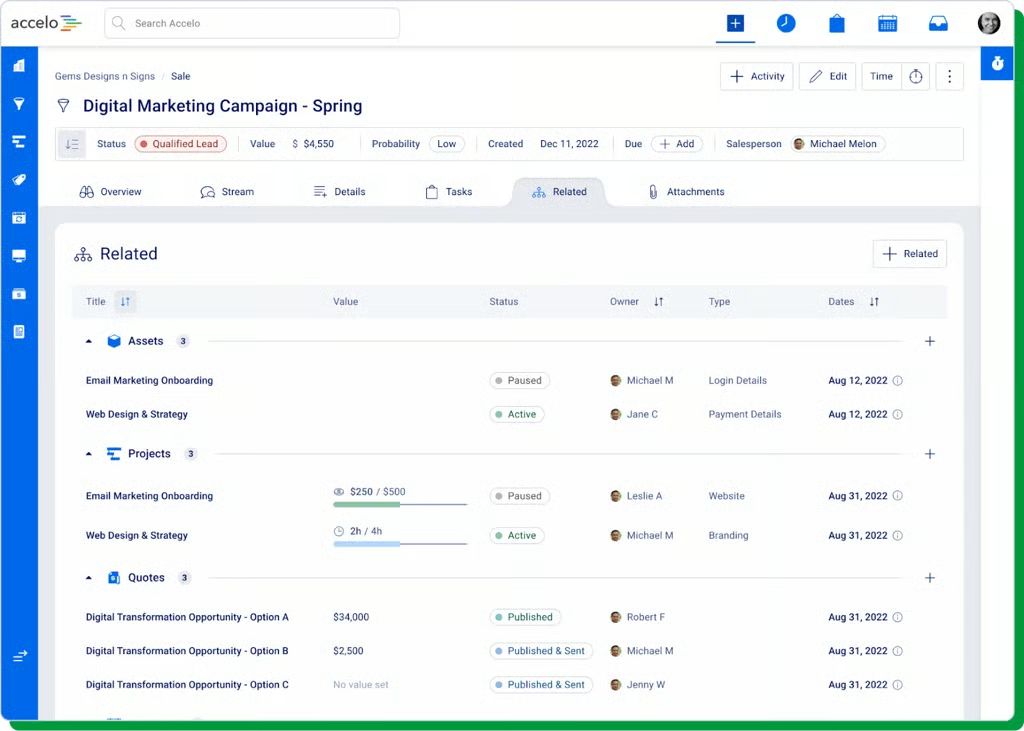
Accelo integrates asset management within campaign workflows, making it a strong fit for marketing teams. This template connects campaign assets, project owner, and associated quotes so you get a quick view of how assets are tracked and used across campaign activities.
Why I like Accelo‘s template
What I like about Accelo’s template is its ability to present complex campaign details in an easily digestible format. You can see exactly which assets and projects are active, paused, or missing resources at a glance. This makes it an ideal option for teams managing client-facing campaigns where assets, timelines, and budgets are tightly interconnected. Plus, the named ownership of each asset ensures accountability, which is crucial when managing multiple client-facing marketing tasks.
By presenting assets, resource allocation, and project status in one view, teams can quickly identify issues like underutilized capacity or misaligned priorities without digging through multiple systems. The added layer of ownership tracking also reinforces accountability, which is critical in fast-moving, client-driven environments.
- Best for: Marketing or agency teams managing multiple client campaigns with interconnected assets, timelines, and budgets
- Trade-off: More tailored to campaign-based workflows, making it less ideal for teams that need standalone asset tracking without project or financial context
9. Knack — Asset repository with tagging and access controls
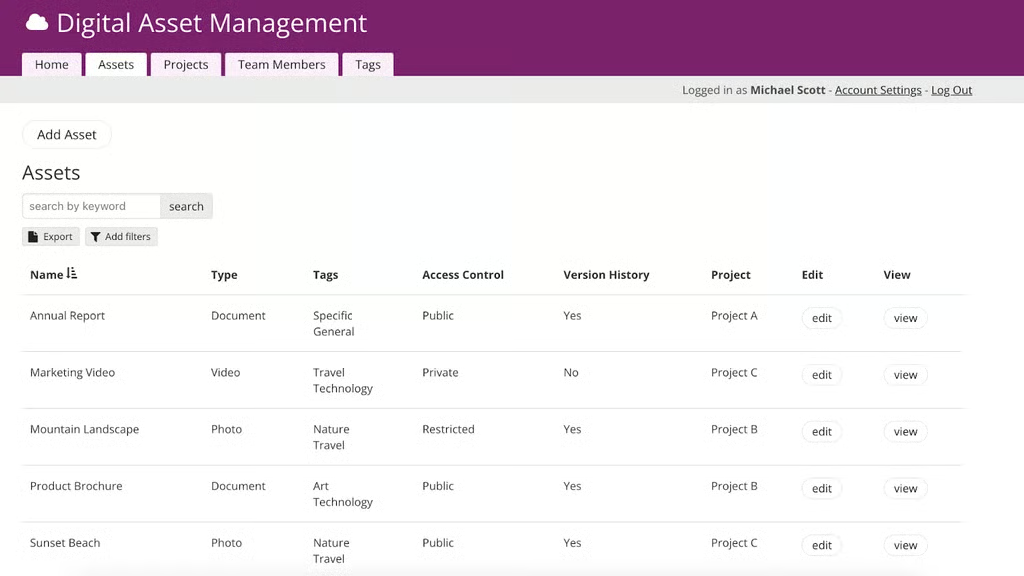
Knack’s digital asset management template is built for secure, organized asset sharing, with a focus on tagging, access control, and version tracking. Each asset is labeled with tags, linked to specific projects, and assigned visibility settings (public, private, or restricted), allowing teams to effectively manage confidential materials.
Why I like Knack‘s template
What stands out to me is how Knack simplifies asset security without adding complexity for its users. You can assign access permissions while still keeping assets searchable and easy to update. It’s a great choice for teams that need a customizable, security-first asset database that scales with project complexity.
As projects grow in complexity, maintaining control over access becomes just as important as organizing the assets themselves. Knack enables teams to assign granular permissions while still keeping assets searchable and up to date, which is something many tools struggle to do without adding friction.
- Best for: Teams handling sensitive or client-specific assets that require controlled access and scalable permissions
- Trade-off: More focused on database structure and access control, with fewer built-in workflow or collaboration features compared to tools like monday.com or ClickUp
10. Softr — Public-facing asset portal with searchable visual gallery
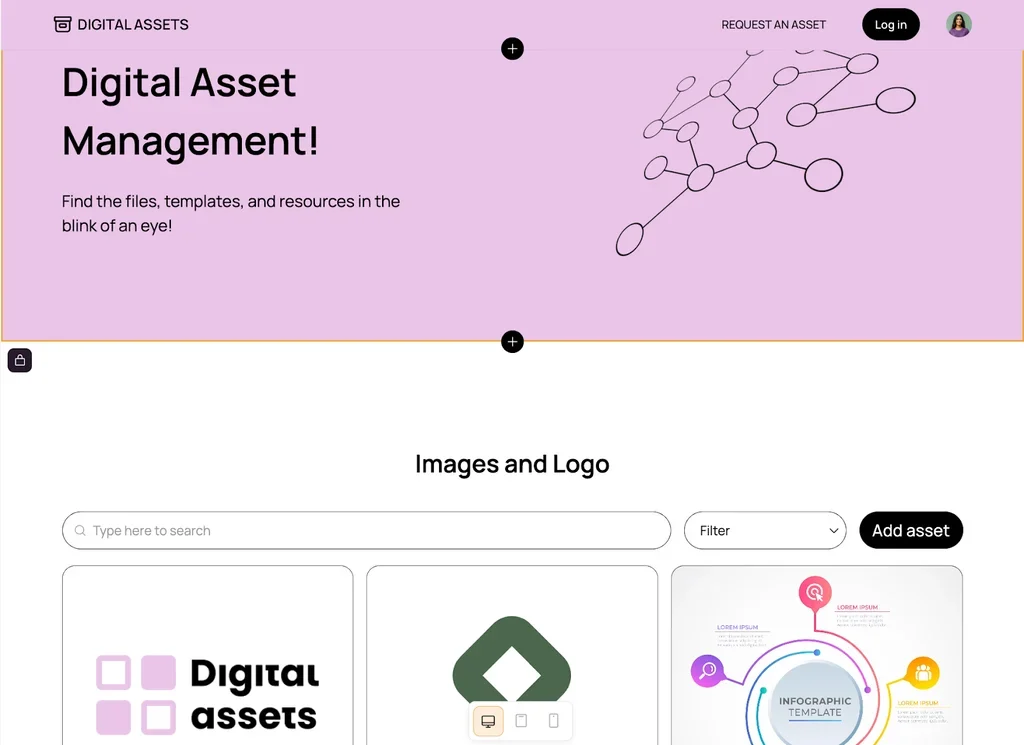
Softr’s asset portal offers a polished, public-facing gallery that makes it easy to browse, request, and access visual content. With its vibrant design and built-in search and filter tools, it’s ideal for organizations that need to showcase digital assets like logos, templates, or brand visuals to external audiences.
Why I like Softr‘s template
I recommend Softr for its visual-first design and intuitive navigation ideal for user-friendly asset showcases. Softr makes it easy for external users to browse, search, and access assets without requiring guidance or training.
Unlike more internal-facing tools, Softr is built to showcase assets, not just store them. This makes it particularly effective for organizations that want to create an effortless self-serve experience for partners, clients, or the public.
- Best for: Teams that need a public-facing or client-facing asset portal with strong visual presentation
- Trade-off: Less suited for internal workflow management or complex asset tracking compared to tools like Airtable or ClickUp
What to look for in a digital asset management template
Choosing the right digital asset management template can streamline your file organization and boost team productivity. But before you select one, consider these core features to ensure the template fits your workflow and asset-tracking needs.
- Ease of use and setup: Pick a template that’s easy to use so your team can quickly learn and implement it, one that requires minimal setup and provides quick access to the features you need most.
- Asset categorization and tagging: Make sure your template supports detailed tagging and categorization. This keeps your files organized and easy to search, even as your library grows.
- Approval and workflow management: Look for a template that includes built-in approval workflows to simplify team collaboration. Status tracking also helps prevent delays and keeps everyone aligned throughout the project.
- Dashboard reporting: Select a template that allows you to easily view all assets attached to a project, including their lifespan, and provides a clear and comprehensible way to identify key data points.
- Version control: Choose a template with strong version control capabilities. This prevents asset duplication and ensures quick access to the most up-to-date file versions.
- Search and filter functionality: Teams with large asset libraries should prioritize templates with powerful search and filtering capabilities. Advanced filters help narrow down results quickly based on file type, project, or custom tags.
- Integrations with existing tools: Look for a template that seamlessly integrates with your existing tech stack. Integration ensures smoother workflows and reduces app switching.
Read next: Top Free Project Plan Templates