

























Six years of managing marketing campaigns across different clients taught me that the workflow matters as much as the strategy. Marketing campaign templates have been the backbone of how I manage that workflow, particularly when the workload is heavy and there’s little room for error. Here are the ones I trust most and would recommend to anyone doing similar work.
- 1. monday.com – A visual and customizable workflow template
- 2. ClickUp – A fully editable campaign timeline view
- 3. Smartsheet – A grid-style layout for campaign coordination
- 4. Wrike – A folder structure for campaign tasks
- 5. Asana – A campaign tracker with milestones
- 6. Notion – A campaign wiki with task board
- 7. Airtable – A campaign database with analytics
- 8. Trello – A Kanban board
- 9. Jira – An Agile campaign workflow template
- 10. Miro – A whiteboard-style planner for brainstorming
- What to look for in a marketing campaign template
- FAQs
1. monday.com – A visual and customizable workflow template
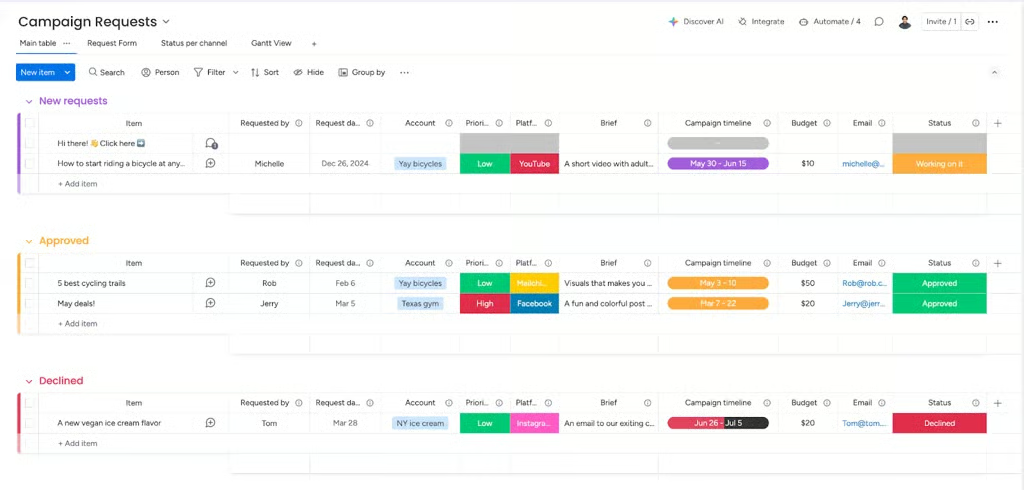
Easily manage every aspect of your marketing campaigns with this highly visual and customizable monday.com template. It’s structured around key campaign stages, including planning, production, execution, and review, using color-coded status columns, drag-and-drop tasks, and timeline tracking. With built-in automations and customizable fields, it’s perfect for simplifying campaign workflows and keeping stakeholders aligned.
This template works especially well for marketing teams managing multi-stage campaigns across departments. It’s a strong fit for product launches with multiple moving parts — like coordinating content, design, and paid media — as well as multi-channel campaigns that span email, social, and advertising. It’s also useful for teams running ongoing campaign calendars, where having clear visibility into progress, timelines, and bottlenecks is key to staying on track.
Why I like monday.com’s template
Among project management platforms, monday.com shines when it comes to visibility, structure, and customization. It enables you to customize workspaces, boards, and individual items to suit specific needs. What I especially like about this template is how its visual layout makes it easy to spot bottlenecks or overdue items in real time. I also appreciate how it allows users to customize automations and set up triggers that better fit their workflow.
Combined with third-party app integrations, monday.com’s template is a smart choice for teams looking to scale their campaigns with more consistency and less confusion.
2. ClickUp – A fully editable campaign timeline view
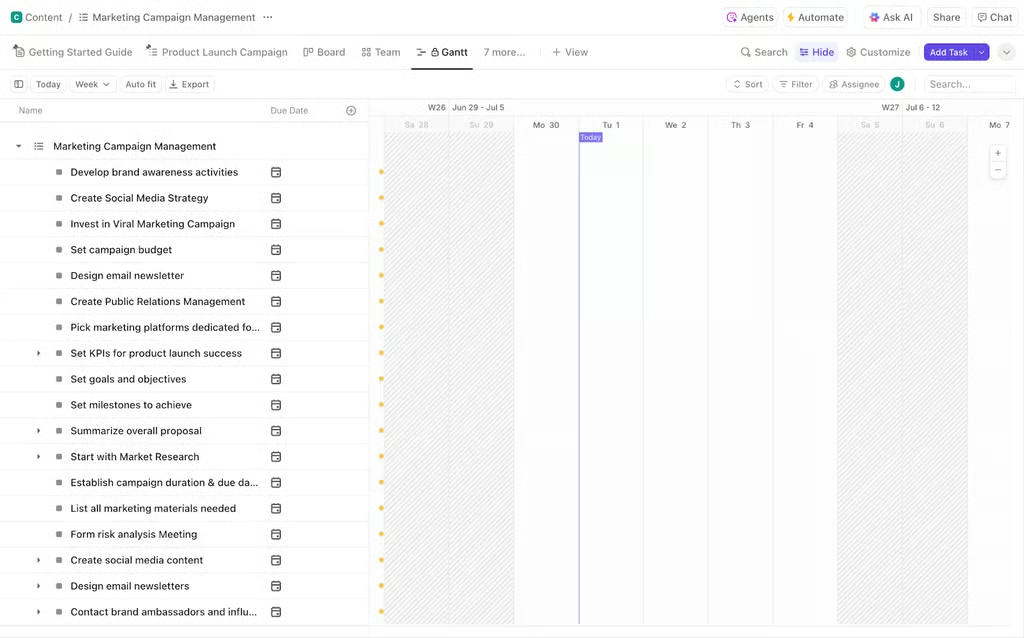
Get a head start on campaign planning with ClickUp’s robust marketing template. It comes with pre-filled tasks, campaign stages, and timelines built into multiple views, including list, board, and Gantt. You’ll also find fields for campaign goals, creative assets, and team assignments, making it easy to align strategy with execution.
This template is a great fit for teams that need to move quickly but still want structure. It works particularly well for campaign planning that involves tight timelines, multiple deliverables, and cross-functional collaboration. If you’re managing a campaign with clearly defined stages, ClickUp helps you map everything out in detail while still giving you the flexibility to adjust as priorities shift.
Why I like ClickUp’s template
ClickUp’s template packs a lot of detail without feeling overwhelming. I particularly love how flexible the layout is. You can toggle between views depending on your style, and the pre-loaded tasks offer a great baseline for marketing teams that need to move fast.
3. Smartsheet – A grid-style layout for campaign coordination
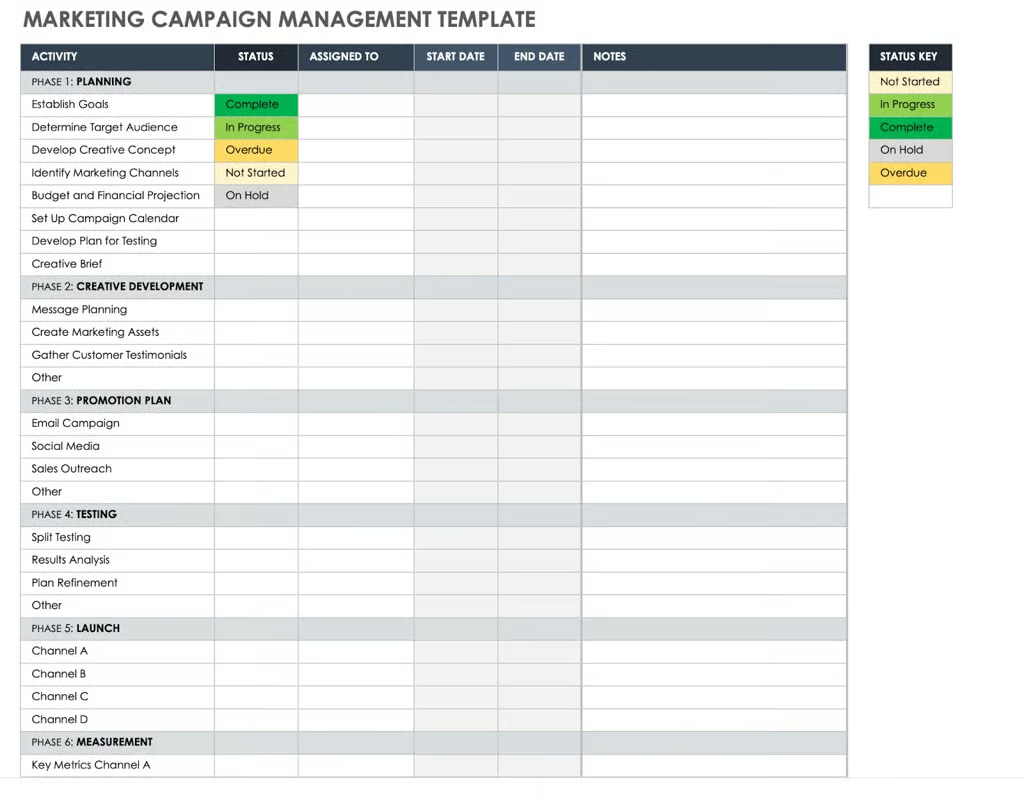
This Smartsheet marketing campaign management template offers a familiar grid-style layout that organizes your campaign tasks, timelines, and team responsibilities in a structured, shareable format. Built-in filters allow you to sort by campaign phase, owner, or status, making it easy to track progress at every stage.
This template is especially useful for teams that are comfortable working in spreadsheets but need more structure and visibility as campaigns grow. If your workflow relies on detailed task lists, reporting, or sharing updates with stakeholders, Smartsheet provides a familiar environment while adding the flexibility needed to manage more complex marketing efforts.
Why I like Smartsheet’s template
If you’re used to spreadsheets but need more functionality, this template hits the sweet spot. I like how Smartsheet combines structure and flexibility that are perfect for marketing managers who want the control of Excel and the power of a feature-rich marketing project management tool.
4. Wrike – A folder structure for campaign tasks
Wrike’s marketing campaign template breaks campaigns into folders by phase, from planning and execution to optimization, making it easier to manage large, complex initiatives. Each task includes due dates, assignees, and dependencies, with reporting features that track campaign performance.
This structure works especially well for larger campaigns that need clear organization from the start. For example, if you’re running a multi-channel campaign with separate workstreams for content, design, and paid media, Wrike’s folder system helps keep each phase and function neatly separated but still connected.
It’s also a strong fit for long-term or high-stakes initiatives, like product launches or brand campaigns, where visibility across phases and detailed tracking are critical to staying on schedule.
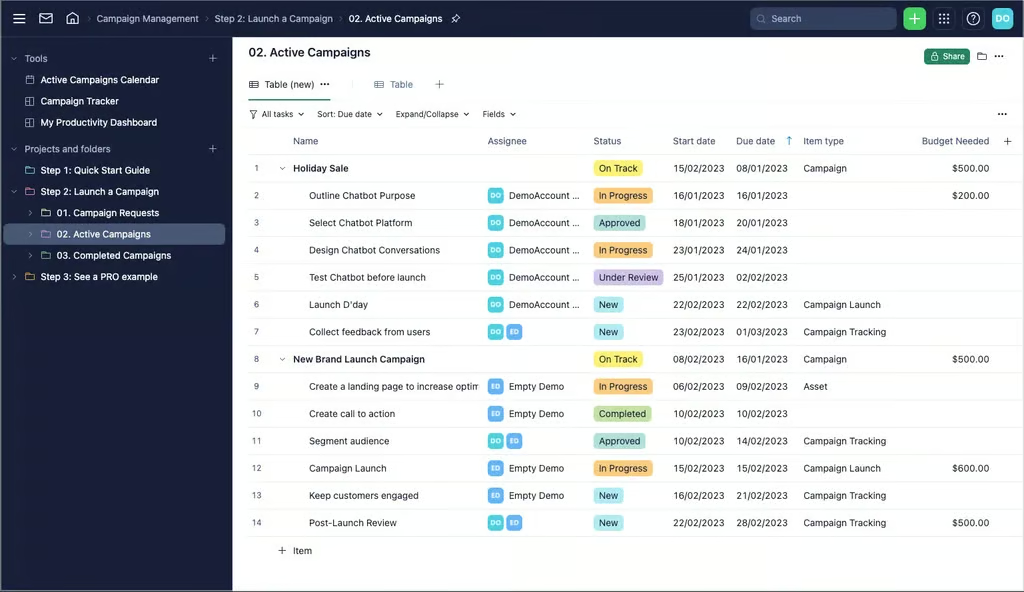
I love how organized this template is right out of the box. The folder setup provides you with a bird’s-eye view of your campaign and allows you to drill down into details with a single click. It’s a strong pick for teams running multi-channel or high-stakes campaigns.
5. Asana – A campaign tracker with milestones
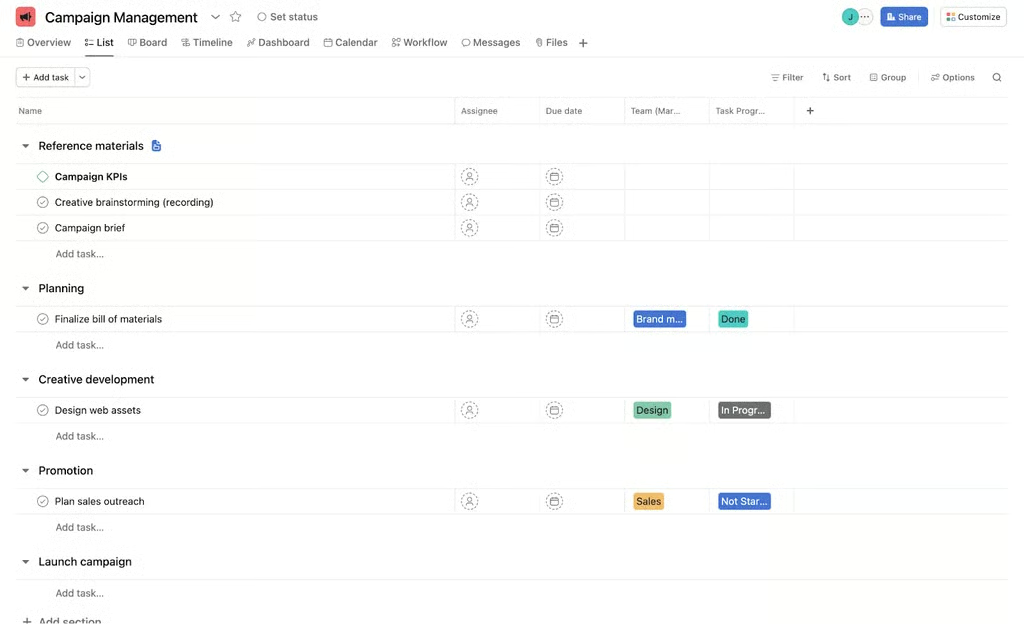
This Asana template guides your team through each stage of a campaign with task dependencies, timelines, and visual progress bars. You’ll find sections for creative briefs, production schedules, launch tasks, and post-campaign analysis.
This template is well-suited for teams that need a clear, step-by-step structure to move campaigns from planning to launch without missing key dependencies. For example, if you’re coordinating a campaign that involves content creation, design approvals, and scheduled releases, Asana helps map out each step so nothing falls through the cracks.
It’s also a strong fit for product launches or seasonal promotions, where staying on schedule and tracking progress against milestones is critical.
Why I like Asana’s template
Asana’s strength is in clarity. I like how this template clearly maps out dependencies so you can prevent delays and finish the campaign smoothly and on schedule. It also features a timeline view to guide the team through each stage of the campaign, as well as milestones that mark significant project checkpoints, showing where you stand in terms of progress and completion. For marketing leads who need to manage moving parts across content, design, and strategy, this template is a reliable foundation.
6. Notion – A campaign wiki with task board
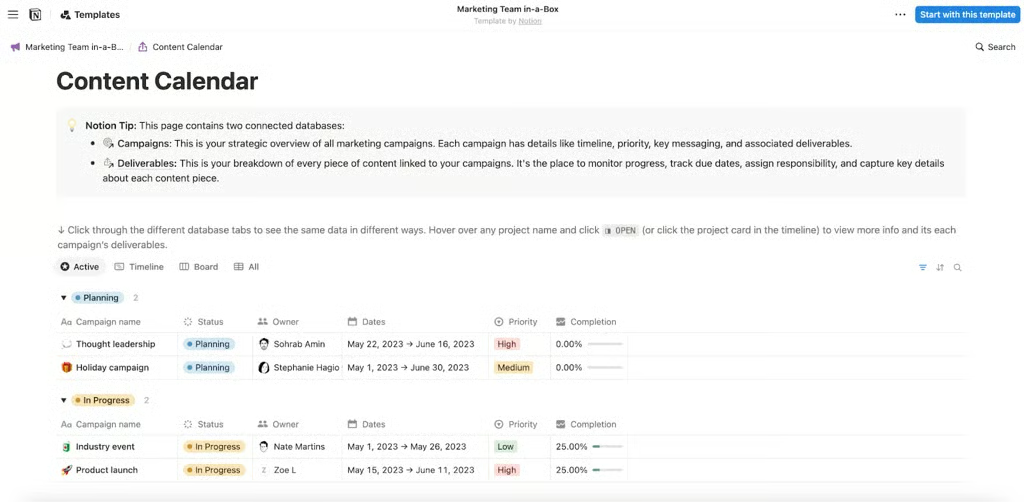
Notion’s Marketing Team in-a-Box marketing campaign template combines Kanban boards, calendars, and editable docs in one place. Use it to store creative briefs, monitor deadlines, assign tasks, and track deliverables, all in a customizable and shareable layout.
This template is most useful for content-heavy campaigns where information needs to live in one place. For example, if you’re managing a campaign that involves creative briefs, copy drafts, and collaboration between writers, designers, and strategists, Notion allows you to centralize everything in a single workspace.
Why I like Notion’s template
Notion’s template is a great fit for content-heavy campaigns. We like how everything, like docs, plans, and to-do lists, lives in a single space. It makes collaboration between strategists, writers, and designers seamless, and you can easily adapt it to match your workflow.
7. Airtable – A campaign database with analytics
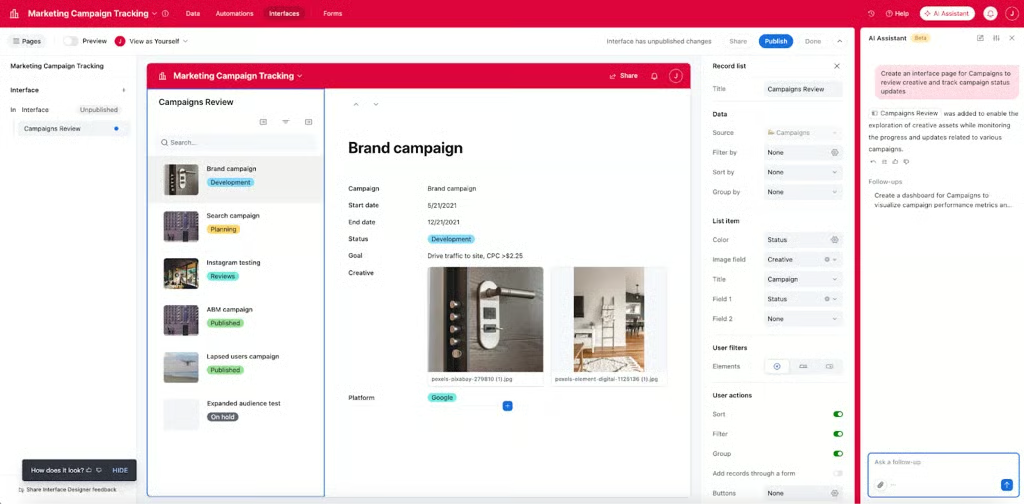
This Airtable template lets you manage campaigns like a database. Track assets, due dates, owners, budgets, and goals across multiple views including grid, kanban, calendar, and gallery. With customizable fields and real-time filtering, it’s designed for speed and scalability.
This Airtable template lets you manage campaigns like a database, which is useful for teams handling large volumes of assets and data. For example, if you’re tracking multiple campaigns with different creatives, budgets, and performance metrics, Airtable allows you to organize everything in one place while viewing it from different angles, whether that’s a calendar for deadlines or a Kanban board for workflow.
Why I like Airtable’s template
I like how this template turns marketing into a system. It’s especially useful if you’re juggling multiple projects or need to manage creatives and metrics in one place. It’s one of the most flexible options for detail-oriented PMs.
8. Trello – A Kanban board
Trello’s kanban-style campaign board uses columns like “Planning,” “In Progress,” and “Launched” to help teams track campaign status with ease. Cards include task descriptions, attachments, and checklists, and the drag-and-drop format makes updates a breeze.
This template is a great fit for smaller teams or straightforward campaigns that don’t require complex workflows. For example, if you’re managing a content calendar or a single-channel campaign like social media or email, Trello keeps everything visible and easy to update.
![Trello’s board keeps campaign phases clear and easy to followWhy I like Trello’s template
This is a lightweight but effective option. I like how simple it is to set up and use — perfect for smaller teams or marketers looking to get started without overcomplicating things. Plus, the visual board keeps everyone on the same page.
[Visit Trello]
9. Jira – Agile campaign workflow with epics and sprints
Jira’s marketing template brings agile framework to campaign management. Break campaigns into epics, user stories, and tasks. Plan sprints, monitor team velocity, and use built-in reporting to track execution in real time.](https://cdn.project-management.com/af4a634a676710f41940cd96c30acde303286f756808f9cde76db67e811df2e7.webp)
Why I like Trello’s template
This is a lightweight but effective option. I like how simple it is to set up and use — perfect for smaller teams or marketers looking to get started without overcomplicating things. Plus, the visual board keeps everyone on the same page.
9. Jira – An Agile campaign workflow template
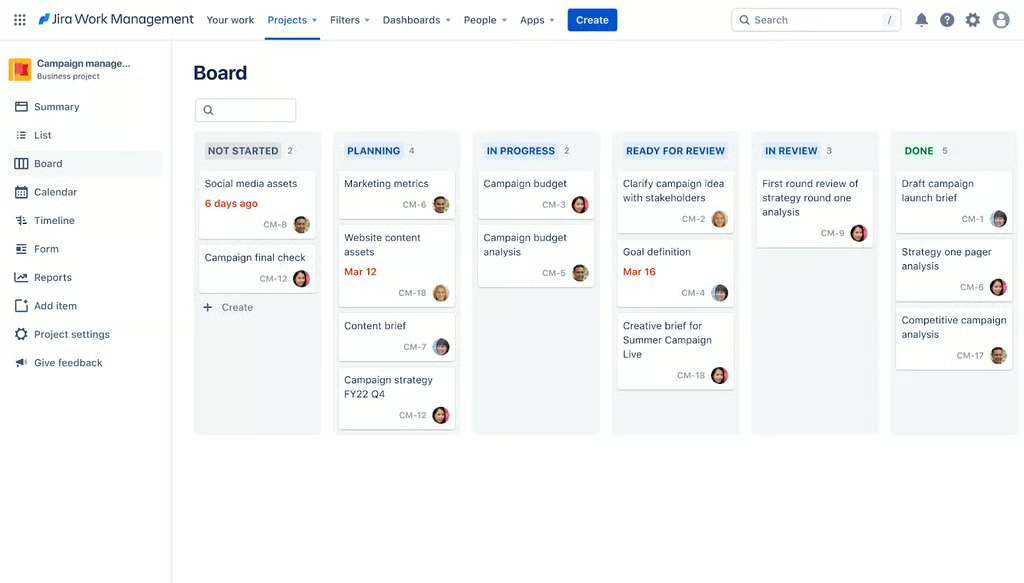
Jira’s marketing template brings agile framework to campaign management. Break campaigns into epics, user stories, and tasks. Plan sprints, monitor team velocity, and use built-in reporting to track execution in real time.
This template is best suited for teams that already operate in agile workflows. For example, if you’re running performance marketing campaigns that require constant testing, iteration, and optimization, Jira helps structure that work into manageable sprints with clear priorities.
Why I like Jira’s template
If your team already uses an agile methodology in your projects, this template is for you. I like how it encourages iteration, fast feedback, and accountability across marketing teams. It’s ideal for performance marketing teams that need to move quickly and continually improve.
10. Miro – A whiteboard-style planner for brainstorming
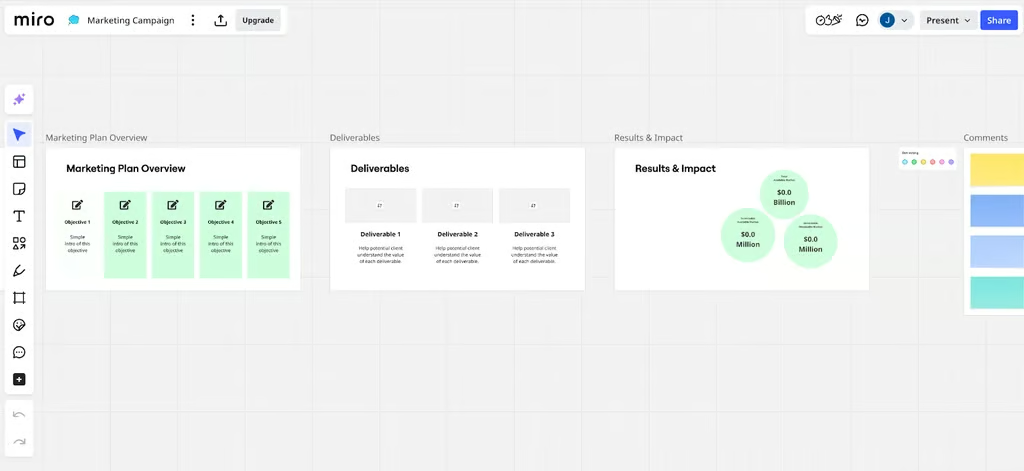
This marketing campaign template from Miro gives your team an infinite canvas for planning, perfect for projects that involve extensive work by multiple team members. Use sticky notes, flowcharts, and timeline blocks to map out strategies, team roles, and content calendars — all in a visual, collaborative space.
If you’re mapping out a new product launch or brainstorming a multi-channel strategy, Miro allows team members to collaborate in real time using sticky notes, flowcharts, and timelines. It’s also a strong fit for workshops or planning sessions where ideas need to be explored, organized, and refined before being moved into a more structured project management tool.
Why I like Miro’s template
I love this for the early stages of campaign planning. Miro’s marketing campaign template provides a space for all parties involved in the campaign to contribute their ideas, exchange feedback, and give their insights into certain initiatives, which helps the team come up with a more robust plan and, ultimately, a well-executed and impactful marketing campaign. It’s particularly helpful for identifying gaps and aligning on direction early, so by the time you move into execution, you already have a clear and well-thought-out plan.
What to look for in a marketing campaign template
Before choosing a marketing campaign template, consider how your team works, the scale of your campaigns, and your existing tool stack. The best template should support the type of campaigns you run, from simple content promotions to multi-channel launches.
- Timelines and milestones: Templates with timelines, calendars, or Gantt charts help map out start dates, milestones, and final deliverables. These features make it easier to track dependencies and avoid last-minute conflicts.
- Team collaboration tools: Look for templates that support task assignments, commenting, file attachments, and shared feedback so everyone works from the same source. This matters most when multiple team members or departments are contributing to the same campaign.
- Customization options: The template should let you adjust fields, rename labels, and add details like budgets, channels, or audience segments.
- Automations: Automations handle repetitive tasks like status updates and deadline reminders, freeing your team to focus on higher-priority work. They also keep campaign steps consistent from one project to the next.
- Progress tracking tools: Templates with dashboards, Kanban boards, or Gantt views show what’s on track, what’s overdue, and what needs attention. This is especially useful when reporting to stakeholders or running several campaigns at once.
- Pre-filled sections or examples: Templates with sample tasks, campaign briefs, or example goals reduce setup time and give you enough to start a plan without building everything from scratch.
FAQs
Which marketing campaign template is the best?
The best template depends on how your team operates. Smaller teams or simple campaigns often benefit from visual, easy-to-use tools like Trello or Notion. Larger teams running complex, multi-channel campaigns may need more structured platforms like monday.com, Asana, or Wrike, which offer timelines, dependencies, and advanced reporting.
What features should a marketing campaign template include to actually improve results?
A strong campaign template should go beyond task tracking. Look for features like built-in timelines, clear ownership, collaboration tools, and progress tracking. Templates that include automations, reporting dashboards, and pre-filled workflows can also help reduce manual work and improve campaign consistency.
When should I use a marketing campaign template vs. building a plan from scratch?
Using a template is ideal when you want to save time and standardize your process, especially for repeatable campaigns like product launches or content calendars. Building from scratch makes more sense for highly unique or experimental campaigns where your workflow isn’t yet defined.