

























Resource management is essential to ensuring your team’s workload is properly managed and that work can continue as efficiently as possible.
Kantata is our top pick for teams that need an all-around resource management solution with forecasting, workload planning, and professional services tools. Smartsheet is better for portfolio-level visibility across projects, while Resource Guru is best for scheduling people, rooms, equipment, and other shared resources.
| Our Pick | Best For | Pricing Starts At |
|---|---|---|
| Visit Kantata | Best All-Around Resource Management Solution | Contact sales for pricing informationLearn more |
| Visit Smartsheet | Best for Portfolio Resource Management | Free trial • Paid plans starting at $9 per user/month*Learn more |
| Visit ClickUp | Best for Teams Managing Freelancers | Free tier • Paid plans starting at $7 per user/month*Learn more |
| Visit Toggl Focus (formerly Toggl Plan) | Best for Collaborative Resource Management | Free tier • Paid plans starting at $9 per user/month*Learn more |
| Visit Resource Guru | Best for Resource Scheduling | Free trial • Paid plans starting at $4.16 per user/month*Learn more |
*Indicates pricing when paid yearly
- How I chose the best resource management software
- Kantata: Best all-around resource management solution
- Resource Management by Smartsheet: Best for portfolio resource management
- ClickUp: Best for teams managing freelancers
- Toggl Focus (formerly Toggl Plan): Best for collaborative resource management
- Resource Guru: Best for resource scheduling
- How to choose the best resource management software for your team
- FAQs
How I chose the best resource management software
I evaluated resource management software based on the features teams need to plan capacity, assign work, and keep projects moving without overloading people or shared resources. I prioritized tools with strong resource planning, workload visibility, scheduling, reporting, integrations, ease of use, pricing transparency, and positive user feedback. I also looked at how well each platform supports different resource management needs.
Kantata: Best all-around resource management solution

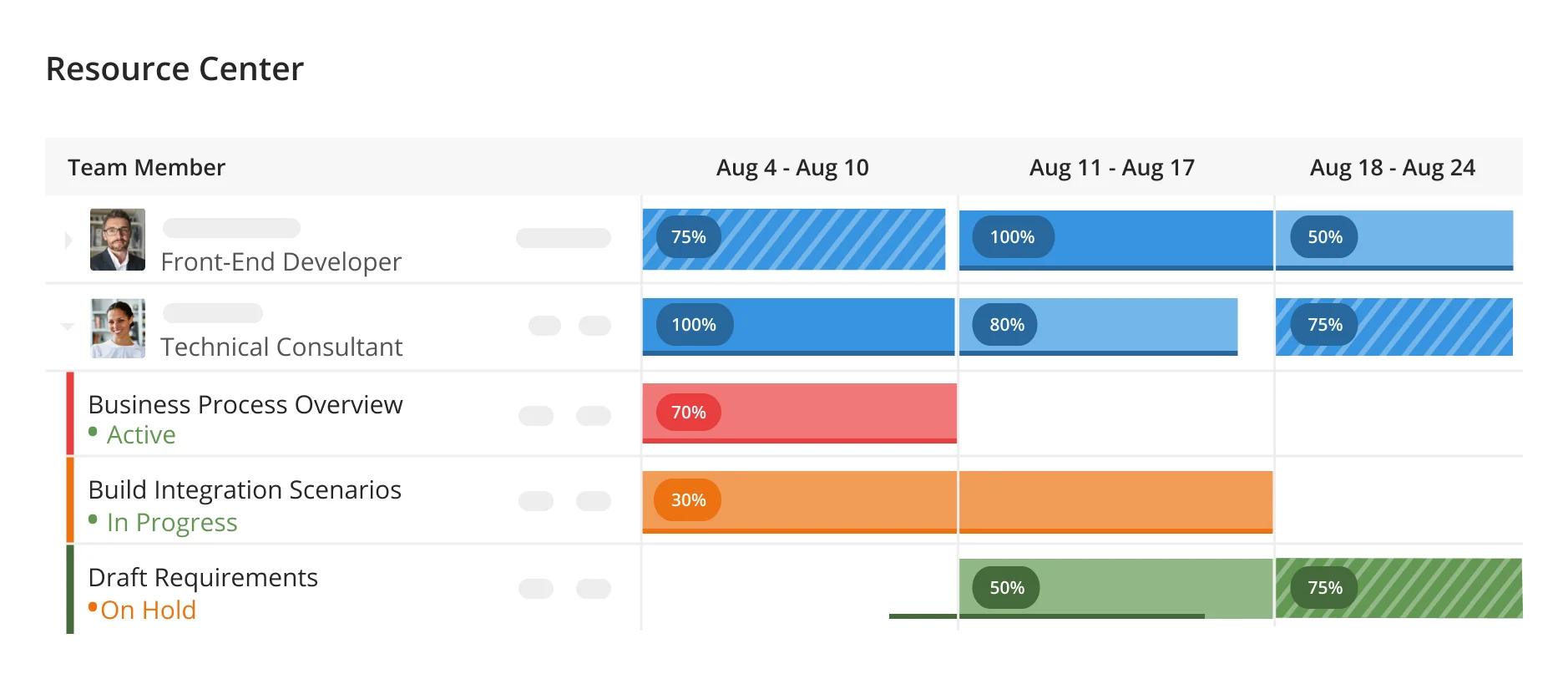
Kantata pulls together some of the best features of our top picks into one easy-to-use solution. As a professional services cloud, Kantata offers much more than just robust resource management features, with functionality that supports project management, project planning, financial management, team collaboration, and more.
Read more: Our full review of Kantata
With numerous integration options, automations, and organization-wide real-time data insights and dashboards, Kantata stands out as the top choice for all-in-one resource management. Despite offering advanced features, Kantata is an approachable option even for less experienced users, with a streamlined interface and a dashboard you can build with drag-and-drop editing.
Key Features
Resource dashboards and forecasting: Resource dashboards compile real-time data about where and how resources are being allocated, helping you stay on top of resource tracking while avoiding overruns.
Skills Inventory: The skills inventory feature highlights each team member’s unique skillset and capacity for taking on new work, making it easy to find the right person for each task while keeping workloads manageable.
External Talent Management: External talent tracking makes it easy to add freelancers and independent contractors to your talent database, with the ability to track their skills, calendars, rates, and more.
Pros & Cons
| Pros | Cons |
|---|---|
| • Convenient resource dashboard views: Comprehensive resource dashboard views with forecasting predictions make it easy to visualize how resources are being allocated. • Budget capabilities: Kantata includes budgeting capabilities that link with project data, predicting potential overruns before they happen. • On-the-go time tracking: Teams can record timesheets and track time instantly in the desktop app or on the go from the mobile app. | • Excessive emails: Many users report excessive notifications and emails from the application, which can be inconvenient and distracting. • Learning curve: The learning curve can be extreme due to numerous, in-depth features. • No free trial: Currently, Kantata does not offer any type of free trial, which can be intimidating for users who are making the leap to a new solution. |
Pricing
Kantata does not disclose pricing publicly. To get a quote, you’ll need to fill out a form on Kantata’s website.
Why I picked Kantata
Kantata is a stand-out choice for teams who have a wide range of business management needs, while still focusing on resource management. Unfortunately, Kantata is not transparent about its pricing, but users can still get a tremendous amount of value out of the extensive feature set. With drag-and-drop functionality available when editing dashboards, Kantata is also an easy-to-use option for teams, regardless of their previous experience with resource management software.
Resource Management by Smartsheet: Best for portfolio resource management

While Smartsheet is most commonly known for its project management software, it offers a resource management-specific solution that pairs effortlessly with Smartsheet project management.
Read more: Read our full review of Smartsheet
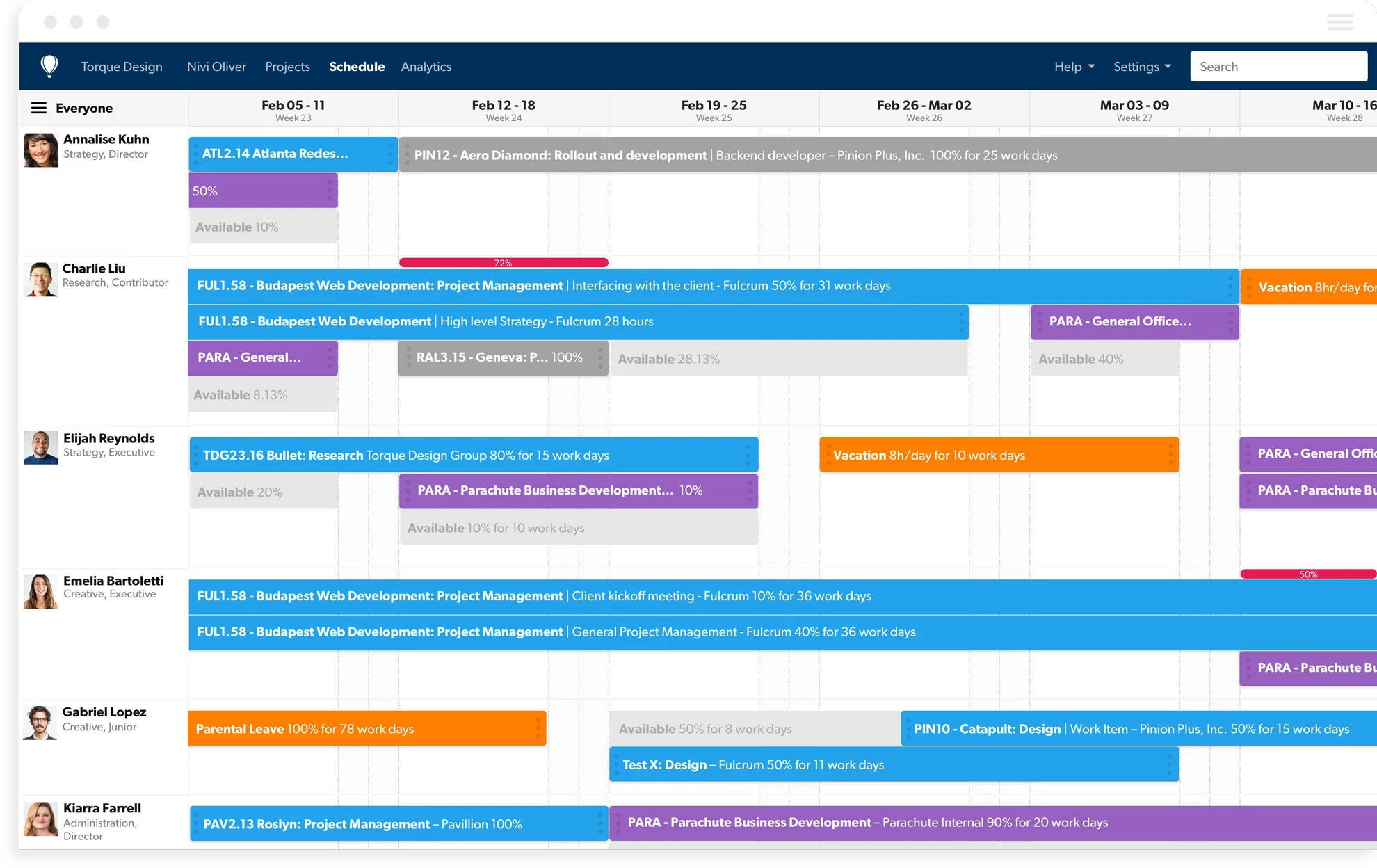
Specifically, Smartsheet for resource management stands out as a top choice for large organizations that are managing a portfolio of projects, thanks to dynamic reporting features, built-in time tracking capabilities, and resource tracking that highlights data trends on a variety of levels, from an organizational view all the way down to unique team members.
Key Features
Team member segmenting: Within Smartsheet for resource management, users can silo individual users into categories based on their talents, department, area of expertise, and current availability – making it easier to manage the entire portfolio of resources in larger organizations.
Smartsheet data connectors: For teams already utilizing Smartsheet for project planning needs, that data can connect directly to Smartsheet for resource management, enabling teams to see who’s been assigned to each project, select the best talent for each deliverable, and keep essential files close for easy reference.
Forecasting and reporting: Forecast capacity, utilization, and project staffing needs using Resource Management reports and planning views.
Pros & Cons
| Pros | Cons |
|---|---|
| • Predictive resource trends: Predictive analytics help prevent surprises and bottlenecks with resource management, providing transparency about team workloads. • Export options: Users who need to take information offline can easily export project and dashboard data as a PDF and other ready-to-export formats. • Template options: Smartsheet offers a wide variety of templates that can make setup easier and help streamline workflows. | • Slow application response: Users, particularly larger teams, report slow load times and sluggish app responsiveness. • Integration limitations: Compared to other vendors, Smartsheet’s 3rd party integrations are limited, with most options requiring a paid Zapier subscription. • Functionality: Other vendors may provide more robust functionality compared to Smartsheet, which can be limited in comparison. |
Pricing
Smartsheet’s resource management feature is available as an add-on to its Business and Enterprise plans. The Business plan starts at $19 per member, per month when billed annually, and requires at least three members. It also includes unlimited guests and contributors.
The Enterprise plan uses custom pricing and requires at least 10 members. It is designed for organizations that need complex solutions, company-wide security, and advanced controls.
Why I picked Resource Management by Smartsheet
Compared to other options, Smartsheet offers users a wide range of flexibility when it comes to tackling resource management, with Smartsheet’s internal integration with project management features and individual team member segmentation standing out as top features. Smartsheet is a great option for larger teams who want the expansive project management functionality offered by choices such as Kantata, in a solution with a more focused set of features pertaining to resource management.
ClickUp: Best for teams managing freelancers

Transparency is the name of the game when it comes to effective resource management, and ClickUp excels at providing teams with multiple ways to visualize resource status in real-time. For teams relying heavily on freelancers and independent contractors, ClickUp provides increased visibility into individual users’ activities and status, thanks to individual user workload profiles.
Read more: Read our full review of ClickUp
Built-in timers for instant time tracking and customizable fields that log freelancer pricing help ClickUp stand out as a top choice for teams who need resource management solutions geared toward 3rd party contractors and internal staff alike.
Key Features
Built-in time tracking: Customizable project fields, including in-app time tracking, make it easy for each individual team member to track their time and attribute it to specific tasks, ensuring data is up to date and never lost in the shuffle of the day-to-day.
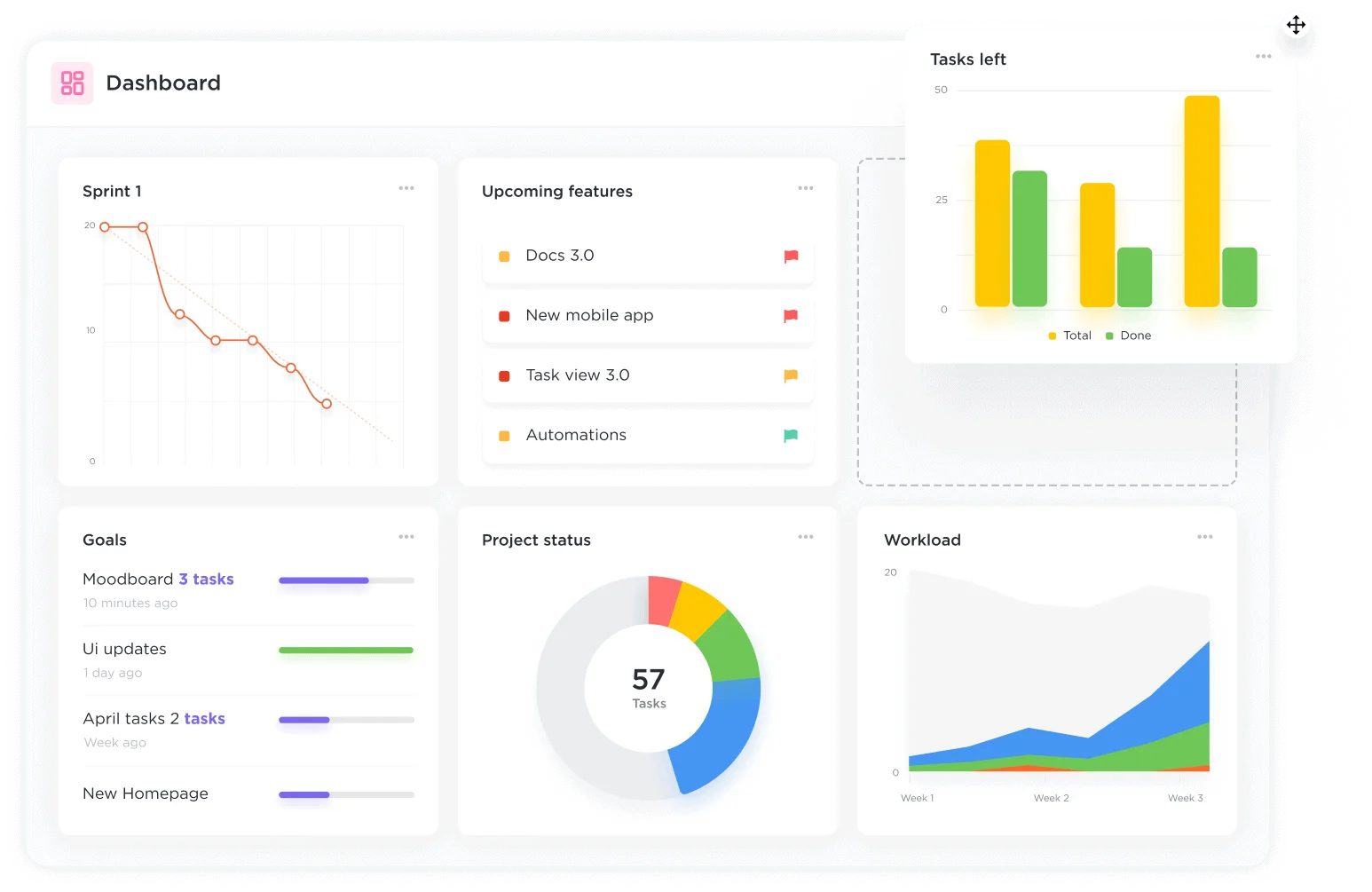
Team and individual views: Flexible view options allow teams to visualize each unique team’s workload capacity per department while also zooming in for a closer look at each individual’s workload and expected time to task completion.
Workload analytics: Data insights through the dashboards feature simplify datasets across your organization and at a more granular level within each department and team, allowing you to track resource trends over time and predict potential roadblocks or bottlenecks.
Pros & Cons
| Pros | Cons |
|---|---|
| • Chat collaboration: ClickUp offers a real-time chat feature, which can help teams collaborate about updates faster without leaving the application. • Workload visualization: The workload view syncs up seamlessly with the timeline view to highlight areas of high resource usage and areas where more resources can be expended. • Tasks per user: Segment and highlight individual workload views and assignee-level workload filtering for a predetermined period, gaining valuable insights into team resource availability. | • Slow reporting times: Generating reports can be time-consuming and inconvenient. • Mobile app limitations: Compared to the desktop version, the mobile version of ClickUp lacks full functionality and can be difficult to use. • Features vary by subscription type: Native time tracking and resource management are listed on the Unlimited plan and higher. |
Pricing
ClickUp’s resource management features are available on the Unlimited plan and higher.
- Unlimited: $7 per user, per month when billed yearly.
- Business: $12 per user, per month when billed yearly.
- Enterprise: Contact sales.
Why I picked ClickUp
Compared to other solutions, ClickUp’s ability to highlight each user’s estimated time to task completion, depict team workloads overall, and include built-in customizable fields that add flexibility help it stand out as a top choice for teams who rely on external collaboration. ClickUp’s reputation as a highly customizable solution can also help provide additional room for essential details that external assets may require, from project documents to operational notes, and more.
Toggl Focus (formerly Toggl Plan): Best for collaborative resource management

Toggl Focus (formerly Toggl Plan) aims to give users the best of both worlds by focusing on resource and project management together through task and workload visualizations. Pop-out task details give Toggl Focus users room to provide essential information about resource utilization while tagging team members to keep everyone in the loop.
Read more: Our full review of Toggl Focus
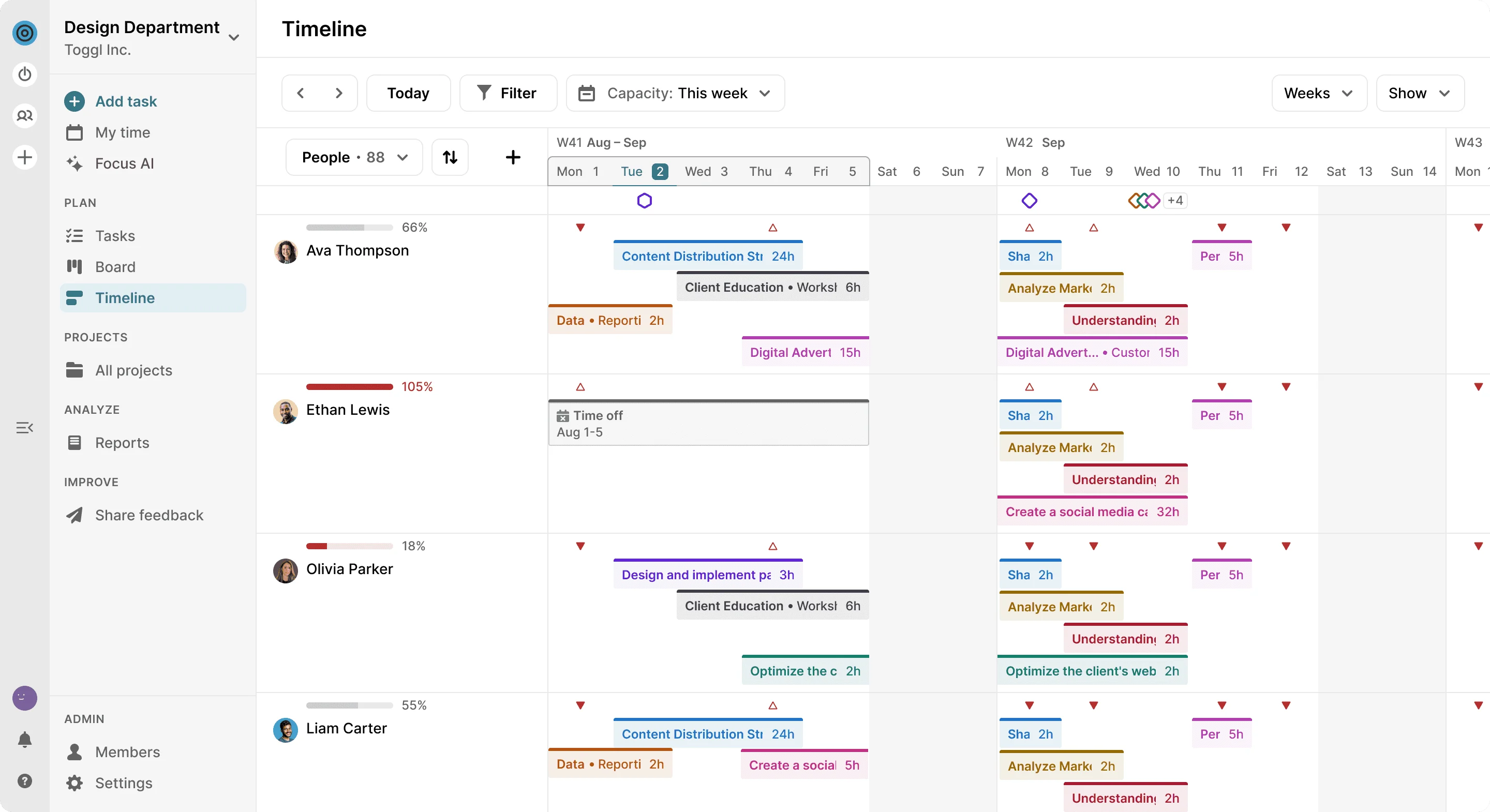
Individualized tags for each department help users quickly visualize where resources are concentrated, while team-wide schedule views help eliminate schedule overruns.
Key Features
Drag-and-drop workload adjustments: Rearrange and move assignments to reallocate resources easily by dragging and dropping them across the team calendar.
Direct update sharing: Working with external stakeholders who need updates on how resources are being managed? Share guest access (with customizable access permissions) directly from within Toggl Plan.
Seamless mobile app usability: Toggl Focus is one of the few solutions on the market today that offers full functionality within the mobile application, making it easy to make adjustments and receive updates on the go.
Pros & Cons
| Pros | Cons |
|---|---|
| • Integration with Toggl products: Other Toggl products, such as Toggle Track and Toggl Hire, integrate easily with the Toggl Focus interface, syncing essential data about team resource usage, task timing data, and more. • Team member search: If you need to fill a role quickly, you can search Toggl Focus for team members who have specific skills and open availability. • Responsive mobile application: Many users note the responsiveness of Toggl Focus’ mobile app, with a comparable experience to the desktop app. | • Limited export options: Data export options are limited; users can only export information is csv format. • Bulk action limitations: When making edits across numerous projects or groups of users, responsiveness can be limited, leading to a slower experience. • Few integrations: Toggl Focus does not offer as many integration options as other vendors. |
Pricing
- Free: $0 for up to 5 users.
- Start: $9 per user, per month when billed yearly.
- Premium: $20 per user, per month when billed yearly.
- Enterprise: Custom pricing.
Why I picked Toggl Focus
Toggl Focus offers users a high degree of flexibility when it comes to adjusting team schedules, managing resources, and visualizing projected workflows. However, what stands out about Toggl Focus against other top picks is its variety of collaborative features and highly functional mobile applications. Users who require a more collaborative resource management approach can benefit from customized team member notifications, team member tagging, in-depth pop-out task notes, and real-time notifications as changes are made.
Resource Guru: Best for resource scheduling

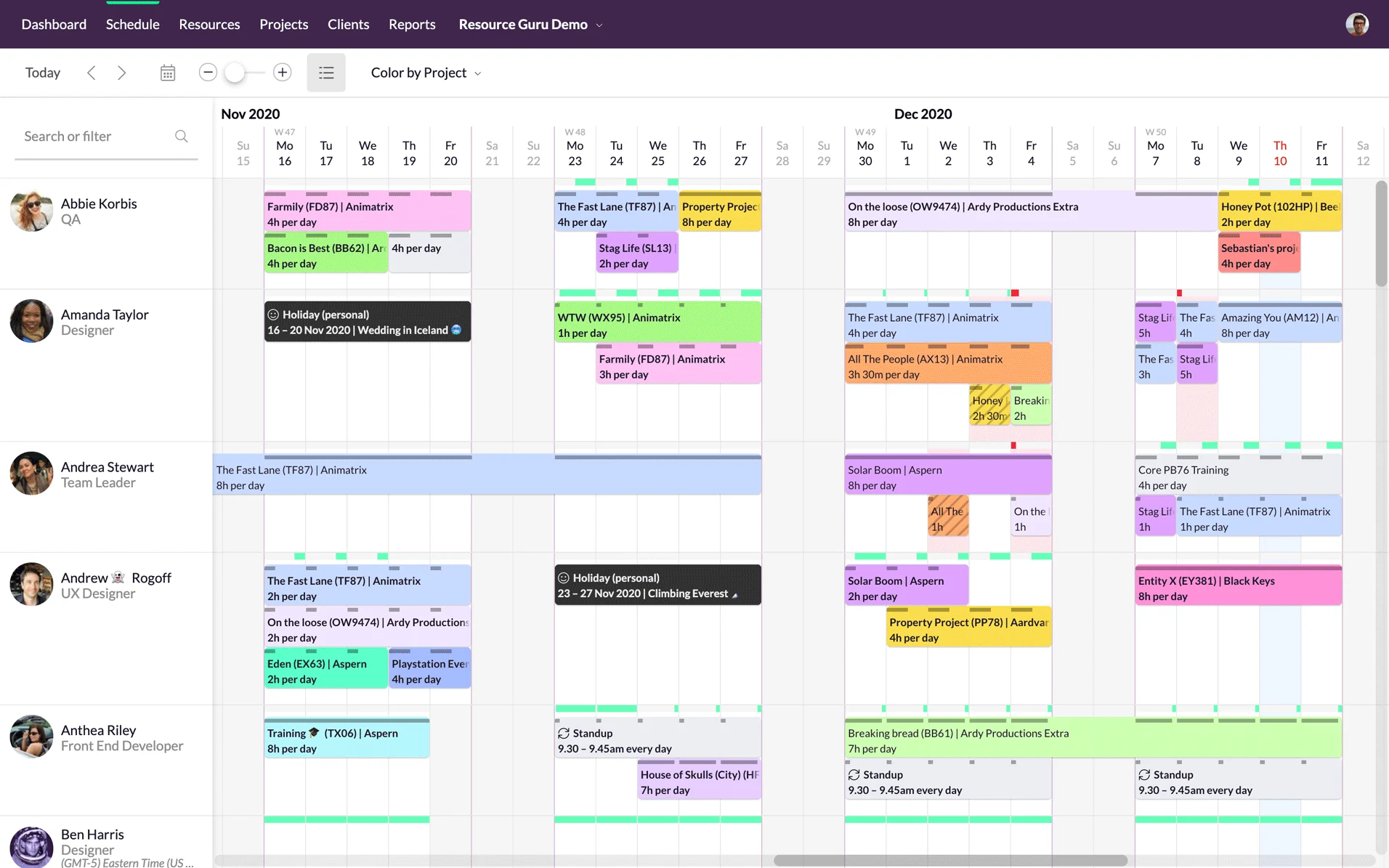
Resource Guru helps teams reimagine resource management through a feature-packed application with streamlined usability and a clean interface. Compared to other top choices, Resource Guru is unique in that it offers users the ability to manage a variety of resources, from scheduling conference rooms to booking equipment rentals.
Read more: Check out our full review of Resource Guru
Multiple team decision-makers can adjust resource schedules at once, making it easy for larger organizations to manage multiple resources at once without causing delays.
Key Features
Calendar integrations: Resource Guru integrates easily with Outlook and G-Cal so you can keep all of your essential data close to the applications you rely on most.
Booking approvals: Team managers can adjust settings to receive booking approvals for the most in-demand team members, freelancers, and team resources to keep a closer eye on when and how resources are allocated.
Personal dashboards and reports: Each team member can elect to receive daily schedule updates and reports, which can also be viewed at any time through the personalized dashboard feature.
Pros & Cons
| Pros | Cons |
|---|---|
| • Variety of resource management options: Resource Guru allows users to create individual tags for a variety of resources, including meeting rooms, company technology assets, and more. • Time-zone labels: Team members can easily view the time zone and working hours of colleagues with time zone labels for each user. • Work approvals: Work approval settings can help administrators limit changes and set resource limitations. | • Search functionality: Resource Guru’s search functionality is often limited, providing poorly matching search results. • Lack of integrations: Native integration options are limited, with a Zapier subscription required to access many integrations. • Limited project capabilities: Users who want to compare resource allocation to project details may need more extensive project management features than Resource Guru offers. |
Pricing
Resource Guru’s resource management tools start with its Grasshopper plan, which costs $4.16 per person, per month. Other resources cost $2.08 each per month. Resource Guru also offers a 30-day free trial on all its plans.
- Grasshopper: $4.16 per user, per month when billed yearly.
- Blackbelt: $6.65 per user, per month when billed yearly.
- Master: $10 per user, per month when billed yearly.
Why I picked Resource Guru
Overall, Resource Guru stands out as a top choice for teams who are scheduling a variety of resources, from internal and external staff to conference rooms, and material resources. With features such as workload predictions and personalized dashboards, teams are always a step ahead of the game and able to predict potential roadblocks before they happen. Moreover, time off planning helps keep internal and external staff aware of team member availability so that resources can be reallocated ahead of time.
How to choose the best resource management software for your team
The best resource management software works well with how your team plans, assigns, and tracks work. Use these steps to narrow down your options:
1. Identify your biggest resource management challenge.
Decide whether you need help with workload visibility, capacity planning, project forecasting, team scheduling, freelancer management, or shared resource booking. For example, an agency may need forecasting tools to see when designers are overbooked, while an operations team may need a shared calendar for rooms, equipment, and staff.
2. List your must-have features
Prioritize the tools your team will actually use, such as workload views, time tracking, availability calendars, reporting dashboards, integrations, and budget forecasting. For example, a team that bills clients by the hour should prioritize time tracking, while a project portfolio team may need reporting dashboards and capacity forecasts.
3. Review what is and isn’t working now
If you’re switching from another tool, note where your current process falls short. Look for recurring pain points, such as overbooked team members, unclear availability, manual scheduling, or limited reporting. If managers keep assigning work to people who are already at capacity, workload visibility should be a top priority.
4. Compare usability, pricing, and scalability
The best tool should fit your team’s budget and be easy enough for regular use. Also consider whether the software can support your team as your projects, headcount, or resource needs grow. A small team may only need basic scheduling now, but a growing firm may need portfolio reporting and advanced permissions later.
5. Use demos or free trials before committing
Test your top options with real workflows when possible. This helps you see whether the platform’s resource planning features, user experience, and reporting tools match how your team actually works. Try building next month’s schedule or assigning a real project during the trial to see where the tool saves time or creates friction.
FAQs
Project management and resource management are inherently tied together – and an imbalance or error in either area can have devastating blowback on the other. Project management relies on the proper allocation of resources to fuel project progress. Resource management relies on effective project management to ensure that resources are utilized in impactful and strategic ways.
Look for features that help you see who is available, who is overbooked, and how work is distributed across projects. Useful tools include workload views, capacity planning, resource calendars, time tracking, reporting dashboards, and integrations with your project management software.
Resource scheduling focuses on assigning people, rooms, equipment, or other resources to specific dates and times. Resource management is broader and includes planning capacity, forecasting demand, balancing workloads, tracking availability, and making sure resources are used efficiently across projects.
Small teams can benefit from resource management software if they manage multiple projects, shared resources, freelancers, or shifting workloads. Even a lightweight tool can help prevent overbooking, missed deadlines, and confusion about who is responsible for what.