

























Both monday.com and Airtable use familiar grid-style layouts to help teams organize projects and keep track of work. After using both platforms for years, I’ve found the main difference comes down to their focus: monday.com offers ready-to-use project tools, while Airtable has more flexibility to work with connected databases and build custom workflows. In this Airtable vs monday.com comparison, I’ll look at which one makes more sense for your team.
- Airtable vs monday compared
- What is monday.com?
- What is Airtable?
- monday vs Airtable: Pros & cons
- Pricing
- Project & task management
- Reporting & resource management
- Data management & customization
- Integrations
- Ease of use
- Airtable & monday.com alternatives
- monday.com vs Airtable: Which one should you choose?
- FAQs
Airtable vs monday compared


My rating
4.80 out of 5
4.20 out of 5
Best for
Projects that depend on connected datasets or custom business apps
Visual project tracking and ready-to-use work management tools
Starting price (billed annually)
Free plan; paid plans start at $20/user/mo
Free plan; paid plans start at $9/user/mo
Core approach
Database-based platform that connects records across tables
Grid-style boards centered on projects, tasks, and workflows
Customization
Extensive customization through linked records, custom fields, and formulas
Custom boards, columns, dashboards, templates, and workflows
Reporting
Custom interfaces can present project and operational data for different users
Dashboards provide visual reporting across project boards
Ease of use
More setup may be required when building databases and relationships
More approachable for teams accustomed to standard task and project boards
How I compared Airtable vs monday
I compared monday vs Airtable using a weighted scoring rubric based on the areas PM software buyers usually care about most. The review covered pricing, core features, usability, support, and overall value using official product information and third-party user feedback.
Pricing (20%): I compared free plans, starting prices, and what each paid tier includes. I compared free plans, starting prices, and what each paid tier includes. I also looked at whether standard project tools require a higher-priced plan or an add-on.
General features (25%): I evaluated the features teams use for daily project work, including task management, collaboration, project views, and scheduling. I also reviewed advanced planning tools, including dependencies, milestones, and critical path.
Advanced and niche features (20%): I looked at what each platform offers beyond standard project tracking. This included automation, forms, approvals, reporting, portfolio management, resource management, and AI features.
Ease of use (10%): I considered the usability of each platform for routine project work. I also reviewed how much setup is needed for workflows, schedules, and reporting.
Support (10%): I compared available support channels and self-service resources. I also looked at community help, security features, and data governance options.
Expert score (15%): I used my experience reviewing project management software to assess each platform’s overall value, feature coverage, and suitability for different project needs. I also considered user reviews and how each provider documents its features and plan limits.
Why you should trust Project-management.com
As a tech analyst for project management software, I have tested nearly 20 platforms over the past five years, and several have become part of my workflow. I have written dozens of buyer’s guides covering a wide range of use cases and company sizes, which gave me a broader understanding of what project teams need from these tools.

Senior Staff Writer for Project Management
Marianne Sison
What is monday.com?
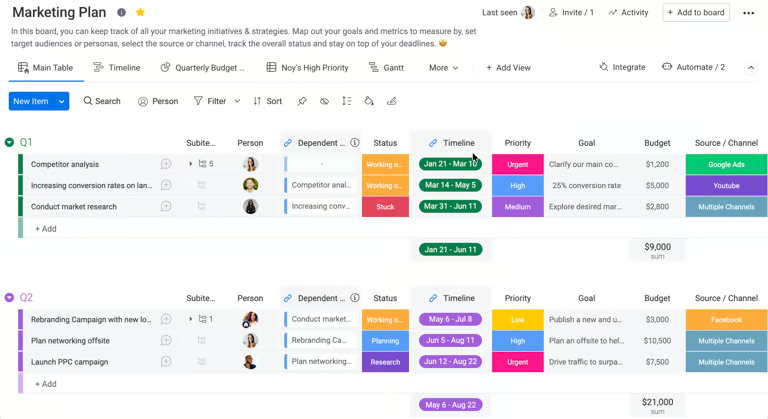
monday.com is an AI work management platform that helps teams plan projects, assign tasks, track progress, and automate routine workflows. Its grid-style interface lets users organize work with custom columns, multiple views, dashboards, and automations.
For project managers, monday.com works well if your team wants an easy way to see what’s happening across projects, who owns each task, and whether work is on schedule.
What is Airtable?
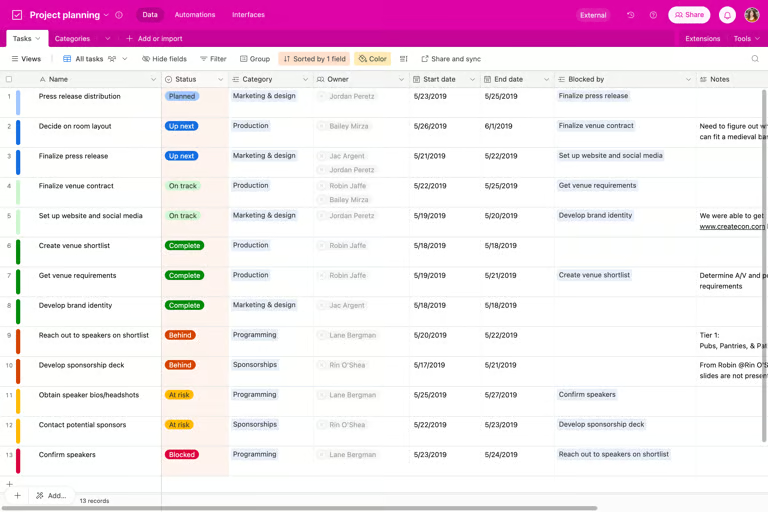
Airtable combines the familiarity of a spreadsheet with database features that help teams organize and connect project data. You can link related records across tables, create different views, and customize workflows for different work types.
This setup works when a project involves information that needs to connect across several areas, such as schedules, resources, clients, and deliverables.
monday vs Airtable: Pros & cons
| monday.com | Airtable |
|---|---|
| PROS | |
| • Visual interface makes project status easy to scan • Gantt, timeline, workload, and dashboard tools support project planning • Lower starting price than Airtable | • Linked records connect related project data across tables • Highly customizable for workflows with complex data • Gantt supports dependencies, milestones, and critical path |
| CONS | |
| • Automations and integrations require a higher-priced plan • More advanced reporting and time tracking require higher tiers • You may need to pay for extra seats to meet the minimum purchase requirement | • Paid plans start at a higher per-user price • Database concepts such as linked records can take more time to learn • Some project features require more setup |
Pricing
For most project teams, monday.com provides the better price-to-feature ratio. Airtable becomes the more compelling option when connected data and custom apps are central to the workflow and relatively few users need editing rights.
In terms of costs, monday.com is the easier buy than Airtable because it starts at a lower price and gives teams more affordable access to project planning tools and AI. Airtable requires a higher per-user investment to access advanced customization and data capabilities. Still, the higher cost can make sense when relational databases and app building are central to the workflow.
| monday | Airtable | |
|---|---|---|
| Free plan | Up to two seats | Up to five editors |
| Entry paid plan | $9/user/mo | $20/user/mo |
| Mid-tier plan | $12/seat/mo | $45/user/mo |
| Higher-paid plan | $19/seat/month | Custom enterprise pricing |
| AI pricing | Plans include monthly AI credits | Plans include monthly AI credits |
| Key cost consideration | Paid plans start at three seats | Higher per-user pricing for editors |
One thing to watch with monday.com is its minimum seat increments of three, five, and 10 seats. If you only need one or two paid accounts, you end up paying for unused seats. With Airtable’s paid plans, you pay for users with edit permissions, while read-only collaborators are free. This can work out better if a few people manage the workspace and everyone else mainly checks project data.
For AI access, monday.com includes monthly AI credits with each paid plan, starting at 1,000 credits on Basic and increasing on higher tiers. Airtable also includes monthly AI credits, with the option to buy more if the team uses up its allowance.
Project & task management
monday.com comes out ahead with its ready-to-use tools for organizing project activities, unlike Airtable, which requires more customization. You can break down tasks with multiple levels of subitems, assign owners, set priorities, and connect related work using four dependency types.
| monday.com | Airtable | |
|---|---|---|
| Best for | Planning and managing project work | Connecting tasks with related business data |
| Task hierarchy | Tasks with multiple levels of subitems | Records can represent tasks and connect related work |
| Task ownership | Assign owners to tasks and subitems | Assign collaborators through user fields |
| Dependencies | Four dependency types on higher tiers | Dependencies created through linked records |
| Milestones & critical path | Supported | Supported |
| Schedule changes | Adjusts dependent dates when schedules change | Can reschedule dependent tasks |
| Dependencies | Supports four dependency types on higher tiers | Links dependent tasks through records |
Airtable allows teams to build their own task layout with records, fields, and linked data. Linked records can create dependencies, while the Gantt chart adds milestones, critical path, and automatic rescheduling. It takes more setup than monday.com, but offers more flexibility when tasks need to connect with data such as clients, campaigns, or deliverables.
Reporting & resource management
While monday reports are easier to set up, Airtable offers more flexibility when workflows involve multiple data types, although building those relationships takes more planning upfront. monday Dashboards bring data from multiple boards into charts and reports, while the Workload view compares assignments with each person’s capacity. This makes it easier to spot overloaded team members and distribute tasks equally.
| monday | Airtable | |
|---|---|---|
| Dashboards | Pulls data from multiple boards into configurable dashboards | Creates custom dashboard interfaces from data stored in a base |
| Reporting | Charts, pivot reports, workload reports, and dashboard widgets | Charts, summary metrics, lists, timelines, and custom interfaces |
| Workload management | Compares assigned work against7645 team capacity | Tracks allocated hours against available hours |
| Resource planning | Manages workload across projects, with advanced portfolio tools | Uses configured fields and records to track resource allocation |
Airtable is more customizable for project reporting, but resource management takes more setup. Interface Designer supports dashboards with charts and summary metrics, while Timeline utilization compares allocated hours with available capacity. However, these tools rely on fields and records you configure first.
Data management & customization
Airtable offers more flexibility in how you manage and connect project data. You can create relationships between projects, clients, tasks, assets, and other data across tables, including one-to-one, one-to-many, and many-to-many relationships. Lookup and rollup fields pull or summarize related information, while formulas handle custom calculations and logic.
| Airtable | monday.com | |
|---|---|---|
| Data relationships | Linked records connect related information across tables | Connect Boards links items across boards |
| Data rollups | Lookup, rollup, and count fields summarize linked data | Mirror Columns display and aggregate information from connected boards |
| Custom calculations | Formula fields work across record data | Formula columns support calculations within boards |
| Custom interfaces | Interfaces can present related records and tailored workflows | Boards and dashboards can be customized with columns and widgets |
monday.com can also connect information across projects, but it uses a more straightforward board-based approach. Connect Boards connects related work stored on separate boards, while Mirror Columns bring selected information, such as status or budget, into one view.
Integrations
monday.com takes the lead with a broader selection of native integrations for workplace apps. Its App Marketplace supports popular tools such as Slack, Microsoft Teams, Gmail, Outlook, Jira, and Salesforce. For two-way data sharing, bidirectional integrations sync updates between monday.com and connected apps.
Airtable also supports integrations with tools such as Slack, Jira, Salesforce, Google Drive, and Tableau, but it focuses on bringing external data into Airtable. Sync integrations can pull information from other platforms into a base, though some connections sync in only one direction.
Ease of use
monday is easier to use for most project teams because its boards follow a familiar table-style setup. New users can start with templates, add owners and dates, and switch between views without building the underlying data model first. The interface also places project actions close to the board, so routine tasks such as updating statuses or checking timelines feel fairly straightforward.
Airtable takes more time to learn because much of its flexibility comes from how you build the database. Teams often need to decide which tables to create, how records should relate, and which fields or interfaces each workflow needs. Once configured, Airtable can be very intuitive for teams that rely on custom processes, but the initial setup is more involved.
Airtable & monday.com alternatives
If neither Airtable nor monday.com matches your project management needs, there are several alternatives worth considering. The options below cover teams that want more traditional project planning, client-focused work management, or lower-cost tools.
| Alternative | Best for | Starting price | Why consider it |
|---|---|---|---|
| ClickUp | Teams that want highly customizable project management | Free plan; $7/user/mo. | Offers tasks, docs, dashboards, goals, automations, and multiple project views in one platform |
| Wrike | Teams managing complex projects and client work | Free plan; $10/user/mo. | Provides advanced Gantt tools, request forms, proofing, workload management, and approval workflows |
| Zoho Projects | Teams managing billable or client-based projects | Free plan available $4/user/mo. | Includes task management, Gantt charts, time tracking, timesheets, and billing-related tools |
monday.com vs Airtable: Which one should you choose?
In this Airtable vs monday.com comparison, monday is the better pick if you want a ready-to-use project management app with minimal setup. Its strengths are task management, scheduling, reporting, resource management, and integrations. Airtable makes more sense when your work revolves around connected data, and you want to customize how information is stored, related, and presented.
Choose monday.com if:
- You want to start managing projects without building the workspace from scratch.
- You need built-in tools for tasks, dependencies, schedules, and workloads.
- You manage several projects and need dashboards to monitor progress and team capacity.
- You want a larger selection of ready-made integrations with workplace apps.
Choose Airtable if:
- Your projects involve several types of related data, such as clients, assets, and deliverables.
- You want more control over how project data is organized and displayed.
- You need to build custom workflows around a relational database.
- You do not mind spending more time configuring the workspace to match your processes.
FAQs
Does Airtable have Gantt charts like monday.com?
Yes. Airtable supports Gantt views with dependencies, milestones, critical path, and automatic rescheduling. monday.com also offers Gantt tools, but its project management setup is generally more direct for teams that want to manage schedules out of the box.
Which is better for small teams, Airtable or monday.com?
monday.com is usually better for small project teams that want to get started quickly. Airtable is better for smaller teams that need custom databases and are willing to spend more time setting up their workspace.
Which is better for project management, Airtable or monday.com?
For most project teams, monday.com is the better project management choice because it offers more built-in tools for task tracking, dependencies, timelines, dashboards, and workload planning. Airtable works better when project tracking depends heavily on connected data.