

























September has a way of making December feel farther away than it is, but the actual delivery window is often shorter than the calendar suggests.
Holidays and planned leave reduce available working days. Reviews may take longer as people become less available toward year-end, while testing, handoffs, or year-end freezes can take additional days off the schedule.
Before the next status meeting ends with “we’re still on track for December,” take a closer look at what the remaining work actually requires. These five questions can help you find out what may need to change while you still have options.
- 1. How much working time do you actually have left?
- 2. Which tasks could push the entire project past December?
- 3. Does your team have the capacity to finish the remaining work?
- 4. What has changed since you committed to December?
- 5. What are you willing to change if December no longer works?
- Pressure-test your project deadline
- Is December still far enough away to make a choice?
1. How much working time do you actually have left?
Start to calendar significant initiatives, but don’t stop at the number of weeks between today and your deadline.
Ask about holiday plans now rather than waiting until November or December. Some employees may still have vacation days they need to use before year-end, while others may already be planning extended time off. Knowing those dates can help you identify periods when key contributors, reviewers, or decision-makers will be unavailable.
For US-based teams, the stretch from Thanksgiving through New Year’s can leave fewer people available as holiday leave overlaps. If your project depends on approvals or handoffs, plan those activities rather than assuming every weekday is available. Your organization may also have year-end change freezes or periods when releases are restricted.
Then account for the work that happens after something is technically “done.” Testing, stakeholder review, revisions, and implementation all need time of their own. Remove unavailable days from your project schedule and calculate how many working days remain. You may find that a project with three calendar months left has a much smaller delivery window.
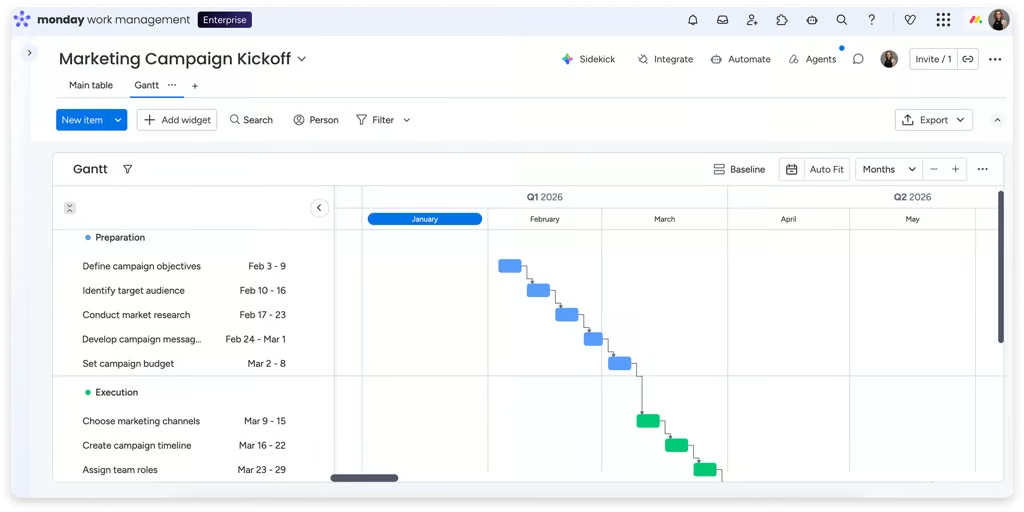
Project management software makes this easier to see. For example, monday.com’s Gantt view displays dependencies alongside project dates, while work schedules can account for working days and time off. If adjusting one date pushes several dependent activities closer to December, you have a much clearer picture of the time you actually have.
| 💬 Expert take: Build buffer into the deadline Maksim Grinevich, CTO of BekoreTech, recommends leaving room between the planned completion date and the actual deadline rather than scheduling work right up to delivery. “In most cases, the planned deadline should be earlier by at least 15–20% of the project duration. If the target date is exactly the delivery date in the project plan (WBS, etc.), it means it would be 100% late.” |
2. Which tasks could push the entire project past December?
A project can have ten delayed tasks and still finish on time. Another project can have just one late task that delays the entire project. The difference may come down to whether that task sits on the critical path.
Critical-path tasks have little or no scheduling flexibility and directly affect the project’s completion date. Start by identifying which remaining activities fall on that path and how much flexibility, if any, they have.
Review the dependencies connected to those activities, including work outside your immediate team. A vendor deliverable, security review, legal approval, or decision from another department may determine when critical work can begin. These dependencies deserve closer attention because a delay can carry into subsequent tasks and put the deadline at risk.
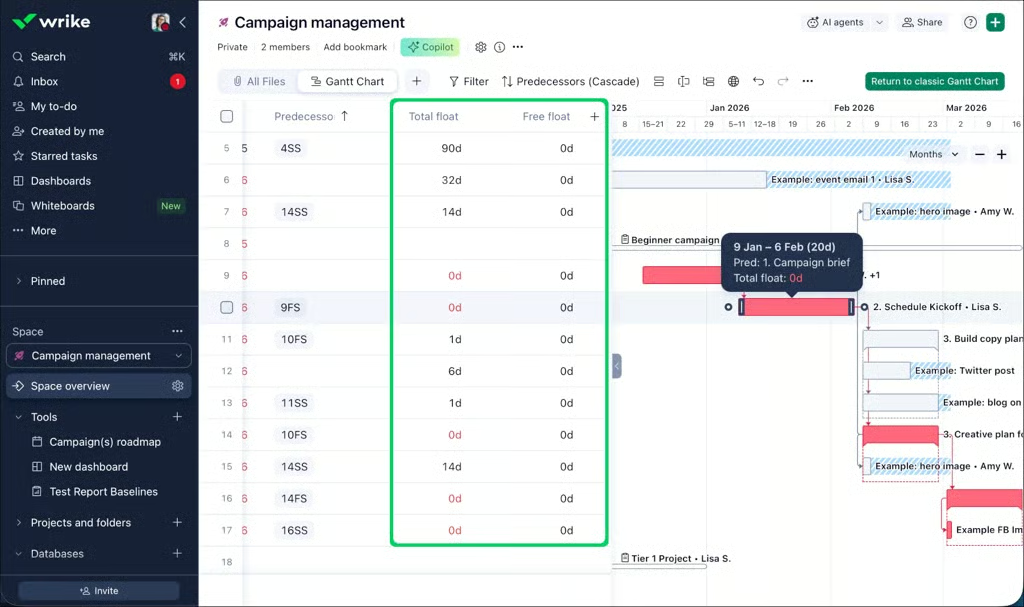
Wrike, for example, displays the critical path in its Gantt chart to distinguish tasks that affect the project finish date from work with more scheduling flexibility. Its dependencies also make it easier to see what else could be affected when dates change.
| 💡Try this: |
| Identify the three remaining activities that would have the biggest effect on your finish date if each were delayed by one week. If you cannot name them quickly, your next schedule review has a clear starting point. |
3. Does your team have the capacity to finish the remaining work?
A schedule can look perfectly reasonable until you compare it with everyone’s actual workload. Suppose a specialist has 80 hours of work remaining before December. It sounds manageable until you discover the same person is handling two other projects, has planned leave, and can realistically give your project only a few hours each week.
Assignments alone do not show whether the team has enough capacity to finish the work. Compare the remaining effort with each person’s actual availability, especially for specialist roles that appear across multiple tasks and may be harder to backfill if workloads increase.
If the numbers show a capacity gap, use the time you still have to look for alternatives. This could mean reassigning work, bringing in another resource, or securing temporary support before the schedule becomes harder to recover.
Capacity can also change as the project progresses. Testing or implementation may bring in team members who had limited involvement earlier in the project, increasing demand on their time as the deadline approaches.
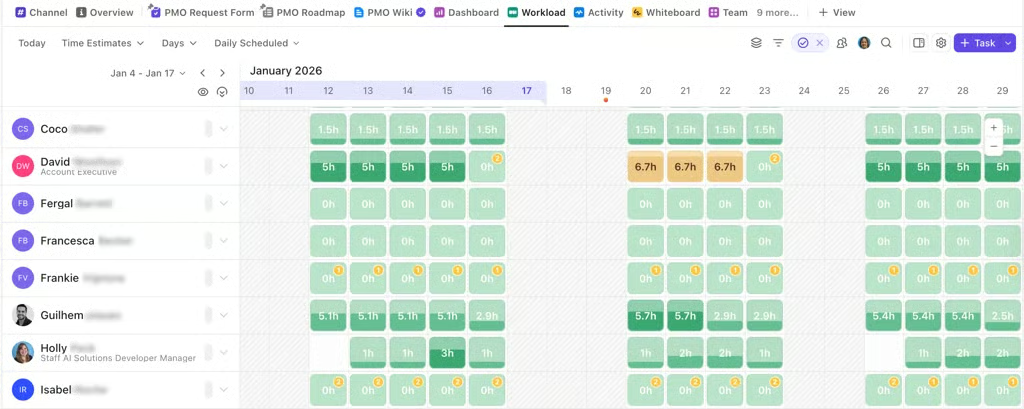
Tools such as ClickUp’s Workload view compare assigned work with each person’s capacity over a selected period. This can reveal when someone has more work scheduled than their available time allows.
4. What has changed since you committed to December?
The December deadline may have been realistic when the project was approved, but the conditions behind that decision may have changed. Compare the project plan with the project you are managing today.
Look for changes that have accumulated since planning. Stakeholders may have added requirements, estimates may have increased, vendor dates may have changed, or people responsible for critical work may have taken on other priorities. Individually, these changes may seem manageable, but together they can put the December deadline under pressure.
A project baseline serves as a reference point. Compare your original schedule, scope, and estimates alongside the current plan to identify changes that could affect the December deadline. Instead of asking only, “Are we on track?” ask, “What has changed since we committed to this date?” The answer can tell you whether December still reflects the project you are actually delivering.
| 💬 Expert take: Check how you measure “on track” Grinevich also recommends using Earned Value to compare expected progress against actual results. In his experience, introducing that measurement changed which projects his organization considered on track. “After we introduced a simple calculation of the Earned Values approach, we identified that many ‘on track’ projects are actually not on track.” He added: “It was a significant way to increase delivery accuracy from 60% to 80–85%.” His takeaway: “Check your ‘ruler’ before you measure everything inside your company or PMO.” |
5. What are you willing to change if December no longer works?
If the remaining work no longer fits within the available time, asking the team to “work faster” is not much of a recovery plan. You need to know which constraints can change.
Review your options. Some lower-priority requirements could move to January, or additional capacity could be assigned to work that affects completion. You may also be able to run certain activities in parallel. If none of these changes create enough time, the deadline itself may need to move.
Bring those options to stakeholders with the consequences clearly stated. Instead of saying, “The project is at risk of missing the December deadline,” explain the decision that needs to be made: “We can deliver by December if two lower-priority requirements move to January. Keeping the full scope would push delivery into early January.”
This gives stakeholders enough information to choose between protecting the deadline and keeping the full scope. Have this conversation as soon as the schedule, dependencies, or available capacity point to a potential delay. The earlier the decision is made, the more time the team has to adjust the plan.
Pressure-test your project deadline
Use these five questions as a quick check before your next project review:
| Question | 🟢 Green | 🟡 Watch closely | 🔴 Action needed |
| Do you have enough working days? | Schedule has buffer | Little buffer remains | Remaining work exceeds available time |
| Are critical dependencies safe? | Key dates are stable | Some dates are uncertain | Critical work is already delayed |
| Does capacity match the plan? | Work fits availability | Some people are near capacity | Key roles are overcommitted |
| Have your original assumptions changed? | Few material changes | Scope or estimates have shifted | Original plan no longer reflects the work |
| Do you have a fallback? | Trade-offs are agreed | Options have been identified | December is the only plan |
You do not need five green answers to keep December on the table. A yellow or red answer tells you where the deadline needs more scrutiny and where a decision may be required.
Is December still far enough away to make a choice?
A year-end deadline becomes much harder to rescue when the first serious conversation happens in late November. Running this check now gives you more options. Revisit scope, address a risky dependency, adjust capacity, or have the deadline conversation while there is still time to make a deliberate decision.
Bring these five questions to your next project review. If “December” is still the answer afterward, you will have more than optimism behind it.