

























A good project tracker template can make a big difference in how efficiently your team manages tasks and deadlines. It provides structure, visibility, and accountability so projects stay on track. In the sections below, I’ll introduce the top project tracker templates and explain how each one can support your team’s goals.
- What is a project tracker template?
- Why use a project tracker template for your projects
- What are the best free project tracker templates?
- 1. monday.com – Best for timeline tracking
- 2. ClickUp – Best for task-oriented team projects
- 3. Smartsheet – Best for executive project reporting
- 4. Wrike – Best for deliverable management
- 5. Notion – Best for personal or creative projects
- 6. Jira – Best for agile development
- 7. Teamwork.com – Best for client-facing workflow
- Tips for effective project tracking
- How to choose the right project tracker template for your team
- FAQs
What is a project tracker template?
A project tracker template is a pre-built framework that helps teams monitor tasks, deadlines, ownership, and progress in one centralized view. These templates often come in different formats, such as spreadsheets, Kanban boards, or Gantt charts, to match various project management styles.
A 2024 study by the Project Management Institute (PMI) shows that 73.8% is the average project performance rate, which demonstrates how vital tracking tools are in boosting success and reducing wasted effort. By using one, teams can easily visualize project stages and keep everyone accountable.
Why use a project tracker template for your projects
Project managers use a project tracker template to surface blockers, overdue tasks, and overcapacity before they escalate into something harder to fix. Here are other ways a project tracking template is helping project managers:
- Improves organization: A template lays out all tasks, deadlines, and owners in one place so nothing slips through the cracks. This central view keeps your team aligned on priorities.
- Saves time: Templates provide a ready-made structure, eliminating the need to build tracking tools from scratch. You can start managing projects right away without spending hours on setup.
- Boosts accountability: With clear task assignments and due dates, everyone knows what they are responsible for. This reduces confusion and makes it easier to follow up on progress.
- Enhances communication: Project tracker templates streamline the process of sharing updates with stakeholders. According to Grammarly, knowledge workers now spend an astonishing 88% of their workweek communicating across various channels. By providing a single source of truth, project trackers help keep everyone aligned and minimize the need for lengthy check-ins and status report emails.
What are the best free project tracker templates?
The table below gives you a quick side-by-side look at the best free project tracker templates. In the following sections, we’ll dive deeper into each option and learn more about their features, functions, and best use cases.
Project tracker template | Template features | Template type | |
|---|---|---|---|
 |
| Table | |
 |
| Table | |
 |
| Chart | |
 |
| Kanban | |
 |
| Table | |
 |
| Timeline | |
 |
| Kanban |
1. monday.com – Best for timeline tracking
I recommend monday.com’s project tracking template if you’re managing both resources and timelines at once. Each activity comes with a cost field and a timeline bar for balancing financials alongside project execution. I can set up groups for each project stage or category, then assign them to specific team members or organize them by ownership.
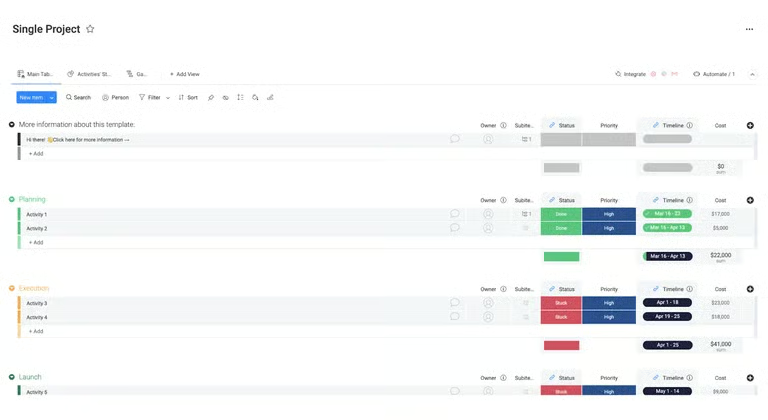
The color-coded sections for planning, execution, and launch make it easy to scan project health at a glance, and the status column immediately flags anything that’s stuck or needs attention. What I appreciate most is the accessibility. monday.com offers this template on its free plan, and since it supports Gantt chart view, it doubles as a free Gantt chart template without any extra setup.
2. ClickUp – Best for task-oriented team projects
I find ClickUp’s collaborative project tracker most useful when I’m managing projects with detailed task lists. The tabular layout puts due dates, statuses, and priorities front and center, giving me granular visibility into every deliverable. The red, yellow, and green indicators make it easy to spot delays at a glance, and grouping tasks by project stage keeps everything organized.
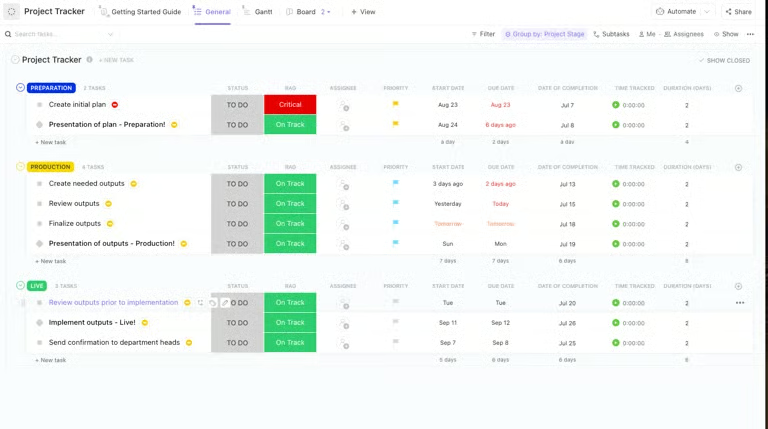
I can create custom statuses to reflect exactly how my team tracks progress, and custom fields let me add specific attributes to individual tasks or milestones. The navigation tab at the top gives me quick access to four views: Assignees, General, Gantt, and Getting Started, so I can shift perspectives depending on what I need to see.
3. Smartsheet – Best for executive project reporting
Smartsheet’s project tracker is the strongest option for executives and portfolio managers who need a high-level view across multiple projects. Unlike most project tracking templates that stick to a standard table layout, this one combines a progress chart, risk task list, and milestone timeline in a single view, giving me a quick health check without pulling separate reports.
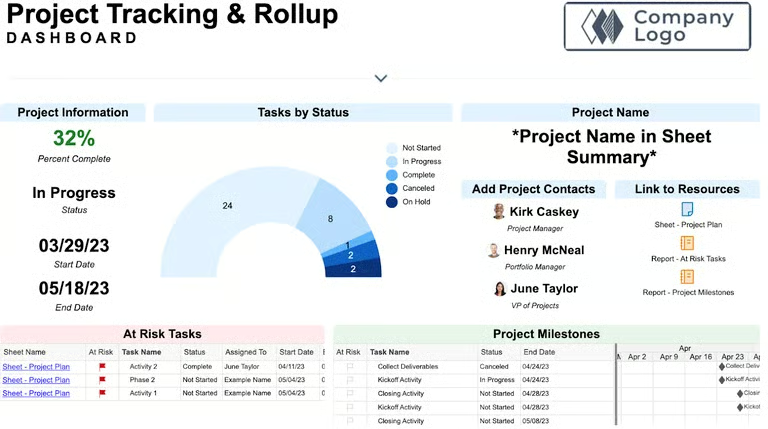
The template set includes an Excel-style task tracker alongside a rollup dashboard that summarizes key project details in one place. Three report types come included: milestones, at-risk tasks, and a task rollup, covering the information stakeholders ask about most.
For Smartsheet subscribers, there’s an added advantage. Licensed sheet owners and admins get access to baseline tracking for comparing actual progress against the project plan.
Pro tip: If you prefer spreadsheets for managing projects, check out this guide on Google Sheets project management. We’ll walk you through on how to customize your tracker in Sheets.
4. Wrike – Best for deliverable management
I use Wrike’s resource management template when I’m handling multiple interdependent workstreams at once. The Kanban-style board organizes tasks into categories like Deliverables, All Other Tasks, and This Month, which helps me prioritize by timeline and project stage. Cards and status labels make it easier to manage large-scale deliverables across departments amid large work volumes.
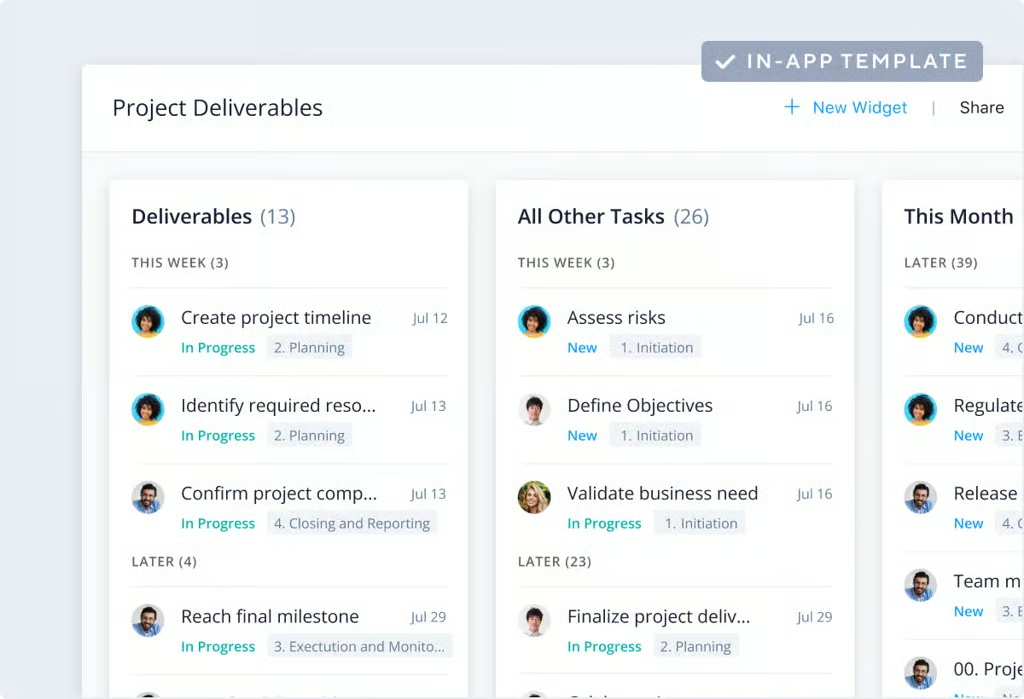
I also use this template when I need a clear distinction between deliverables and non-deliverables while keeping an eye on my team’s overall workload. It’s fully customizable, so I can add start and end dates to any task and check in on statuses regularly.
5. Notion – Best for personal or creative projects
Notion’s template works best for when I need to keep close track of my workload or when working with teams juggling diverse project types. The clean, database-style layout lets me sort and view projects by status, type, or priority. What sets it apart from other project tracker templates is its emphasis on flexibility over standard task structures.
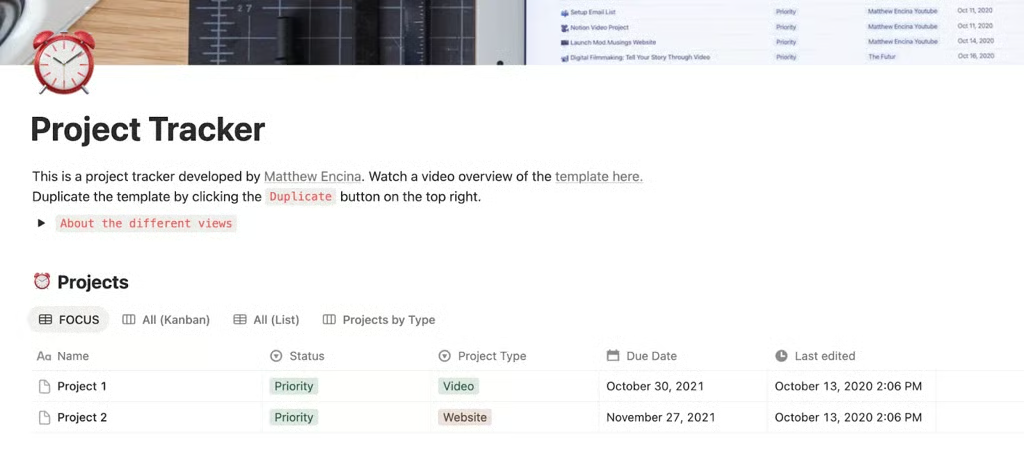
The template comes with four views: List, Focus, Kanban, and Projects by Type. It opens in Focus view by default, which surfaces my current priorities. I find this useful when deadlines are approaching and I need a quick read on my current task lineup. Switching to Kanban organizes projects by status across Queue, Priority, and Done. When I want to zoom out and review everything under a specific category, the Projects by Type view offers a more filtered perspective in one click.
6. Jira – Best for agile development
I recommend Jira’s project tracker template specifically for agile development teams with sprint-based workflows. The timeline view displays epics and releases across months, so it’s easier to track dependencies and measure progress toward sprint goals. As an issue tracking tool, Jira is ideal for managing bugs and development tasks, and I can check project or task status at any point.
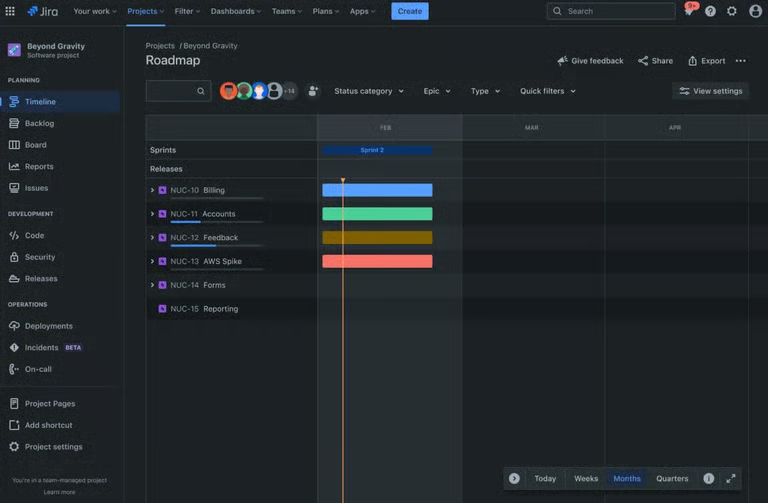
I also appreciate the ability to compare actual progress against the projected timeline. That side-by-side view helps me catch potential delays or resource bottlenecks. Beyond the timeline, the template includes a Kanban board for a more visual workflow and a list view that serves as a central hub for all pending tasks.
7. Teamwork.com – Best for client-facing workflow
Teamwork’s Kanban-style project tracker template works well for marketing or client-facing teams with visual workflows. The To Do, Doing, and Done format keeps collaboration straightforward, and tags like “freelancer” or “needs approval” make accountability easy to maintain. It’s a strong fit for fast-moving projects that goes through multiple approvals.
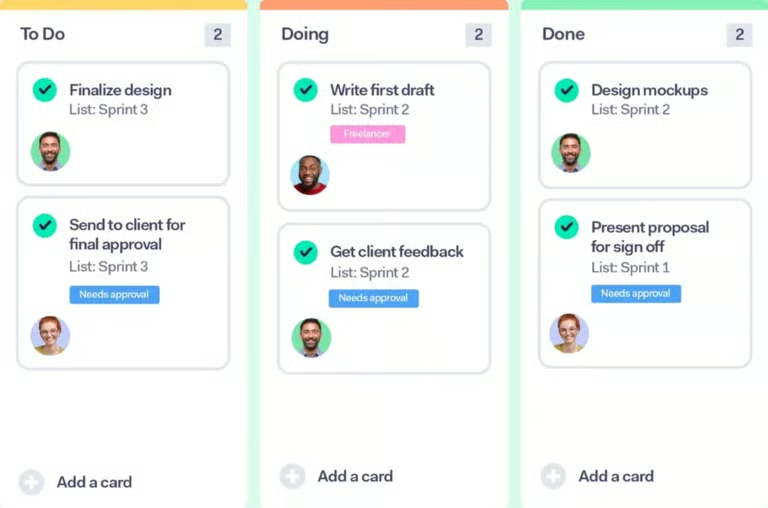
The template lets me easily share visual updates to clients and move work across the pipeline. When I’m working with different project at the same time, having a real-time tracker like this makes it much easier to send status updates on every task.
Tips for effective project tracking
Keeping projects on track requires more than just assigning tasks. It is about maintaining visibility, communication, and accountability. By following these best practices, you can streamline workflows and ensure smoother project delivery.
- Set clear goals and milestones. Defining specific goals and milestones gives your team measurable checkpoints to stay aligned. It also makes it easier to track progress and spot delays early.
- Prioritize tasks effectively. Not all tasks carry the same weight, so identify high-priority items that impact the successful delivery of the project. This helps your team focus energy on what matters most.
- Communicate regularly. Consistent updates keep stakeholders informed and reduce misunderstandings. Use status meetings or project dashboards to share progress in real time.
- Monitor risks and bottlenecks. Track potential risks before they become roadblocks. Proactively addressing resource shortages or task delays prevents your project from falling behind schedule.
- Review and adjust frequently. Projects rarely go exactly as planned, so review progress regularly and make necessary adjustments. Small course corrections prevent bigger setbacks later on.
- Adapt a project management software. Using project management software centralizes tasks, deadlines, and communication in one place. In fact, 82% of companies use project management software to drive organizational efficiencies, according to monday.com, highlighting how essential these platforms have become for boosting productivity at scale. These tools feature dashboards, Gantt charts, and Kanban boards that make it easier to see progress at a glance.
How to choose the right project tracker template for your team
Choosing the right project tracker template depends on how your team works and the type of projects you manage. The right template should balance simplicity with functionality so it adapts to your workflows seamlessly.
- Customization: Look for templates that allow you to adjust fields, stages, and task categories to fit your team’s specific needs. A customizable tracker ensures you are not locked into a one-size-fits-all format.
- Flexible project views: Select templates that offer multiple views such as timeline, Kanban, and list. This flexibility allows team members to visualize progress in the way that works best for them.
- Ease of use: A good project tracker should be intuitive and simple for your team to adopt quickly. If it feels overly complex, it can slow down progress instead of improving it.
- Collaboration features: Templates that support real-time collaboration through features like chat, comments, and file sharing make the workflow smoother. These features minimize the need for long email chains and keep all updates in one place.
- Scalability: Consider templates that can grow with your team and projects. A scalable tracker helps you move from small initiatives to larger, multi-department projects without switching to new templates.
The best project tracker templates provide a solid foundation for keeping tasks organized and projects on track. While downloadable templates can be useful for smaller initiatives, they often lack the adaptability and collaboration tools that growing teams need. If you are looking for templates, do not settle for basic downloads; opt for a project tracking software solution that comes with built-in templates and robust features to support your long-term goals.
FAQs
How to create a project tracker?
To create a project tracker, start by listing all tasks, deadlines, and stakeholders in a table or any other visual project management tool. Add columns for status, priority, and due dates so you can easily monitor progress. Using a template can save time by giving you a ready-made structure.
How do you track projects?
You can track projects by regularly updating task progress and reviewing milestones. Many teams use dashboards, Gantt charts, or Kanban boards to visualize status. Consistent updates and check-ins ensure the project stays aligned with goals.
How to create a project timeline template?
You can begin by outlining the key phases of your project and assigning start and end dates to each task. Place them on a visual timeline, such as a Gantt chart, to show dependencies and deadlines. Most project management tools include timeline templates that you can customize for your team’s needs.