

























If you’re searching for project management platforms, you might come across Asana, often compared with competitors such as monday.com and ClickUp. Traditional project planners often gravitate toward its streamlined interface, task management features, and goal tracking, though the pricing turns away those on a budget. In this Asana review, I share why I often rank it highly and when another platform may make more sense.
 Asana review at a glance | |
| Free plan | Personal, free for up to 2 users |
| Starting paid price | $10.99/user/month, billed annually |
| Best for | Teams that want task management with cross-project reporting and workflow automation |
| Key features | Tasks, dependencies, Gantt charts, forms, rules, reporting dashboards, portfolios, workload, goals |
| AI | Task summaries, automated status updates, AI-generated custom field values, no-code AI workflows |
Why you should trust Project-management.com
As a tech analyst for project management software, I have tested nearly 20 platforms over the past five years, and several have become part of my workflow. I have written dozens of buyer’s guides covering a wide range of use cases and company sizes, which gave me a broader understanding of what project teams need from these tools.

Marianne Sison
Senior Staff Writer for Project Management
How I evaluated Asana
I evaluated Asana using a weighted scoring system based on the capabilities and buyer considerations I consider most relevant when reviewing project management software.
Pricing (20%): I looked at Asana’s free plan, monthly fees, and how many advanced capabilities are included before a team has to upgrade. I also considered total cost of ownership, including paid add-ons and how predictable costs remain as requirements increase.
General features (25%): I evaluated Asana’s core project management capabilities, including task management, project organization, collaboration, multiple project views, and workflow automation. I scored each area against specific functions rather than awarding points simply because Asana lists a feature by name.
Advanced and niche features (20%): I reviewed capabilities for more complex project needs, including advanced scheduling, portfolio and goal management, resource planning, and request intake. I also examined approvals, proofing, and other specialized tools for enterprise project management.
Ease of use (10%): I assessed the user experience and onboarding resources, then considered how easily users can manage routine project work. My evaluation also accounts for admin controls, including permissions and workspace configuration.
Support (10%): I checked Asana’s support channels, service availability, security, and data governance policies. I considered how easily users can find answers on their own and whether real-time support is available when needed.
Expert score (15%): My expert score combines Asana’s feature coverage and value for money with third-party reviews. I also considered how Asana documents its capabilities and plan availability, since unclear documentation can make software evaluation harder for buyers.
What is Asana?
Asana is a project management platform for planning projects, assigning tasks, tracking dependencies, and monitoring progress across teams. It also supports portfolio reporting, resource management, goals, and AI-assisted workflows for teams managing projects across multiple departments. Its interface is relatively easy to navigate, while project planning tools give managers more visibility as project volume increases.
Asana is a good choice for
- Projects with multiple handoffs: A task can appear in multiple projects, which helps avoid duplicate entries.
- Teams with repeatable intake and approval processes: Forms, rules, and custom fields standardize how requests enter Asana and progress through the workflow.
- Project managers who need scheduling views: Timeline and Gantt views help managers track dependencies and schedule changes.
- Program managers overseeing several projects: Managers can track progress and assignments across projects through Portfolios, workload, and dashboards.
- Organizations that use goals or OKRs: Goals link projects and portfolios to company objectives.
- Teams that want AI inside project workflows: Asana AI can summarize work, draft updates, populate fields, classify requests, and automate workflows.
Asana is less suitable for
- Small teams looking for a generous free plan: Asana’s free plan supports two users. I recommend ClickUp as the best free project management software for individuals and startups.
- Budget-conscious teams needing portfolio or resource management: Access to portfolios, workload, goals, and native time tracking costs $24.99 per user monthly.
- Teams with advanced budgeting needs: Budget management and timesheets require a separate monthly add-on.
- Teams that want extensive customization: Asana includes custom fields, rules, and templates, but ClickUp offers more options for workspace and task configuration.
- Teams that want one tool for communication: Asana covers comments and project updates, but chat and meetings still rely on tools like Slack or Zoom.
Asana pros & cons
| Pros | Cons |
| • Tasks can appear in multiple projects • Base plan includes Gantt, Timeline, forms, custom fields, dashboards, and unlimited automations • Goals connect company objectives to projects and portfolios • AI features use project and task context • Unlimited free guests are included with Starter | • The free plan is limited to two users • Native time tracking requires upgrading to the highest plan tier. • Capacity planning requires Enterprise • Some AI capabilities use credits or request-based usage • Timesheets and Budgets are available as a paid add-on. |
Asana pricing
At first glance, Asana looks slightly pricier than most project management software. Competitor entry-level plans often start around $5 to $9 per user per month, while some mid-tier options remain under $15.
The pricing tiers are easier to evaluate when you look at which capabilities appear at each tier. Starter costs $10.99 per user per month, but includes Gantt and Timeline views, custom fields, forms, reporting dashboards, unlimited automations, and AI Studio Basic with 50,000 monthly credits per billing account.
| Plan | Price billed annually | Best for | Feature inclusions |
| Personal | $0 | Individuals or two-person teams | Unlimited tasks and projects, list, board, calendar |
| Starter | $10.99/user/month | Project teams | Timeline, Gantt, custom fields, forms, dashboards, unlimited rules, AI Studio Basic |
| Advanced | $24.99/user/month | Multi-project teams and departments | Portfolios, goals, workload, approvals, proofing, time tracking |
| Enterprise | Custom | Large organizations | Universal workload, capacity planning, SAML, SCIM, workflow bundles |
| Enterprise+ | Custom | Organizations with advanced security requirements | Additional governance and compliance capabilities |
Advanced instantly jumps to $24.99 per user and adds portfolios, workload, goals, approvals, proofing, and native time tracking. It also increases AI Studio Basic to 75,000 monthly credits, so teams planning to use AI for workflows or agent-based automation get a higher allowance at this tier.
Resource planning increases the total subscription cost because universal workload and capacity planning require Enterprise. Teams that need project budgeting and timesheets also pay an extra $5.99 per user, even though some providers include these features in their plans.
When it comes to Asana’s pricing, the main question is which advanced capabilities your team will need over time. Portfolios, resource planning, project financials, and heavier AI usage require higher tiers or add-ons, so it helps to account for those costs ahead of time.
Project management
Asana’s project management focuses on one idea: make work easy to understand as projects get more complex. Tasks, dependencies, milestones, and custom fields cover most project needs, while List, Board, Timeline, and Gantt offer different ways to view the same work. I also like that one task can appear in multiple projects, which is ideal teams share a deliverable.
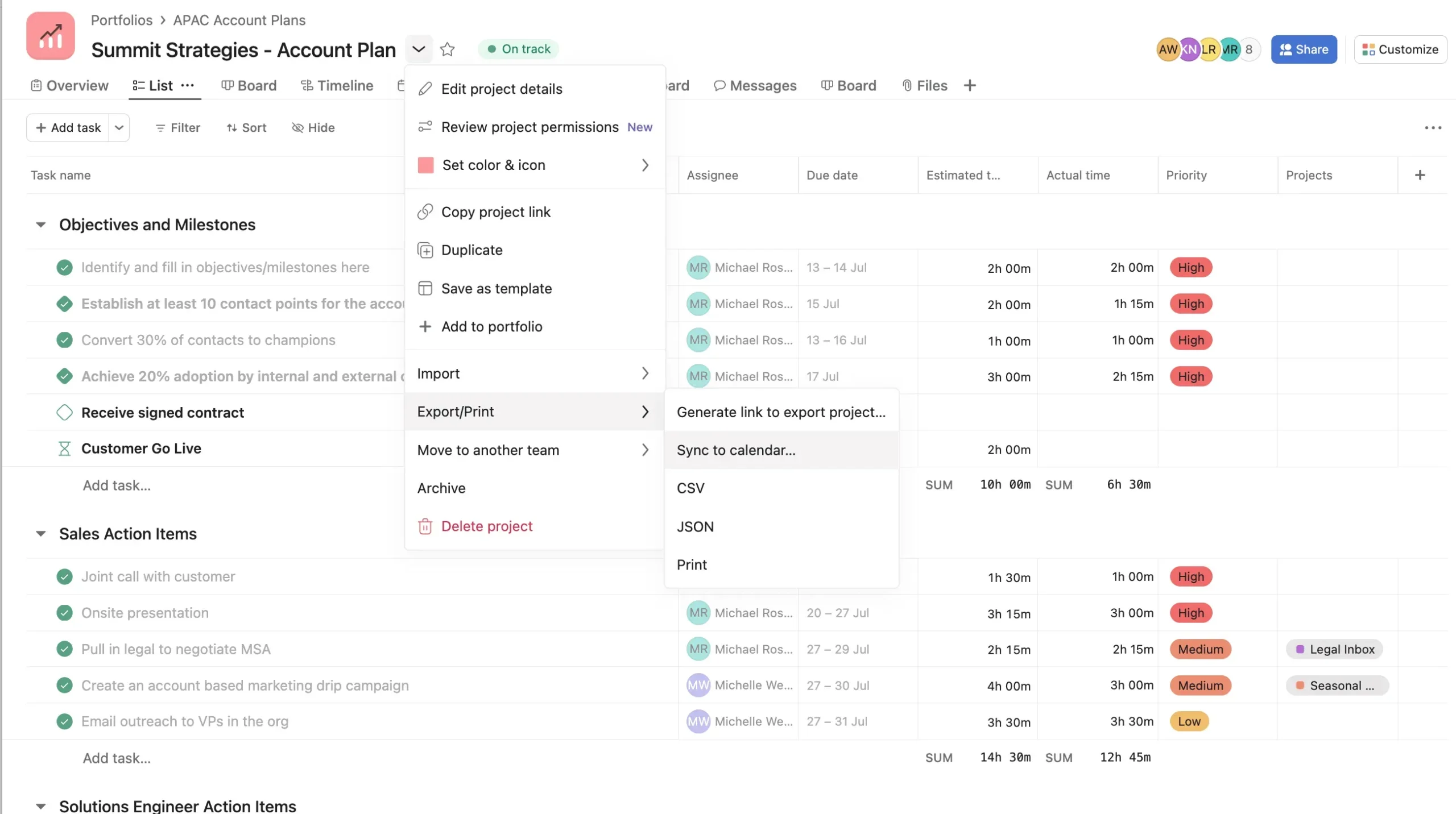
The platform works best when teams standardize project setup. Once you set naming conventions, fields, and templates, Asana is easier to maintain across recurring and cross-functional work. This matches feedback on G2 and Capterra, where users often praise Asana’s task organization and ease of use but say more complex setups take time to learn.
Asana’s main limitation is its more guided approach to project setup. Teams that need detailed scheduling or highly customized task systems may want more flexibility. Some users also note that key features require higher tiers and that complex setups take longer to learn.
AI & workflow automation
Asana’s automation works best for repeatable processes. Rules handle predictable actions such as assignments and field updates, while AI Studio can classify requests, route work, and flag risks. I like how teams can keep simple workflows rule-based, then use AI only when the workflow needs context.
As a project assistant, Asana AI can summarize task or project activity, draft status updates, populate fields, surface priorities through Dash, and assign more complex work to AI Teammates. These capabilities rely on Asana’s existing project data, so I recommend updating project data regularly.
While user feedback is generally positive about project summaries and workflow automation, some have concerns around AI pricing, credit limits, and response accuracy. Users also noted that advanced automation takes time and effort to configure.
Team collaboration
Asana keeps project conversations connected to the relevant tasks and projects, so comments and updates retain their context. Comments, @mentions, followers, and status updates support discussions around specific work, while Inbox gathers updates across assigned tasks.
Each task has one owner, while teammates can follow and comment on the same task, which connects discussions to deadlines and deliverables. Recent G2 reviews frequently mention the shared visibility and smoother communication, while Capterra reviewers also praise having comments, files, and project updates in one workspace.
Asana’s comments and @mentions are better suited to asynchronous collaboration than live conversation. Teams can leave updates directly on tasks and respond later, while real-time discussions are usually handled in Slack or Teams.
Notification management can also become a pain point as projects grow, with users often mentioning overload from comments and updates. I recommend keeping task-related discussions in Asana and broader discussions in chat tools.
Reporting & portfolio management
Asana’s reporting depends on how consistently teams maintain task fields and project statuses. Dashboards can combine data from one project or several, which gives managers a direct view of progress and workload, but inconsistent fields or outdated statuses can make the reports misleading.
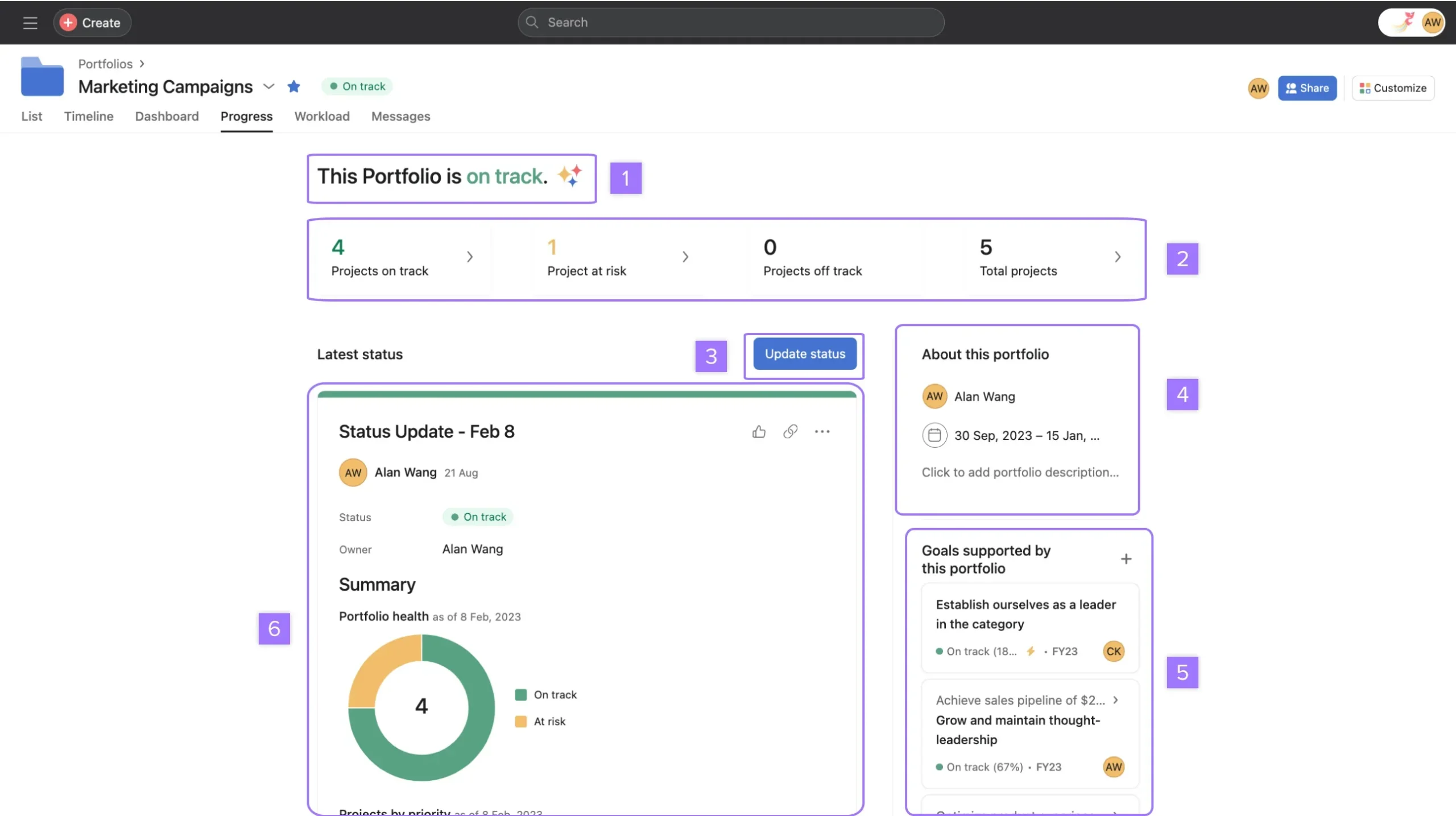
Portfolios give program managers and department leads a central view of related projects. They can compare status, review workload, and share updates without opening each project separately, which current users also cite as a useful reporting capability.
Asana is good for tracking project status, workload, and portfolio health, but teams that need highly customized executive reports, financial analysis, or more complex data modeling may still rely on exports or a separate BI tool. Asana’s reporting tools work best when the data you need is already stored in its tasks, projects, and portfolios.
Goals & strategic planning
Goals is one of Asana’s standout features, especially for teams that want company objectives connected to active project work. Goals can have owners and progress targets, while linked projects or portfolios update that progress automatically. For PMOs and department leads, this makes strategy reviews easier because goal progress comes from active project work instead of a separate tracker.
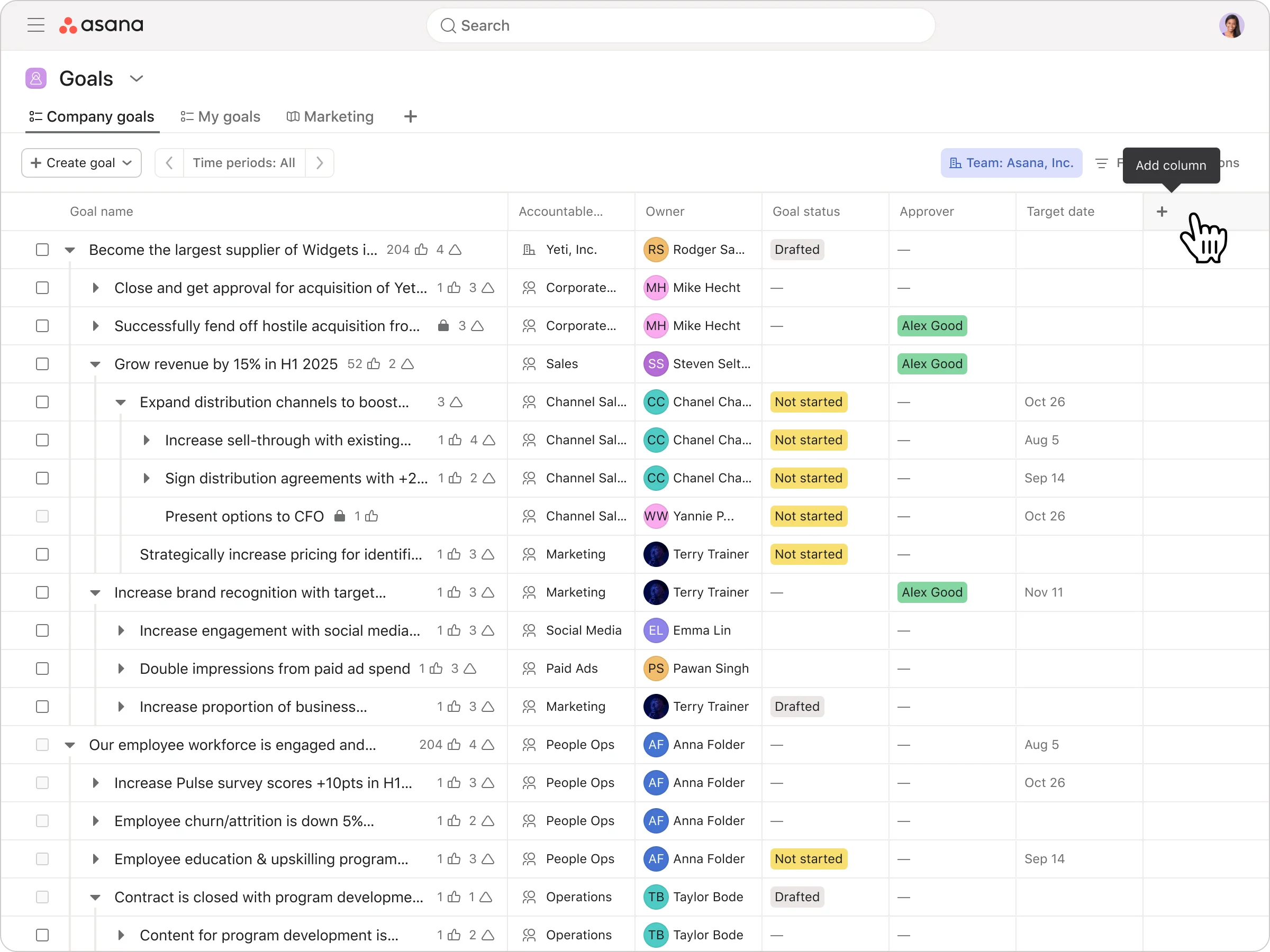
Company objectives can connect to team goals and the projects that support them, which gives managers a clearer view of how project progress contributes to company goals. Asana reviews also point to this connection between project work and higher-level goals as a benefit.
Asana can track progress against a strategy, but teams still need to define the objectives and decide how success is measured. The feature works best for organizations with a consistent goal-setting process and clear ownership.
Ease of use
Asana is relatively easy to learn for basic project work because tasks, deadlines, and ownership are easy to scan. Creating tasks or switching between List, Board, and Timeline takes little setup, which is one reason ease of use comes up so often in Asana user reviews. Capterra currently rates Asana 4.4 out of 5 for ease of use, and recent reviewers frequently describe the interface as clean or intuitive.
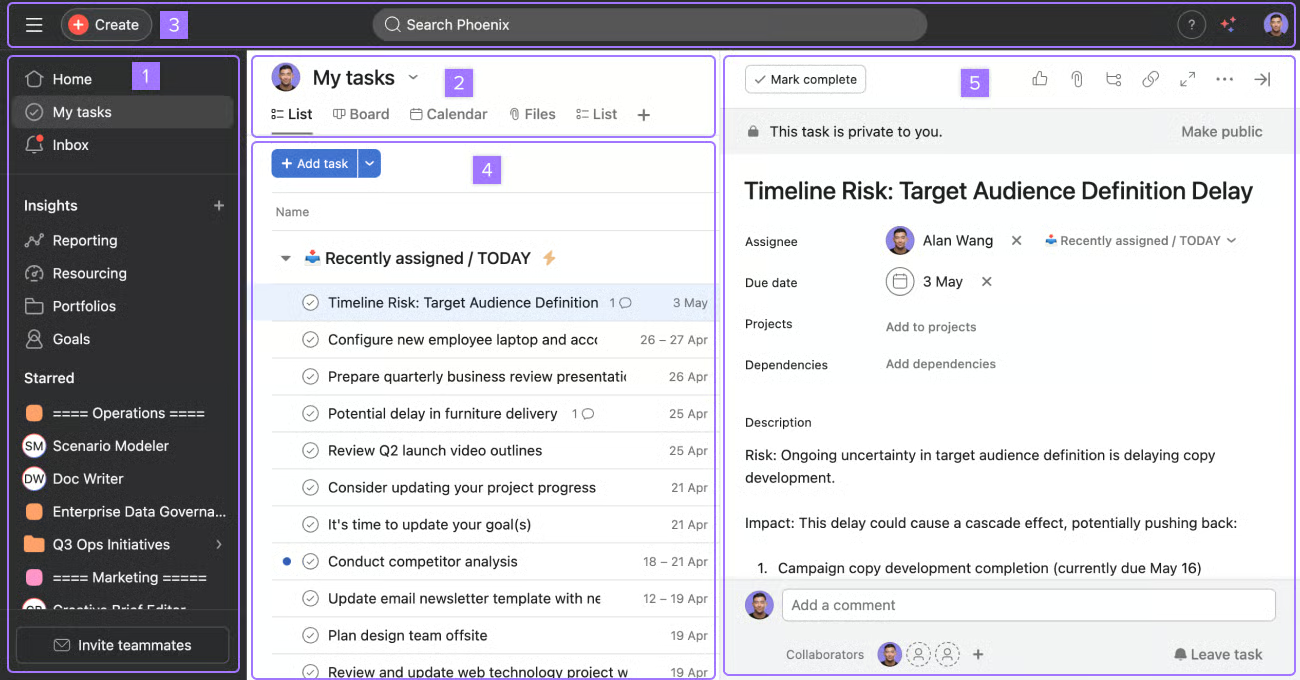
Users are more likely to face a learning curve when building more complex workflows. Custom fields, rules, portfolios, reporting, and AI automation add more setup options, so teams may need time to learn how these features work together.
Asana’s usability depends as much on team conventions as the interface itself. Naming rules, templates, and shared project standards reduce duplicate tasks and inconsistent workflows as more teams start using Asana.
Asana alternatives
Asana alternatives such as monday.com, Wrike, and ClickUp may suit teams that want lower pricing, more customization, or advanced resource management. Each offers a different tradeoff in how teams plan work and manage projects.
| Best for | Starting price | How it compares to Asana | |
| monday.com | Board-centric work management | $9/seat/month | Lower base price and highly configurable boards |
| Wrike | Complex resource and financial planning | $10/user/month | Higher-end plans include advanced capacity planning and budgeting |
| ClickUp | Teams seeking more PM capabilities at a lower starting price | $7/user/month | Unlimited includes Gantt, time tracking, portfolios, and resource management |
Final verdict: Is Asana worth it?
Asana is a good choice for teams that want clear task ownership, flexible workflows, and visibility across multiple projects. Its ease of use, cross-functional project tracking, and connection between Goals and portfolios make it especially useful for growing teams.
The main concern is pricing, since portfolio management, resource planning, native time tracking, and high-volume AI use can require higher tiers or add-ons. Overall, I recommend Asana for teams that have outgrown basic task management but do not need extensive customization.
FAQs
Is Asana good for project management?
Yes. Asana supports tasks, subtasks, dependencies, milestones, recurring work, and several project views. Starter adds Gantt and Timeline views, custom fields, forms, rules, and project reporting.
Is Asana difficult to learn?
Asana’s basic task and project model is relatively straightforward because projects center on tasks with owners and due dates. Complexity increases as teams use custom fields, rules, portfolios, and cross-project reporting. That said, larger implementations require more decisions about how work should be organized.
Is Asana free?
Yes. Asana Personal is free and supports up to two users with unlimited tasks and projects. It includes list, board, and calendar views but omits paid features such as Gantt, Timeline, and unlimited custom fields.
What is Asana best used for?
Asana is well suited to cross-functional project management where teams need assigned tasks, dependencies, workflow automation, and project reporting. Advanced extends the platform to portfolios, workload management, and organizational goals.