

























Project managers know that the right freelancers can function as extensions of the in-house team, but managing them requires the right system to keep everything organized. A freelance management template helps you handle assignments, schedules, and payments while keeping key information accessible in one place.
With around 60% of freelancers working remotely in 2023, and that number expected to rise as remote work becomes more common, it’s more important than ever to have a system for managing freelancers across distributed locations.
To give you a head start, I’ve rounded up five of my favorite free templates to help streamline how you work with freelancers.
1. monday.com – Best for freelancer approval workflows

monday.com’s freelance management template cuts down the time it usually takes to review and approve outputs. The workflow is designed to streamline document reviews, making approvals much faster, which I’ve found especially useful when managing short-term projects.
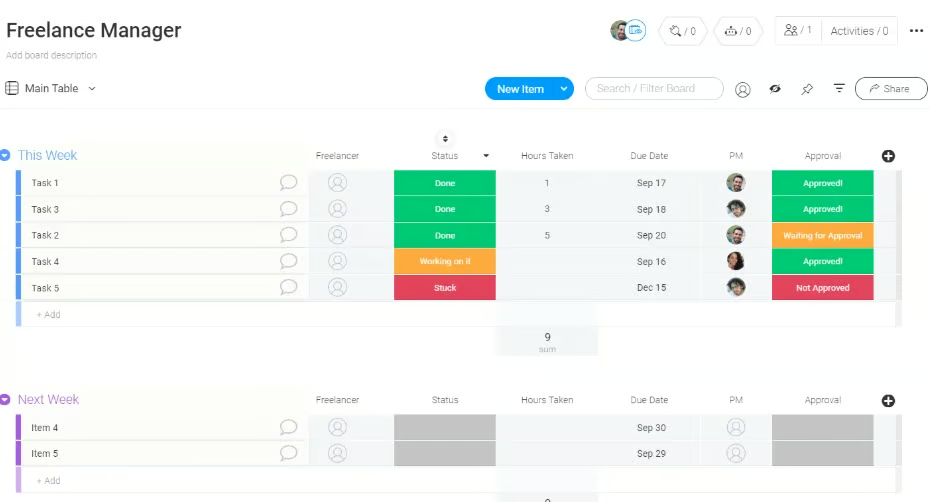
What makes monday.com stand out further is the way it presents a visual overview of approval stages. You can quickly see which freelancers are falling behind schedule and which managers are dealing with too many approval requests, giving you the visibility needed to rebalance workloads before they become a bottleneck.
2. Teamwork.com – Best for tracking freelancer rates

Teamwork.com’s template is designed to help you keep a close eye on budgets and profitability for every freelancer you hire. The user rate tool lets you assign unique hourly rates to each person and see exactly how profit is affected as hours are logged. From my experience, this makes it easier to ensure freelancers are always paid fairly while keeping project margins under control.
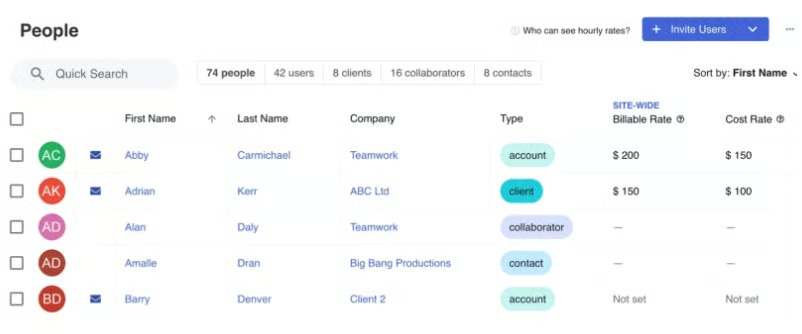
You also get a billable time tracker that runs in the background to record work hours, breaks, as well as billable and non-billable time. On top of that, the template includes detailed reporting features so you can generate accurate invoices and get a clear picture of how contractor expenses are impacting your overall budget.
3. Airtable – Best for managing contractor databases

Airtable gives you a database-style template that connects contractors directly to the internal managers supervising them. If your business relies heavily on freelancers, this setup becomes a centralized hub where you can quickly access all the information you need for a specific project. Instead of juggling scattered files, you get one place to store contracts, portfolio links, expertise, and hourly rates.
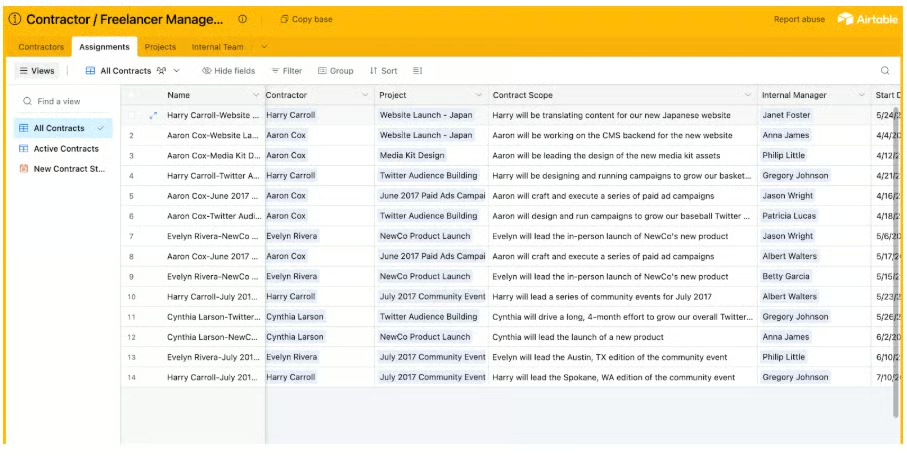
On a single board, you can assign freelancers to projects and manage contractor spend at the project level. But one Airtable feature I find particularly useful is the built-in application form, which allows freelancers to submit their work samples directly. From there, you can review submissions as a team and filter candidates based on expertise, rate, or the specific skills you’re looking for.
4. Knack – Best for storing freelancer information

Knack provides a straightforward directory of freelancer profiles for quick lookup of contractor details. Like Airtable, it lets you filter talent based on criteria such as expertise and location, but Knack is more beginner-friendly and less cluttered, as it uses fewer navigation bars and visual elements, which makes it simpler to navigate.
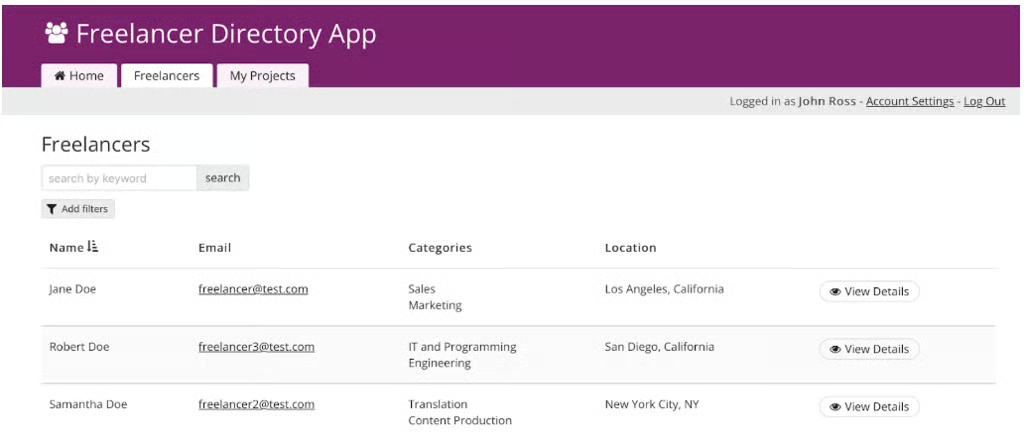
You can build and customize their freelance profiles in the template, including their skills, work experience, resumes, LinkedIn accounts, and portfolios. Once you identify the right candidate, you can move straight into initiating projects within the platform. I also like the invoicing feature, since it allows freelancers to send invoices directly through the app, which streamlines the payment process.
5. Asana – Best for freelance editorial teams

This template is built for content managers and editorial leads, especially if you’re coordinating multiple freelancers working on tight deadlines. On one board, you can organize tasks by assignee, due date, status, content type, billing month, and more. Tags for content types (e.g., articles, product descriptions, and landing pages) make it easy to see at a glance what each freelancer is working on.
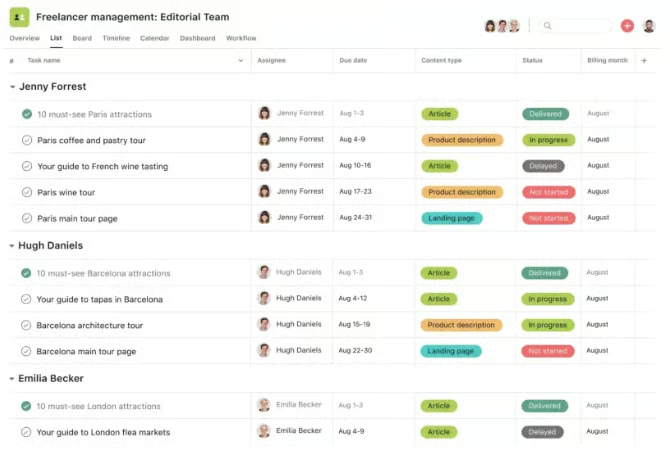
From my experience in editorial, I find this setup extremely convenient for both managers and freelancers when it comes to tracking deliverables. Instead of relying on email orconstantly switching between different tools, freelancers can attach their completed work directly to the task, which saves time and keeps everything in one place.
What elements should a freelance management template have?
When choosing a freelance project management template, it helps to know which elements will save you time and prevent miscommunication down the road. With 28% of skilled knowledge workers now operating as freelancers or independent professionals, having the right system in place is no longer optional. The best templates balance organization and flexibility so you can manage freelancers with less effort.
- Contact information: Having updated contact details, such as email addresses, phone numbers, and communication preferences, makes it easier to reach freelancers. It also saves you from having to dig through old emails or chat logs whenever you need to get in touch.
- Portfolio: A place for freelancers to share past work gives you immediate context on their skills and quality of output. This is especially useful when assigning projects, as it allows you to pair the right freelancer with the right task.
- Social media channels: A freelancer’s social media channels can offer valuable insight into their personal brand and level of professionalism. Platforms like LinkedIn, for example, can provide a clearer picture of their past work and experience. As long as it’s relevant to the role and not overly intrusive, having a section for social media links can be a helpful addition.
- Expertise: Tracking areas of specialization avoids guesswork when sourcing talent. Over time, this creates a searchable record of who is best at writing, designing, coding, or other core functions.
- Contributor agreements: Contract or agreement sections in freelance project management templates ensure clarity on terms, payment schedules, and ownership rights. This reduces risk and sets expectations from the start, which I’ve found crucial for long-term partnerships.
- Payment tracker: Having a section for tracking payments helps keep a clear record of money sent to freelancers, complete with invoice dates, amount, payment status, and due dates. This ensures transparency and prevents missed or delayed payments.
- Onboarding checklist: An onboarding checklist helps freelancers get up to speed quickly by outlining your processes, tools, and submission standards. Instead of repeating the same instructions every time, you can simply point them to the template and keep everything clear and consistent.
The type of freelance management templates you use should serve as a starting point, not establish a rigid system. All the examples featured here are fully customizable, allowing you to adapt them to fit your specific workflows and refine them as your needs evolve. Be sure to take advantage of advanced platform features, including AI tools, to automate workflow and get even more value out of your freelance management process.
FAQs
What are the pros and cons of freelance PM?
The biggest advantage of freelance project management is flexibility. You can choose tools and workflows that suit your style while keeping clients updated in real time. The drawback is that you’re responsible for setting these systems yourself, which can feel overwhelming if you don’t have a structured process in place.
What is the best project management software for freelancers?
The best project management software for freelancers depends on your workflow and the type of projects you handle. From my experience, monday.com is one of the strongest options because it offers a wide range of templates and features without forcing you into expensive plan upgrades.
How does one manage multiple projects as a freelancer?
Using a dedicated project management platform makes it much easier to juggle multiple projects, even when working independently. Tools like monday.com and ClickUp provide freelancer-friendly templates that help you organize your work and stay on track with deadlines.