

























Among construction management solutions, Procore and Autodesk Forma Build serve large-scale jobsites while smaller contractors pick Contractor Foreman and JobTread for their predictable pricing. Construction-specific platforms often take time to learn, so alternatives like monday.com focus on ease of use and customization. To help you choose, I compare the best construction project management software and explain what each platform does best.
| Best for | Monthly starting fee | |
|---|---|---|
| Procore | Best for large commercial construction | Custom pricing |
| Autodesk Forma Build | Best field document management | $66.67/mo. for single user |
| Contractor Foreman | Best affordable contractor management | $49/mo. for single user |
| JobTread | Best for estimating and job costing | Custom pricing |
| Construction Online | Best advanced construction scheduling | Custom pricing |
| monday work management | Best custom construction workflows | $9/user/mo. |
| Houzz Pro | Best residential client management | Custom pricing |
| Buildertrend | Best for home builders | Custom pricing |
- Featured Partners: Construction Project Management Software
- 1. Procore – Best for large commercial construction
- 2. Autodesk Forma Build – Best field document management
- 3. Contractor Foreman – Best affordable contractor management
- 4. JobTread – Best for estimating and job costing
- 5. ConstructionOnline – Best advanced construction scheduling
- 6. monday work management – Best for custom construction workflows
- 7. Houzz Pro – Best for residential client management
- 8. Buildertrend – Best for home builder operations
- Key features to look for in construction project management software
- How to choose the best construction project management software
- FAQs
Featured Partners: Construction Project Management Software
Why you can trust TechnologyAdvice
Over the past four years as a tech analyst, I have tested dozens of project management platforms, including tools built specifically for contractors and construction teams. Through buyer’s guides, I separate dedicated construction software from general project management platforms adapted for scheduling and coordination. I evaluate each product with a comprehensive scoring rubric based on hands-on testing and verified product research.
Marianne Sison
Senior Staff Writer for Project Management

1. Procore – Best for large commercial construction

- My rating: 4.79 out of 5
- Custom pricing
Why I chose Procore
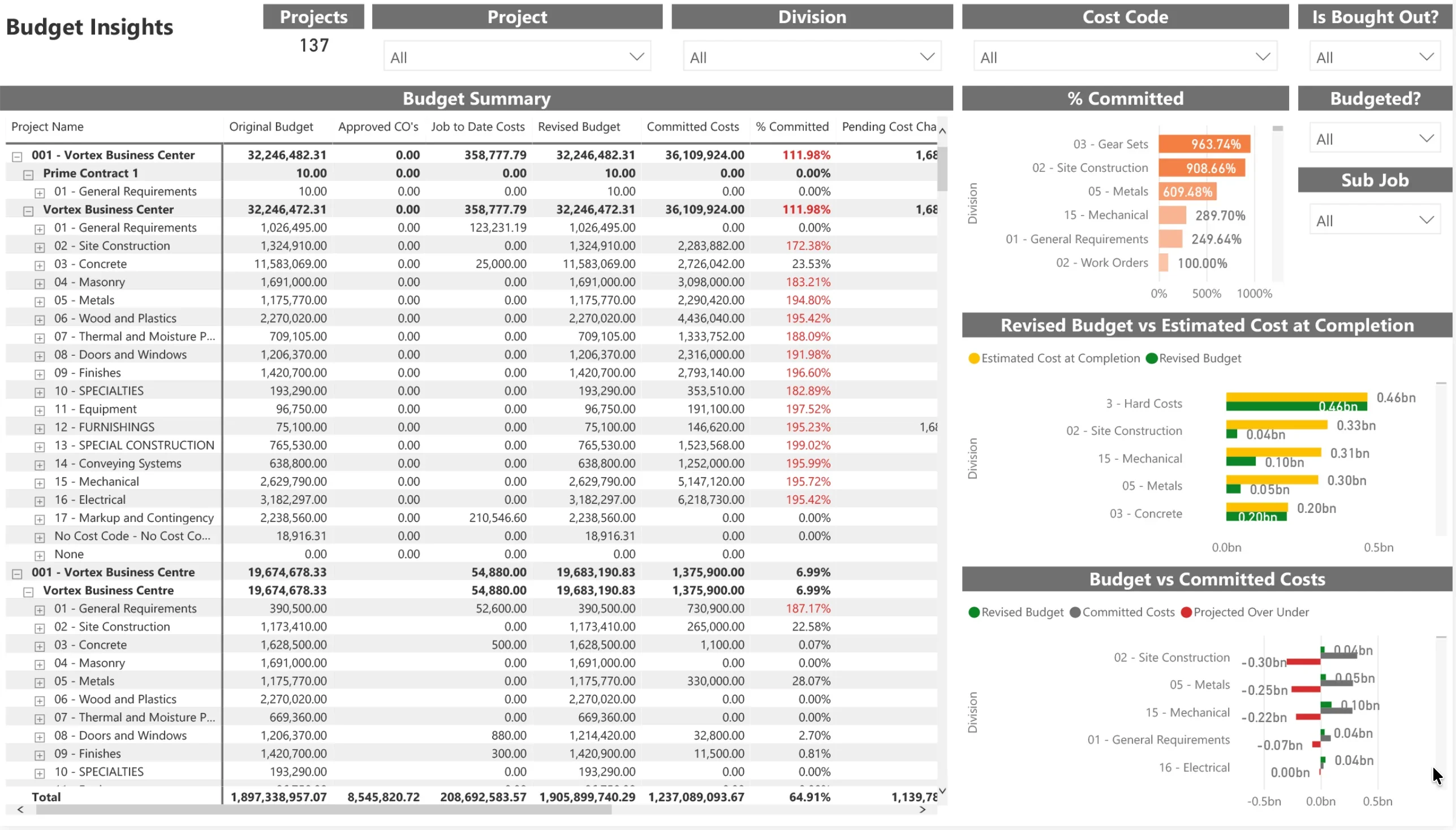
Procore is a widely used construction management platform for commercial projects involving dozens of subcontractors, frequent change orders, and payment workflows. Preconstruction and project management tools carry estimate and bid data into the project budget, preserving the financial record throughout the construction lifecycle.
As an all-in-one construction platform, users can review design revisions and scope changes alongside supporting documents and budget impact. This enables project managers to assess the financial and scheduling consequences before approving additional work.
Procore also offers executives a portfolio view of ongoing projects. Labor costs, production data, and forecasts are linked to field activity, so it’s easier to compare planned spending with project performance.
For syncing financial and operational data, Procore integrates with enterprise resource planning (ERP) systems and over 500 apps. It also includes safety management and reporting tools for overseeing complex projects involving large groups of subcontractors and stakeholders.
The downside: Procore products vary in pricing, with costs based on annual construction volume, so smaller firms may struggle to forecast costs. If you’re looking for predictable pricing, Contractor Foreman offers user-based plans at affordable monthly rates.
Pros
 Links field photos to project drawings
- Updates financial records from direct costs
- Tracks lien waiver payment status
Cons
 Mobile app drains battery quickly
- Frequent alerts overwhelm users
- Pricing is too steep for small contractors
Key features
- Request for information (RFI): Send project questions for review and connect approved answers to drawings or change orders
- Submittals: Track material and equipment documents through review before purchase or installation
- Daily log: Record labor, weather, equipment, delays, and safety events from the jobsite
- Budget: Compare project costs and commitments against the approved construction budget
Pricing
Custom pricing – Includes project tracking features, cost management, resource management, and lifecycle management. Procore charges an upfront annual fee based on selected products and annual construction volume. Unlimited users are included.
2. Autodesk Forma Build – Best field document management

- My rating: 4.73 out of 5
- Starts at $66.67/mo.
Why I chose Autodesk Forma Build
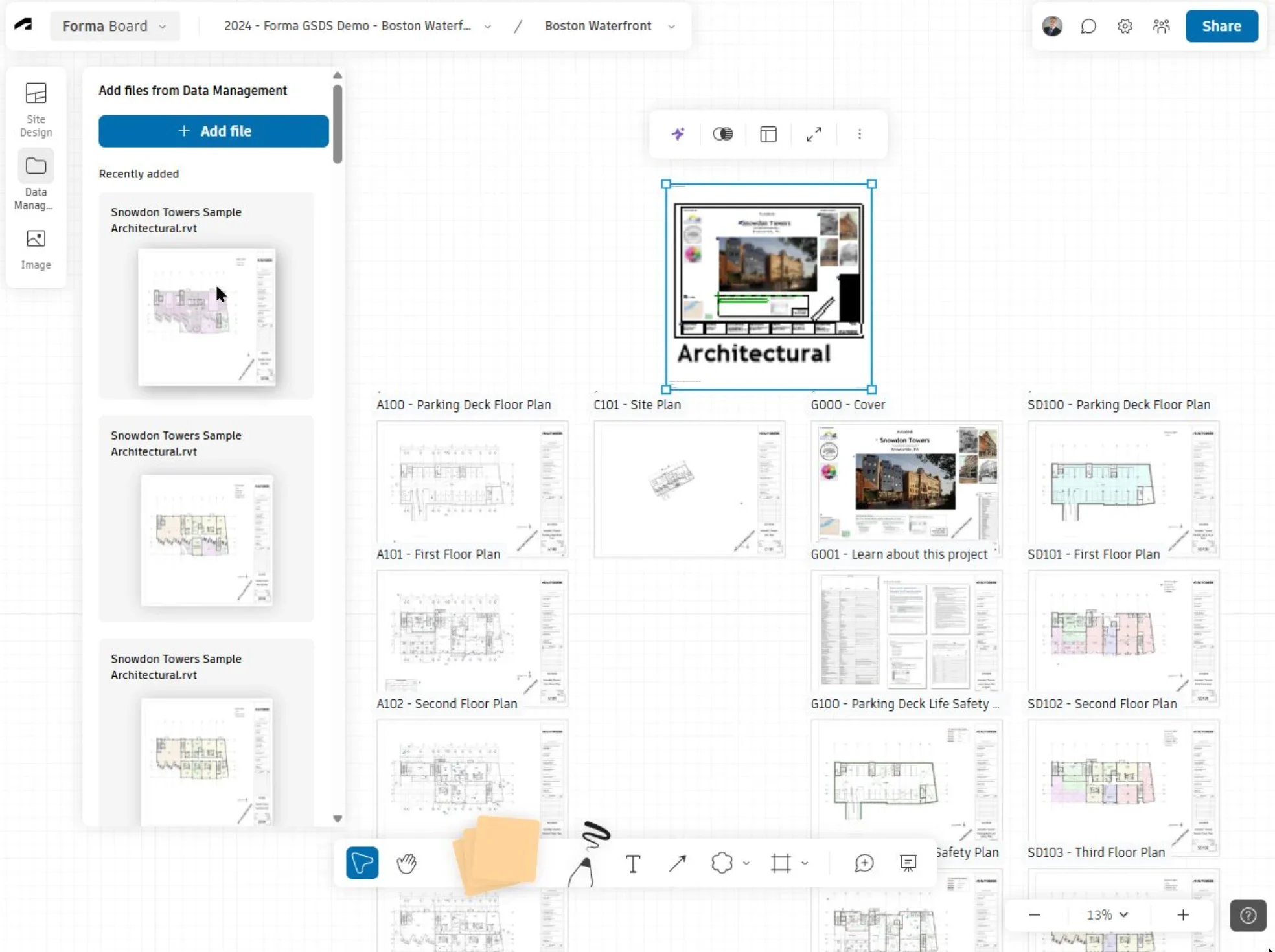
Autodesk Build gives field teams controlled access to drawings, models, and project documents from a single workspace. When a revised drawing is published, the platform automatically updates version history and preserves previous revisions. Users can also leave feedback and approve files before release, reducing the chance that unapproved documents reach the jobsite.
The platform is also designed for field use with mobile sync and markup tools. For example, a construction supervisor can access the latest drawing on a mobile device and share the annotated issue to other users without returning to a desktop. You can also configure who can view or edit each file, so contractors can share project data with subcontractors while protecting restricted files.
Some Autodesk plans use sheet allowances or per-user pricing, which can affect costs as project access expands. Procore may be a better option for projects with multiple external contributors because of its fixed pricing for unlimited users.
Pros
- Centralizes models for field coordination
- Automates submittal document handoffs
- Adds new cost control features regularly
Cons
- Some BIM 360 features are unavailable
- Product name changes confuse users
- Insufficient current evidence
Key features
- Cost management: Track budgets, contracts, project costs, and financial changes in one workspace
- Submittals: Send material and equipment documents through review before procurement or installation
- Issues: Record quality or safety problems and assign corrective work to project owners
- Schedule: Update construction activities as project dates or jobsite conditions change
Pricing
Forma Build Essentials: $66.67/mo., when billed at $800 annually. Includes field execution, document access, issue tracking, daily reports, and forms.
Forma Build: $116.67/user/mo., when billed at $1,400 annually. Includes project management, cost controls, reporting, and admin tools.
3. Contractor Foreman – Best affordable contractor management

- My rating: 4.71 out of 5
- Free trial available
- Starts at $49/mo.
Why I chose Contractor Foreman
Contractor Foreman caters to small and midsize contractors that need construction and project management software without enterprise pricing. Annual plans start at $49 per month for one user, while higher tiers expand access to three, eight, 15, or unlimited users.
Lower-cost plans cover project records, estimates, schedules, daily logs, client communication, and financial tracking. This pricing approach allows a small contractor to select a user allowance that matches the current crew rather than paying for unused seats or separate products for each construction workflow.
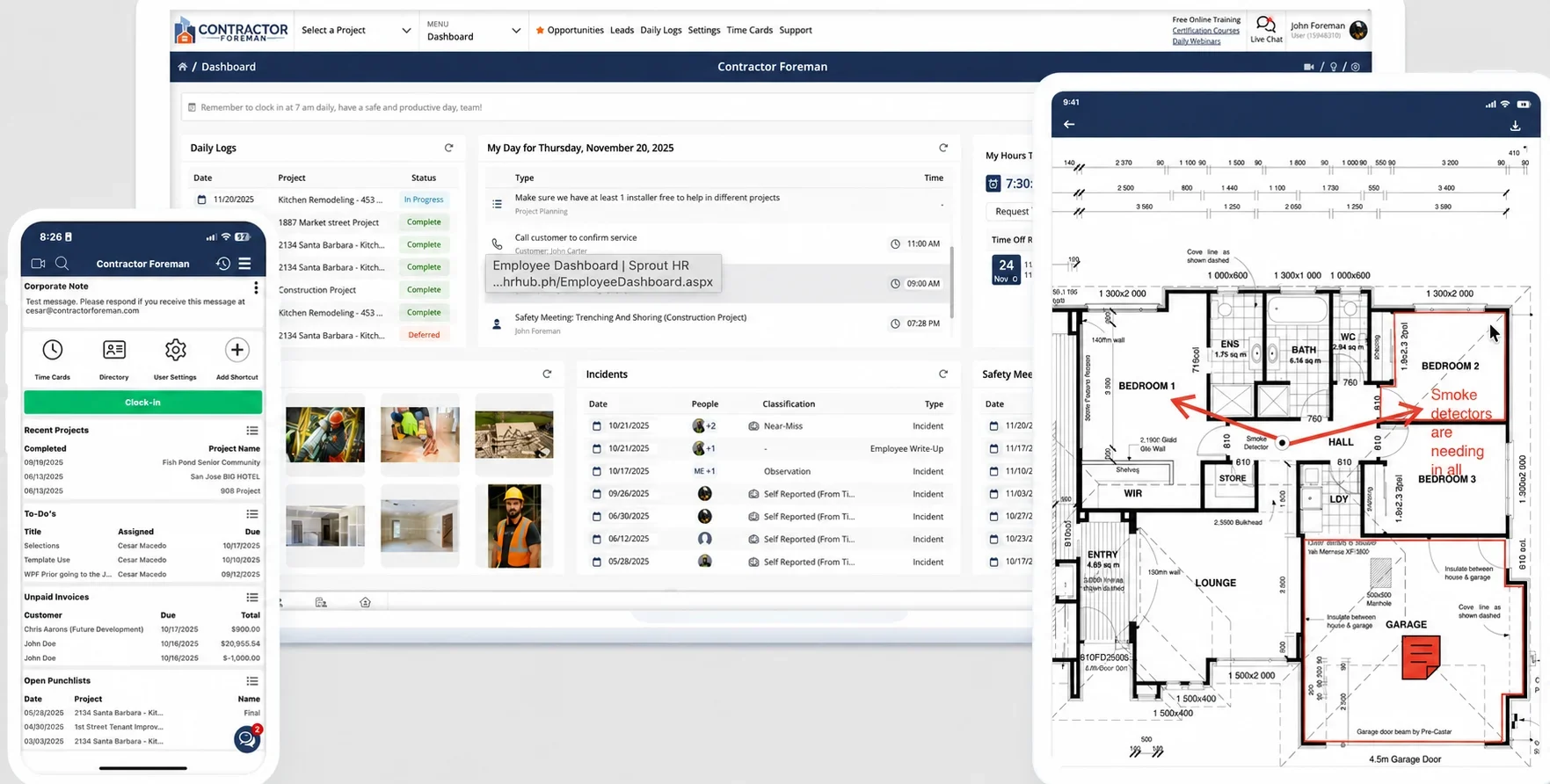
The software also moves project data through several stages of contractor operations. Teams can manage bids, then track schedules, permits, inspections, and labor hours. Financial tools connect estimates with expenses and change orders, which provides a record of job costs from project proposal through payment.
Contractor Foreman also includes a 30-day trial and a 100-day money-back guarantee, reducing the financial risk for smaller firms that need more time to configure the system and train users.
The tradeoff: The number of available features can make setup more time-consuming, especially when configuring role permissions and workflows. If you want a more centralized platform for drawings and field documentation, Autodesk Build Forma is a better option because it centralizes project files and site records.
Pros
- Connects budgets with employee timecards
- Flat pricing supports larger teams
- Support resolves issues quickly
Cons
- Service tickets restrict recurring appointments
- Software bugs interrupt daily work
- Setup takes significant time
Key features
- Estimates: Create itemized estimates with stored costs, markups, branding, and electronic approvals
- Daily logs: Record jobsite progress, weather, materials, incidents, photos, and employee hours
- Client portal: Provides a single space for sharing project updates and approved documents with customers
- Time cards: Track employee hours by project for labor costing and payroll review
Pricing
Free trial: 30 days
Basic: $49/mo. for one user. Includes core construction project management and financial tools.
Standard: $105/mo. for up to three users. Includes broader access to reporting, training, and business management tools.
Plus: $166/mo. for up to eight users. Includes implementation support and document management.
Pro: $221/mo. for up to 15 users. Includes takeoffs, submittals, and invoicing.
Unlimited: $332/mo. for unlimited users. Includes unlimited private training.
4. JobTread – Best for estimating and job costing

- My rating: 4.64 out of 5
- Custom pricing
Why I chose JobTread
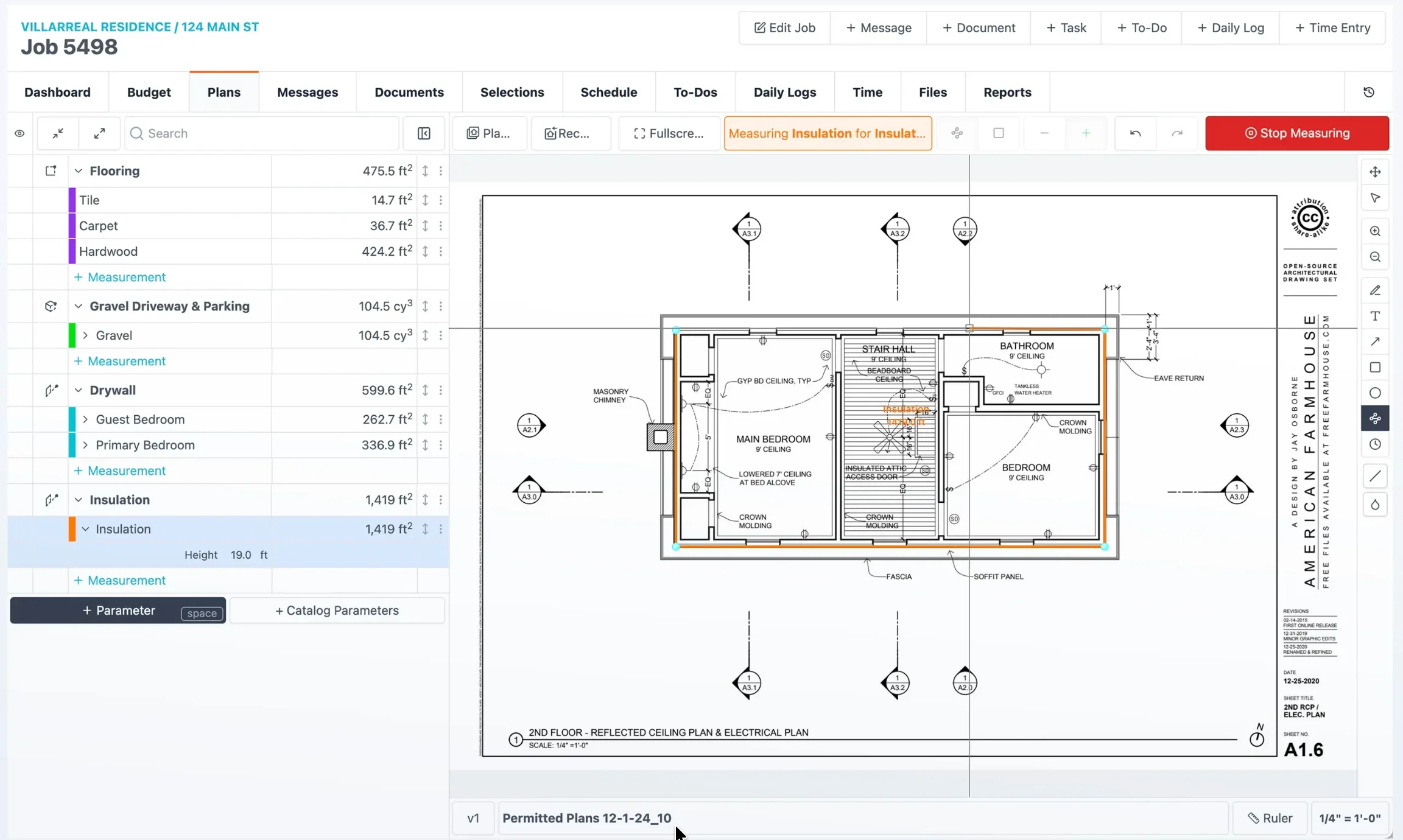
JobTread builds the project budget from the estimate, giving contractors a single financial baseline from the bid through completion. This lets me easily start with budget templates, perform quantity takeoffs from project plans, and use formulas or target margins to calculate pricing. After the customer approves the proposal, the estimate becomes the project budget, which supports bid requests and payment schedules.
During construction, JobTread compares actual costs with the original budget in real time. Teams can review paid and outstanding vendor bills, reconcile expenses with purchase orders, and identify cost variances by category or project phase. Job costing reports also break down profitability by project or individual cost item, which helps contractors address budget issues.
The downside: JobTread offers fewer advanced scheduling tools than other competitors in this guide. If the priority is managing complex construction schedules, I would choose ConstructionOnline instead.
Pros
- Connects estimates to job budgets
- Sends vendor bills to QuickBooks
- Provides hands-on implementation support
Cons
- Scheduling lacks resource workload data
- QuickBooks sync needs manual review
- Mobile controls are difficult to find
Key features
- Estimating: Create construction estimates and convert approved pricing into job documents
- Job costing: Compare actual project costs against the budget to track profitability
- Custom schedule views: Show project schedules by team, job, or construction activity
- Customer and vendor portals: Share job documents with clients and vendors without paid user accounts
Pricing
Custom pricing: Includes all features, unlimited jobs, unlimited document storage, customer portals, vendor portals, data imports, and implementation support.
5. ConstructionOnline – Best advanced construction scheduling

- My rating: 4.38 out of 5
- Free trial available
- Custom pricing
Why I chose ConstructionOnline
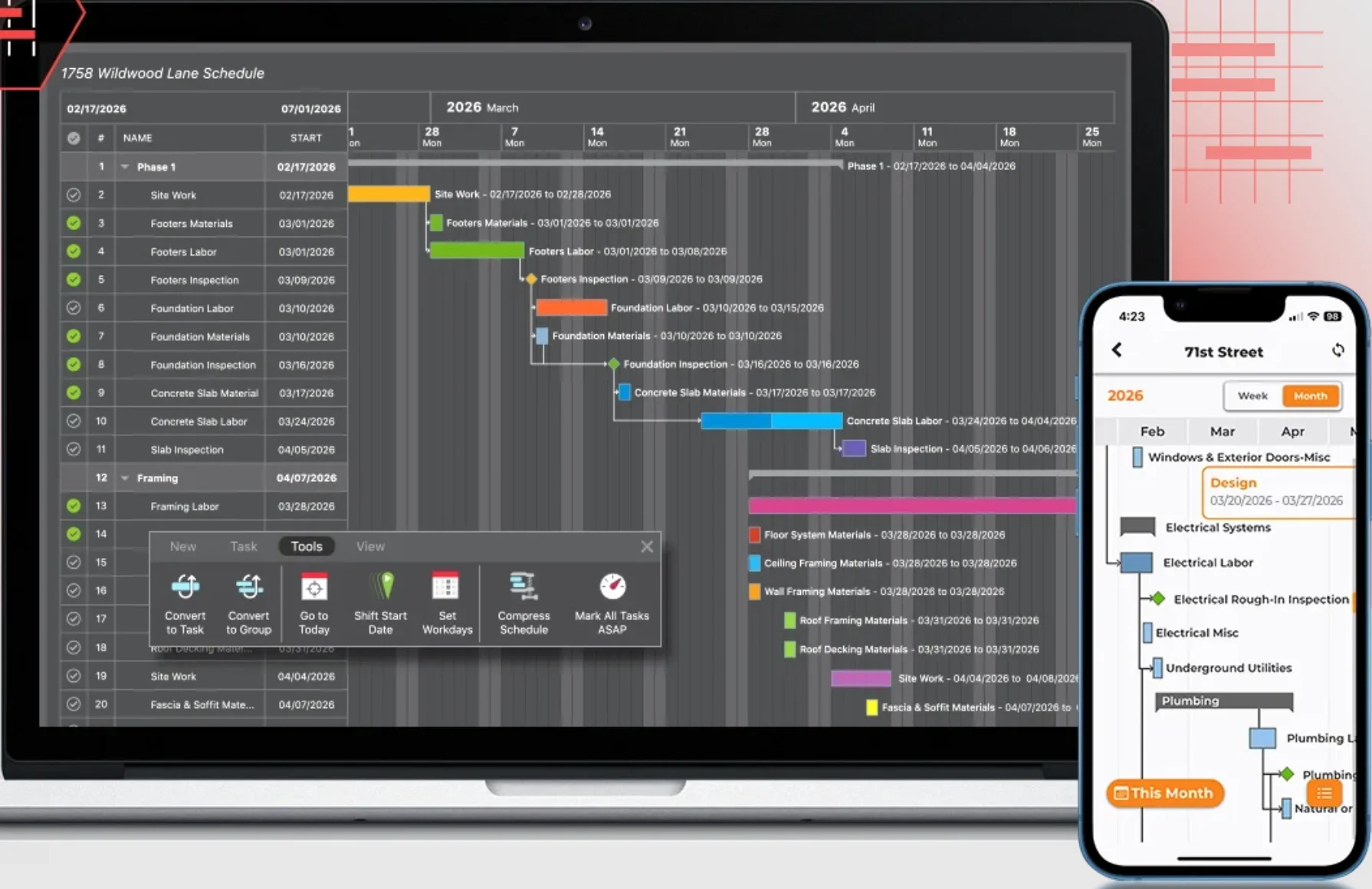
ConstructionOnline provides a range of scheduling tools for coordinating project activities through Gantt charts, lag time, milestones, and critical-path analysis. When a schedule changes, activities adjust based on their dependencies, while baselines show how current dates compare with the original plan.
The platform also merges task planning with resource availability. Before assigning work, I can check whether employees, subcontractors, or vendors are already committed elsewhere, which prevents scheduling conflicts. Multi-project scheduling, bulk task editing, automated reminders, and reports for resource conflicts or projected completion dates support contractors with multiple workloads.
ConstructionOnline can export schedules to external calendars, but automatic synchronization is unavailable. monday work management may suit teams that value flexible customizations and basic planning
Pros
- Connects estimates with project schedules
- Stores project communication in one place
- Gives field teams access to drawings
Cons
- Dispatch planning requires manual reports
- Document uploads sometimes fail
- Mobile app has fewer desktop features
Key features
- OnCost estimating: Build detailed estimates and connect pricing with job costs and purchasing
- OnPlan scheduling: Create construction schedules and compare current dates against the original baseline
- Change orders: Track added costs, schedule changes, and client approvals for extra work
- TrueVision Business Intelligence: Compare project performance, financial results, and schedules across active jobs
Pricing
Free trial: 10 days
Custom pricing: Includes construction scheduling, resource management, estimating, job costing, project documentation, and business intelligence.
6. monday work management – Best for custom construction workflows

- My rating: 4.25 out of 5
- Free trial available
- Starts at $9/user/mo.
Why I chose monday work management
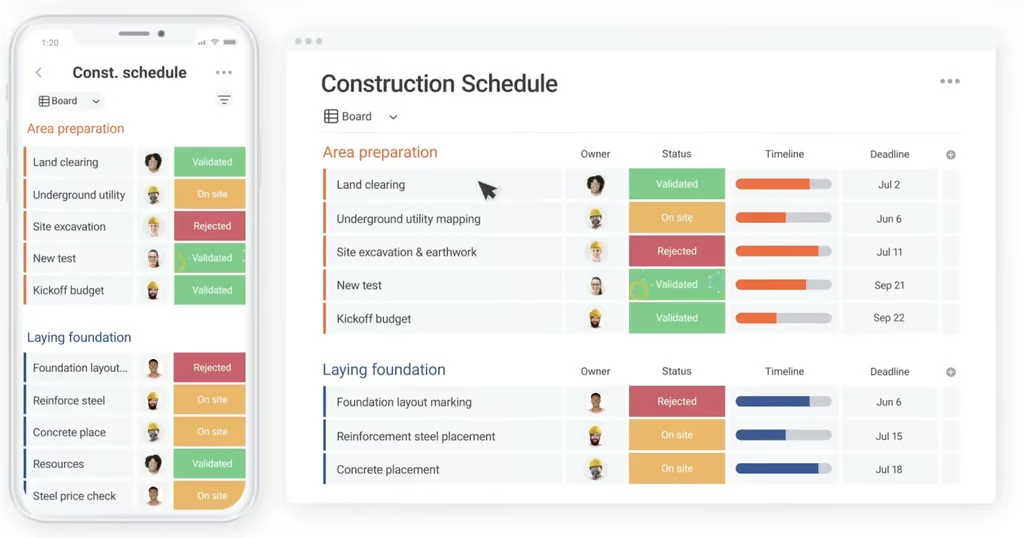
For teams that do not want to adapt to standard construction workflows, monday work management lets you organize projects around your existing processes. Each board supports different types of project data, allowing me to create separate boards for schedules, procurement requests, and subcontractor coordination.
The platform also syncs project information across desktop and mobile devices so task changes reflect in real-time. Teams can also view the same project data as timelines or dashboards, while automations update assignments and send alerts after status changes.
While monday.com is a versatile project tool, estimations and job costing require third-party apps and customizations. If your priority is managing financial workflows in construction, I recommend JobTread instead.
Pros
- Adapts boards to construction workflows
- Updates timelines when dependencies change
- Combines reports across multiple projects
Cons
- Requires custom construction financial tracking
- Complex workflows take time to configure
- Seat block pricing increases costs for small teams
Pricing
Free plan: Includes up to two users, three boards, work documents, templates, and mobile apps.
Free trial for paid plans: 14 days for the Pro plan.
Basic: $9/user/mo. Includes unlimited work items, unlimited viewers, and basic project tracking.
Standard: $12/user/mo. Includes timeline and Gantt views, guest access, automations, integrations, and dashboards.
Pro: $19/user/mo. Includes time tracking, advanced reporting, dependencies, formulas, and higher automation limits.
Enterprise: Custom pricing. Includes portfolio management, resource planning, advanced permissions, enterprise security, and higher usage limits. Paid plans require at least three users.
All quotes are billed annually.
7. Houzz Pro – Best for residential client management

- My rating: 4.15 out of 5
- Free trial available
- Custom pricing
Why I chose Houzz Pro
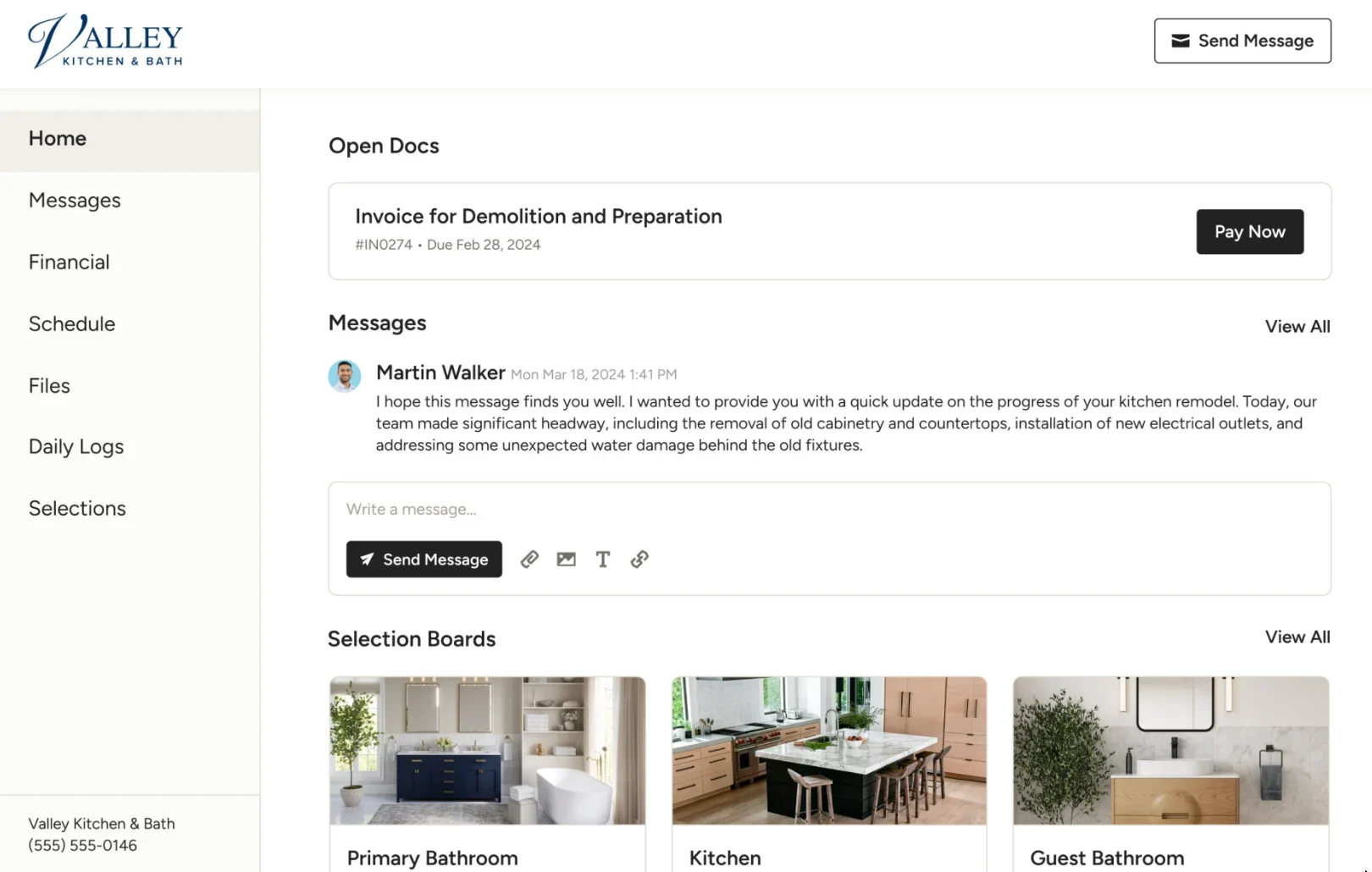
Houzz Pro offers a client-facing dashboard where homeowners can review project activity and financial documents. Contractors control what each client can view, while homeowners can approve estimates and change orders, pay invoices online, and review assigned tasks.
Within the portal, clients can review fixtures, finishes, and layouts through visual selection boards and 3D floor plans, then leave feedback on each item. Shared project timelines and client task lists also make it easier for homeowners to track upcoming milestones and complete required actions.
Houzz Pro focuses on residential work, so its client tools may be less relevant for large commercial projects. Procore better serves commercial contractors that need RFIs, submittals, and contract administration.
Pros
- Helps clients approve 3D designs
- Combines client billing with project tracking
- Speeds up product selection workflows
Cons
- Invoice templates cannot be transferred
- Large blueprints slow mobile performance
- Clients cannot access rendering comments
Key features
- Takeoffs: Measure digital plans and convert quantities into material estimates
- Estimates: Create client estimates and convert approved pricing into invoices or schedules
- Selections: Present product choices and track client approvals against the project budget
- Client dashboard: Share project updates, invoices, and selection decisions with homeowners
Pricing
Free trial: 30 days
Custom pricing applies across plans.
- Pro: Includes estimates, invoicing, online payments, and floor planner
- Custom: Includes takeoffs, schedule, budgets, bid management, change orders, and financial reports
- Enterprise: Includes unlimited users and priority support
8. Buildertrend – Best for home builder operations

- My rating: 4.12 out of 5
- Custom pricing
Why I chose Buildertrend
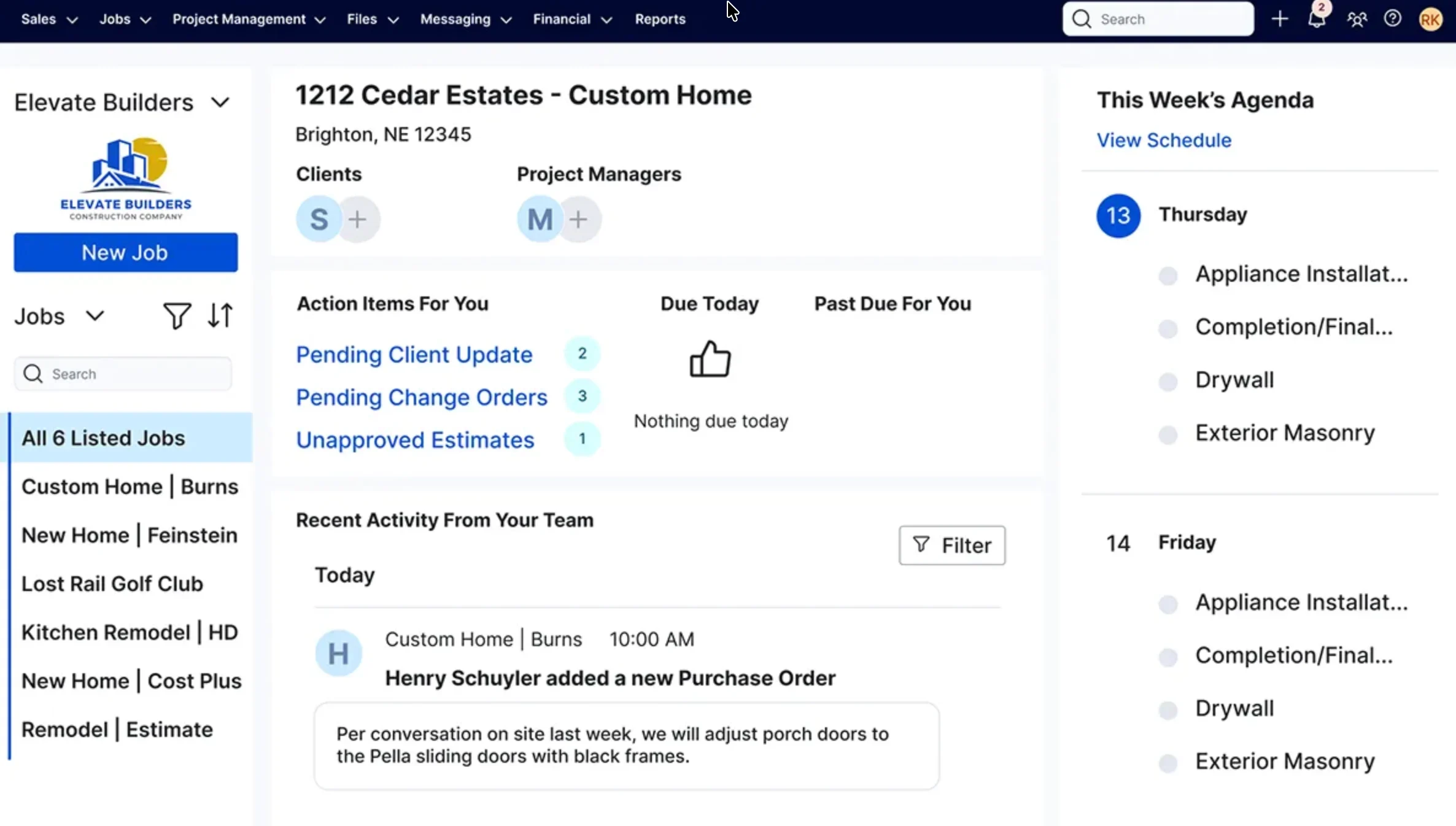
Buildertrend supports the full lifecycle of a residential construction project, from preconstruction through warranty. Within the platform, builders can manage selections, allowances, estimates, and budgets. It also includes budget tracking that compares estimated costs with actual spending to identify cost overruns before project completion.
When it comes to homeowner collaboration, the client portal includes access to schedules, project updates, documents, and financial information. AI-powered updates convert daily logs into client-friendly progress reports, while warranty tracking helps builders manage service requests after project handover.
Since Buildertrend is designed for residential construction, it may be less suitable for commercial projects that rely heavily on formal documents. If your projects rely heavily on submittals, RFIs, and field document control, consider Autodesk Build Forma instead.
Pros
- Centralizes homeowner decisions in client portals
- Connects material selections with budgets
- Moves sales projects into production
Cons
- Mobile screens hide key project details
- Search filters slow record retrieval
- Pricing can burden smaller builders
Key features
- Schedule: Coordinate construction phases and share current dates with teams and clients
- Selections: Record homeowner choices and track their effect on the project budget
- Customer Portal: Share schedules, budgets, photos, selections, and change orders with clients
- Change Orders: Send project changes for client review and record approval
Pricing
Custom pricing: Includes unlimited users, lead management, project scheduling, task tracking, budgeting, invoicing, and client communication.
How I evaluated the best construction project management software
I scored each platform using a comprehensive rubric covering pricing, core capabilities, usability, and support. I also considered advanced construction tools and my overall assessment of each product’s value for contractors and project teams.
- Pricing (20%): I looked at starting costs, free plans or trials, and the construction features available at the entry level. Setup fees, user limits, contract requirements, and paid add-ons also factored into the evaluation.
- General features (25%): For standard offerings, my assessment focused on scheduling, job costing, field reporting, document control, and external collaboration. Platforms earned higher scores when these capabilities were built specifically for construction workflows.
- Advanced and niche features (20%): I looked at estimating and takeoff tools, RFI and submittal workflows, BIM support, automation, and cross-project reporting. More weight was given to features handling specialized construction processes without additional configuration.
- Ease of use (10%): This score reflected both initial setup and overall navigation. I also considered how each platform adapts to different workflows.
- Support (10%): I reviewed each vendor’s available support channels, including help centers and training resources. Security controls and active community also contributed to this score.
- Expert score (15%): My expert assessment considered the availability of construction-specific capabilities and the value offered for the price. I also reviewed current third-party ratings and the official product documentation.
Featured Partners: Construction Project Management Software
Key features to look for in construction project management software
Construction project management software should include tools for scheduling, estimating, job costing, document management, field reporting, and change management. Additional capabilities such as RFIs, submittals, client portals, cross-project reporting, and integrations help contractors update project data and control project costs.
| Feature | What to look for |
|---|---|
| Construction scheduling | Tracks task dependencies, milestones, baseline schedules, and the critical path to identify activities that delay project completion. |
| Estimating & takeoffs | Measures quantities from plans, calculates material and labor costs, and converts estimates into project budgets. |
| Job costing & budgeting | Compares estimated costs with actual labor, material, and subcontractor expenses |
| RFIs & submittals | Records design inquiries, document reviews, and approvals with links to the related drawings and specifications. |
| Document management | Offers version history, file permissions, and access to the latest drawings and project documents. |
| Change order management | Records scope changes, project costs, and approvals before revising the contract value. |
| Field reporting | Records daily site activity, labor hours, equipment usage, inspections, and safety observations from mobile devices. |
| Client & subcontractor access | Allows sharing of schedules, drawings, financial documents, or assigned tasks without exposing internal records. |
| Portfolio reporting | Reviews schedules, budgets, resource allocation, and project performance across multiple active jobs. |
| Integrations | Exchanges data with accounting, payroll, ERP, design, and document management systems to avoid duplicates. |
How to choose the best construction project management software
The right project management software for construction work depends on the projects you manage, company size, and the processes you want to improve. Start by identifying the work that consumes the most time, then compare how each platform handles those tasks.
Use the steps below to narrow your options:
- Identify your biggest operational challenge: Start with the process that consumes the most time or causes the most errors, such as estimating, scheduling, job costing, document management, or client communication. Prioritize software that includes these capabilities instead of relying on third-party tools.
- Choose software designed for your type of contractor: Residential builders often need client portals, selections, and warranty management. Commercial contractors may require RFIs, submittals, document control, and portfolio reporting. General-purpose project management software works well when your team values flexibility over construction-specific workflows.
- Compare financial control: Review how each platform manages estimates, budgets, change orders, purchase orders, invoices, and job costing. The best project management software for construction projects connects these records to ensure consistent costs from the initial estimate through final billing.
- Review document management: If your projects rely on drawings and specifications, confirm that the software provides version history, file permissions, digital markups, and mobile access to current documents.
- Check the mobile experience: Field teams should be able to open drawings, submit daily logs, report issues, and update task progress from a phone or tablet. Test these workflows during the evaluation instead of relying on feature lists.
FAQs
What is the best construction project management software for small contractors?
Contractor Foreman is best for small contractors because it combines estimating, scheduling, job costing, and client management at a lower starting cost than many enterprise platforms. monday work management is another option if you need a simpler, more flexible system but do not require native construction estimating or job-costing tools.
What is the difference between construction management software and general project management software?
Construction software includes workflows specific to contractors, such as job costing, RFIs, submittals, daily logs, and drawing control. General project management platforms usually focus on tasks, timelines, and configurable workflows, which may require additional setup for construction use.
How do I choose construction project management software?
Start with the workflows that create the most admin work or project risk for your business. Compare products based on those needs, then review pricing, mobile functionality, and integration requirements before committing to a platform.