

























KEY TAKEAWAYS
After the initiation phase confirms the project is approved, the next step is to define how the work will be carried out. This is where the project planning phase begins, where project managers develop a comprehensive project plan detailing the scope, schedule, resources, risk, and communication strategy.
In this article, we walk through the key components, steps, and common mistakes of the project planning phase.
| Phase | Overview |
| 1. Initiation | Defines the project’s purpose, scope, and stakeholders; determines if the project is feasible and worth pursuing. |
| 2. Planning | Outlines the roadmap, including timeline, resources, budget, risks, and deliverables. |
| 3. Execution | The team completes the work and produces deliverables based on the project plan. |
| 4. Monitoring & Control | Tracks progress, manages changes, and ensures the project stays on scope, time, and budget. |
| 5. Closure | Finalizes deliverables, obtains approvals, and documents lessons learned. |
What is the project planning phase?
Project planning is the second stage of the project management life cycle, following project initiation and preceding project execution. It’s where high-level goals from the initiation phase are broken down into specific work items that the team can actually act on.
The recently updated PMBOK® Guide defines planning as the focus area that establishes how a project will deliver its intended value by defining scope, refining objectives, and determining the course of action. It is supported by adaptable, non-prescriptive processes that guide decisions across scope, schedule, cost, risk, and resources. Its primary output is the project plan: a living, integrated document that aligns delivery approach, budget, risk responses, and communication strategies with the value the project is expected to create.
Why project planning matters
Project planning provides teams with a reliable framework for monitoring progress from start to finish, reducing confusion, minimizing errors, and keeping projects on time and within budget. Yet despite its importance, only around 40% of organizations consistently complete projects on time or within budget based on a Wellingtone 2025 report.
If you’re looking to improve those odds, here are the advantages of an effective project planning process:
- Defines clear direction: Planning establishes agreed-upon goals, scope, and deliverables upfront, so every team member understands what success looks like before work starts.
- Improves resource efficiency: Identifying resource requirements enables project managers to strategically allocate people, budget, and tools, which minimizes waste and avoids costly last-minute adjustments.
- Reduces risk: A well-developed plan anticipates potential obstacles and builds in contingency measures, allowing the team to address challenges before they escalate into larger problems.
- Keeps projects on schedule and budget: Defining timelines and cost estimates create accountability benchmarks that make it easier to recognize warning signs and take corrective actions.
- Strengthens stakeholder alignment: A formal project plan gives all stakeholders a single reference point that sets expectations and reduces the risk of conflicting priorities during execution.
Key components of project planning
A project plan is made up of several key components, each covering a critical aspect of the project: the scope, schedule, resources, budget, risks, and communication needs. Together, they form a comprehensive framework that guides the team from planning through to delivery. Here is a breakdown of the core components:
| Project planning components | Description |
| Project scope | Defines the boundaries of the project, including deliverables, objectives, and what is explicitly excluded from the work. |
| Work breakdown structure (WBS) | Breaks the project scope into smaller, manageable tasks and subtasks that can be scheduled and assigned. |
| Project schedule | Sequences tasks, defines durations, identifies dependencies, and establishes milestones and deadlines. |
| Resource allocation plan | Identifies the people, tools, equipment, and materials needed to complete the project, along with how they will be allocated. |
| Budget and resource estimates | Estimates the total cost of the project and establishes financial controls to track spending. |
| Risk management plan | Identifies potential risks, assesses their likelihood and impact, and outlines mitigation and contingency strategies. |
| Communication plan | Defines how information will be shared among stakeholders and team members, including frequency, channels, and ownership. |
| Stakeholder plan | Identifies all project stakeholders, their expectations, influence levels, and how they will be engaged throughout the project. |
| Quality management plan | Establishes the quality standards the project must meet and outlines how those standards will be monitored and maintained. |
| Project plan | Acts as the master document that consolidates all of the above components into a single reference for the entire project team. |
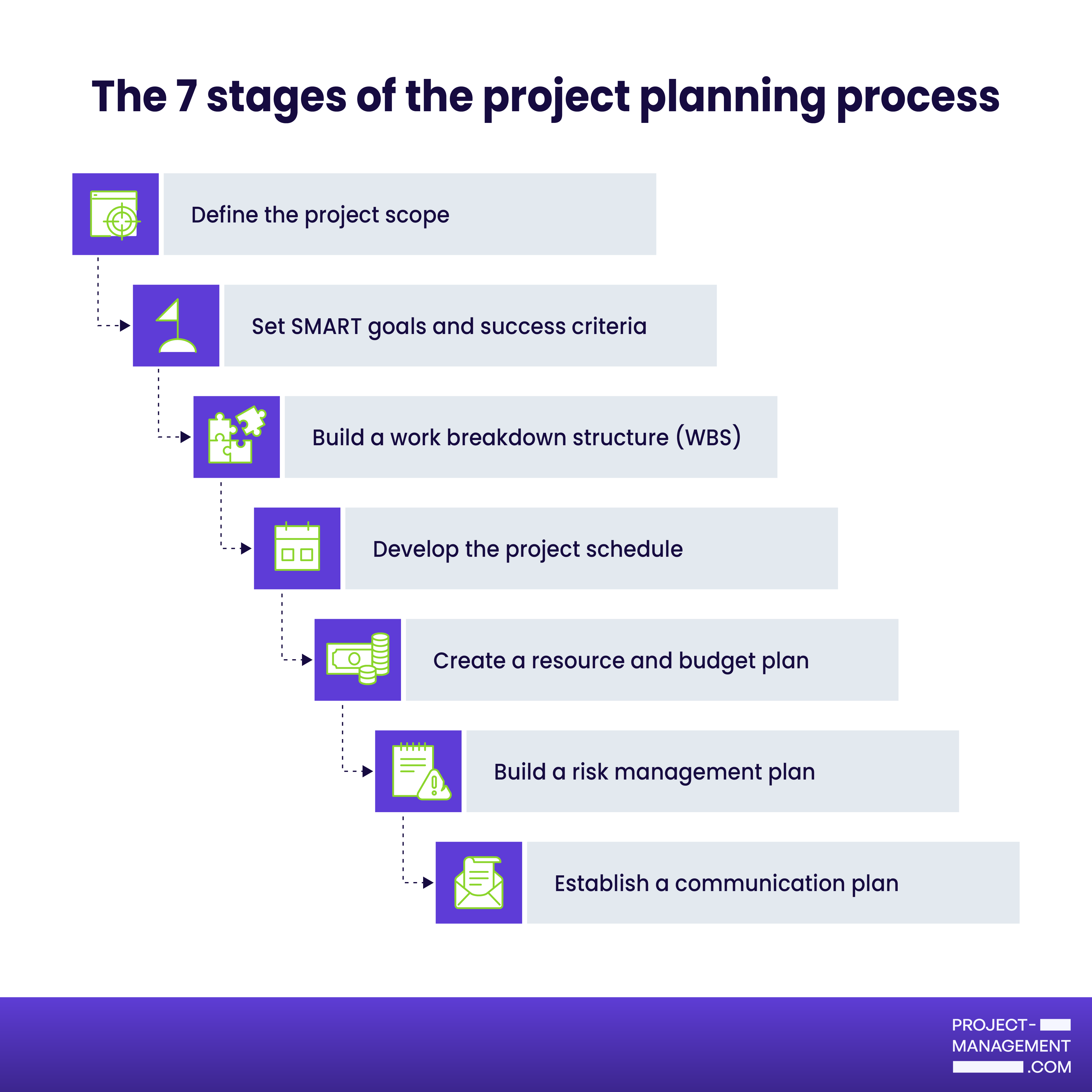
7 stages of the project planning process
The project planning phase involves defining the project scope, setting goals, breaking down work, building a schedule, allocating resources, managing risk, and establishing communication. Here is a step-by-step breakdown of how to work through each step effectively.
Step 1: Define the project scope
Planning begins with knowing what your project will and will not deliver. Document the objectives, deliverables, and boundaries of the work so that everyone involved has a shared understanding of what is expected. This step prevents scope creep, which is when unplanned work expands the project beyond its original boundaries.
Step 2: Set SMART goals and success criteria
Translate your project objectives into SMART goals: Specific, Measurable, Achievable, Relevant, and Time-bound. Then define how success will be evaluated at the end of the project. Clear goals give your team a concrete target to work toward and make it easier to assess whether the project delivered what it promised.
Step 3: Build a work breakdown structure (WBS)
Break the project scope down into smaller tasks and subtasks. Using a WBS makes it easier to assign responsibilities, estimate effort, and track progress. Think of it as turning a high-level goal into a to-do list for the entire project.
Step 4: Develop the project schedule
Order your tasks by sequence and map out dependencies between them. Set milestones and deadlines so every team member knows exactly what is expected of them.
Step 5: Create a resource and budget plan
Identify the people, tools, and materials the project requires, then map out the timing of each resource across the project schedule. Alongside this, estimate the total cost of the project and allocate budget across tasks.
Step 6: Build a risk management plan
List potential risks and rate each one by likelihood and impact. For each significant risk, document a mitigation strategy or contingency plan. Addressing risks during planning saves time and money down the line.
Step 7: Establish a communication plan
Define how information will be shared across the project. This includes deciding who needs to receive updates, how often, through which channels, and who is responsible for delivering them. A communication plan reduces the chances of misunderstandings or conflicts throughout the project.

ClickUp is an all-in-one project management platform that offers over 15 ways to visualize your project plan. It includes a library of over 1,000 templates, with pre-built boards for WBS, project schedule, and resource plan. A project board may come with a built-in AI scheduling assistant to automate scheduling and streamline the planning process.
Visit ClickUpCommon pitfalls to avoid during project planning (+tips)
Unrealistic timelines, poor risk planning, and lack of stakeholder engagement are among the most common mistakes that can compromise a project during the planning phase. Below are six of the most frequent planning pitfalls and how you can avoid them.
- Defining scope too broadly or too loosely
A vague scope creates room for misinterpretation and opens the door to scope creep. Write a scope statement that explicitly details the project’s boundaries and exclusions and establish a change management process for any additions to the project.
- Setting unrealistic timelines and budgets
Underestimating time and cost creates an added pressure on the team to deliver more than what was planned for. Back your estimates with historical data and consult the team members responsible for the work.
- Overlooking risk planning
Without a risk plan, problems are dealt with as they surface rather than before they occur, which is often more costly and disruptive to the schedule. During the planning phase, rate each list by likelihood and impact and document a mitigation or contingency plan for the highest-priority ones.
- Failing to engage stakeholders early
When stakeholders are engaged too late, their feedback often conflicts with decisions already finalized, forcing the team to redo work that could have been avoided. Identify all stakeholders early in the planning phase and set a communication schedule to keep them informed throughout the project.
Next step: Project execution
With an approved project plan in place, the project moves into the execution phase, where the work defined during planning is carried out by the team. This is the longest and most resource-intensive phase of the project life cycle, where tasks are completed and deliverables are produced. We’ll cover this in more detail in the next article in this series.
FAQs
The duration varies depending on the size and complexity of the project. Small projects may require a few days of planning, while large or complex projects can take several weeks. As a general rule, the planning phase should be as long as the project requires to produce a complete and realistic plan.
The initiation phase determines whether the project is worth pursuing. The planning phase, on the other hand, assumes the project has been approved and focuses on defining how it will be executed.
The project manager leads the planning phase and is responsible for producing the project plan. However, it is a collaborative process. Team members and subject matter experts all contribute their input to ensure the plan is in line with business objectives.
Featured Partners: Project Management Software
Project-Management.com may receive a commission from merchants for referrals from this website