

























KEY TAKEAWAYS
 Work breakdown structures have three types: deliverable-based organizes by outputs, phase-based follows project lifecycle stages, and hybrid, which combines both approaches.
- Apply the 100% rule to ensure child elements represent exactly 100% of the parent’s scope and decompose work until packages are small enough to estimate accurately, typically 8-80 hours of effort.
- A well-constructed WBS enables accurate cost and time estimation and creates a common reference point for project deliverables and responsibilities.
Every successful project starts with knowing exactly what needs to be delivered. Yet one of the most common reasons projects fail is when teams fail to fully break down the work, leading to missed deliverables, budget overruns, and confused stakeholders.
The work breakdown structure (WBS) decomposes complex projects into a hierarchy of specific phases and work packages. This comprehensive guide will teach you everything you need to know about creating a WBS and the right tools to use to improve project outcomes.
What is a work breakdown structure?
A work breakdown structure (WBS) is a hierarchical way to break a project into smaller, manageable components. Think of a WBS as a visual roadmap that answers the question: “What needs to be done?” Instead of listing tasks, a WBS focuses on deliverables, organizing them in a tree-like structure that shows what must be produced to complete the project successfully.
Benefits of a work breakdown structure in project management
A work breakdown structure serves as the foundation for virtually all other project planning activities, including cost estimation, resource allocation, scheduling, and risk management. In fact, the Project Management Institute (PMI) considers it one of the essential tools in a project manager’s toolkit.
Here’s why project professionals rely on it:
- Reduces the likelihood of discovering missing requirements late in the project
- Enables accurate resource estimation by breaking work into smaller chunks
- Helps project teams see how their work contributes to larger deliverables
- Provides clear milestones and deliverables to measure against
Components of a work breakdown structure
A work breakdown structure comprises hierarchy levels, work packages, control accounts, and a dictionary. Before building one, it’s important to understand how each component works.
1. The hierarchy (levels)
The structure relies on a parent-child relationship. The higher levels represent broad phases or major deliverables, while the lower levels represent specific, granular outputs.
- Level 1 (Root node): This is the project title. It represents the final, total deliverable.
- Level 2 (major deliverables): These are the main work chunks (e.g., “Planning,” “Construction,” “Design”).
- Level 3+ (Sub-deliverables): Breaking down the major chunks into smaller components.
2. Work packages
A work Package sits at the very bottom of any branch in the WBS. This is the point where work is assigned to a team member or department and estimated for cost and time. It follows the 8/80 rule, where a work package should take no less than 8 hours and no more than 80 hours to complete.
3. Control accounts
A control account is placed at selected levels of the WBS (usually above work packages but below the project level). It allows project managers to integrate scope, budget, and schedule for performance measurement. In complex projects, you might not want to track costs for every single tiny task. Instead, you group several work packages under one control account to track the budget variance for that specific section of the project.
4. WBS Dictionary
The visual chart cannot hold every detail without looking cluttered. The WBS Dictionary is a companion document that provides the specific details for each element in the WBS. It typically includes:
- A detailed description of the work
- Deliverables associated with the work package
- Acceptance criteria (How do we know it’s done?)
- Responsible party (Who owns this?)
- Budget and resource requirements
5. WBS code (Numbering system)
To organize the hierarchy, every element has a unique identifier. This is crucial when you import your WBS into a Gantt chart or financial software.
- 1.0 Project Title
- 1.1 Phase 1
- 1.1.1 Work Package A
- 1.1.2 Work Package B
Types of work breakdown structures & industry examples
A work breakdown structure generally falls into three types: deliverable-based, phase-based, and hybrid. A deliverable-based WBS organizes the project around tangible outputs, while a phase-based WBS structures the hierarchy by lifecycle stages. A hybrid WBS blends both approaches to reflect how work is planned and approved.
The following sections explore industry-specific examples of work breakdown structures to help you select the right approach for your project.
1. Deliverable-based WBS
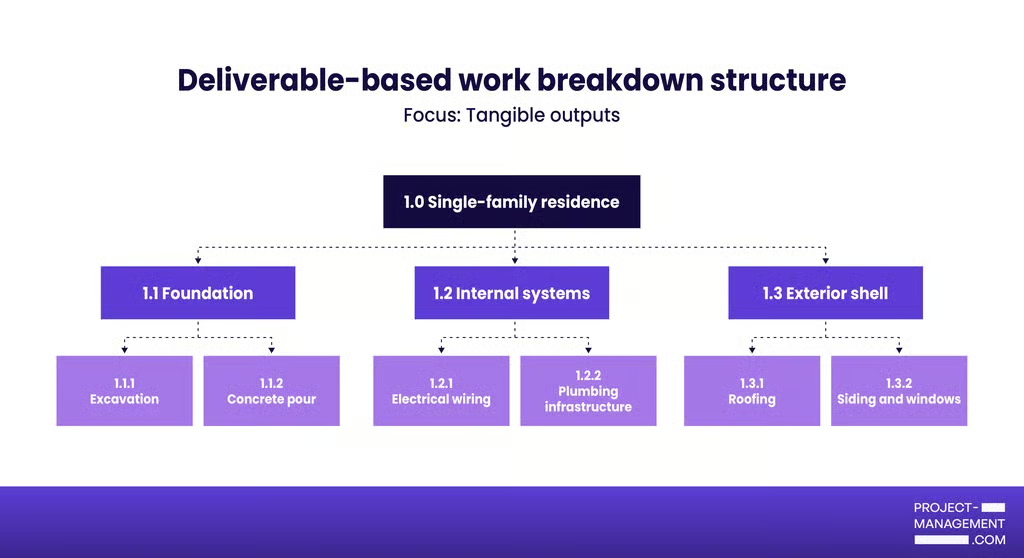
A deliverable-based WBS organizes the project around tangible outputs rather than activities. Each level represents a deliverable or sub-deliverable rather than an activity or phase. It emphasizes “what” you’re delivering rather than “how” you’ll do it, making it easier to ensure all required outputs are accounted for.
2. Phase-based WBS
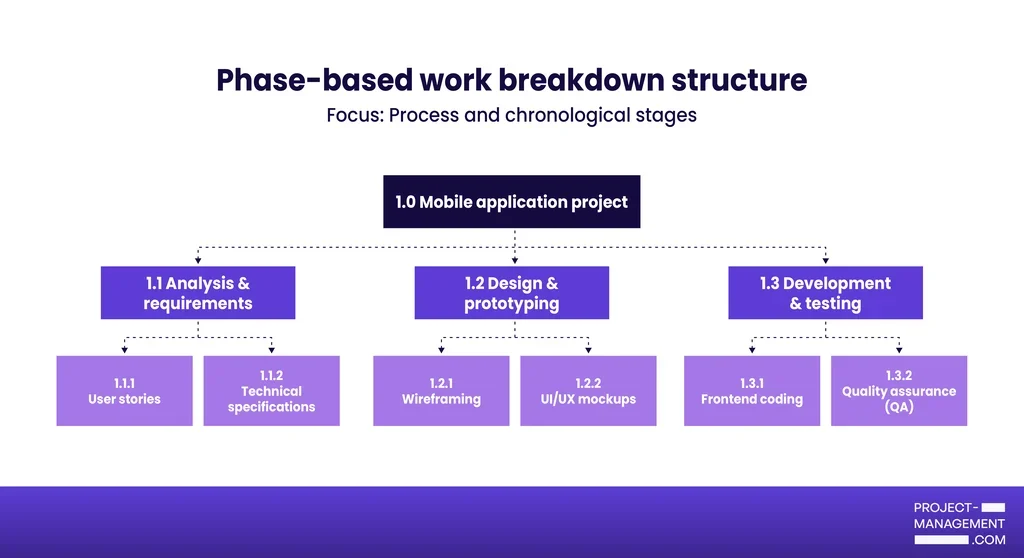
A phase-based WBS organizes the project based on lifecycle stages. Each major branch represents a phase, such as initiation, planning, execution, or closure. It answers the question: “When are we doing the work?” This approach works well when timing and sequence are critical, or when your organization follows specific project management methodologies like waterfall.
3. Hybrid WBS
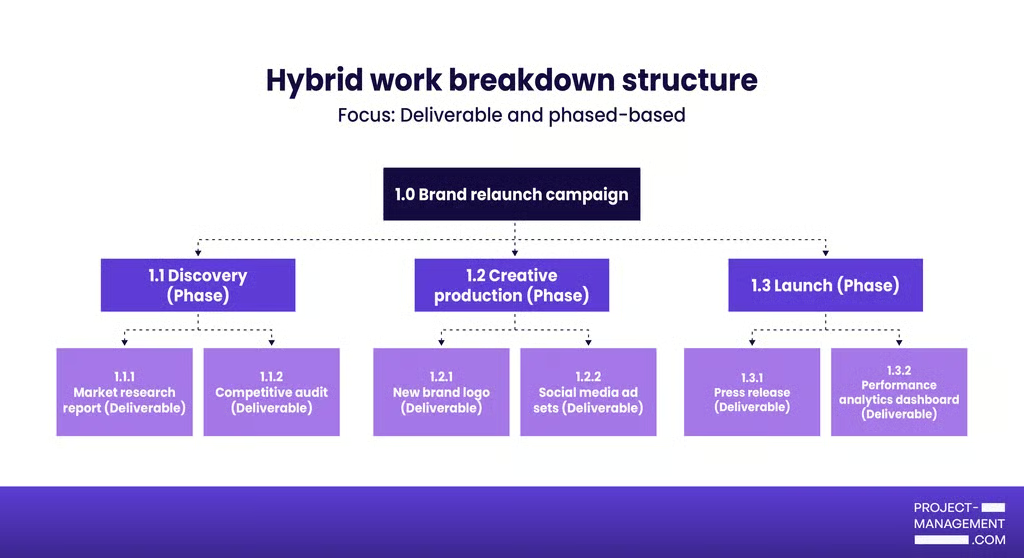
A hybrid approach combines both deliverable-based and phase-based elements, using whichever structure makes most sense at each level. The top levels might be organized by phase, while lower levels focus on deliverables, or vice versa.
Step 4: Assign unique identifiers
Give each WBS element a unique code or number using a hierarchical numbering system. For example: 1.0 for the project, 1.1 for the first major deliverable, 1.1.1 for its first sub-component, and so on. These identifiers make it easy to reference specific elements in schedules and budgets.
Step 5: Create the WBS dictionary
For each work package, document the scope description, responsible party, estimated duration and cost, required resources, dependencies, and acceptance criteria. This companion document eliminates ambiguity and serves as a reference throughout the project.
Types of work breakdown structure & tools
While a work breakdown structure uses the classic tree diagram, project management platforms visualize a WBS in different ways to cater to your team’s preferences and project needs. Here are work breakdown structure examples for project management use:
| WBS Type | Best for |
|---|---|
| Hierarchical chart | Executive presentations |
| Gantt chart | Timeline management |
| List view | Task management |
| Outline or indented list | Technical documentation |
| Mind map | Brainstorming |
| Kanban board | Tracking workflow status |
| Spreadsheet | Budgeting and data tracking |
To help you choose the right visualization for your WBS, here is a breakdown of the formats and where they shine most in project management.
1. Hierarchical chart
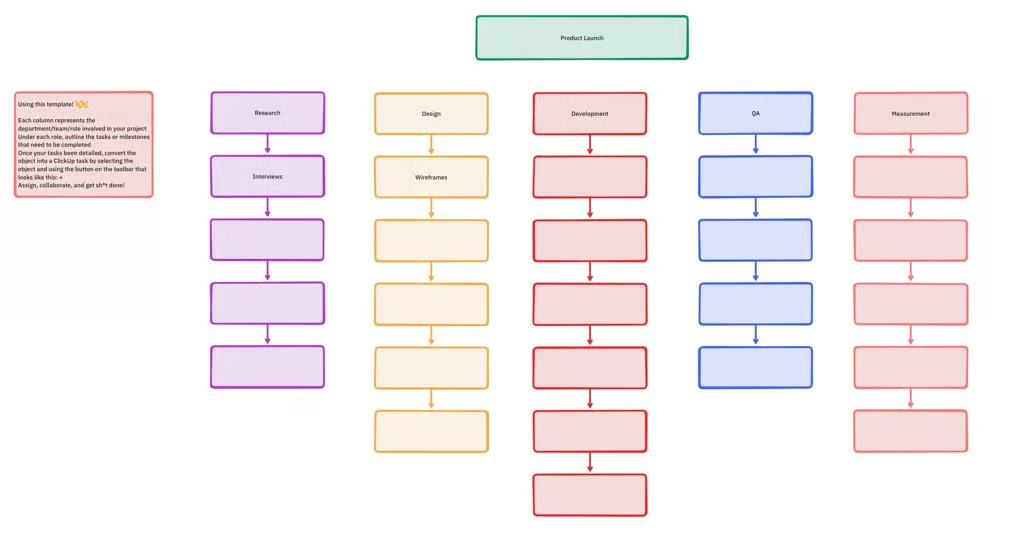
ClickUp modernizes the traditional WBS chart by allowing teams to brainstorm the hierarchy on a digital whiteboard where each column represents a specific department or role. Its tree structure shows parent-child relationships and makes it easy to see how work rolls up to higher-level deliverables. You can instantly convert these visual shapes into tasks and organize major deliverables as color-coded branches.
2. Gantt chart
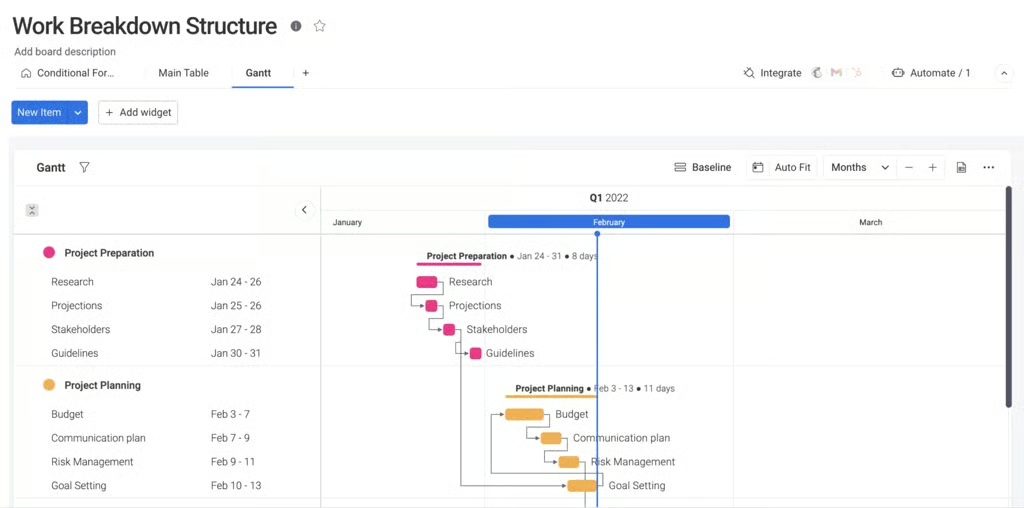
Using a Gantt chart tool for your WBS works for projects where time management is critical. The hierarchical task list on the left side serves as the WBS, while the timeline on the right shows scheduling. For example, monday work management provides the option to automatically convert your WBS task list to a Gantt view. The color-coding system shows different project phases at a glance, while the interactive timeline visually connects parent tasks to their subtasks through dependencies.
3. List view
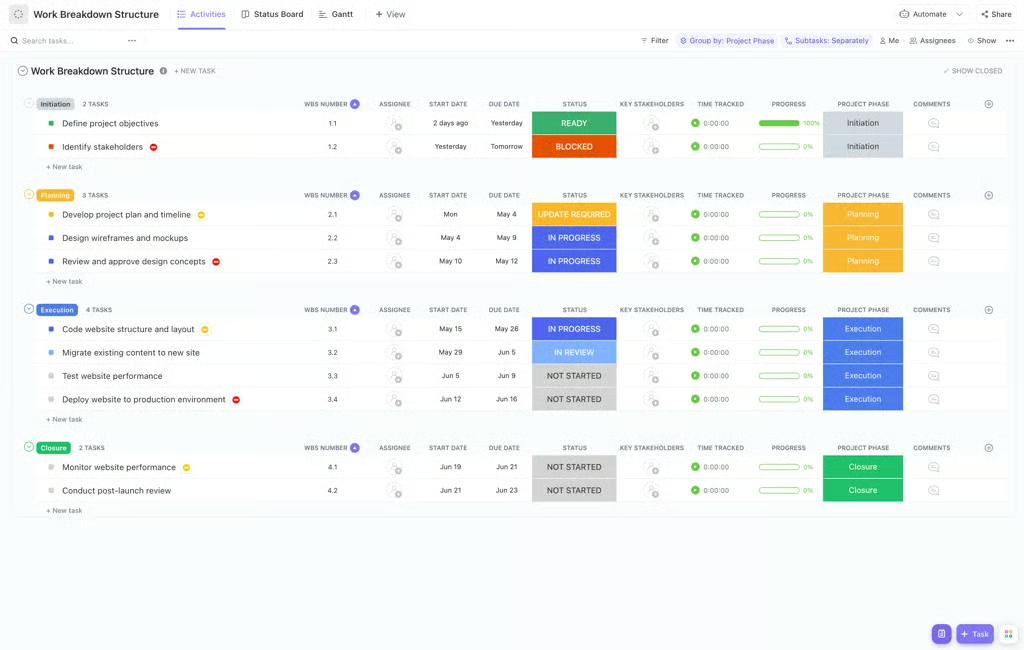
List views work exceptionally well on mobile devices and for teams that prefer simplicity over complex visualizations. In ClickUp’s list view, you can organize your WBS by grouping tasks into color-coded project phases like “Initiation” or “Execution.” It also includes dedicated columns for unique WBS numbers and status bars, so every subtask is categorized.
4. Outline or indented list
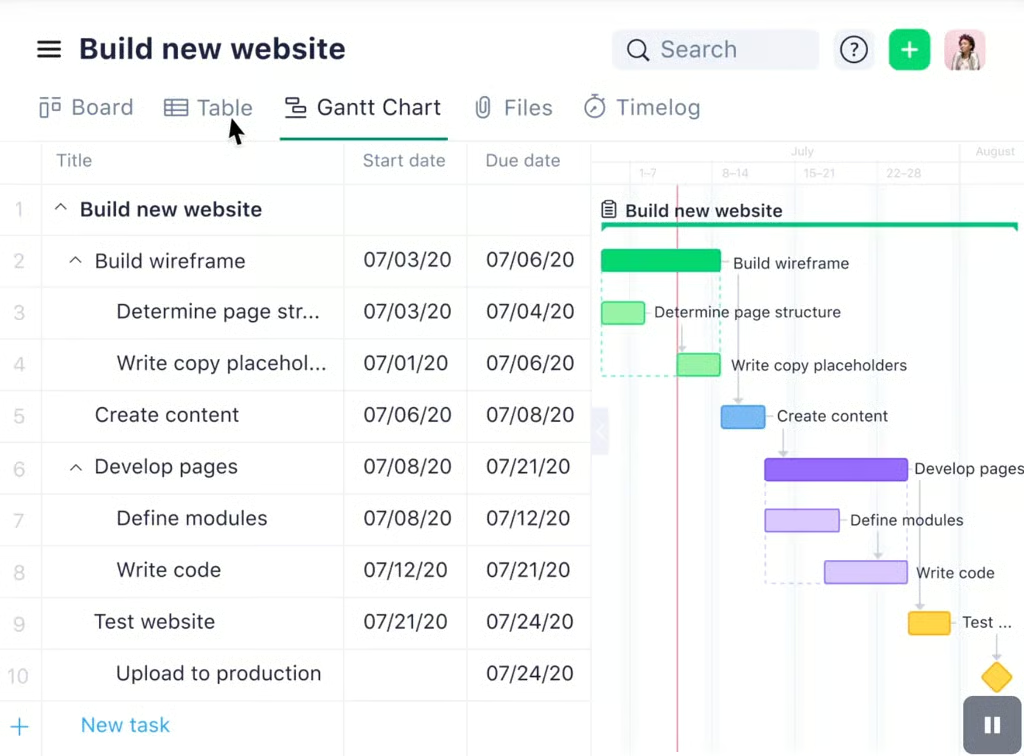
Outlines are quick to create and work well in documents and spreadsheets. Each level is indented further than its parent, with number codes like 1.0, 1.1, 1.1.1. This work breakdown structure example from Wrike nests tasks within folders and subtasks to create a hierarchy of deliverables. You can then switch to the Gantt Chart view to visualize how these indented work packages translate into a timeline, complete with start and end dates.
5. Mind map
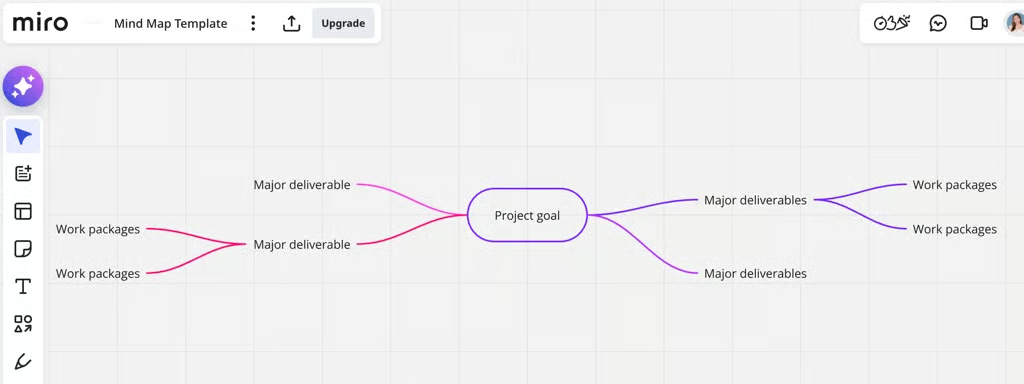
A mind map places the project goal at the center with major deliverables radiating outward as branches, and work packages extending from those branches. It’s a more non-linear visualization, which encourages creative thinking and works well for brainstorming sessions with teams.
Miro provides a digital canvas for brainstorming, with a central “Project goal” node to anchor major deliverables and work packages as they branch out. The infinite canvas makes it easier to visualize how granular tasks roll up into high-level project objectives.
6. Kanban board
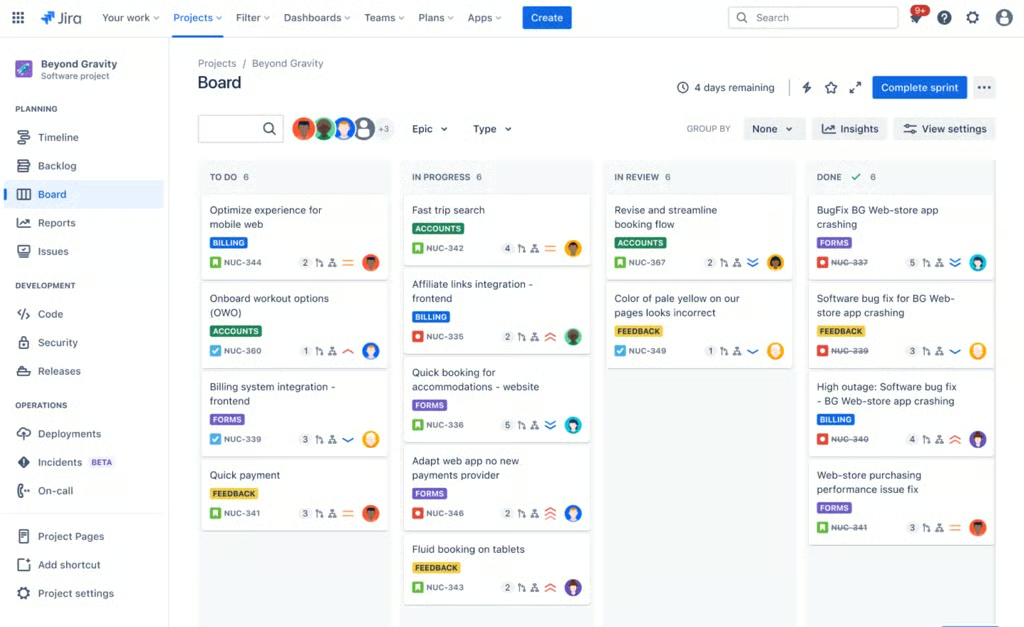
While not a traditional WBS visualization, Kanban boards can represent work packages by status, phase, or deliverable category in columns, with cards representing individual components. This method is particularly effective for agile teams and phase-based projects where work packages move through stages.
Jira lets you use columns to represent the current status of each work package, such as “In Progress” or “In Review,” while leveraging color-coded labels like “Billing” or “Accounts” to categorize deliverables. This layout provides an immediate view of task ownership and priority, allowing teams to track how individual components contribute to the larger project scope.
7. Spreadsheet
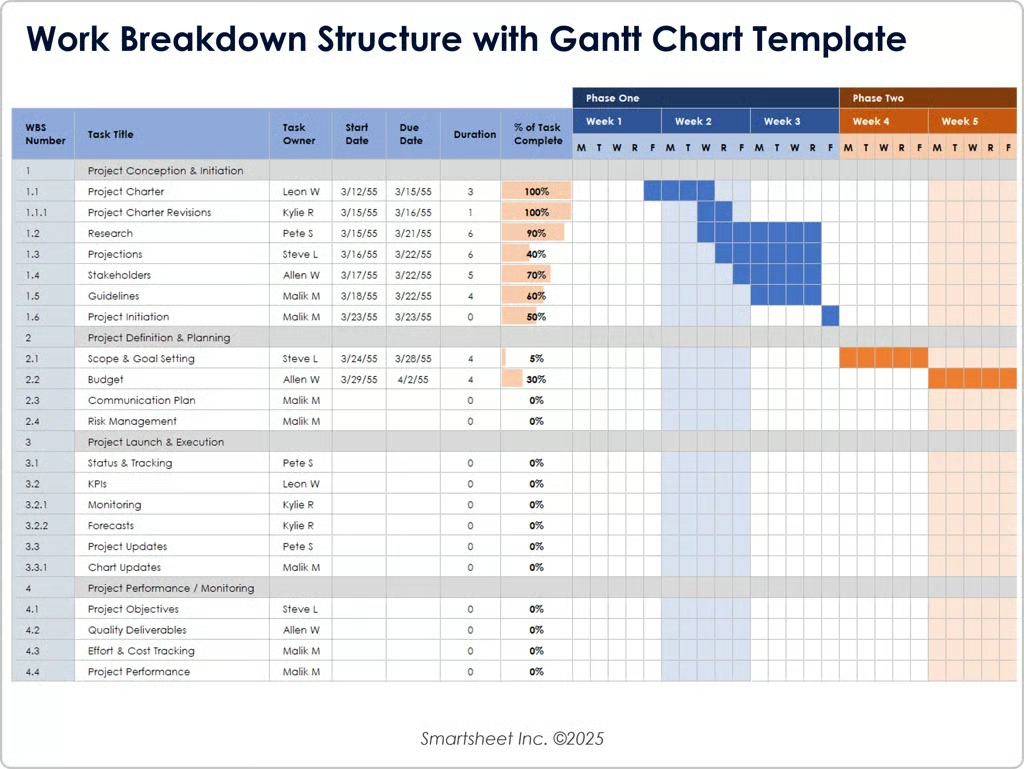
A spreadsheet format features columns showing WBS code, element name, description, level, parent element, and other attributes like owner, duration, or cost. It provides the most flexibility for adding custom fields and works well for cost tracking and resource allocation.
Smartsheet lets you visualize phase overlaps and schedules alongside your WBS spreadsheet. It pairs with a dynamic Gantt chart, so you can track granular details in the columns while tracking project progress through the timeline on the right. Plus, if you want a head start, Smartsheet offers a library of work breakdown structure templates for each workflow type.
Work breakdown structure best practices
Creating a work breakdown structure in project management is fairly straightforward, but it requires a careful breakdown of deliverables, team collaboration, and adherence to proven principles. Following these best practices will help you avoid common pitfalls and ensure your WBS serves as a reliable reference throughout your project lifecycle.
- Follow the 100% rule: Ensure the WBS includes 100% of the work defined by the project scope and captures all deliverables, including internal, external, and interim.
- Keep work packages mutually exclusive: Define each element distinctly to avoid overlap in responsibilities and prevent the double-counting of work or costs.
- Involve the project team: Collaborate with subject matter experts during the creation process to ensure technical accuracy and improve team buy-in.
- Use a consistent coding scheme: Assign a unique numerical identifier to every element to track the hierarchy and simplify integration with financial and scheduling systems.
- Create a WBS dictionary: Provide a supporting document that defines the specific scope, milestones, and requirements for every component listed in the chart.
FAQs
What is the difference between a task list and a WBS?
A task list is a linear sequence of activities focused on the “how.” A WBS is a hierarchical framework that organizes the total project scope into deliverable-based or phase-based format to ensure every project requirement is accounted for in a parent-child relationship.
Can you use WBS in Agile?
Absolutely. Agile teams use a product-based WBS to break down high-level Epics and Features into user stories that fit within individual sprints. This structure lets project managers track progress on specific features while adjusting the work sequence as requirements change during development.
Who is responsible for creating the WBS?
The project manager typically leads the creation process, but it is a collaborative effort. It requires input from subject matter experts and team members who will actually perform the work to ensure all work packages are accurately laid out for estimation.