6 Best No-code Database Application Builder Tools You Should Try in 2026

6 Best No-code Database Application Builders You Should Try in 2026

Discover the best database software with no-code application builders for project workflows. Compare features, pricing, and use cases to find the right platform.

Written By
Marianne Sison
Marianne Sison
Apr 2, 2026
13 minute read
project-management.com content and product recommendations are editorially independent. We may make money when you click on links to our partners. Learn More

Ready-made apps are built around generalized workflows that often do not match how teams operate. Building custom software to fit those workflows requires developers, longer timelines, and higher costs that many teams cannot justify. A database app builder allows teams to design systems and set up workflows without code. In this article, I share my hands-on experience with database software with no-code application builders and explain which workflows each platform handles best.

Best forStarting monthly price
SoftrBest for building client portals$49 for 20 users
Zoho CreatorBest for custom business process apps$8 per user
AirtableBest for flexible database-driven workflows$20 per user
Google AppSheetBest for no-code apps powered by Google Workspace data$5 per user
KnackBest for database apps with granular user control$49 for unlimited users
SmartsheetBest for spreadsheet-based workflow management at scale$9 per user

Table of Contents

What is a database application builder?

A database application builder is a no-code platform that lets you create data-driven applications without writing code. Instead of building a custom app from scratch, you work with a visual interface to set up data relationships and design the screens or workflows your team interacts with. 

These platforms are commonly used for:

  • Running project workflows with status tracking, assignments, and deadlines
  • Managing customer or contact databases with linked records and search
  • Building internal tools like asset trackers and request management systems
  • Creating portals where external users log in to view or submit their own data
  • Automating processes such as approvals, notifications, and record updates
  • Replacing spreadsheets that have outgrown their original purpose and need multi-user access or relational data structure
Advertisement

Best online database application builder compared

Free plan?Key featuresMonthly starting fee
Softr• AI app generation
• Interface builder
• User portals
$49 for 20 users
Zoho Creator• AI-assisted migration
• Schema builder
• Data collection forms
$8 per user
Airtable• Relational database
• Custom data views
• Custom sign-in page
$20 per user
Google AppSheet• Rich data capture
• Workflow logic
• App governance policies
$5 per user
KnackX• Custom domain
• Scheduled tasks
• Ecommerce payments
$49 for unlimited users
SmartsheetX• Conditional logic
• Cell-level security
• No-code work apps
$9 per user

Back to top

Users and organizations can choose from ready-to-use cloud-based software to support their business. However, companies with unique requirements prefer to use database builders that give them greater flexibility and control. Below are our favorite online database app builders that provide dependable core functions as well as flexible technical platforms for the best combination possible.

1. Softr – Best for building client portals

Rating: 4.89 / 5

  • Starts at $49/month
  • Free plan available
Visit Softr
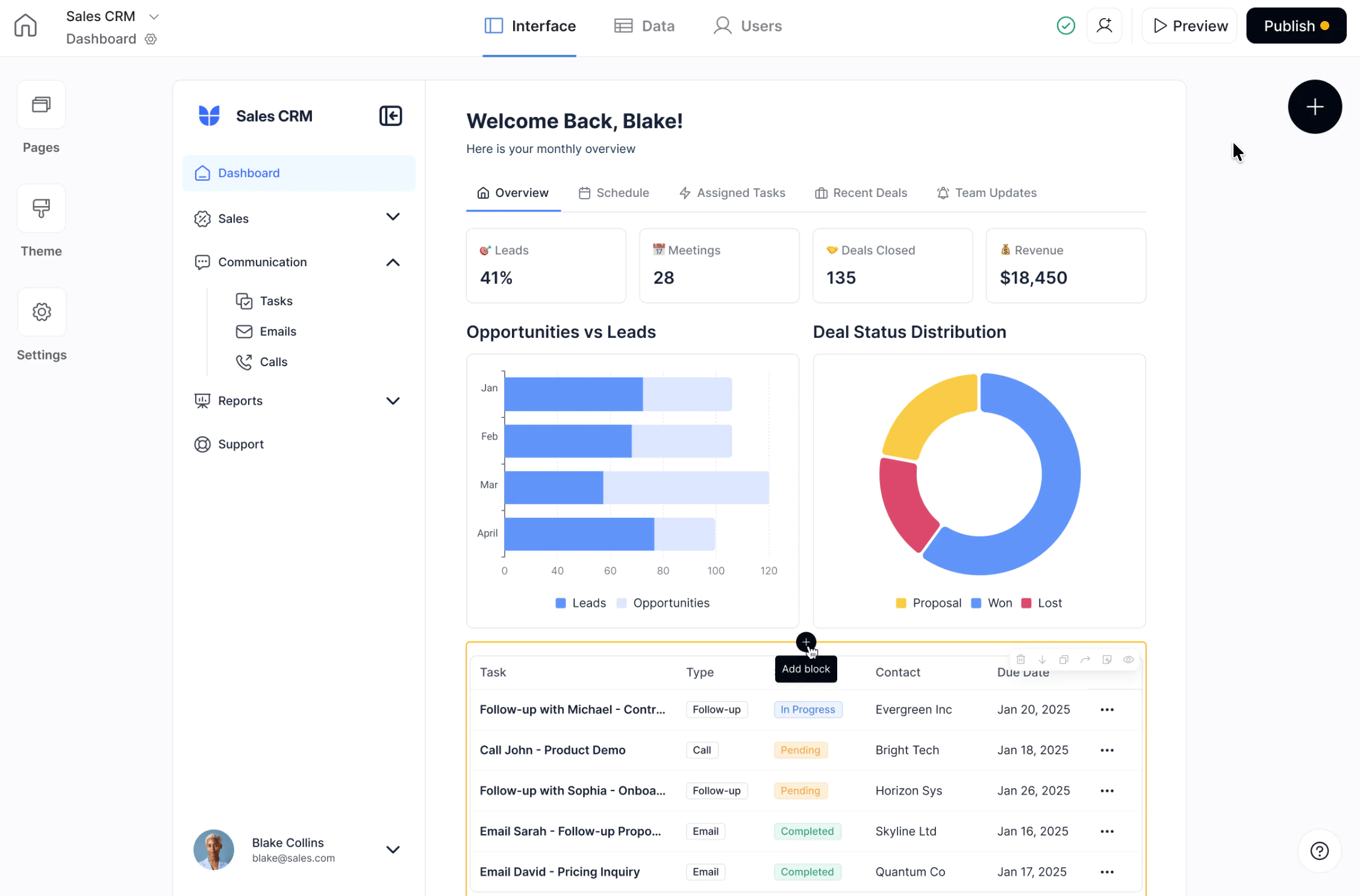
Softr app builder dashboard displaying a sales CRM interface with navigation, performance metrics, charts, and task tracking within a customizable front-end layout.
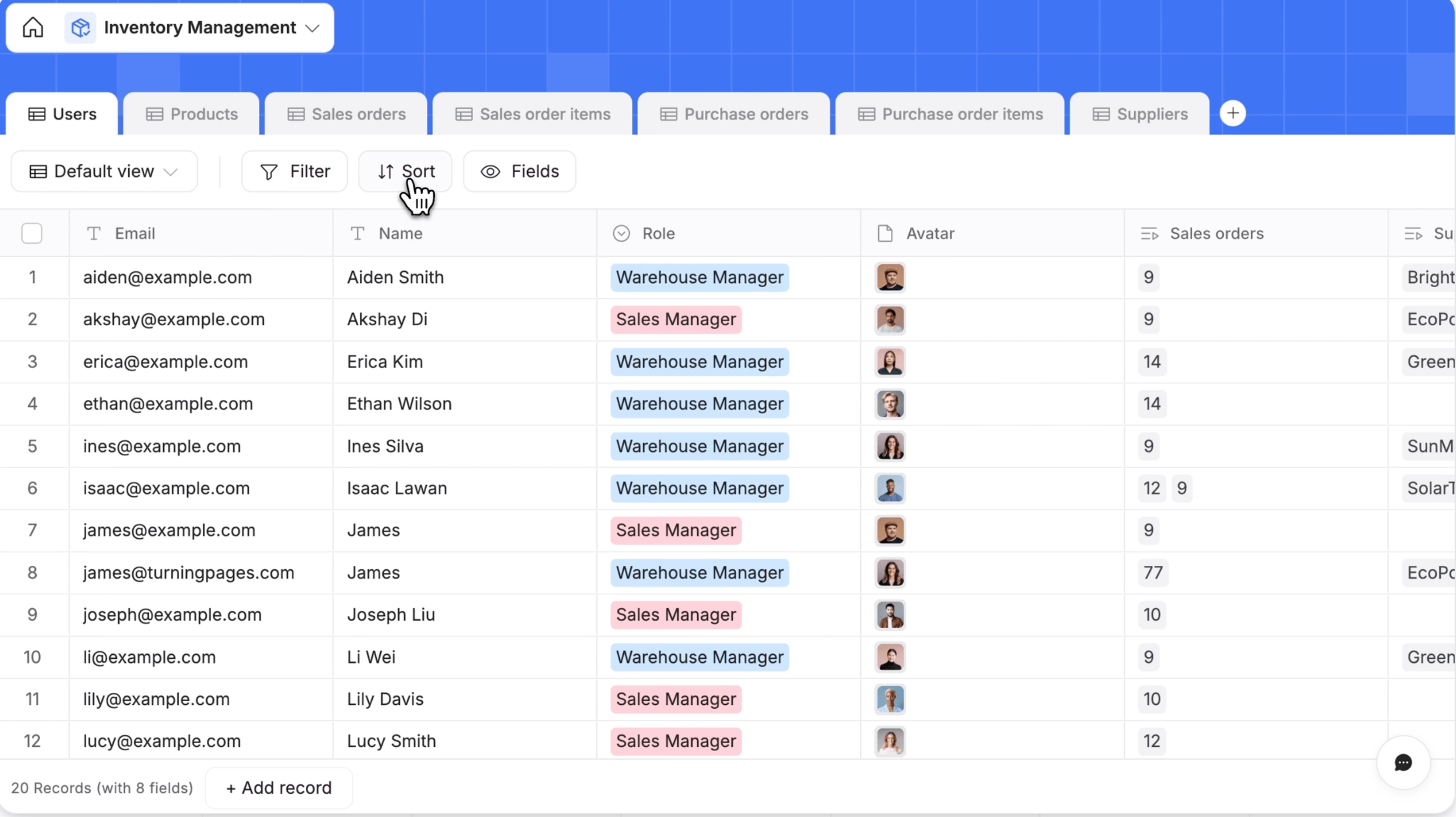
Softr database interface showing an inventory management table with user records, roles such as warehouse manager and sales manager, and options to filter, sort, and customize fields.
Softr turns database records into user-facing apps with customizable dashboards, role-based access, and interactive views.

Softr works best when you need to turn internal data into a client-facing portal without building a full app. I’ve used it in scenarios where teams already rely on Airtable or similar databases but need a secure way to share that data with clients or members.

Instead of exporting reports or managing access manually, I can create a login-based portal where each user only sees their own records, such as project updates, invoices, or requests. This makes it a strong fit for agencies, consultants, and operations teams that want to deliver a smooth front-end experience on top of existing data.

What stands out to me is how quickly I can go from raw data to a functional interface. The building blocks let me assemble dashboards, directories, and forms without writing code, which keeps setup straightforward even for non-technical teams.

The integration with Airtable or Softr’s database keeps data in sync, so I do not need to manage multiple systems. Role-based permissions let me control exactly what each user can view or edit. I also rely on page rules and conditional visibility to tailor the experience per user.

Pros

  • Reliable Airtable integration
  • User guides and learning resources simplify setup and onboarding
  • Intuitive page builder

Cons

  • Customizing blocks can feel restrictive
  • Lacks advanced options for complex logic and filtering
  • Price increases quickly as you scale
Advertisement

Standout features

Pre-built blocks: Build app pages using customizable elements such as lists, charts, tables, and forms. 

Field types: Organize your data using different field types such as attachments, formulas, lookups, and checkboxes.

Formula fields: Compute dynamic values using formulas that perform calculations, manipulate text, and apply conditional logic based on other fields.

Datetime Formatting: Format and convert date and time values using customizable formats, parsing, and timezone adjustments.

Softr pricing

  • Free: 10 users – Includes custom domain, unlimited apps & collaborators, basic forms, timeline, Vibe coding block, and 5,000 database records
  • Basic: $49/month for 20 users – Adds 50,000 database records, default user groups, Kanban view, and custom code
  • Professional: $139/month for 100 users – Adds 500,000 database records, conditional forms, chart, comments, export CSV/PDF, and inline editing
  • Business: $269/month for 100 users – Adds 1M database records
  • Enterprise: Custom pricing – Custom usage limits, SOC2 reporting, and advanced app security

2. Zoho Creator– Best for custom business process apps

Rating: 4.71 / 5

  • Free plan available
  • Starts at $8 per user/month
Visit Zoho Creator
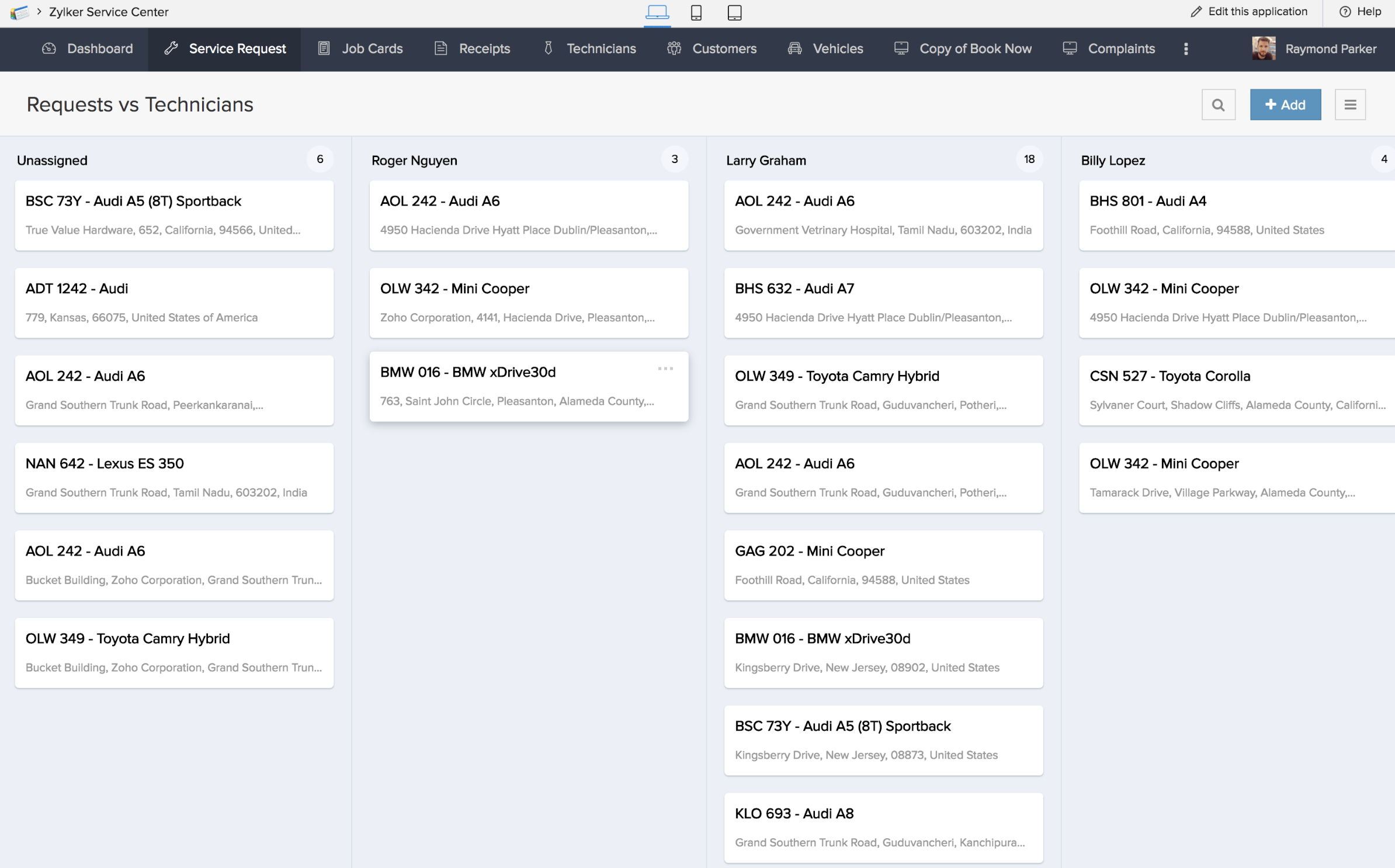
Zoho Creator dashboard showing a service request app with cards grouped by technician, including vehicle details, locations, and assignment status across columns.
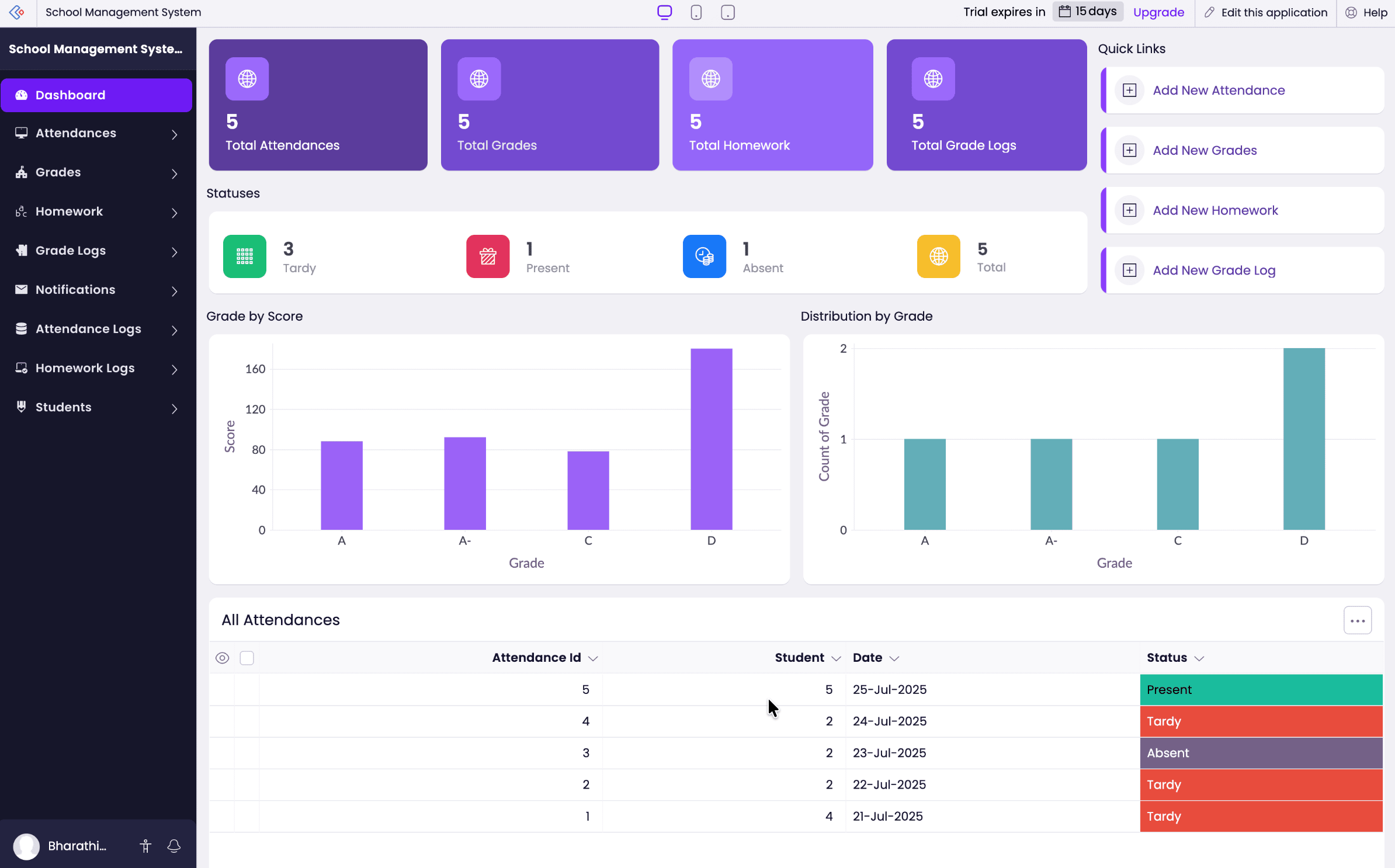
Zoho Creator interface displaying a school management dashboard with attendance metrics, grade charts, and a data table tracking student records and status.
Zoho Creator lets you build custom database apps with dashboards, role-based views, and workflow-driven data tracking across different business use cases

Zoho Creator is a strong fit when you need to digitize business processes involving steps, approvals, and rules. It works well for operations teams or department leads who manage requests that cannot be handled effectively in spreadsheets. This includes use cases such as employee onboarding, service request tracking, or approval systems, where each step has specific conditions and ownership. 

The Blueprint feature allows me to map each stage of a workflow and assign responsibility, which is critical for approval-heavy systems. When workflows require more complex logic, I rely on Deluge scripting to handle conditions that go beyond standard automation. 

Built-in automation also lets me trigger actions based on specific events, such as updating statuses or sending notifications at each stage. Plus, smart import and data tools help ensure the data feeding these processes is consistent, which is essential for maintaining reliable workflows.

Pros

  • Seamless integration with Zoho services
  • No-code workflow automation
  • All plans have access to premium support

Cons

  • Interface customization options are limited, which restricts flexibility
  • Charges 20% of the license fee for real-time support
  • Steep learning curve for non-technical users
Advertisement

Standout features

Smart import: Modify your data during upload by removing junk data, deleting unnecessary rows, and filtering out errors.

AI-powered data collection: Scan documents and images, then convert them to searchable digital files.

Lookup field: Syncs and auto-populates fields with the data stored from other forms. 

Blueprints: Visualize business processes by defining each stage, assigning owners, and setting required conditions.

Zoho Creator pricing

  • Free: Basic app building
  • Standard: $8/user/month – Includes approvals, one app, forms, reports, workflows, custom schedules, blueprints, portal, developer tools, custom AI models, and app deployment in web/mobile/tablet
  • Professional: $20/user/month – Adds unlimited apps, 15 data sources, and 10 custom connectors
  • Enterprise: $25/user/month – Adds 30 data sources, 20 custom connectors, a custom domain, and a rebranded mobile app
  • Flex: Custom pricing for tailored requirements

3. Airtable – Best for flexible database-driven workflows

Rating: 4.64 / 5

  • Free plan available
  • Starts at $20 per user/month
Visit Airtable
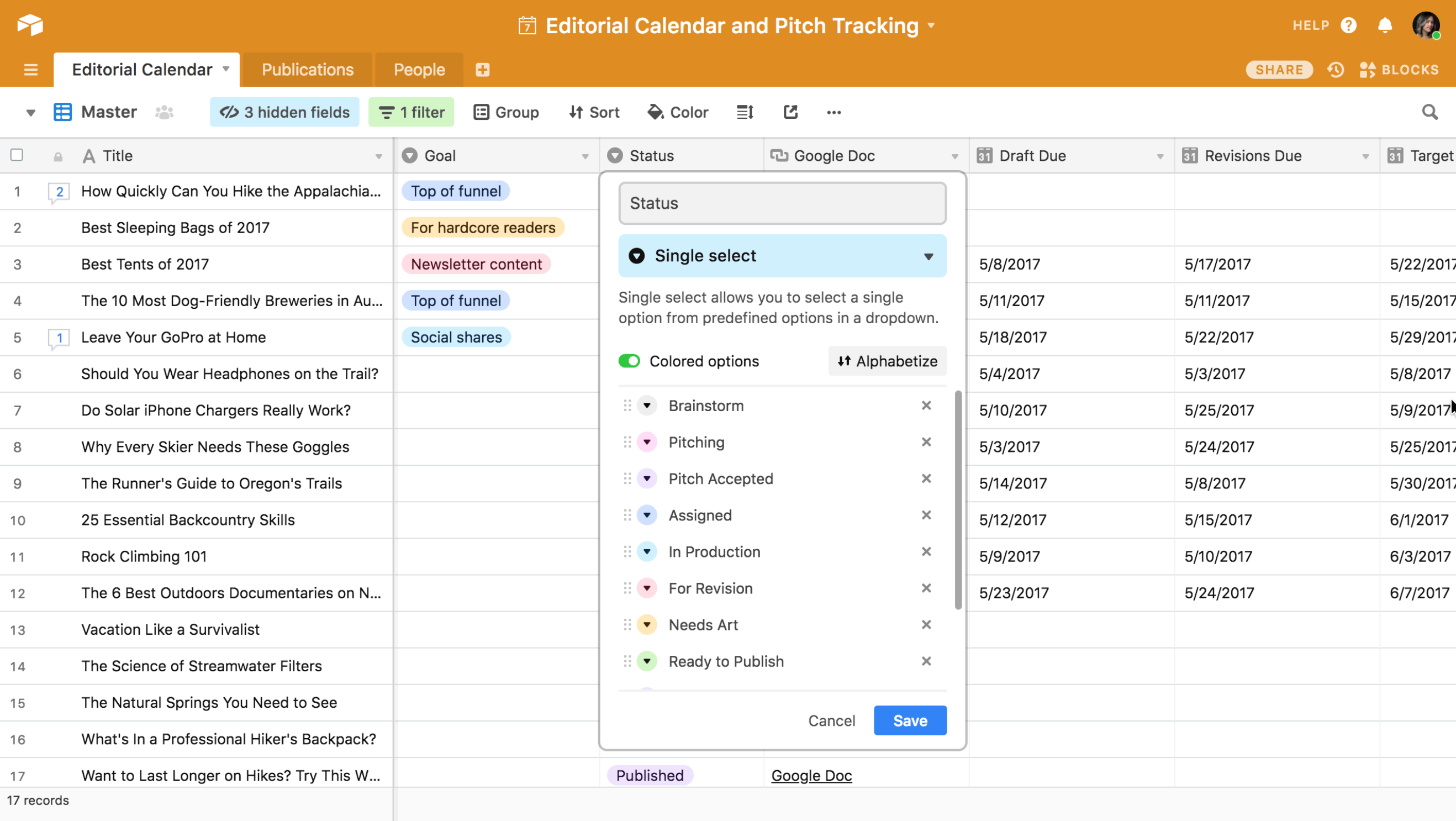
Airtable grid view showing an editorial calendar with columns for title, goal, status, Google Doc link, and due dates, with a dropdown menu open to edit status options such as brainstorming, pitching, and ready to publish.
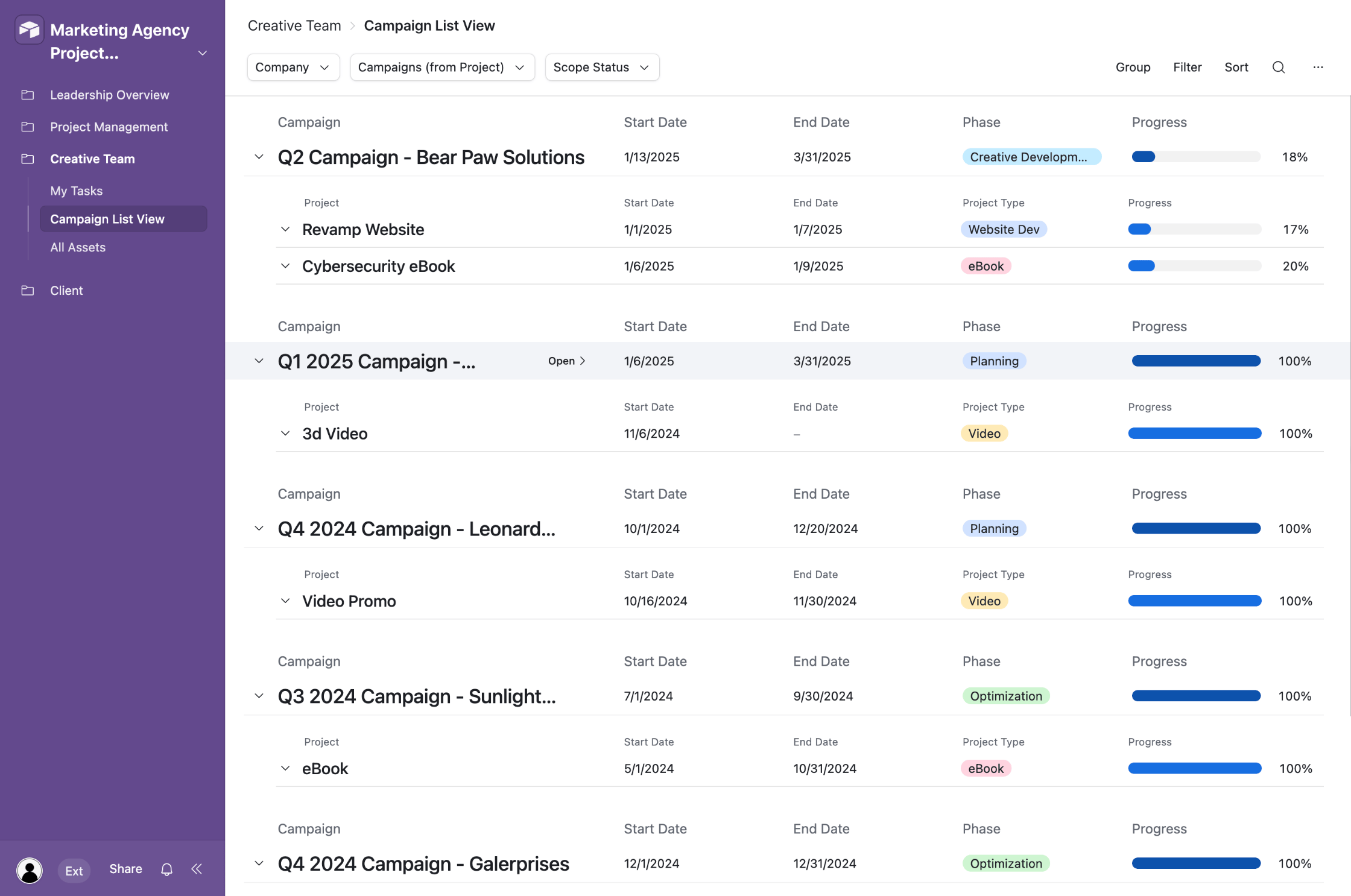
Airtable interface displaying a campaign list view with grouped projects under quarterly campaigns, including fields for start date, end date, phase, and progress bars for each project.
Airtable lets you manage content pipelines and campaign tracking using customizable fields, linked records, and multiple views within the same database.

I use Airtable’s relational database model to build workflows that match how my team actually tracks work. I create separate tables for projects, campaigns, or contacts, then define how those records connect using fields that support files, tags, and rich text. This lets me organize different types of data in one base while keeping each dataset distinct. 

Data across tables can be linked through record fields, which lets me tie clients to projects or tasks to owners and keep those relationships consistent across the base. From there, I use lookup, rollup, and formula fields to calculate totals, pull in related details, or track progress within the same workflow. I also choose field types like attachments or multi-select to capture more than just text or numbers, then switch between Grid or Kanban views depending on how I need to work. 

For sharing workflows, I use the Interface Designer to build interfaces that show only the fields and records relevant to a specific role. I can also configure inline actions such as editing, filtering, or grouping records directly within those interfaces, which supports workflows such as approvals or status updates, so users interact only with relevant data and actions.

Pros

  • Supports dynamic form creation
  • Sleek user interface
  • Initial setup is easy for non-technical users

Cons

  • Large datasets can slow down performance
  • Reporting capabilities are less advanced
  • Data management becomes more complex at scale
Advertisement

Standout features

Portals: Share branded interfaces with external users and get controlled access to specific data and workflows.

Conversational AI builder (Omni): Build complete apps with tables, interfaces, and automations by simply describing your requirements.

Interface Designer: Design custom interfaces for your apps that extract and display data from existing databases.

Views: Visualize your data in different layouts, such as list, timeline, Kanban, Gantt, calendar, grid, gallery, and form views.

Airtable pricing

  • Free: Includes 500 AI credits, unlimited bases, 1,000 records/base, 100 automations, interface designer, 1GB attachments/base, and basic project views
  • Team: $20/user/month – Adds 15,000 AI credits, unlimited bases, 50,000 records/base, 25,000 automations, Gantt & timeline view, extensions, resource allocation, customization, and standard sync integrations
  • Business: $45/user/month – Adds two-way sync, 125,000 records/base, verified data, admin panel, app Sandbox, roadmap view, exec summary cards, user groups, and conditional filtering
  • Enterprise Scale: Custom pricing – Adds 500,000 records per base, app library, and admin reports

4. Google AppSheet– Best for no-code apps powered by Google Workspace data

Rating: 4.60 / 5

  • Free plan for 10 users
  • Starts at $5 per user/month
Visit Google AppSheet
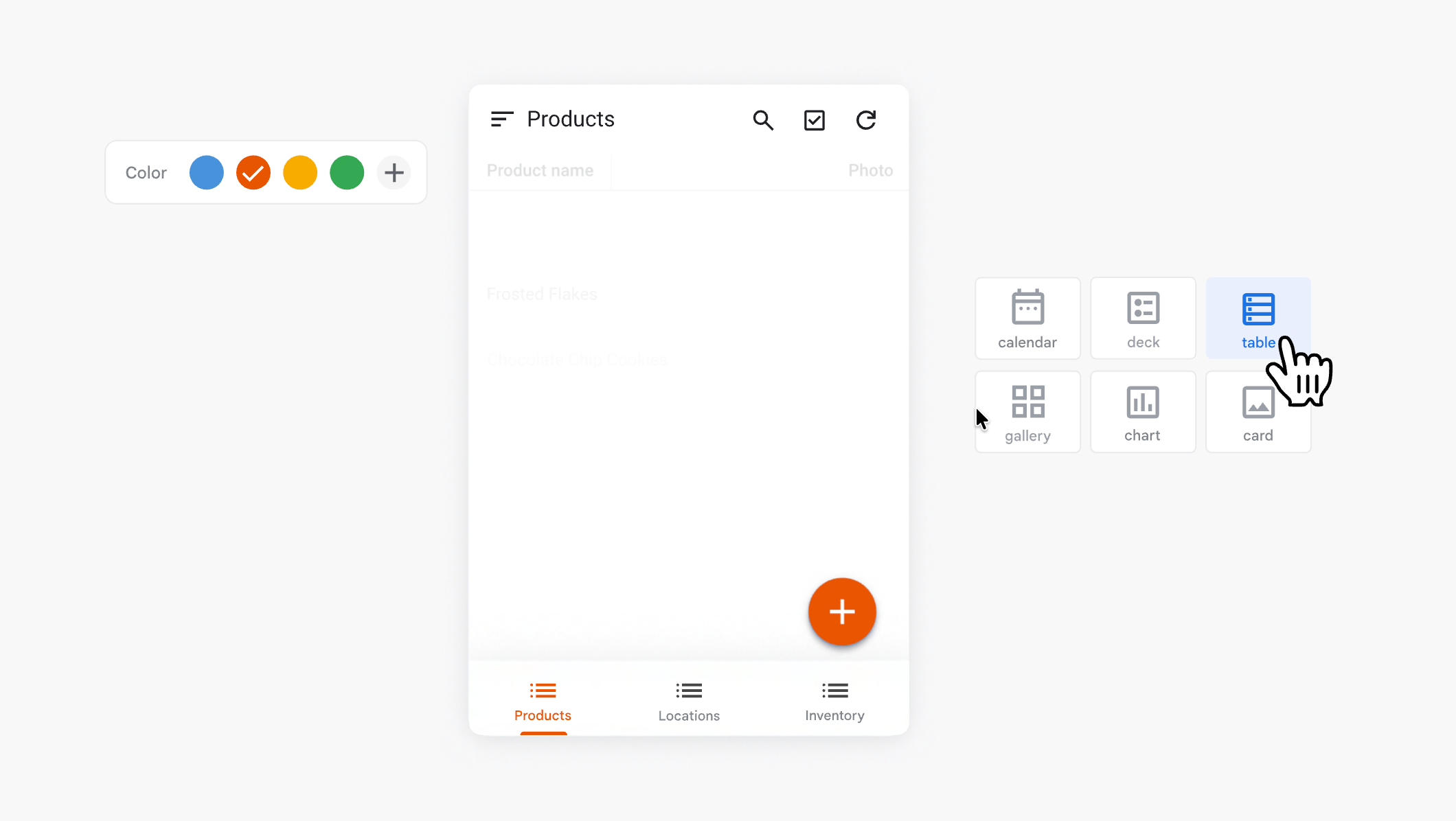
Google AppSheet interface showing a mobile app preview with a product list, plus options to switch between views such as table, gallery, and calendar.
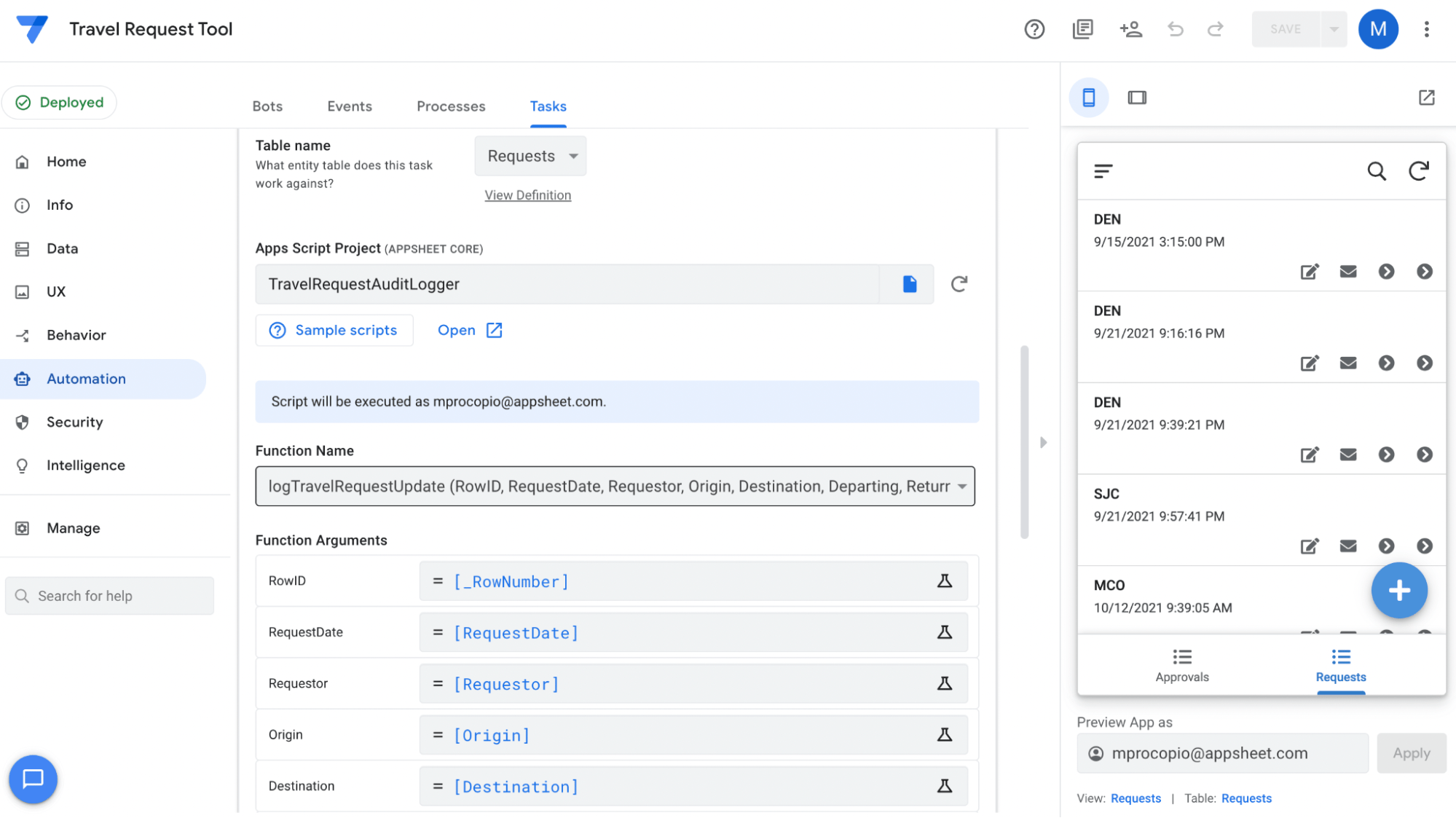
Google AppSheet automation panel displaying a workflow setup with function arguments, data fields, and a preview of a request tracking app on the right.
Google AppSheet lets you build database-driven apps with automation, view customization, and mobile-ready interfaces directly from your data.

Google AppSheet is built for teams running their operations on Google Workspace, as it natively integrates with the rest of the Google Workspace suite, such as Google Sheets, Drive, Forms, and Calendar. You can build forms that capture rich data such as photos, GPS locations, barcodes, and digital signatures, all of which sync back in the app in real-time. 

Automation and event-based triggers support operational workflows by reacting to data changes in real time. I use them to send alerts when a row updates or to trigger actions after a form submission. For example, I can set up an approval request in Gmail so the recipient reviews details, adds comments, and approves or rejects directly from their inbox. The recipient’s response writes back to the source data and can trigger the next step, such as generating a document, sending a notification, or creating a calendar entry.

The mobile-first app generation is another strong advantage because it automatically adapts my data into a ready-made interface. I can also use Gemini for App Creation as my starting point since it lets me describe a business process in natural language and generate an app with suggested tables, fields, and prebuilt views.

Pros

  • Most app features and behavior can be tested for free until ready to deploy
  • Included in most Google Workspace plans
  • Personal version supports up to three users

Cons

  • Limited number of view types and formatting options
  • Lacks flexibility in pricing model
  • Limited UI customization
Advertisement

Standout features

AI-powered app creation: Generate apps using natural language with Gemini AI integration.

External eventing: Trigger workflows when users update data in connected external sources like Google Sheets.

Version number management: Automatically track app changes with version numbering that updates for minor edits and major releases.

Automation monitor: Track the status of bot execution, including successful runs, errors, and pending processes.

Google AppSheet pricing

  • Free: Test your apps with up to 10 users 
  • Starter: $5/user/month – Basic app and automation features, five databases, branding, connect to spreadsheets, and file storage platforms 
  • Core: $10/user/month – Adds barcode scanning, automation for data changes, and webhooks from app events, smart assistant, and app security controls 
  • Enterprise Plus: $20/user/month – Adds connection to APIs, SaaS, and enterprise data services, enhanced app security, shared data sources, and machine learning modeling

5. Knack – Best for database apps with granular user control

Rating: 4.53 / 5

  • Free trial only
  • Starts at $49/month
Visit Knack
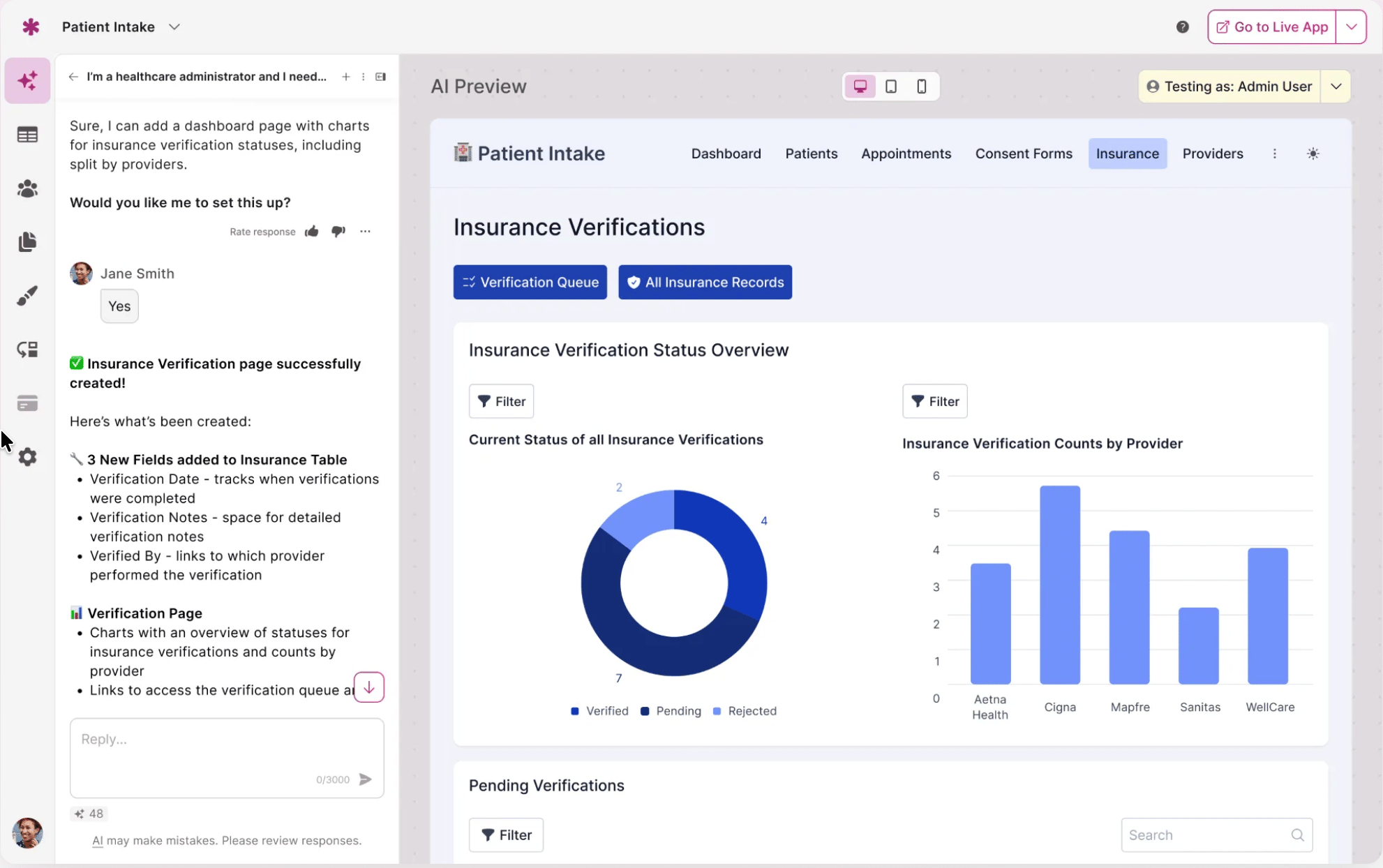
Knack app interface showing a patient intake dashboard with insurance verification charts, status breakdowns, and filters for tracking records.
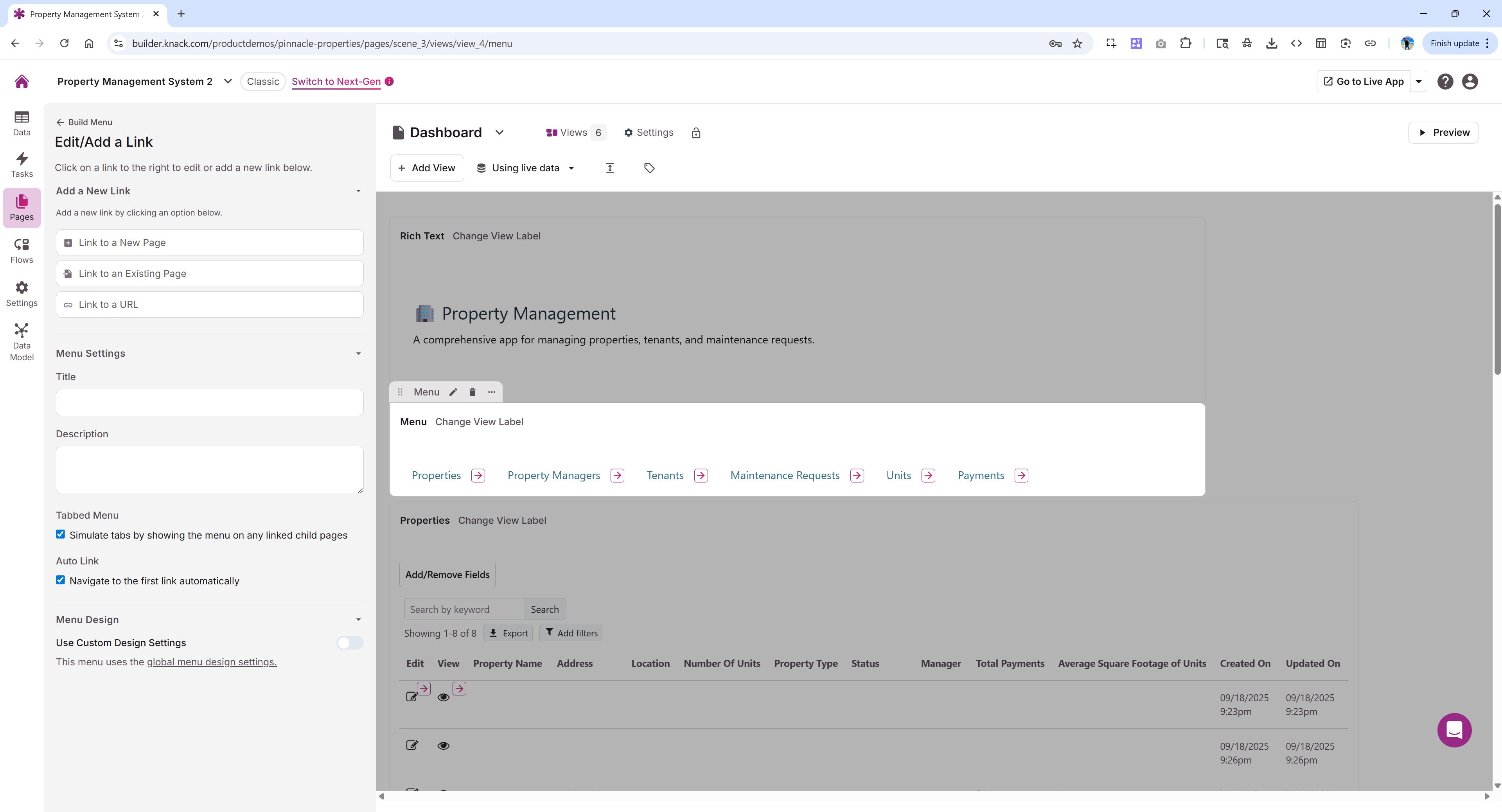
Knack builder interface displaying a property management app with menu setup, linked pages, and data tables for properties, tenants, and maintenance requests.
Knack lets you build database apps with role-based views, connected data, and customizable pages for managing workflows and user access.

I use Knack’s role-based access system to control how each user interacts with my app. I define roles such as project manager or client, then assign each one its own pages with specific fields and actions. When a user logs in, they only see the pages tied to their role, and the navigation menu reflects that setup.

I also control which records each user can access by linking data directly to their account. For example, a project manager only sees projects associated with their user record, while teams within the same division can access shared data through group-based filters. On top of that, I use record rules and page rules to trigger actions like approvals or status updates based on pre-defined conditions. 

Pros

  • Flat-rate pricing with unlimited users
  • Robust multi-step form builder
  • Fully customizable databases

Cons

  • Requires significant time to design custom apps
  • API calls require a $37.50/mo fee
  • Lacks native Kanban and Gantt views
Advertisement

Standout features

Batch updates: Update multiple records by applying changes to selected fields simultaneously.

Conditional filtering: Apply rules to automatically select records for bulk updates or deletion based on defined conditions.

Page Rules: Trigger actions or change page elements dynamically based on defined conditions when users access a page.

Map elements: Visualize location-based data on interactive maps with searchable geographic points.

Knack pricing

  • Starter: $49/month – Includes unlimited users, three apps, no-code database, automation/integration, front-end web app designer, unlimited tables/fields/pages//forms, AI app builder, and 20k database records
  • Pro: $110/month – Adds schedule tasks, ecommerce payments, 2FA, one custom domain, maps, and 50k database records
  • Corporate: $250/month – Adds app restores, three custom domains, 125k to 2.5m database records
  • Enterprise: Custom pricing – Adds private Server Environment Options and 2.5m database records

6. Smartsheet – Best for spreadsheet-based workflow management at scale

Rating: 4.22 / 5

  • Free trial only
  • Starts at $9 per user/month
Visit Smartsheet
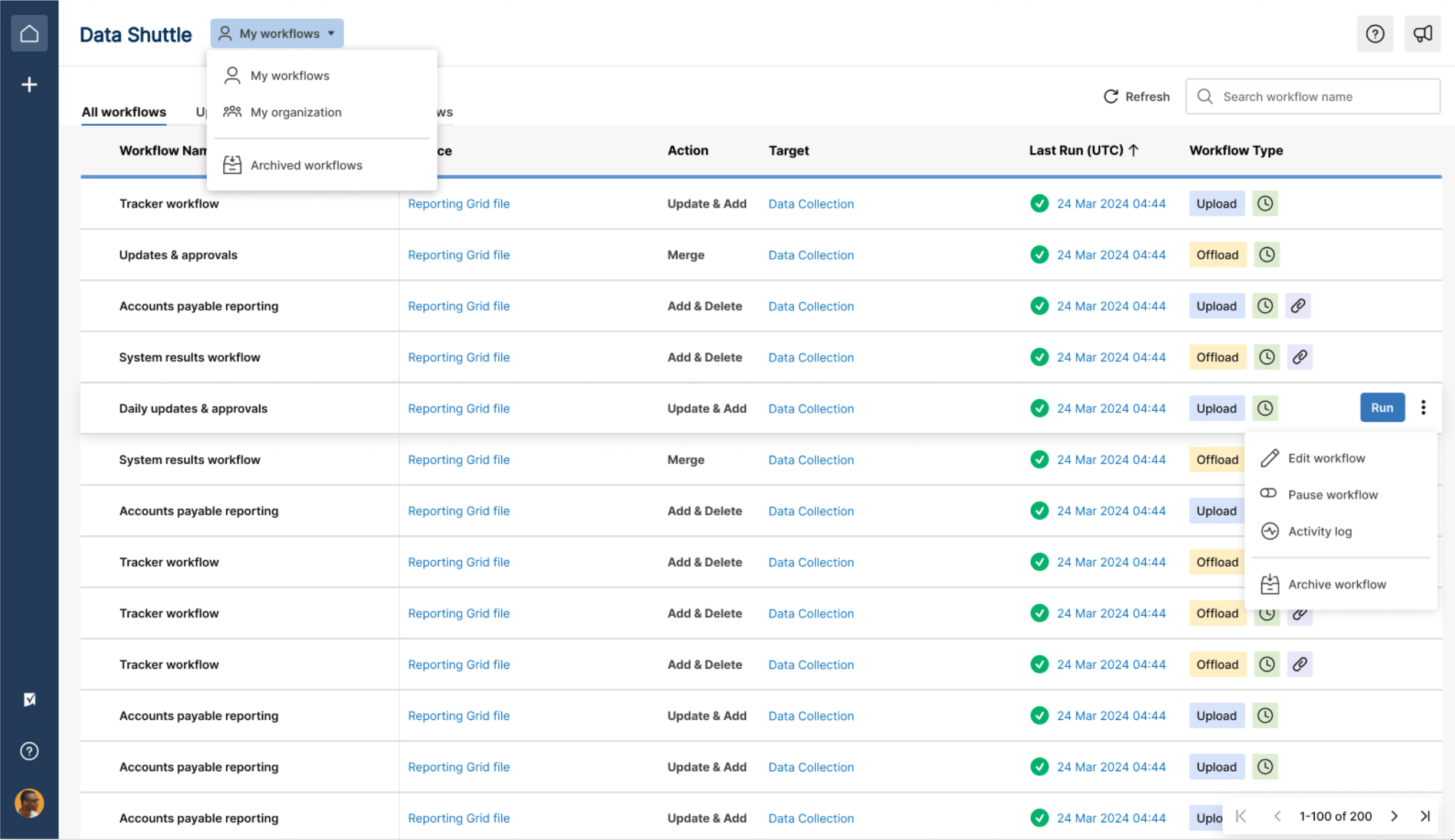
Smartsheet Data Shuttle interface displaying a list of workflows with actions, targets, run history, and options to edit, pause, or archive each workflow.
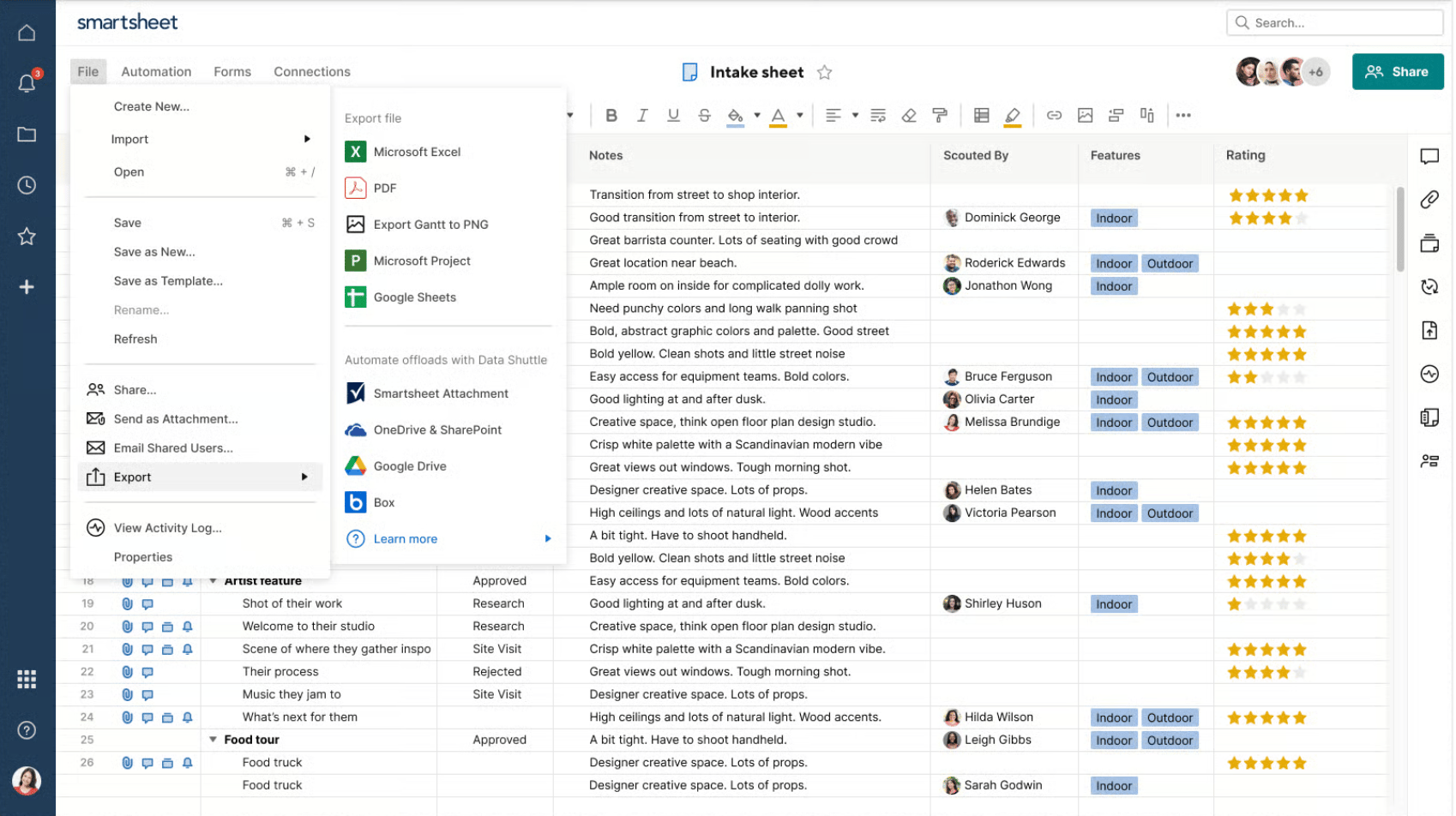
Smartsheet grid view showing an intake sheet with rows of project notes, assigned team members, tags, and rating fields, alongside export and integration options.
Smartsheet combines spreadsheet-style data management with automation and integrations to manage workflows across large datasets.

For spreadsheet-based workflow management, I use Smartsheet’s grid and table view to manage projects in a familiar row-and-column format. Each row represents a task, and each column captures details like status, owner, or due date, which makes large datasets easy to navigate. As my data volume increases, I can easily switch to Table view to handle sheets with hundreds of thousands of rows and up to a million cells. I can sort, filter, or group rows to focus on specific tasks or timelines within the same sheet.

I can build workflows inside the sheet using automation rules that start when a value changes or a date is reached. Setting up conditions control which rows trigger actions, then defines outcomes like sending approval requests or updating fields. When I manage multiple projects, the Control Center generates new sheets from a predefined blueprint that includes the same columns, workflows, and logic. Data from each project feeds into portfolio reports, so I can review progress across all projects from a single reporting view.

Pros

  • Robust form builder with conditional logic
  • Insert images directly into cells
  • Offers multi-layered filtering

Cons

  • AI features are strictly restricted to the highest tiers.
  • Basic linking can be difficult to aggregate.
  • Data management functionality sold as a monthly add-on
Advertisement

Standout features

DataTable: Create a centralized, secure data store that can be shared and used across multiple sheets as a single source of truth.

DataShuttle: Upload, offload, merge, and sync data between Smartsheet and external systems such as ERPs, CRMs, and databases.

DataMesh: Sync data across sheets and reports by pushing updates from a source to multiple target sheets.

Pivot App: Create pivot tables to summarize data across sheets and keep key metrics automatically updated whenever data changes.

Smartsheet pricing

  • Pro: $9/user/month — Includes unlimited users, rich formulas, sheets, and project views
  • Business: $19/user/month — Adds free guests, unlimited automations, timeline view, workload tracking, and admin capabilities
  • Enterprise: Custom — Adds work insights, AI formulas, unlimited attachment storage, and SSO
  • Advanced Work Management: Custom – Adds Control Center and dynamic view

How I evaluated the best online database application builders

To compare the best online database application builders, I used a weighted scoring rubric based on how teams manage database-driven workflows. I tested each platform against these criteria to see how well it supports use cases such as app building, data control, and automation.

Pricing (20%)

I reviewed whether each platform offers a free plan or limits access to trials, then compared monthly pricing across entry and mid-tier plans. I also evaluated how features are distributed across tiers to see if essential functionality requires upgrades or add-ons.

General features (25%)

I examined how each tool handles relational data, including linked records and cross-table calculations like rollups or lookups. I also assessed view options, form builders, templates, and built-in automation to see how well each platform supports database workflows.

Advanced and niche features (20%)

I evaluated app-building capabilities such as interface designers or user portals, along with API access and integrations. I also looked at AI features, scripting support, and how each platform handles more complex logic or multi-step workflows.

Customer service and support (10%)

I compared support channels such as live chat, phone, or email, and checked availability across different plans. I also reviewed documentation, community activity, and security features like SSO or compliance certifications.

Ease of use (10%)

I assessed how quickly a user can build and manage a database app, including interface navigation and setup requirements. I also considered how much technical knowledge is needed to use advanced features like relationships or automation.

Expert score (15%)

I combined my hands-on testing with user feedback to evaluate overall performance, and value for money. I also considered how well each platform handles database use cases at scale.

Advertisement

How to choose the right database app builder

Choosing the right database app builder depends on what your team needs to build and how complex your data and user requirements are. Before choosing a platform, discuss these questions with your team:

  • What is the primary use case? A client portal with external user logins has different requirements than an internal project tracker or an inventory management system. Start with the end product in mind.
  • How complex is your data structure? If your workflow involves multiple related record types (e.g., clients linked to projects linked to tasks), you need a platform that supports relational data connections.
  • Who will be using the app and how? Identify whether you need different user types with separate access levels, or whether the entire team works from the same interface with the same permissions.
  • How much automation does your workflow require? Some platforms offer basic notifications and status updates, while others support multi-step conditional logic and approval routing.
  • What is your team’s technical level? Some builders are designed for non-technical users, while others assume familiarity with data modeling concepts like field types, relationships, and formulas.
  • Will the app need to connect to other tools? If your workflow depends on data from a CRM, a form tool, or a project management system, confirm that the platform supports the integrations your stack requires.

FAQs

Marianne Sison

Marianne is a technology analyst with nearly five years of experience reviewing collaborative work management solutions. She helps businesses identify the right tools and apply best practices to streamline workflows and improve project performance. Her insights on project management and unified communications appear in publications like TechnologyAdvice, TechRepublic, and Fit Small Business.

Recommended for you...

Project Status Report: How to Write One + Templates & Examples
Marianne Sison
Mar 3, 2026
How to Create a Project Schedule: Techniques, Examples & Tools
Marianne Sison
Feb 24, 2026
Agile Software Development Explained: Process, Frameworks, & Tools
Marianne Sison
Feb 20, 2026
Work Breakdown Structure (WBS) Guide: Examples, Templates & Methods
Marianne Sison
Feb 13, 2026
project-management.com Logo

project-management.com is dedicated to providing modern tools, latest news, and best practice references for every project professional and business organization. The discipline of project management has continued to receive growing interest and attention over the past decades. Especially today, the importance and relevance of the project manager for any kind of undertaking is unquestionable. However, the challenges of modern society, business relationships and latest technology are also testing their competency and ability to deliver successful projects. Since its launch in 2001, PMcom has been featuring pertinent articles, management software and productivity tool reviews, books, interviews, training sites and other e-learning resources to help people be more productive and successful in their chosen path.

Property of TechnologyAdvice. © 2026 TechnologyAdvice. All Rights Reserved

Advertiser Disclosure: Some of the products that appear on this site are from companies from which TechnologyAdvice receives compensation. This compensation may impact how and where products appear on this site including, for example, the order in which they appear. TechnologyAdvice does not include all companies or all types of products available in the marketplace.