






















Key takeaways
 monday.com, Microsoft Copilot Studio, and Salesforce Agentforce are leading enterprise AI agent builders. monday.com specializes in AI-powered work management, Copilot Studio supports automation across Microsoft apps, and Agentforce focuses on CRM-driven workflows.
- Choose an AI agent builder that can complete tasks across your existing business applications. The platform should access current records, make authorized updates, and require human approval for sensitive actions. A pilot should verify these capabilities and execution costs.
- AI workspace capabilities determine how employees manage agent-generated work. Check whether agents can update project records directly and whether managers can review their actions. Calculate net time savings after accounting for employee reviews and corrections.
Choosing an enterprise AI agent builder requires more than comparing automation features. Business leaders must determine whether a platform meets their operational requirements, enforces security policies, and accommodates growing workflow demands.
Some platforms embed AI agents within work management software, while others connect multiple applications or offer custom development options. This guide explains how to evaluate these approaches, assess AI workspace capabilities, and compare enterprise AI agent builders.
- What is an enterprise AI agent builder?
- How to choose an enterprise AI agent builder in 7 steps
- Why AI workspace capabilities matter for enterprise AI agents
- What are the top enterprise AI agent builder platforms in 2026?
- 1. monday.com: For AI agents within a shared work management environment
- 2. Microsoft Copilot Studio: For Microsoft-based business environments
- How to test an enterprise AI agent builder before purchasing
- Which enterprise AI agent builder should you choose?
What is an enterprise AI agent builder?
An enterprise AI agent builder lets organizations create and deploy AI agents that use business data and connected apps to perform tasks. Unlike traditional automation, which follows predefined rules, AI agents can interpret requests and select authorized actions based on available information.
For example, an agent could review project requests, identify missing details, and route submissions for approval. Some builders offer no-code development tools, while others support custom integrations. AI workspaces let agents and employees access shared work information and manage tasks in the same environment.
How to choose an enterprise AI agent builder in 7 steps
Choosing an enterprise AI agent builder starts with determining which tasks you want to automate. From there, you'll need to assess whether the platform can access the required information, perform authorized actions, and meet your organization's technical requirements.
The following seven steps explain how to evaluate these capabilities before selecting a platform.
1. Identify the business workflows you want to automate
The first step is to identify processes where AI agents could handle repetitive tasks or requests that require judgment. Project intake and service ticket routing are potential candidates because submissions often contain different information.
For each workflow, document the existing process and answer these questions:
- What triggers the process?
- Which business records are needed?
- What determines the next action?
- Which tasks require approval?
- What constitutes a completed request?
For example, an AI agent could review project proposals, identify missing details, and route complete submissions to the appropriate team. Managers would retain approval authority for projects requiring additional resources.
Processes with predictable conditions may only need traditional automation, such as alerts when deadlines change. AI agents are better suited to tasks that require interpreting information, such as classifying project requests by business objectives.
These requirements will help you evaluate whether vendors can complete the tasks you've identified.
2. Evaluate AI workspace capabilities
An AI workspace should give agents access to authorized business records and let them update information in the work management platform. Employees can then review agent updates in their existing workspace instead of a separate interface.
For example, an agent could identify a project delay and update its status on the project board. The assigned employee could review the change instead of manually entering the agent's recommendation.
monday.com's AI Workspace connects employees and AI agents through shared work information. Its native agents can perform configured tasks using permitted board data.
When comparing platforms, check how employees receive notifications about pending approvals or incomplete tasks. Managers should also have access to an activity history for reviewing agent actions.
3. Check integrations with existing business systems
An AI agent builder must connect to your business applications and perform the necessary tasks. Some connectors provide read-only access, while others let agents create or update records, sometimes with additional configuration.
For customer onboarding, an agent might retrieve account details from a CRM before creating a task in project management software. Both applications must support these actions through their respective connections.
When comparing platforms, consider these capabilities:
- Prebuilt connectors: Compatibility with your existing applications.
- Custom integrations: APIs or webhooks for applications that lack native connections.
- Read and write access: Permissions to retrieve or modify business records.
- Data synchronization: Accuracy of information transferred between connected applications.
A vendor's integration directory may confirm compatibility but leave out restrictions on individual actions. Request a demonstration of your selected workflow to identify permission limitations or additional development costs.
4. Review security and AI agent governance
Enterprise AI agents may handle confidential information or initiate transactions, so administrators need controls over data access and sensitive actions.
Focus on these four security requirements:
- Identity and access management: Assign permissions based on each agent's responsibilities, with options to revoke access.
- Human approvals: Require authorization before purchases or other sensitive transactions.
- Audit trails: Record completed actions and unsuccessful attempts, including denied requests.
- Data governance: Review where to process and store business information, along with retention policies.
Consider a purchasing agent for collecting documents and preparing transactions. A manager's approval may still be necessary before submission, and the platform should enforce this restriction even when an employee requests an exception.
For organizations handling confidential or regulated records, review data residency options and contractual security terms before deployment.
Security testing should also include attempts to access restricted information or initiate unapproved transactions. Unauthorized requests should be blocked, with corresponding records available in the audit logs.
5. Evaluate scalability and operational reliability
As more employees use AI agents, request volumes and simultaneous executions may increase. Check the platform's concurrency limits and service availability, along with any infrastructure or subscription costs associated with higher usage.
Another consideration is how the system recovers from failed actions. An agent might create a project record but receive no confirmation because of an integration failure. If the agent retries the operation, the system could create a duplicate record.
To prevent this, add safeguards against duplicate transactions and notifications for incomplete tasks. Execution histories should also provide enough information for administrators to investigate errors and determine whether human intervention is necessary.
A reliability test with simultaneous requests and temporary integration failures can reveal potential performance issues. Review processing times and error notifications, including the platform's ability to prevent duplicate actions under the expected workload.
6. Compare development requirements and total costs
Before comparing platforms, identify who will build and maintain the AI agents in your organization. No-code builders allow business users to configure agents through visual tools, while developer-oriented platforms offer more customization through APIs or programming frameworks.
If operations managers will maintain the agents, check whether they can update instructions and workflow rules independently. Custom integrations may require engineering support, adding to implementation and maintenance costs.
Pricing models also vary. Some vendors charge subscription fees, while others bill according to AI usage or agent executions. Your cost estimate should include:
- Platform subscriptions and AI usage charges.
- Integration development and implementation services.
- Employee training and ongoing administration.
- Maintenance and monitoring expenses.
For an accurate comparison, give vendors the same workload estimate. For example, request a monthly quote for 1,000 requests, with two application actions per request. Ask whether unsuccessful executions or automatic retries incur additional charges.
First-year estimates should account for initial implementation and recurring expenses. This provides a consistent basis for comparing each platform’s total cost.
7. Define measurable business outcomes
Before deploying an AI agent, establish how much time employees currently spend on the process and how often errors occur. These figures provide a baseline for measuring productivity improvements and determining how much employee involvement is still necessary after AI agents are introduced.
Use the following metrics to evaluate performance:
Metric | What it measures |
|---|---|
| Average processing time | Time required to complete a request |
| Successful completion rate | Percentage of requests completed correctly |
| Human intervention rate | Percentage of tasks requiring employee assistance |
| Rework time | Time spent correcting errors or unsuccessful actions |
| Cost per completed request | Operating expenses divided by completed requests |
Employee review time also affects the actual savings. For example, if an agent eliminates five hours of manual processing each week but requires three hours of employee review and corrections, the net savings amount to two hours per week.
Compare these results with the platform's operating costs to determine whether the productivity improvements justify the investment. A pilot can provide the initial performance data before a wider deployment.
Why AI workspace capabilities matter for enterprise AI agents
An AI workspace can give agents access to current business records and let employees review their actions in the work management platform. For project intake, this could reduce manual updates between request submissions and project records.
How an AI agent handles project requests within a workspace
An operations team may receive project requests through a shared work management platform. Each submission includes a proposed timeline and business objective, with manager approval required before the project can proceed.
An AI agent could assist with four stages of the process:
- Review the submission. The agent checks the request for missing information and prepares a clarification message if additional details are necessary.
- Classify the request. Based on the organization's criteria, the agent assigns a category and routes the submission to the responsible team.
- Request managerial approval. The agent forwards the request to a manager, who decides whether to authorize the project.
- Update the project record. After approval, the agent creates or updates the record within its assigned permissions. Employees can review the changes in the workspace.
This example illustrates a possible workflow rather than a verified deployment. Buyers should confirm whether their shortlisted platforms support the required actions and approval procedures.
An activity history is also essential for accountability. Employees should have access to the agent's activity history and review the latest status of each project request.
How monday.com supports AI workspace execution
For organizations already using monday.com, its AI Workspace provides a shared environment where employees and native AI agents can access information from existing project boards.
With appropriate permissions, monday.com AI agents can update item statuses or assign owners using board data. Activity histories allow employees to review these actions, while permissions and governance controls help administrators manage AI usage.
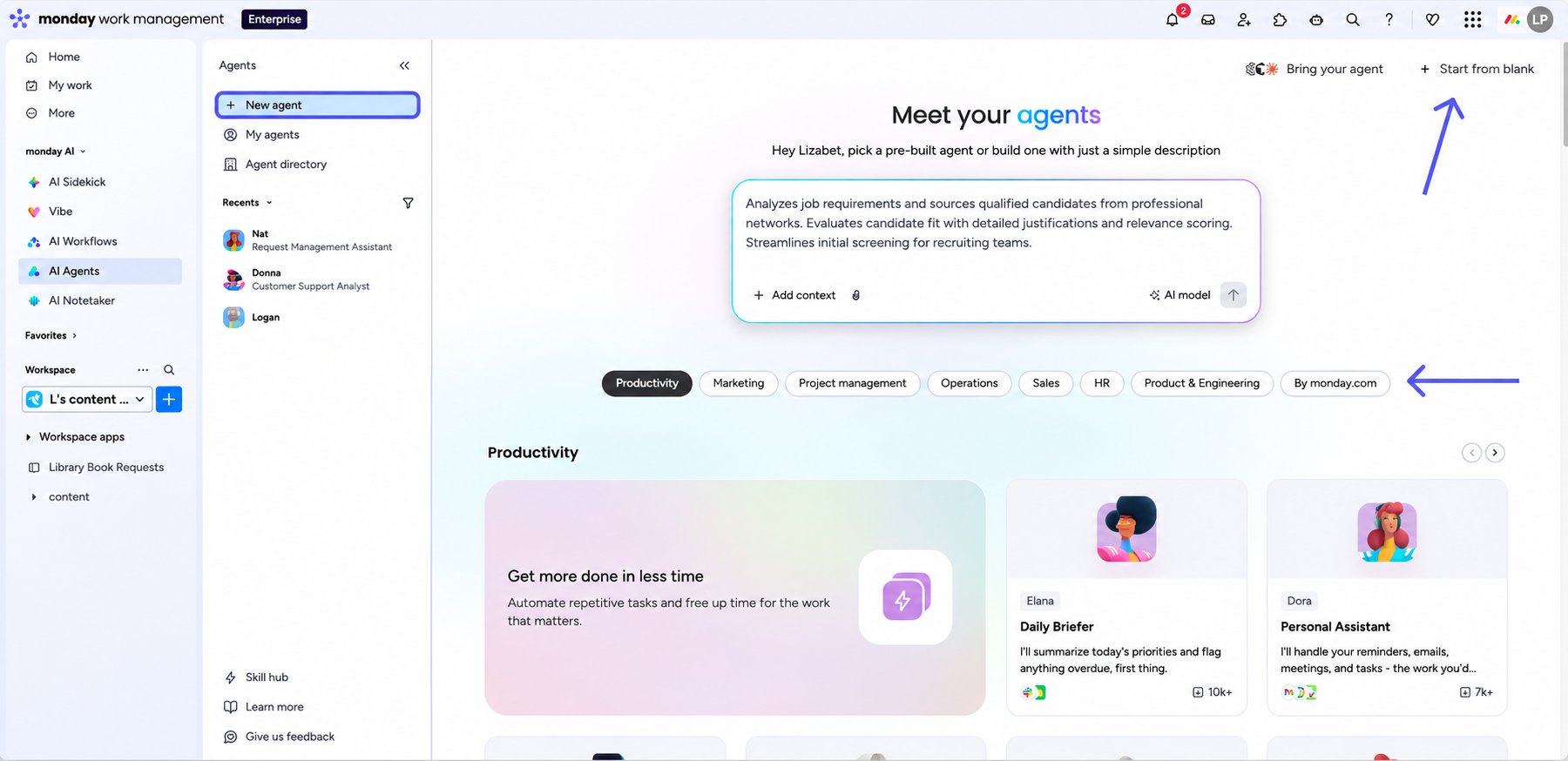
During project intake, an agent could update a request's status or assign the next task on the project board. However, available actions depend on the agent's configuration and permissions, while workflows involving external apps may require additional integrations.
Native agents are available on the monday AI platform, with availability across other monday.com products forthcoming. Buyers should confirm product access and licensing requirements before purchasing.
For workflows that depend on external applications, a separate agent development environment may be more ideal. The evaluation should consider the required integrations and how employees can review completed actions.
What are the top enterprise AI agent builder platforms in 2026?
Enterprise AI agent builder platforms include monday.com, Microsoft Copilot Studio, Salesforce Agentforce, ServiceNow AI Agent Studio, and Google Gemini Enterprise Agent Platform. These platforms support different enterprise requirements, from agents embedded in work management environments to custom development and automation across multiple applications.
The table below compares each platform's primary use case and the factors to consider when evaluating its capabilities.
Enterprise AI Agent Builder | Starting fee | Best for | Agent development approach | Key consideration |
|---|---|---|---|---|
| monday.com | Free; paid from $9/user/month | AI agents within a shared work management environment | Natural-language agent configuration | Native agent availability and permissions |
| Microsoft Copilot | $200/month | Microsoft 365 and Power Platform organizations | Low-code development with custom tools | Environment policies and external integrations |
| Salesforce Agentforce | $0.10/action | CRM-based sales and service workflows | Low-code and developer-oriented tools | Salesforce data access and required entitlements |
| ServiceNow AI Agent Studio | Custom quote | IT service and employee-service workflows | Guided agent development and testing | ServiceNow products and licensing requirements |
| Google Gemini Enterprise Agent Platform | Usage-based | Custom enterprise agent development | Low-code and code-first development | Engineering resources and deployment administration |
| Workato Agent Studio | Custom quote | Workflows across business applications | No-code development using integration workflows | Connector permissions and execution costs |
| n8n | ~$22.05/month | Custom automation and self-hosted deployments | Visual workflow development | Technical admin and enterprise featur |
1. monday.com: For AI agents within a shared work management environment
Teams that already manage projects through monday.com can incorporate native AI agents into their existing workflows. Its AI agent builder supports natural-language configuration, with agents able to access permitted board information for tasks such as updating statuses or assigning owners. Employees can review these actions within the same work management environment.
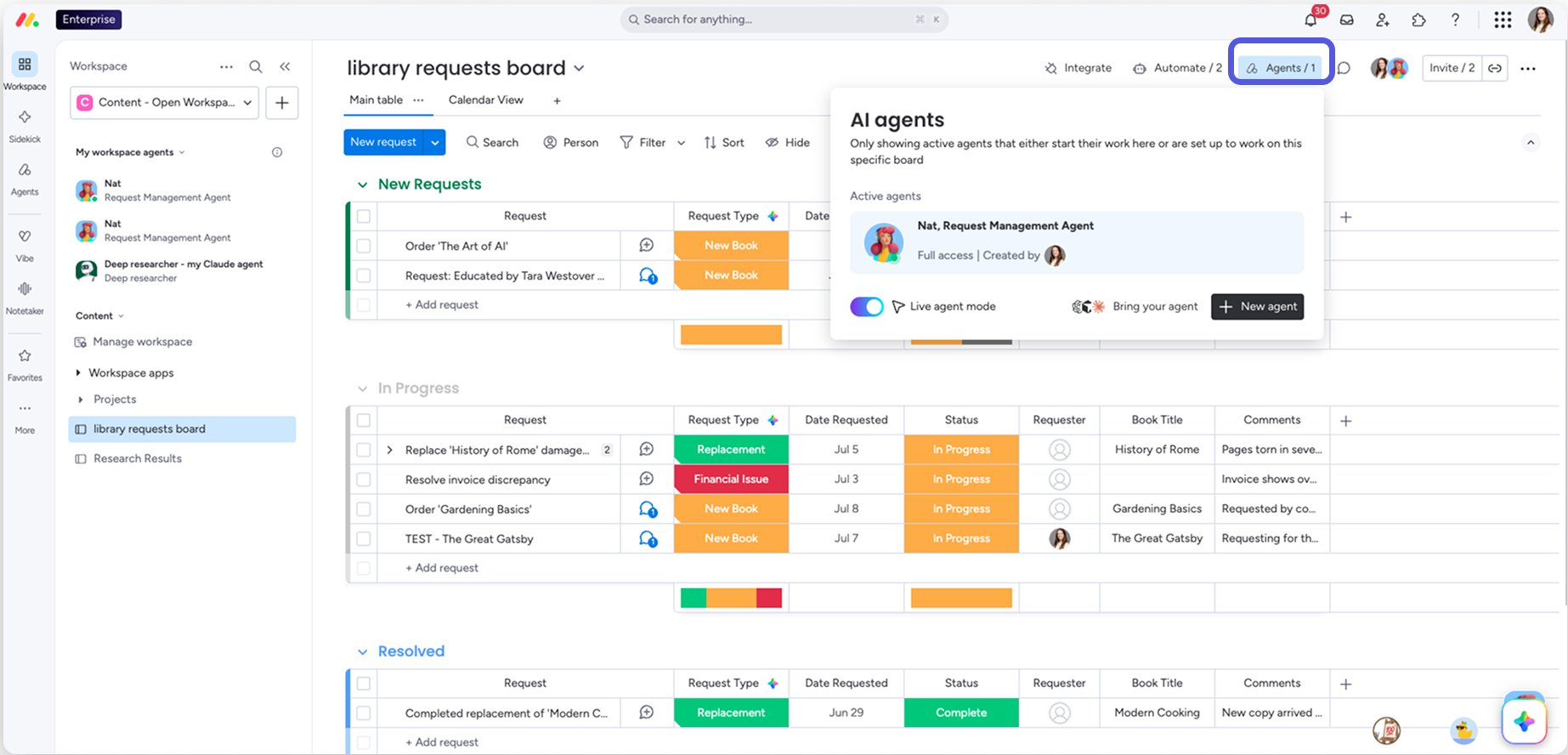
Product availability remains an important consideration because access to native agents depends on the monday.com product and licensing. Organizations should confirm which capabilities are included in their subscriptions, especially when workflows require external integrations.
PROS | CONS |
|
|
2. Microsoft Copilot Studio: For Microsoft-based business environments
For organizations invested in Microsoft 365 and Power Platform, Microsoft Copilot Studio offers low-code tools for developing agents that interact with business apps. Connectors and APIs support agent actions, while Power Platform environments provide administrative policies for deployment and data access.
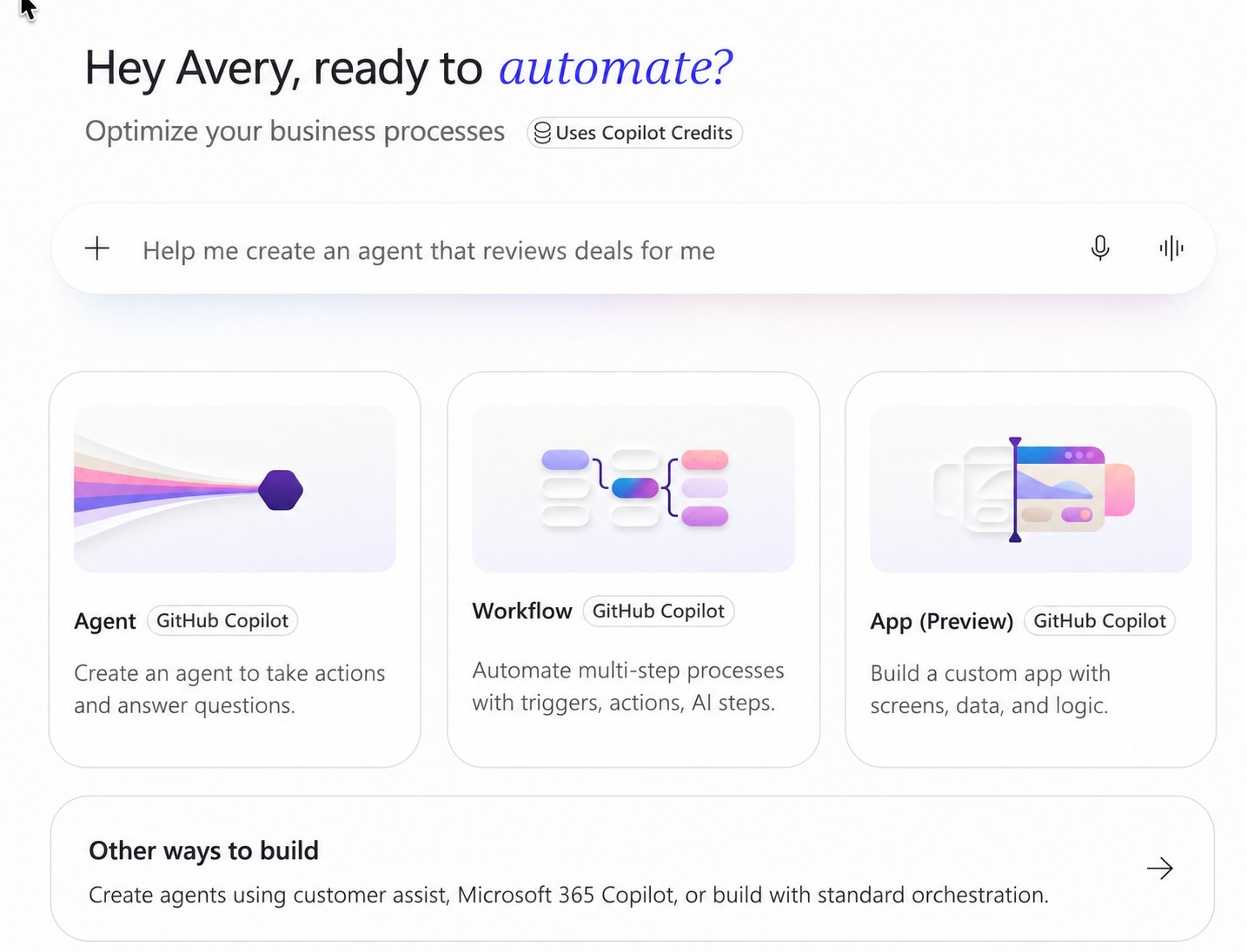
The existing Microsoft environment may simplify development, depending on the applications involved. However, connections to external systems may require additional configuration or security approvals. Buyers should examine these requirements alongside the licensing options for their intended agents.
PROS | CONS |
|
t |
3. Salesforce Agentforce: For CRM and customer-facing workflows
Salesforce Agentforce focuses on AI agents that use CRM data to support sales and customer service processes. With Agentforce Builder, organizations can configure agents using low-code tools or developer capabilities. Salesforce Flows and Apex also support actions involving CRM records, with connections to external services available for additional business processes.
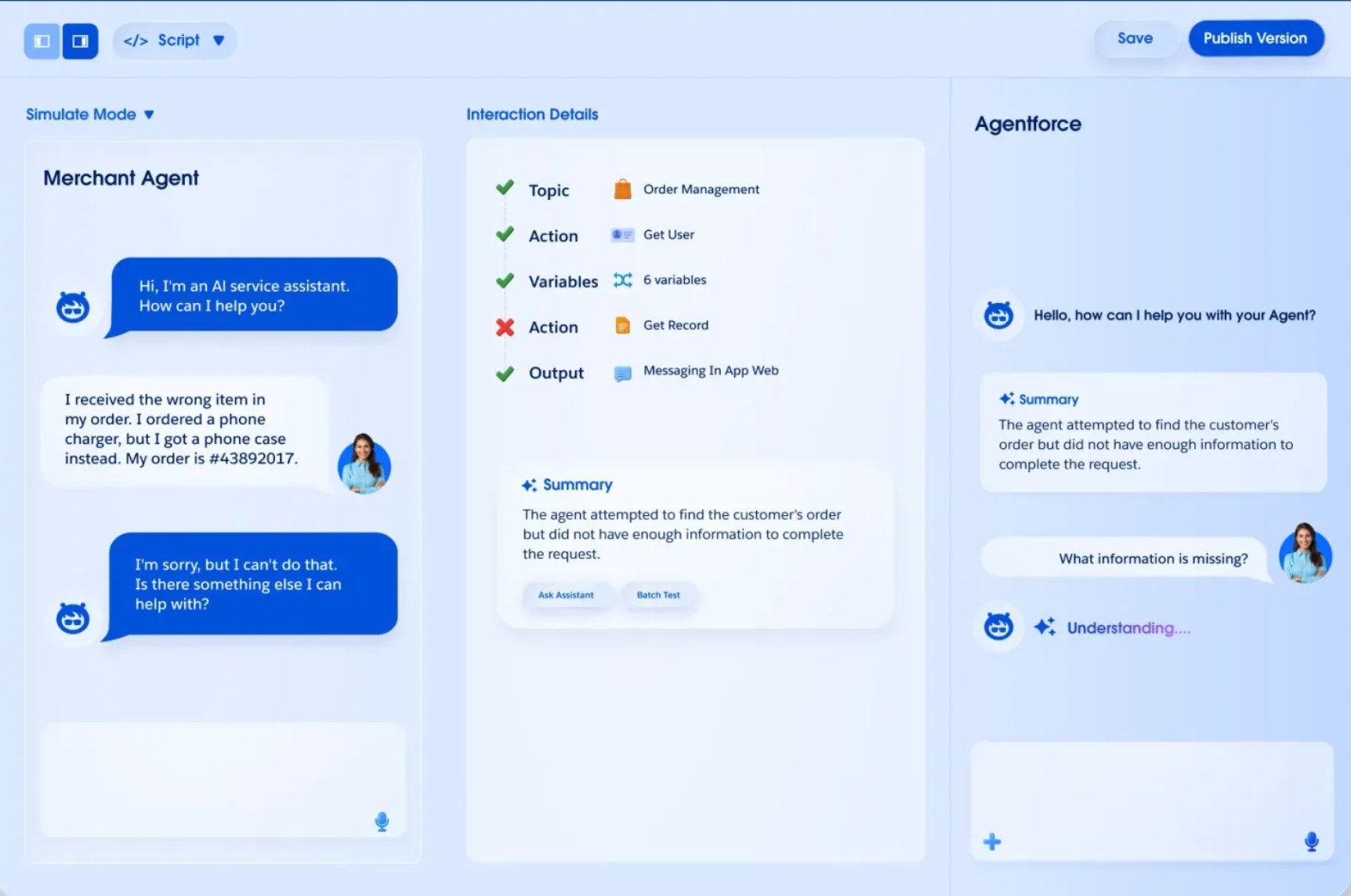
Existing Salesforce customers can assess Agentforce against their current CRM workflows, especially for retrieving customer data or updating records. The evaluation should also account for external data requirements and the Agentforce entitlements necessary for the deployment.
PROS | CONS |
|
|
4. ServiceNow AI Agent Studio: For IT service workflows
IT teams responsible for incident management or employee service requests may already maintain their processes in ServiceNow. AI Agent Studio lets organizations develop and test agents in that environment, with access to preconfigured agents and tools for examining execution behavior.
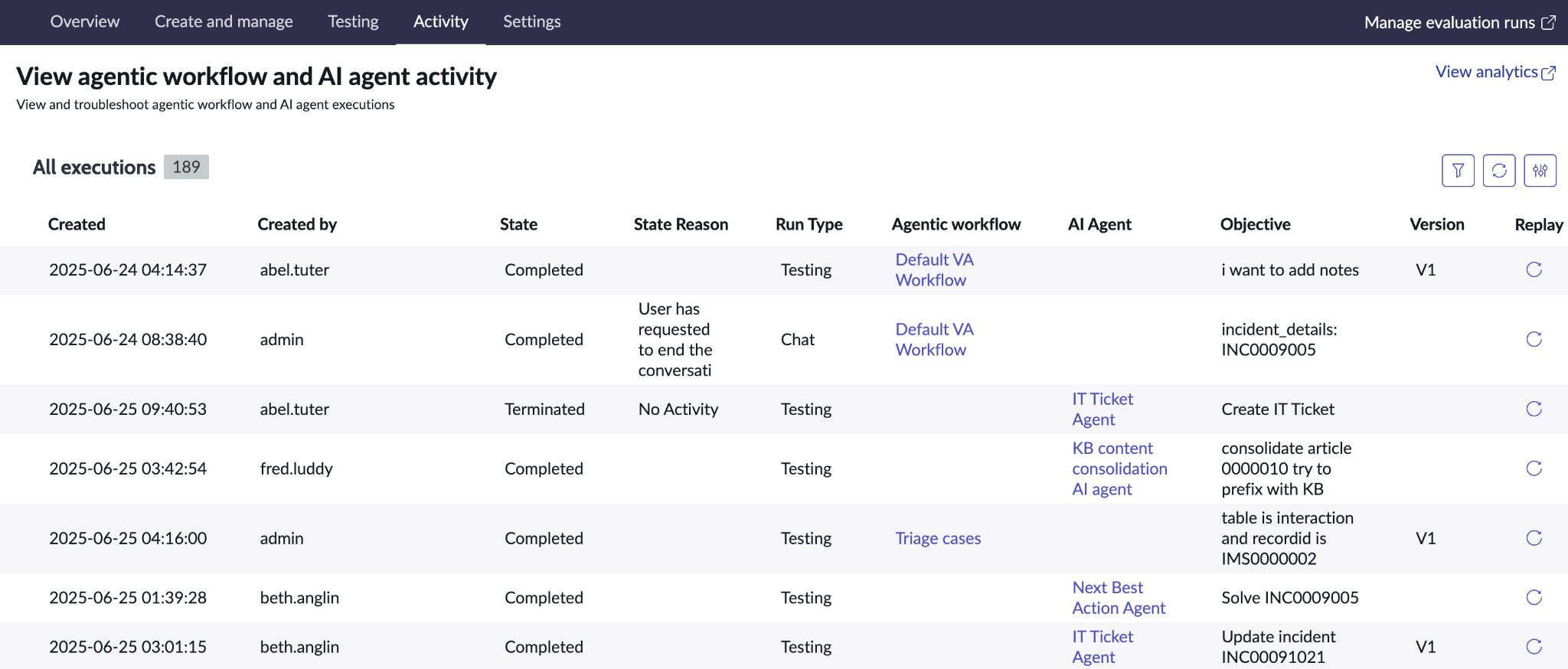
Organizations should examine how agents handle service records and existing approval procedures. For example, administrators could test whether an agent can classify an incident and assign it to the appropriate support group. It's also worth accounting for any additional ServiceNow products or licenses required for the workflow.
PROS | CONS |
|
|
5. Google Gemini Enterprise Agent Platform: For custom enterprise agents
Organizations with specialized development requirements can consider Google Gemini Enterprise Agent Platform for building and deploying custom AI agents. Technical teams have access to Agent Studio for low-code development or the Agent Development Kit for code-first development, depending on their preferred approach.
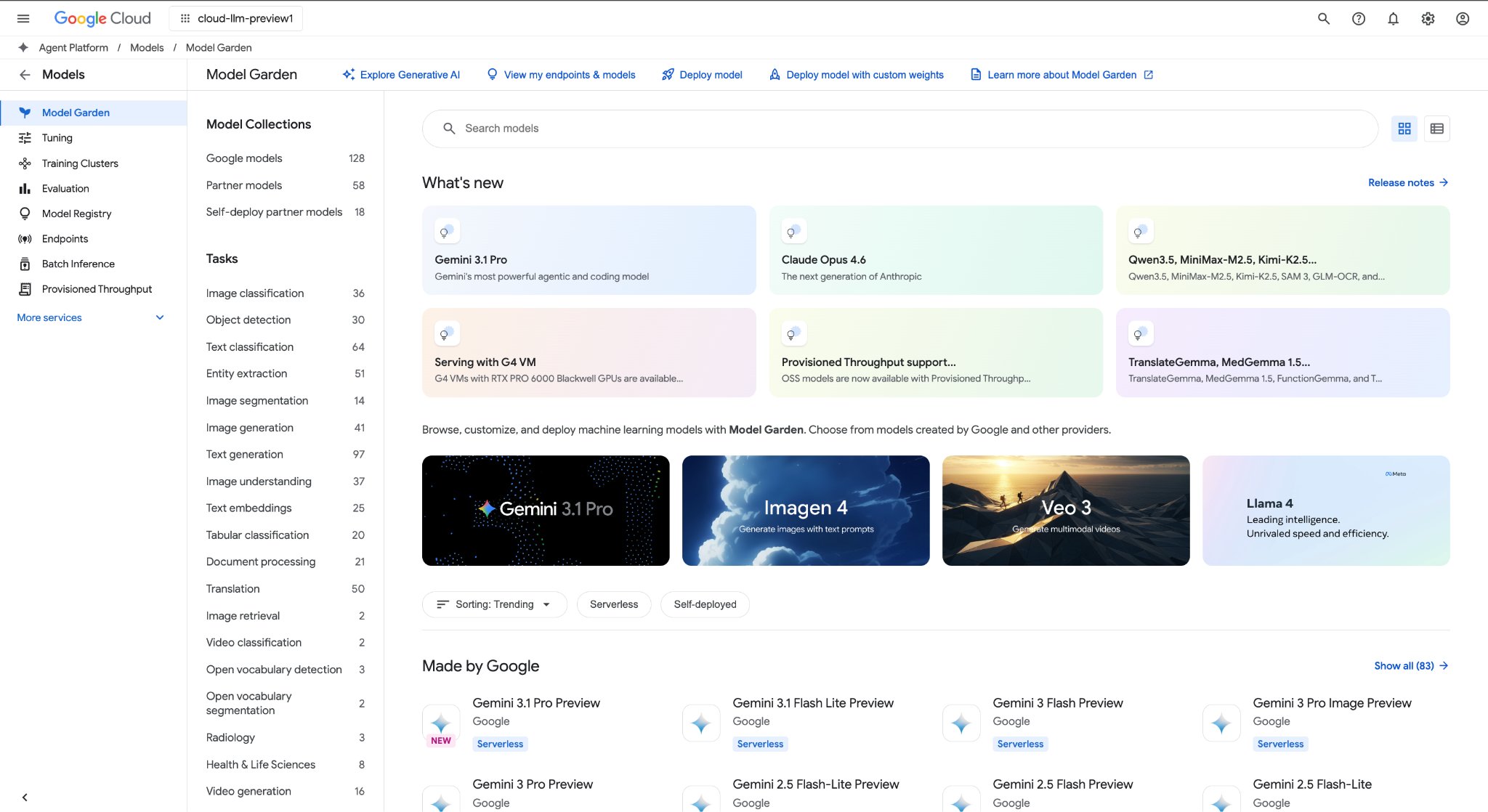
The platform also supports agent identity management and administration. However, custom development introduces decisions about engineering resources and deployment infrastructure. Before committing to the platform, organizations should estimate implementation costs and establish roles for agent maintenance and access management.
PROS | CONS |
|
|
6. Workato Agent Studio: For workflows across business apps
When business processes involve several applications, Workato Agent Studio offers AI agents called Genies that use existing integration workflows, known as recipes. These connections allow agents to retrieve information and perform authorized actions across compatible systems.
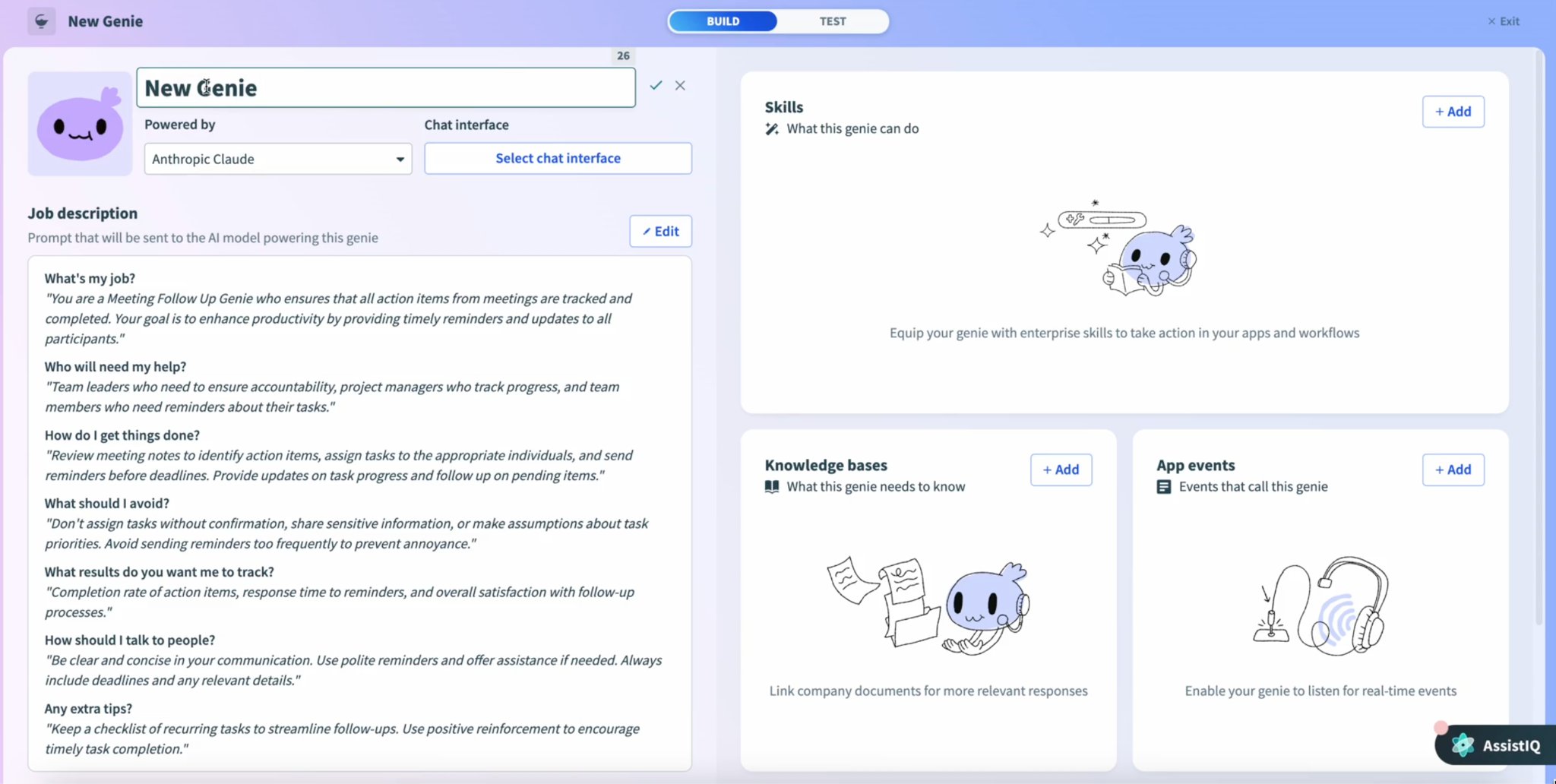
Workato recipes let you incorporate AI agents into your existing automation processes. It also provides authentication and role-based permissions for agent access. Cost estimates should account for the required connectors and expected agent activity, including any usage charges associated with workflow executions.
PROS | CONS |
|
|
7. n8n: For customizable automation and self-hosted deployment
Self-hosted deployment may appeal to organizations with internal infrastructure requirements or dedicated technical teams. n8n supports this approach alongside its cloud service, with visual workflow development tools and configurable AI agents performing tasks through connected apps.
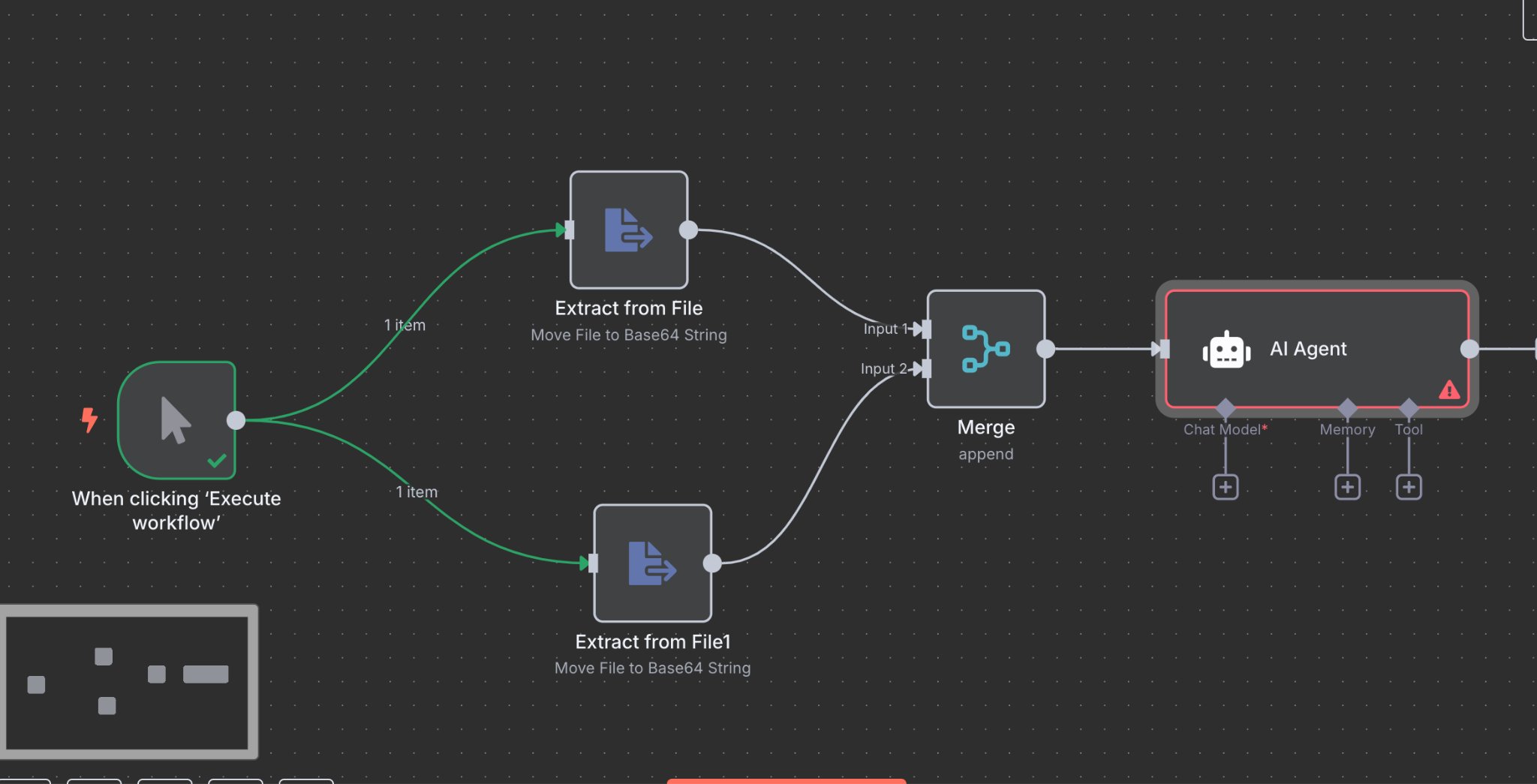
Organizations choosing self-hosted deployment assume responsibility for server maintenance and security configuration. These administrative requirements can also affect implementation costs and ongoing technical support. Buyers should also verify which governance features are included in the Enterprise plan, particularly access controls for AI agent workflows.
PROS | CONS |
|
|
How to test an enterprise AI agent builder before purchasing
Before purchasing an enterprise AI agent builder, organizations should run a controlled pilot using an existing business workflow. Each shortlisted vendor should receive the same tasks and operating conditions to assess completion accuracy, error handling, and overall performance. The results can help compare performance and identify potential limitations before deployment.
Step 1: Establish the performance baseline
Document the current workflow's performance, including processing time and error rates. For project request intake, you could also measure the percentage of submissions requiring additional information.
Historical requests show common problems, such as missing documents or incomplete project details. Choose a representative sample that reflects the team's usual workload, including requests that require additional review or clarification.
Step 2: Configure the same workflow in each platform
A consistent test requires vendors to configure the same business process using comparable information and instructions. For example, a project intake agent should identify missing fields, classify complete submissions, and prepare assignments for the appropriate team. The workflow should then route requests for managerial approval before creating a project record.
The configuration should also define which applications the agents can access and which actions require employee authorization. Ask vendors to document any additional development or setup requirements, as these may affect implementation costs.
Step 3: Test normal requests and exceptions
Successful task completion is only one part of agent reliability. The pilot should also examine how the platform responds to incomplete requests and temporary system failures. Include the following scenarios to assess its behavior under different conditions.
Test case | Expected result |
|---|---|
| Complete request | Agent performs the authorized task correctly |
| Missing information | Agent identifies missing details and requests clarification |
| Restricted record | Agent cannot access unauthorized information |
| Approval required | Agent waits for the designated employee's authorization |
| Unavailable application | Agent reports the failure and follows the configured recovery process |
| Repeated request | Agent avoids creating unintended duplicate records |
Since AI agent behavior can vary between executions, repeat each test several times rather than relying on a single successful attempt. Record completion rates and instances requiring employee intervention, along with any execution errors.
Execution histories can provide additional evidence by identifying unsuccessful actions and attempted tool calls. These records distinguish agent errors from external app issues.
Step 4: Compare results using an evaluation scorecard
After the pilot, compare vendors using a weighted scorecard based on your company priorities. The example below gives AI workspace capabilities the highest weight, followed by workflow execution and security requirements.
Evaluation criterion | Suggested weight |
|---|---|
| AI workspace and business context | 25% |
| Workflow integration and execution | 20% |
| Security and agent governance | 20% |
| Reliability and scalability | 15% |
| Development and administration | 10% |
| Total cost and operational value | 10% |
| Total | 100% |
Assign a score from one to five for each criterion based on the pilot results. To calculate the weighted total out of 100, divide each score by five, and multiply the result by its assigned weight. Adding these weighted scores produces the vendor's final rating.
Organizations can adjust the suggested weights according to their requirements, but mandatory security conditions should remain pass-or-fail criteria regardless of the final score. Employee effort also deserves attention because frequent intervention may reduce the expected productivity gains.
Additionally, compare the time spent reviewing agent actions or correcting errors against the workflow baseline. These results determine whether the platform offers sufficient improvements to justify its operating costs.
Which enterprise AI agent builder should you choose?
Choosing an enterprise AI agent builder depends on whether the platform can complete your business workflows within your organization's security policies and budget. For teams using a shared work management platform, agents should be able to access current records and make authorized updates directly. Workflows involving multiple applications require reliable connections that support the necessary actions between systems.
Before making a purchasing decision, test shortlisted vendors using the same workflows and cost assumptions. Compare task completion rates and employee review time against projected operating costs. The results should show whether the platform can save enough time to justify the investment.
FAQs
What is the difference between an AI agent builder and workflow automation software?
AI agent builders allow organizations to create agents that interpret requests and choose authorized actions based on available information. Traditional workflow automation follows predefined rules for each step. Both approaches can exist within one platform, but AI agents are better suited to processes involving variable information or contextual decisions.
Do enterprises need an AI workspace to use AI agents?
Enterprises can deploy AI agents through standalone platforms connected to their business applications. An AI workspace brings agent activity into the environment where employees manage tasks and review records. Its value depends on whether the organization relies on a shared work management platform for its business processes.
How much does an enterprise AI agent builder cost?
Enterprise AI agent builder costs vary by subscription terms and usage volume. Vendors may charge per agent execution or per AI consumption, with additional costs for implementation and integrations. Request quotes based on your expected workload, then account for employee monitoring time and ongoing maintenance in the total cost estimate.
What security features should an enterprise AI agent builder have?
An enterprise AI agent builder should provide agent authentication and role-based permissions, with approval requirements for sensitive actions. Administrators also need activity logs and controls for disabling agents. Review the vendor's data retention policies and test whether unauthorized requests are blocked and recorded for security review.