

























- Key takeaways
- What is a CI/CD pipeline?
- CI vs CD explained
- 5 stages of a CI/CD pipeline
- Why the CI/CD pipeline matters in project management
- How popular PM tools support CI/CD workflows
- CI/CD metrics that matter to project managers
- Common CI/CD challenges and how project managers can address them
- Real-world examples of project managers working with a CI/CD pipeline
- How to introduce or improve a CI/CD pipeline as a project manager
- FAQs
Key takeaways
 A continuous integration (CI) and continuous deployment (CD) pipeline is a sequence of steps that guides developers in delivering a new version of software via automation.
- In project management, the CI/CD pipeline acts as a delivery framework that reduces release risk through early defect detection and shortens feedback cycles with continuous testing.
- A project manager ensures CI/CD supports predictable delivery by aligning releases with priorities, monitoring risk, and turning pipeline data into project insights.
The CI/CD pipeline, short for continuous integration and continuous delivery, is an automation framework that enables teams to deploy software updates in smaller increments. While CI/CD is primarily a DevOps practice, it also affects project timelines, release planning, budget control, compliance, and stakeholder reporting, all of which fall within a project manager’s responsibility.
If you plan to introduce or improve a CI/CD pipeline within your development team, this article provides a complete guide on what a CI/CD pipeline is and how to manage it effectively from a leadership perspective.
What is a CI/CD pipeline?
A CI/CD pipeline is an automated workflow that moves code from development to production through a series of repeatable stages that run every time a change is introduced. It connects development activities with testing and deployment so teams can release software updates quickly without sacrificing quality or stability. Instead of integrating code at the end of a cycle, developers merge small changes into a shared repository frequently.
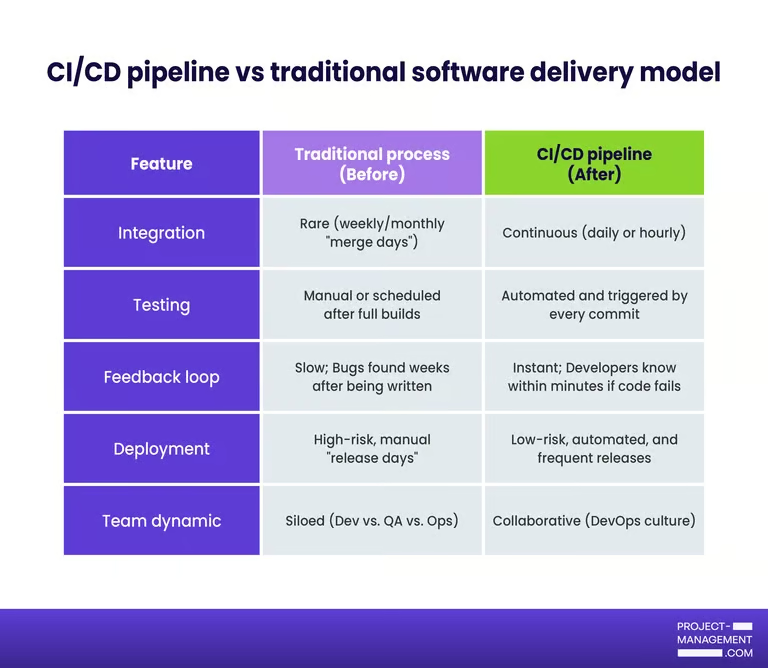
Before CI/CD pipelines, software releases were manual. Developers worked on features for weeks or months in isolation. Near the end of a release cycle, teams merge large batches of code, test everything at once, and prepare deployment through multiple handoffs. This approach limits real-time visibility into code stability and often causes release delays because risks only become visible at the end of the cycle.
CI vs CD explained
CI/CD is an umbrella term that combines three related practices: continuous integration, continuous delivery, and continuous deployment. These terms are often grouped together, but they refer to different stages of the software release process.
To manage a CI/CD pipeline effectively, you need to understand the differences between these three core concepts.
Continuous integration
Continuous integration is the practice of merging code changes into a shared repository frequently, often several times a day, with each change triggering an automated build and test process. The goal is to detect defects early and prevent integration conflicts from accumulating.
Continuous delivery
Continuous delivery builds on continuous integration by ensuring that code is always in a deployable state after it passes automated tests. Once validated, the application is packaged and prepared for release to staging or production, but a human decision typically approves the final deployment. This approach gives you control over when new features go live while maintaining release readiness.
Continuous deployment
Continuous deployment extends automation one step further by releasing code to production automatically after it passes all stages of the pipeline. There is no manual approval gate between validation and live deployment. This model supports rapid iteration and short feedback cycles, which can speed up product evolution in competitive markets.
5 stages of a CI/CD pipeline
A CI/CD pipeline is mostly automated, but it does not have to be fully hands-off. Many teams include manual approval steps (called “gates”) to reduce risk.
The CI/CD pipeline typically begins when a developer commits code to a shared repository. From there, an automated workflow moves the change through build, testing, and deployment stages, with optional human checkpoints along the way.
| Stage | Description |
|---|---|
| 1. Source stage | The process begins when a developer pushes code to a shared repository such as GitHub, GitLab, or Bitbucket. This action triggers the pipeline automatically. Version control systems track every change for traceability. |
| 2. Build stage | In this stage, the system compiles the application and prepares it for testing. Dependencies or libraries are installed if required. The goal is simple: confirm that the code can be built successfully without errors. |
| 3. Test stage | After a successful build, automated tests run. These tests check small units of code and verify how components work together. If a test fails, the pipeline stops. This prevents unstable code from moving forward. |
| 4. Artifact stage | Once the code passes testing, the system packages it into a deployable file known as an artifact. This becomes the approved software version released to different environments. |
| 5. Deployment stage | The final stage moves the tested artifact into a staging or production environment. In continuous delivery, a person approves the release before going live. In continuous deployment, the system automatically releases the artifact after passing all required checks. |
Why the CI/CD pipeline matters in project management
A CI/CD pipeline improves predictability, reduces delivery risk, increases visibility, and speeds up value delivery. For project managers, these benefits shape release planning, stakeholder management, and the evaluation of delivery performance. If you are new to CI/CD, it helps to look at its benefits from a project management perspective.
- Improves predictability: CI/CD replaces large, infrequent releases with smaller updates because the code is integrated and tested continuously. This enhances the reliability of sprint forecasting and release planning as teams are less likely to face last-minute changes before a deadline.
- Reduces delivery risk: Automated builds and tests identify defects earlier in the development cycle. Instead of discovering major issues when a project phase ends, you detect problems as soon as they appear. Early detection lowers the chance of production failures.
- Increases visibility into progress: Pipelines generate real-time data such as build status and deployment frequency to reveal insights into team performance and product stability. You no longer rely solely on status meetings to understand delivery health.
- Supports faster feedback and value delivery: Frequent deployments give stakeholders and users quicker access to updates. Dev teams receive timely feedback to adjust priorities and refine features before investing too much time and resources on the wrong path. Overall, this approach keeps the project aligned on business objectives and customer expectations.
How popular PM tools support CI/CD workflows
Beyond code integration and automated testing, a CI/CD pipeline relies on project management to track team priorities, release timelines, and stakeholder expectations. This is where project management tools come in by connecting development activity to project planning and cross-functional collaboration.
Below are several PM platforms that support CI/CD workflows through integrations and release tracking features.
| Provider | Native DevOps integrations | Release tracking features | Best suited for |
|---|---|---|---|
| monday | Offers an open API and integrations with many third-party tools, including Slack, GitHub, and GitLab, to connect with DevOps tools; supports custom integration via API. | Dashboards and widgets allow tracking of tasks and milestones to support release planning when linked to deployment workflows. | Teams needing visual workflows and flexible, cross-department tracking. |
| ClickUp | Native integrations with Jira and DevOps tools, plus syncing options for Azure DevOps; allows real-time task sync from dev platforms. | Built-in support for release planning, timelines, and dashboards to track features and deployment status. | Teams needing comprehensive task planning and release tracking in one workspace. |
| Jira | Deep integration with DevOps ecosystems, issue tracking, and agile workflows; connects with many CI/CD tools via Marketplace apps. | Support for sprint tracking, release versions, and roadmap views that link development to releases. | Software dev teams practicing agile with backlog and release planning. |
| Wrike | Integrates with Jira and other DevOps platforms to sync tasks and issues across tools. | Gantt charts and dashboards help visualize deadlines and track progress toward release milestones. | Teams managing complex schedules or coordinating with technical teams. |
CI/CD metrics that matter to project managers
Deployment frequency, change failure rate, lead time for changes, and mean time to recovery are CI/CD metrics that measure how efficiently a team delivers software and how much risk each deployment carries. Project managers do not need to configure pipelines to gain value from these metrics. They need to understand what the data reveals about timeline stability, team capacity, and overall release health.
- Deployment frequency: This measures how often code is released to production. Higher frequency often indicates smaller, incremental updates instead of large releases. It reflects the team’s release cadence and shows whether sprint output consistently reaches customers.
- Lead time for changes: Lead time tracks how long it takes for a code change to move from commit to production. Shorter lead times suggest efficient workflows and fewer bottlenecks. If this number increases, it may signal delays in approval or testing, or resource constraints.
- Change failure rate: This represents the percentage of deployments that result in production issues such as bugs or service disruptions. A rising failure rate may indicate deficiencies in product quality and testing. Monitoring this metric balances speed with reliability.
- Mean time to recovery (MTTR): MTTR measures how quickly the team restores service after a production incident. Faster recovery times indicate a well-prepared and responsive operational environment. From a risk management standpoint, this metric reflects the resiliency of your delivery system under pressure.
Common CI/CD challenges and how project managers can address them
Cultural resistance, complicated toolchains, and unclear governance are common challenges project managers face when implementing a CI/CD pipeline. The following strategies explain how to address them effectively.
1. Work enters the pipeline without a clear scope
When user stories lack sufficient information or acceptance criteria, automated tests may not reflect real expectations. This leads to rework and failed deployments. You can address this by improving backlog refinement practices and defining a clear “definition of ready” before work begins.
2. Testing slows down delivery
Delays commonly arise during testing, approval stages, or when environments are not readily available. When builds are stacked up or deployment is delayed, the lead time will increase. Monitor pipeline metrics and collaborate with engineering leads to identify the cause of the delay. Once visible, you can prioritize improvements such as additional test coverage or better environment management.
3. Frequent production issues after deployment
Frequent deployment failures reduce confidence in the system. This may indicate weak automated tests or rushed sprint commitments. Encourage smaller changes per sprint and ensure quality standards are enforced. Protect time for test improvements and technical debt reduction instead of overloading the sprint backlog.
4. Stakeholders do not understand pipeline metrics
CI/CD tools generate technical data that can be difficult for non-technical stakeholders to interpret. Without proper context, leadership may not see how those numbers reflect actual project progress. As project manager, your role is to translate metrics such as deployment frequency, change failure rate, and recovery time into business terms that demonstrate their impact on timelines and overall risk.
Real-world examples of project managers working with a CI/CD pipeline
Understanding CI/CD becomes easier when you see how it plays out in real delivery scenarios. Below are two industry-based examples that show how a project manager operates within a CI/CD pipeline.
1. Fintech company releasing a mobile banking feature
A fintech firm is launching a new mobile payment feature within its banking app, and the dev team uses a CI/CD pipeline to integrate code and automatically deploy updates to a staging environment.
The project manager coordinates sprint planning around incremental feature releases than a single large rollout. By reviewing metrics such as deployment frequency and change failure rate, the project manager monitors system stability throughout development. When automated tests regularly fail, additional feature intake is temporarily deprioritized to resolve defects in the next sprint.
Since the organization operates in a regulated environment, the final production release requires formal approval. Even though the pipeline can deploy automatically, the project manager enforces a controlled -release checkpoint to ensure that documentation and compliance reviews are complete before launch.
2. SaaS company enhancing an analytics dashboard
A SaaS provider aims to improve its customer analytics dashboard based on user feedback. The team uses a CI/CD pipeline to deploy small UI improvements multiple times per week.
The project manager aligns backlog priorities with customer impact so incremental enhancements quickly reach production. Lead time for changes is tracked to ensure that feedback cycles remain short and predictable.
When lead time increases, the project manager works with engineering leads to identify the cause, which turns out to be slow automated UI tests delaying the build stage. Test optimization becomes a sprint priority, restoring deployment speed and improving workflow efficiency.
How to introduce or improve a CI/CD pipeline as a project manager
Introducing or improving a CI/CD pipeline works best when it is treated as a delivery improvement initiative rather than a technical experiment. As a project manager, the focus should remain on measurable outcomes and sustainable change.
- Start with business objectives: Anchor the effort to specific goals such as shorter release cycles or fewer production defects. When the automation connects directly to delivery performance, executive support and team buy-in become easier to secure.
- Assess the current workflow: Identify where delays occur in integration, testing, or deployment. Understanding existing bottlenecks prevents unnecessary tool changes and helps prioritize high-impact improvements.
- Introduce changes incrementally: Rather than attempting a full process overhaul, focus on one improvement at a time, whether that is automating a testing stage or simplifying release approvals. Small, deliberate changes give the team time to adjust and build confidence before moving to the next improvement.
- Define and track success metrics: Establish success metrics such as lead time for changes or deployment frequency. Tracking these indicators ensures that improvements are tied to performance gains rather than assumptions.
When approached strategically, CI/CD becomes more than an engineering upgrade. It evolves into a delivery system that enhances predictability and supports long-term project success.
FAQs
How long does it take to implement CI/CD?
Basic CI/CD can be set up in a few weeks. Mature, fully automated pipelines with testing and governance controls may take several months, depending on system complexity and team readiness.
What is the difference between CI and CD?
Continuous integration regularly merges code changes and runs automated tests to quickly identify potential issues. Continuous delivery or deployment then moves approved code into production, either after manual approval or through automatic release.
Is CI/CD only for DevOps teams?
No. While DevOps teams manage implementation, CI/CD impacts project managers, QA teams, and leadership because it affects release speed, risk management, and overall delivery performance.