

























Task management software, though similar to traditional project management software, offers specific features to help individuals gain better control over project tasks and subtasks. Learn about the best task management software solutions, their pros and cons, key features, and more in this comprehensive buyers’ guide.
The best task management software for most teams is Jira for its agile software teams, ClickUp for its strong free plan, or monday for its task automation. Below is the full list of the best task management software in 2026.
- Jira – Best for Agile-based Software Teams
- ClickUp – Best Free Plan Option
- monday work management – Best for Task Automation
- ToDoist – Best for Task Gamification
- Asana – Best Task Templates
- Trello – Best for Ease of Use
Our Picks: Top Task Management Software
| Our Picks | Best For | Pricing Starts At |
|---|---|---|
 | Best for Agile-Based Software Teams | Free to try • $7.91/user/mo. See details |
 | Best Free Plan Option | Free to try • $7/user/mo. See details |
 | Best for Task Automation | Free to try • $9/user/mo See details |
 | Best for Task Gamification | Free to try • $5/user/mo. See details |
 | Best Task Templates | Free to try • $10.99/user/mo. See details |
 | Best for Ease of Use | Free to try • $5/user/mo. See details |
Jira – Best for Agile-Based Software Teams
Jira is a top-rated project and issue-tracking solution widely used for granular task management. The software has a number of advanced features and workflows specifically designed for Agile, DevOps, IT service management, and work management teams, though teams from other backgrounds can also benefit from Jira’s capabilities. Jira is especially well-suited to large project teams, as per-user pricing on the Standard plan scales down each time you move to a higher user-count tier. The solution comes with unlimited tasks and projects.
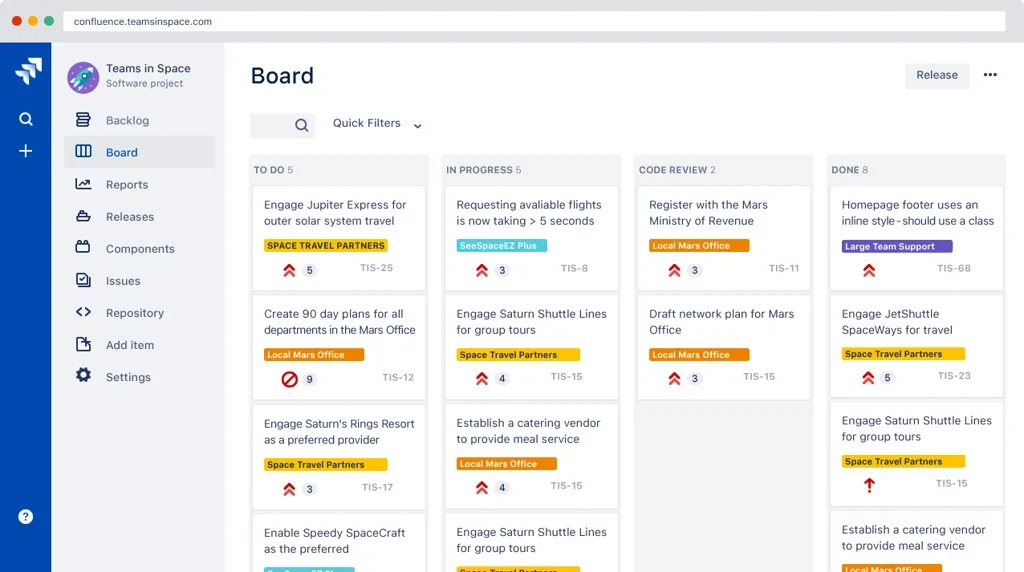
Jira Key Features
Various project view options: List, Calendar, Timeline, and Boards. List view makes it simple to edit tasks with in-line editing, Timeline helps teams to visualize project dependencies, and Boards is especially effective for task status tracking.
Industry-specific features and templates: Jira has many sprint-style and Agile-specific features that make it a great fit for technical project teams. The product also includes several additional business project templates for marketing, HR, operations, design, finance, legal, and sales teams.
Well-integrated ecosystem: Jira integrates with other solutions in the Atlassian tool stack, including Jira and Confluence. Smart links, shared release dates, and automation help to connect projects and tasks across different departments and teams as necessary.
Jira Pros
 Automation options: Extensive automation is available even on the free plan.
- Task customization: Highly customizable task issues for admin users.
- Admin controls: Admins have the option to set up either team-managed or company-managed projects with granular tasks and dependencies.
Jira Cons
 Customer support: Limited customer support options.
- Learning curve: Compared to other options, this solution has a high learning curve.
- Project role limitations: Project roles are not available on the free plan.
Why We Picked Jira
Jira provides some of the best industry-specific features for task management, especially for more technical teams. It also has some of the most extensive integration and automation options on the list, particularly for users of other Atlassian products. Unlimited tasks are available in both the free and the paid plan options, and the free plan supports advanced features and capabilities for up to 10 users.
Jira Pricing
- Free: $0, 2 GB of storage, up to 10 users
- Standard: $7.91 per user/month, 250 GB of storage, up to 100,000 users per site
- Premium: $14.54 per user/month, unlimited storage, 24/7 support
- Enterprise: Custom-quote, unlimited storage, multiple sites (up to 150)
Read our review of Jira
ClickUp – Best Free Plan Option
ClickUp is a project and task management solution with a highly visual, simple-to-use interface. While it’s easy to keep your workspace organized and straightforward with simple tasks and subtasks, you can also power up your workflows with customizable ClickApps, task automations, custom fields, and various project views.
Though there are still some limitations to the Free Forever plan, we’ve found that ClickUp’s free plan is one of the best for task management requirements, giving users access to unlimited tasks, task checklists, tags, dependencies, priorities, and subtasks in multiple lists, and 24/7 customer support.
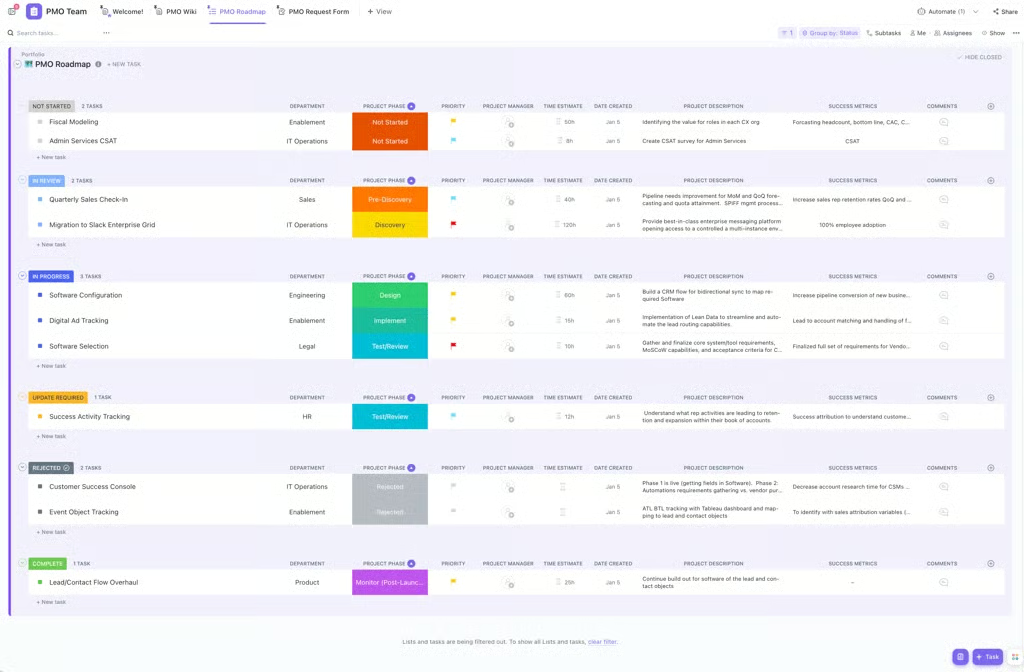
ClickUp Key Features
Highly collaborative and visual task assignments: Tasks can be assigned to multiple users, and comments can be used to thread communication and tag other users on task updates. Comments can be set as action items, and images and screen recordings can be shared on tasks.
Granular task categorization and customization: Tasks can be grouped by category via Item Types, and custom statuses and fields are available to users. Additionally, tasks can be categorized and labeled with priorities, tags, relationships, dependencies, and checklists.
Several core and advanced view options for tasks: List, Board, and Calendar views are all available as core task management views. Advanced views include Map, Mind Map, Activity, Box, Gantt, Table, Timeline, and Workload views.
ClickUp Pros
- Generous free plan: The free forever plan provides users with access to nearly all relevant task management features and most project views.
- Customization options: ClickUp’s interface is highly customizable, allowing users to create custom task statuses, fields, and views.
- Support and education: Free training and 24-hour support are available to users.
ClickUp Cons
- Task ID limitations: Custom task IDs are available only on the Business, Business Plus, and Enterprise plans.
- Limited guest access: There are few to no guest access options available in the free forever plan.
- Lags and bugs: ClickUp users occasionally encounter issues, including slow load times and performance lags.
Why We Picked ClickUp
ClickUp is a user-friendly task management solution that offers intuitive project views and drag-and-drop functionality. It also has some of the most granular subtask management, task customization, and task labeling features in the market.
ClickUp Pricing
- Free: $0/user/mo., 60 MB of storage
- Unlimited: $7/user/mo. unlimited storage, extensive integration capabilities
- Business: $12/user/mo., unlimited dashboards and storage, suite of project management tools
- Enterprise: Custom-quoted, made for managing many large teams
Read our review of ClickUp
monday – Best for Task Automation
Visit monday work managementmonday work management is a top task management solution that can also be used for more robust project tasks, like project portfolio management and workflow automation. Some of its most advanced task management features include dashboards, recurring tasks, task templates, task ownership, time tracking, and task automation. monday work management has some of the best task-level automations available, but manages to not compromise on ease of use; automations can be set up with simple triggers across projects and items. Keep in mind that most automations are available only on the three highest-tier plans.
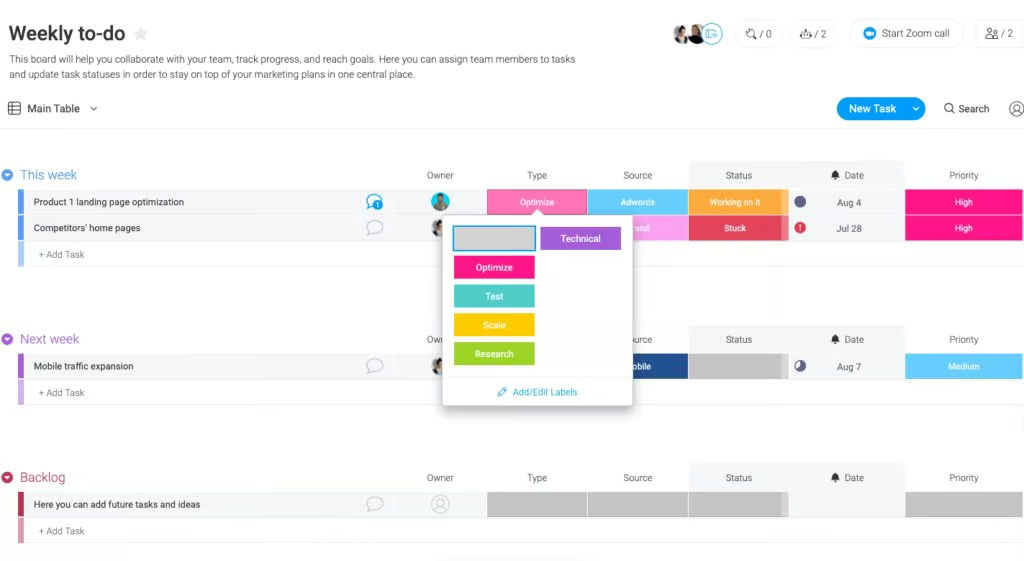
monday Key Features
Task dashboards and reporting: monday comes with a variety of dashboard widgets and reporting features. Dashboards can be used to view task distribution, task type, and task status; custom metrics can also be added.
Task ownership and user assignments: Adding custom people columns, monday.com users can assign tasks to specific users and nest assigned subtasks under those tasks as well. There’s also the option to assign multiple people to one task.
Task templates: monday.com offers over 200 prebuilt project and task templates in its library. While some templates are industry or use-case-specific, others are geared toward task and time management. One of the more popular templates available in monday.com is the “Design weekly tasks” template.
monday Pros
- User-friendly automations: monday’s task automations that balance robustness with ease of use.
- Template library: Extensive and highly customizable template library.
- Widgets and reporting tools: Dashboard widgets and reporting tools are customizable and highly visual, which makes it easier to track project progress.
monday Cons
- Free plan limitations: monday.com’s free plan does not include unlimited tasks/items.
- Not the best choice for individual users: monday.com is better suited for team-level collaboration and task management than for individual task management.
- Plan upgrades: Certain advanced automations, integrations, and dashboard features are available only on the Enterprise-level plan.
Why We Picked monday work management
monday work management makes it so that large teams can easily automate and template both projects and tasks, making it the ideal solution for enterprise teams that need collaborative task management and features like recurring tasks. It’s also a very visual tool with a strong dashboard, reporting tools, and a variety of task view options.
monday Pricing
- Free: $0/ month — up to 2 seats
- Basic: $9 per seat/month — 1,000 AI credits
- Standard: $12 per seat/month — 2,000 AI credits
- Pro: $19 per seat/month — 3,000 AI credits
- Enterprise: custom-quoted for larger teams 20,000 AI credits
Read our review of monday work management
Todoist – Best for Task Gamification
Todoist is one of the most popular task managers and to-do list apps in the world today. Primarily accessed through its mobile app, Todoist lets individual users manage recurring due dates, organize sections and subtasks, set priorities and reminders, delegate tasks, create personal task views, and manage tasks in a variety of formats. Tasks can specifically be added by forwarding emails to Todoist, and tasks can be supplemented with comments, file uploads, and calendar feeds. Todoist’s most distinctive feature is Todoist Karma, which awards users “points” each time they take steps toward meeting their productivity goals.
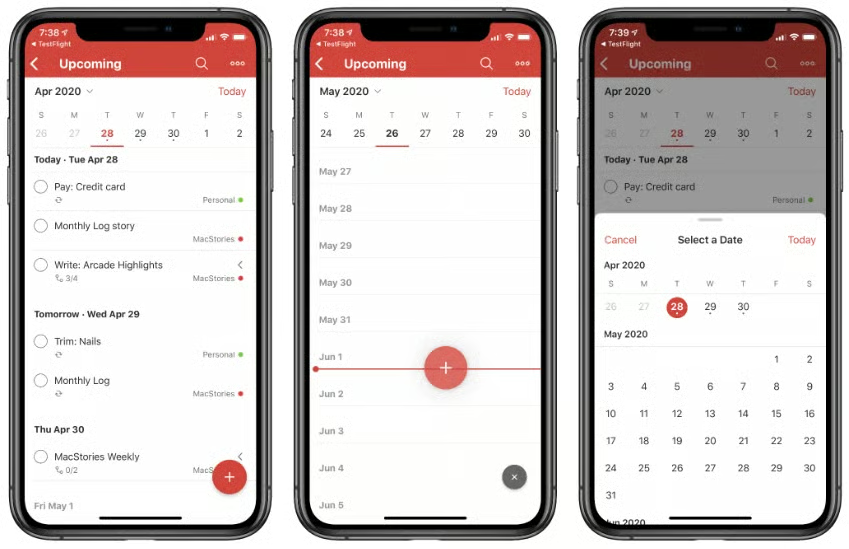
Todoist Key Features
Task prioritization: Daily tasks can be prioritized with built-in priority levels. The Favorites feature keeps frequently used projects, labels, and filters at the top of your task view. For Pro and Business plan users, Reminders are available as push notifications.
Workload sharing and task assignments: For Business plan users in particular, tasks can be easily delegated by searching for and clicking another user’s name. Notifications let users know when they’re tagged in tasks or when people post comments or complete tasks.
Productivity management and visualization: Weekly and monthly productivity visuals are colorful and easy to read. Activity history and completed tasks archive can both be filtered by project or person. Todoist Karma empowers individuals to track and reward their productivity.
Todoist Pros
- Easy-to-use: Dedicated task management and to-do list format make this an easy-to-use tool.
- Progress tracking: Productivity visualizations and the completed tasks archive make it easier to track task progress over time.
- Todoist Karma feature: It adds a unique gamification and rewards system to the solution.
Todoist Cons
- Lack of integrations: Todoist does not offer or easily integrate with more advanced enterprise project management features and tools.
- Lack of multi-user support: Only the Business plan supports multiple users.
- Limited upload and storage capacity: Limited file upload and storage capacity compared to many other task management solutions.
Why We Picked Todoist
Overall, Todoist is easy to use and offers users strong progress-tracking features. It’s one of the few solutions that offer an effective approach to gamification that encourages users to achieve their goals in an engaging way. Nearly all major features are available in its free-to-use plan, and the app itself is incredibly mobile-friendly. Its paid plans are also the most affordable in this buyers’ guide.
Todoist Pricing
- Beginner: $0/user/mo. — 5 personal projects
- Pro: $5/user/mo. — 300 personal projects
- Business: $8/user/mo. — 500 team projects
Read our complete review of Todoist
Asana – Best Task Templates
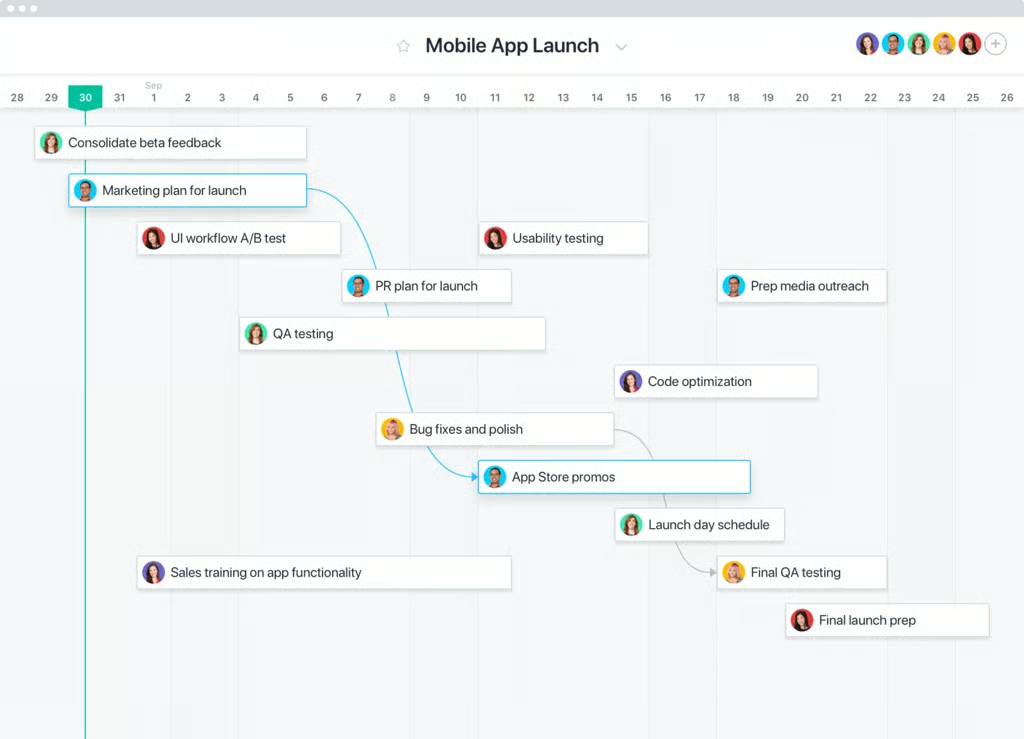
Asana is a cross-functional project management system that works well for task management purposes, too. One of its greatest strengths is its broad collection of task templates, which can be accessed directly from a user’s project board. Users can also create custom task templates, adjusting the task type, title, assignee, relative due date, project, task dependencies, description, subtasks, and more to fit specific project requirements. Beyond its templates, Asana is also a great solution for teams that want to incorporate time tracking, automations, and multiple view options into their task management workflow.
Asana Key Features
Workflows and Rules: Workflow Builder is a low-code/no-code tool from Asana that enables you to automate workflows and integrate them with over 200 third-party business applications. Rules is another automation feature that can automatically assign tasks, send notifications, and adjust project and task timelines.
Multi-Homing and dependencies: With Asana’s multi-homing feature, users can track, manage, and update tasks that live in multiple places; when they update the task in one location or project, it is automatically updated in other locations as well. Tasks can also be marked as having dependencies, so users know whether they can complete their tasks yet.
Multiple project views: List, Board, Calendar, and Timeline views are all available to Asana users. Timeline view allows users to visualize tasks and their dependencies in a Gantt-like format. The calendar view makes it easier to track task deadlines.
Asana Pros
- Multi-project tracking: The multi-homing feature makes it easy to track and update tasks across multiple projects at once.
- Limitless task creation: Unlimited tasks are available in all plans.
- High storage capacity: Asana offers more file storage capacity than most competitors in task and project management.
Asana Cons
- Free plan limitations: A handful of task features, such as task dependencies and task templates, are not available on the free plan.
- Solo assignees: Each Asana task can only have one assignee.
- Expensive for larger teams: Asana can quickly get expensive for larger teams that need Premium-level or Business-level features.
Why We Picked Asana
A variety of task-specific templates are available to Asana users. The Workflow Builder makes it easy to automate task workflows and set up integrations. Additionally, multi-homing is a unique feature that makes it easy to manage task dependencies and tasks across multiple project workflows. Finally, Asana offers unlimited access to many features, including unlimited tasks, even on its free plan.’
Asana Pricing:
- Personal: $0/user/mo. — 2 user limit
- Starter: $10.99/user/mo. — no user seat limits
- Advanced: $24.99/user/mo. — unlimited portfolios
- Enterprise: custom-quoted — large team task management
Read more with our Asana review
Trello – Best for Ease of Use
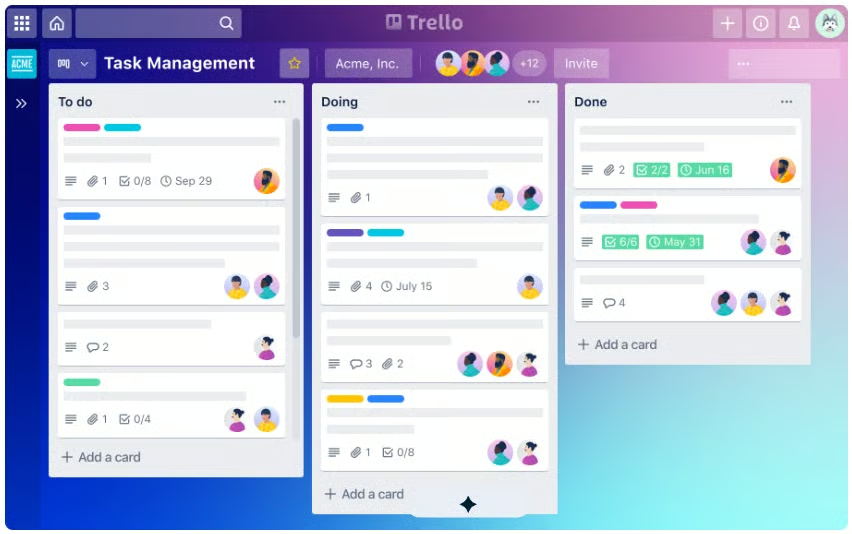
Trello is a sleek, Kanban board-focused task management system that enables users to assign tasks, track their progress toward completion, and automate workflows. Each task within Trello corresponds to an individual task card where users can attach files, add notes, and tag other users in comments, which are relayed as notifications. As tasks move toward completion, users can drag each card into their respective columns: “to do”, “doing”, and “done”.
Trello Key Features
Subtask checklists: Users can break down tasks into smaller tasks using the subtasks checklist feature, which makes it easier to organize larger tasks in one card.
Workflow automations: Commands and automated rules help automate menial tasks and speed up workflows.
Integration options: Over 200 options make it easier for teams to connect their existing tech stack to applications such as Salesforce, Slack, and Google Drive.
Trello Pros
- Intuitive interface: Trello is extremely easy to learn and navigate, with drag-and-drop-focused functionality.
- Great task management: Detailed task card options, subtask checklists, and the ability to collaborate underneath individual tasks make Trello stand out for task-management-focused users.
- Multiple views: While Trello is Kanban-focused, it also offers dashboard, table, calendar, and timeline views.
Trello Cons
- Limited reporting options: Compared to the other top picks, Trello offers limited data analytics and reporting features.
- Limited free plan: The free plan has severe limitations, with attachment file limits, limited features, and few integrations.
- Notification issues: Some users report missing notifications and difficulty receiving updates due to poor notification organization.
Why We Picked Trello
Trello is a powerhouse for task management with an easy-to-use interface that anyone can learn to use in minutes. The ability to break down tasks into subtasks within a single card is convenient, and the features that aren’t as strong, such as reporting options, can be compensated for by using integrations.
Trello Pricing:
- Free: $0/user/mo, up to 10 collaborators
- Standard: $5/user/mo, unlimited boards
- Premium: $10/user/mo, AI tools included
- Enterprise: 17.50/user/mo, large team task management tools
Read our review of Trello
How We Chose Our Top 6 Task Management Solutions
To complete this buyer’s guide, I evaluated over 25 task management solutions. The top selections were chosen by experimenting with features across various task management tools, reading customer reviews on review sites, reviewing product pages and documentation, comparing pricing, considering industry-specific features and differentiators, and focusing on the quality of the user experience.
Read More: Top 10 Project Management Software
Methodology
How We Chose Our Top 6 Task Management Solutions
In order to complete this buyer’s guide, I assessed over 25 task management solutions. The top selections were chosen by experimenting with the features available in various task management tools, reading customer reviews across review sites, reviewing product pages and documentation, comparing pricing, considering industry-specific features and differentiators, and focusing on the quality of the user experience.
Read More: Top 10 Project Management Software
FAQ: What Are Task Management Software’s Key Features?
Task scheduling and automation
Task scheduling and automation features help plan recurring tasks, simplify task and subtask workflows, and ensure next steps and dependencies are considered at each stage of a project. Look for tools that make it easy to schedule tasks and set up automatic task assignments and notifications.
Subtasks
Especially for complex or long-term projects, tasks often become their own mini-projects that require subtasks to stay on track. Not all software platforms make it easy to nest or add subtasks to a project planning board, so be on the lookout for tools that allow you to include subtasks and dependent tasks when necessary.
Task assignments & notifications
When using task management software as a team, it’s important to assign tasks to specific users so that no deadlines or important steps fall through the cracks. Look for software that lets you assign individual tasks to one or more users, depending on your needs, and prioritize solutions that include built-in messaging, tagging, and other notification features.
Multiple task views
Oftentimes, tasks overlap, intersect, and generally become overwhelming. Toggling between task views can help you get a fresh visual of task timelines and overall project goals. Timeline, calendar, and Gantt-style views are among the most helpful for visualizing granular tasks and subtasks.
Progress & time tracking
Task management, especially in a team environment, is more effective when progress-tracking features are in place to measure performance and timeliness. Look for solutions with time tracking, workload management, progress visualizations, and gamification features to assist with progress tracking.
Task Management Software FAQ
What Are the Benefits of Task Management Software?
Task management software offers many benefits to project managers, project teams, and even individuals who want to better manage their workloads. Here are just a few of the benefits that come from using task management software:
Enhanced communication and visibility among teams
Though task management software primarily benefits individuals, it also helps teams gain better visibility into each other’s tasks. Task management software allows teammates to communicate on specific task threads without ever requiring them to leave another app or system.
Improved progress and performance tracking for project managers
Instead of simply getting broad visibility into project progress, task management software makes it easy for project managers to drill down and see how individual task owners are tracking toward their goals.
Added personal accountability and productivity measures for individual team members
For individual contributors, task management software can also help track progress and keep tabs on upcoming deadlines. You don’t need to invest in expensive or bulky project management software to reap the benefits of task management and to-do list features.
Better identify bottlenecks and overworked team members
Especially if you’re regularly using task ownership and assignment features, it will quickly become apparent if you’re overworking certain team members. Many task management solutions also include workload and capacity management features to help you distribute tasks more effectively among your teammates.
More efficiently manage all tasks, subtasks, and deadlines
In broader project management setups, smaller tasks and subtasks often get lost in the shuffle. With dedicated task management software and features, teams can more easily visualize individual project components, dependencies, and impending deadlines for different segments of their work.
What Are the Differences Between Task Management & Project Management?
What is the difference between task management and project management software?
While project management software focuses on projects as a whole and all of the communications and workflows that go into them, task management software gets more specific, looking at tasks, subtasks, and action items on a more individual basis. In many cases, task management features are included in project management software solutions.
Check out our comprehensive Top 10 Project Management Software Buyers’ Guide
Does Google have a task management solution?
Google has a limited task management solution called Google Tasks, which can be downloaded and synced with other Google Workspace apps. Many Google users use Google Tasks alongside Google Keep, Google Sheets, Gmail, and Google Calendar to comprehensively manage their tasks.
What is CRM task management?
CRM task management is a specific type of task management that helps marketers and salespeople set, assign, automate, and otherwise manage tasks related to the customer lifecycle in a customer relationship management (CRM) platform. An example of a CRM task management solution is HubSpot Task Management, which is offered as part of HubSpot’s Sales Hub.
Also see: Marketing Project Management Software Buyers’ Guide
What is the best task management software?
The best task management software will depend on the number of users, the complexity of their tasks, and the types of projects the team is working on. For more complex tasks or projects, a robust system like Jira, monday Work Management, or ClickUp is preferred; for users looking for an easy-to-use task management solution that works well for individuals, Todoist is a great option.
How to Choose the Best Task Management Solution
Choosing the right task management solution for an individual or a business can be difficult because each tool operates a little differently. While some solutions are designed to work well with large teams and their requirements, others cater to the needs of individuals and small teams.
If you’re most concerned with ease of use and don’t need advanced project management or collaboration features, go with a simple task management solution like Todoist or Trello.
Task-management-only solutions like Todoist don’t always offer the most advanced features, but they’re typically low-cost, easy to use, and designed with individual users’ needs in mind.
If your company prioritizes high levels of integration and automation, a more robust solution like Jira Work Management, monday Work Management, ClickUp, or Asana is a better fit.
These tools offer advanced project management features in addition to task management, including project portfolio management and issue tracking.