

























Key takeaways

CMW Lab stands out for workflow automation and business process management, making it a strong choice for organizations that need process standardization and operational efficiency.- The platform offers extensive customization through its low-code workflow designer, allowing teams to build processes that align with specific business requirements.
- CMW Lab is better suited for mid-size businesses and enterprises than small teams, as setup and workflow administration require more planning than traditional project management software.

CMW Lab is a low-code business process management platform (BPM) that helps organizations automate complex workflows with minimal developer involvement. Having tested the platform firsthand, I found it capable for enterprise operations teams but with a steeper learning curve than most general-purpose project management tools. In this CMW Lab review, I’ll break down its features, pricing, and real-world limitations to help you decide if it fits your team.
| CMW Lab overview | |
|---|---|
| Best for | Organizations that need workflow automation, business process management (BPM), and project management |
| Starting price | Custom pricing |
| Ease of use | Moderate; low-code interface is accessible for non-technical users, but setup requires time investment |
| Key features | Workflow automation Project management Process mapping Document management |
| Strengths | Highly customizable workflows, BPM capabilities, low-code automation tools, flexible approval processes |
| Limitations | No public pricing, steeper learning curve than traditional project management tools, advanced customization may require admin expertise |
My methodology
To evaluate CMW Lab, I reviewed its workflow automation, business process management (BPM), and project management capabilities from the perspective of teams looking to centralize operations. I examined the platform’s core features, including workflow design, task management, reporting, approval processes, customization options, and integrations.
I also assessed the user experience by analyzing setup requirements, ease of navigation, and the level of technical expertise needed to build and maintain workflows. Finally, I compared CMW Lab against competing workflow management platforms to determine its strengths, limitations, and overall value for organizations seeking process automation and operational efficiency.
Who should use CMW Lab?
CMW Lab is built for organizations that want to streamline business processes through workflow automation. It delivers the most value to teams with well-defined processes and a clear strategy for automation.
CMW Lab is a good fit for:
- Organizations seeking to automate complex business processes across departments.
- Operations teams managing approval workflows, requests, and compliance procedures.
- Enterprises that need a customizable BPM platform without extensive custom development.
- Teams looking to centralize process documentation, task management, and workflow automation in one system.
CMW Lab is less suited for:
- Small businesses seeking a simple task management or collaboration tool.
- Teams that need visual project planning with Kanban boards and Gantt charts.
- Organizations looking for out-of-the-box project management software with minimal setup requirements.
- Agile software development teams that require sprint planning and developer-focused tools.
CMW Lab pricing
CMW Lab does not publish standard pricing tiers publicly. Third-party sources cite a starting price of around $30/user/month (billed annually), but actual costs vary based on user count, deployment requirements, and organizational needs. To get an accurate quote, you’ll need to contact the vendor.
A few other cost factors worth noting before engaging the vendor:
- Deployment flexibility: CMW Lab supports both cloud and on-premises deployment under the same licensing structure, which gives enterprise buyers more control but can add implementation costs depending on the setup required.
- Professional services: Onboarding and configuration support is available through CMW Lab’s consulting services, though this adds to the total cost of ownership.
- Free trial: A free trial is available, which is worth taking advantage of given the platform’s complexity before committing to a contract.
Pricing is one of the most common concerns mentioned in user reviews. Many users view CMW Lab as more expensive than competing BPM platforms, which can make it difficult to justify for smaller organizations. However, enterprise customers often consider the cost worthwhile due to the platform’s advanced workflow automation and governance capabilities.
Key features
CMW Lab focuses automating business processes while maintaining visibility into projects, approvals, and operational workflows. Unlike traditional project management tools, it combines BPM capabilities with workflow automation, reporting, and task and case management.
During my testing, three features stood out for their impact on process efficiency and workflow management.
BPMN 2.0 process modeling
CMW Lab supports BPMN 2.0, the industry-standard notation for mapping business processes. This helps organizations standardize workflows across departments and support compliance or audit requirements. The drag-and-drop process builder makes it accessible to non-technical users, while developers can extend processes with high-code customization where needed.
Low-code workflow automation
Up to 95% of applications on the platform can be built without code. Users can configure trigger-based automation, approval chains, escalation rules, and conditional logic through a visual interface. This gives business teams greater control over process design while reducing reliance on IT resources.
Real-time dashboards and reporting
CMW Lab’s reporting tools provide visibility into process performance, bottlenecks, and task status across workflows. Custom dashboards help teams track role-specific metrics and identify improvement opportunities without relying on a separate BI tool. This makes the platform particularly valuable for organizations managing high-volume, cross-departmental processes.
Ease of use
CMW Lab occupies an interesting middle ground on usability. The low-code interface is accessible for non-technical users, but setup requires more effort than most project management tools.
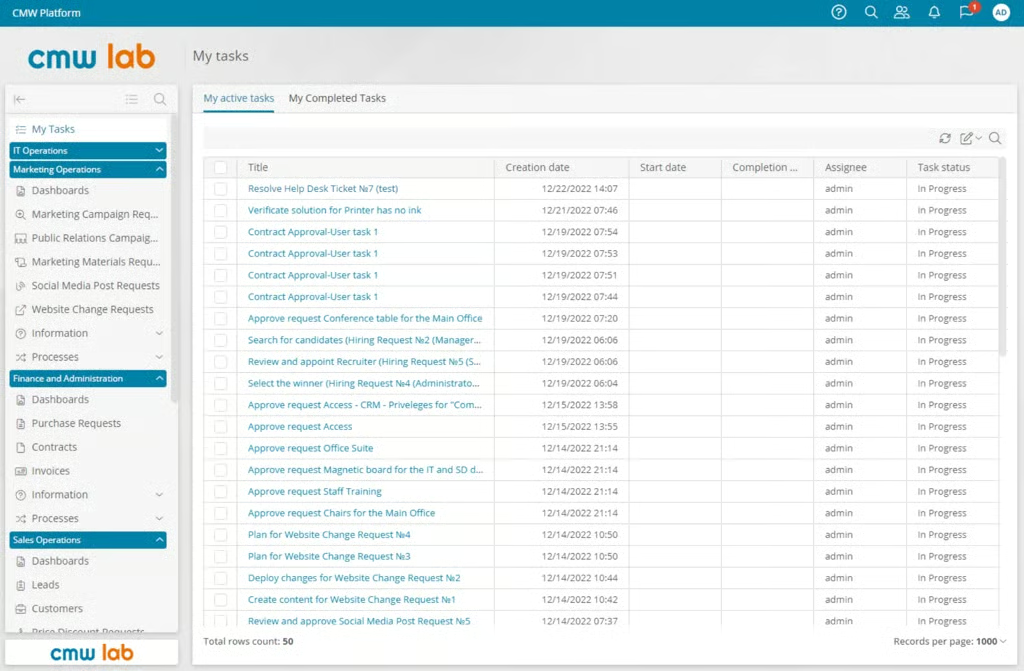
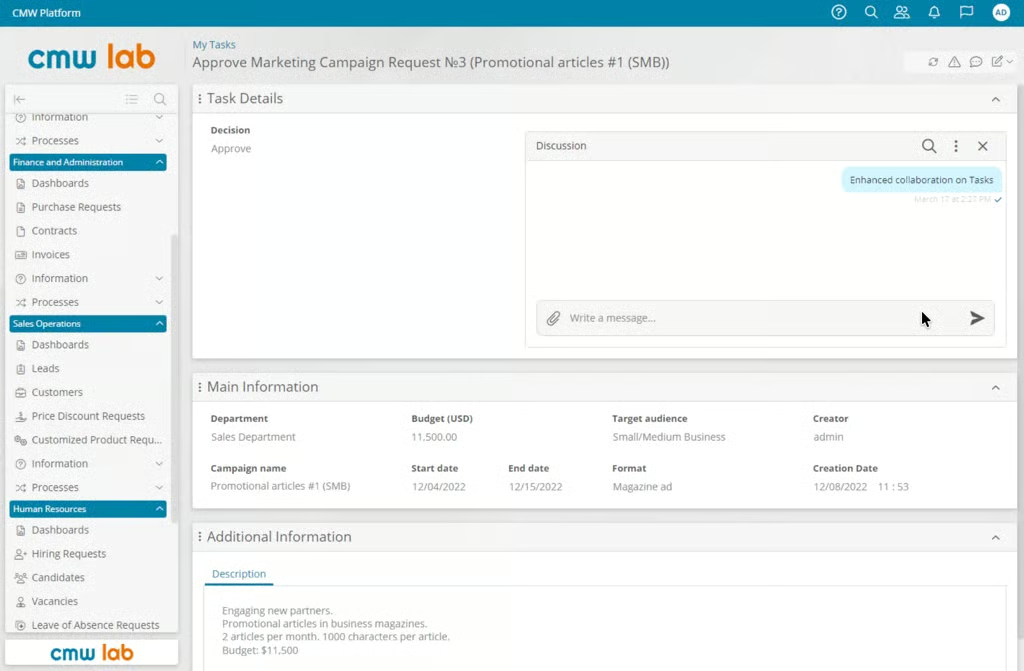
I found the interface organized and functional, with a navigation structure that separates workflows by department, process, and business function. For end users, the experience is relatively straightforward. Tasks appear in a centralized workspace where users can view assignments, review supporting information, participate in discussions, and manage approvals. The platform’s structured forms help standardize data entry and keep workflows consistent across teams.
Customer support
CMW Lab’s support offering is one of the stronger aspects of the platform, particularly for enterprise buyers navigating a complex initial setup. Users across Capterra, G2, and Gartner Peer Insights frequently describe CMW Lab’s support team as responsive and helpful during onboarding and workflow setup.
Support channels include expert consultation, a ticketing system, product tutorials, how-to guides, and an FAQ library covering both CMW Platform and CMW Tracker.
Security
CMW Lab uses role-based access controls (RBAC) to help organizations manage who can access information within the platform. The platform also offers cloud and on-premises deployment options. This gives organizations greater flexibility when addressing data residency requirements or internal policies that restrict the use of third-party cloud services.
Another notable security feature is its audit trail functionality. CMW Lab records workflow activity, approval actions, and process changes, allowing organizations to track who performed specific actions and when they occurred. These records can support compliance efforts, internal reviews, and external audits.
FAQs
What is CMW Lab?
CMW Lab is a business process management (BPM) and workflow automation platform that helps organizations streamline approvals, requests, and operational processes. It combines workflow automation, project management, and reporting tools in a single system.
How does CMW Lab compare to other BPM tools?
CMW Lab competes with tools like Appian, Pega, and Nintex. It differentiates on ease of use for non-technical users, with up to 95% of applications buildable without coding. It’s rated #1 in BPM by Gartner Peer Insights, though it has less market visibility than larger enterprise competitors.
Is CMW Lab good for project management?
CMW Lab supports project management, but its primary strength is workflow automation. It is best suited for organizations that need structured business processes, approval workflows, and process tracking rather than traditional project planning tools.